EBERBACH E6003.00 Manual de usuario

USE AND CARE FOR CATALOG NUMBER:
- E6003.00 Shaker Power Unit
Variable Speed 60-260 rpm with Tachometer and Timer
115-230V 50/60Hz
GENERAL INFORMATION
oHandle this unit with care. Unpack and check that the contents coincide
with the packing-list. If any part is damaged or missing, please advise
the distributor immediately.
oDo not install or use this equipment without first reading this manual.
oThis manual should always be attached to the equipment and made
available to all users.
oNEVER TOUCH THE RECIPRICATING PORTION OF THE SHAKER
WHILE THE UNIT IS RUNNING!!
oIf you have any doubts or inquiries, please contact your supplier or
Eberbach Corporation technical service.
OPERATION
The Eberbach bench top reciprocating shaker (catalog E6003.00) features:
oA continuously variable speed range, adjustable between 60 and 260
osc/min with fixed stroke length set to 1.5” (38mm).
oA digital tachometer and programmable digital timer for simple and
accurate use.
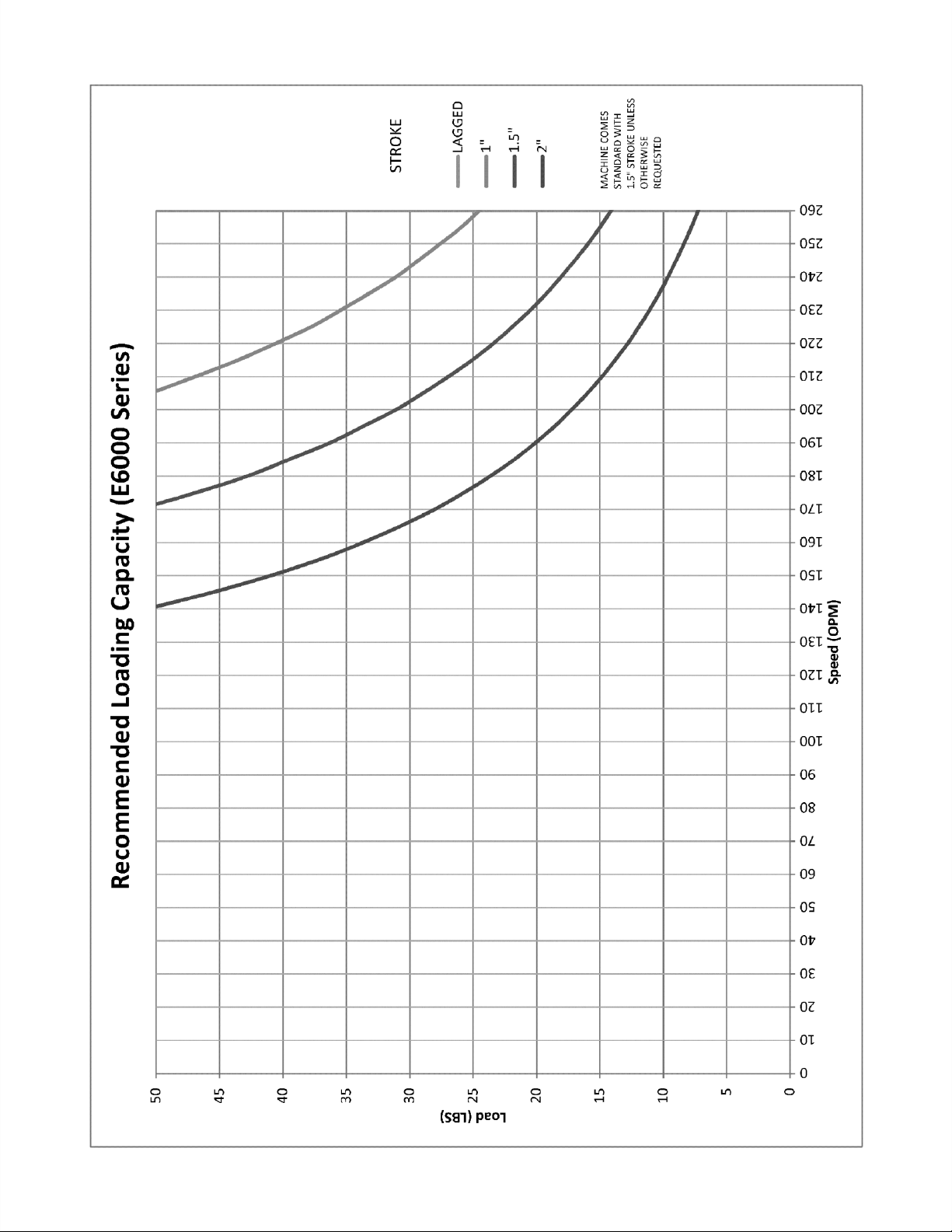
oA maximum shaking weight of 50lbs.
See the chart on the following page for the recommended loading capacity at
various speeds.


1) Power Switch
2) Liquid Crystal Display (LCD)
3) Directional Pad (D-Pad)
4) Enter Button
5) Cursor
Operation: Press the Power Switch down into the ON position.
The LCD should light up and show the main menu. There are three
different run modes to choose from. Select a run mode by moving
the Cursor (using the D-PAD) and press the Enter Button.

Run Mode: The shaker will begin the run mode at its lowest speed.
The speed shown in parenthesis (xxxx) is the set speed controlled by
the user. The speed listed to the right is the tachometer read out or
the actual speed of the shaker in real time. The speed can be
increased/decreased by pressing and holding the up/down arrows on
the D-PAD. The longer the button is held down the faster the speed
will increase/decrease. Once engaged the timer will begin counting
all the way up to 999 hours before the timer overflows back to zero.
To pause the shaker move the Cursor to the PAUSE item by
pressing the left arrow on the D-PAD and press the Enter Button.
The clock will pause at its current time and the shaker will gradually
come to a complete stop. The clock and shaker can be resumed at
its current time and speed by selecting RESUME and pressing the
Enter Button. To go back to the main menu move the Cursor to the
EXIT item by pressing the right arrow on the D-PAD and then press
the Enter Button.

Timed Run Mode: The timed run mode features a count down timer
that automatically shuts the shaker off when the time runs out. When
selected the user will be taken to the Timed Run Setup Menu and will
need to input the run time in hours, minutes, seconds and select the
speed for the run. The left/right arrows on the D-PAD can be used to
move the cursor between hours, minutes or seconds and the up and
down arrows can be used to set the time. The longest run time
allowed is 999:59:59. Once the time is set move the Cursor down by
pressing the right arrow on the D-PAD until the Cursor is next to the
RPM line item. The speed can be set using the up and down arrows
on the D-PAD. Now that the data is set navigate the Cursor to the
START line item using the left/right arrows on the D-PAD and press
the Enter Button.

After selecting START the shaker will begin at the selected speed
and the timer will begin counting down. The speed can be adjusted
in real time using the up/down arrows on the D-PAD. The speed
shown in parenthesis is the target speed controlled by the user and
the speed listed to the right is the actual speed as read by the
tachometer. The shaker and countdown timer can be paused and
resumed. Move the Cursor to the line item PAUSE by pressing the
left arrow on the D-PAD and then press the Enter Button. Exiting
the Timed Run Menu will bring the user back to the Timed Run Setup
Menu.

Speed Run Mode: The speed run allows the user to program in a
set run speed. Once engaged the timer will begin counting all the
way up to 999 hours before the timer overflows back to zero. Select
the speed run mode from the main menu and press the Enter
Button. The user will be prompted with the speed run setup menu.
Set the desired speed using the up/down arrows on the D-PAD. The
left/right arrows can be used to move the Cursor between START
and EXIT. EXIT will take the user back to the main menu. Keep the
Cursor next to the START line item and press the Enter Button.
The user will now be taken to the speed run menu. The shaker will
begin at the speed selected in the setup menu. The speed run menu
behaves in the same way as the run menu with one exception.
Pressing EXIT will not take the user back to the main menu instead
pressing EXIT will take the user back to the speed run setup menu.

Note: All run menus will have two speeds listed. The leftmost speed
will be displayed inside parenthesis. This is the target speed
controlled by the user. The shaker will attempt to match this speed
and should do so within ten seconds after making an adjustment.
The rightmost speed is the tachometer reading, which shows the user
what the shaker is actually running at. The tachometer reading will
not necessarily match the target speed at all times, but is guaranteed
to be within +/- 5 RPM when calibrated correctly. Tachometer will
need to be recalibrated after belt changes or excessive belt wear.
See following page for Calibration information.
Note: Reciprocating shakers will display OSC (oscillations) instead
of RPM (revolutions per minute).
Note: Use slowest speed necessary to produce required shaking
action.

To calibrate the tachometer system follow these steps:
Step 1 Hold down the Green Enter Button and power the machine on to access
the utilities menu
Step 2 Select the “Tests Menu” and press the Enter Button.
Step 3 Select the “Calibration” item and press the Enter Button.
Tabla de contenidos


