
Dr. Board DB-02C Manual de usuario

—1 —

—2 —
Contents
Reminder-------------------------------------------------------------------------------------3
Safety instruction--------------------------------------------------------------------------3
Overview--------------------------------------------------------------------------------------5
Components --------------------------------------------------------------------------------6
Specification
For Station ---------------------------------------------------------------------------------7
For Stylus ----------------------------------------------------------------------------------8
Environment requirement--------------------------------------------------------------10
Installation ----------------------------------------------------------------------------------11
Calibration ----------------------------------------------------------------------------------13
Trouble Shooting -------------------------------------------------------------------------15

—3 —
Reminder:
Please read carefully and follow the instruction from this User Manual before install and use
this product.
Safety Instruction
This product has been designed and intended for use indoor via a USB cable or wireless USB
receiver connected to a desktop or laptop computer. Use this product in an outdoor and/or wet
environment could damage this product and create a potentially unsafe operating condition.
Safety Level
WARNING
Indicates a potential hazard that could result in serious injury
or death and/or property damage.
CAUTION
Indicates hazards that could result in minor or moderate
injury and/or property damage.

—4 —
Safety Instruction
Do not use this product in an outdoor and/or wet environment. Electric shock will result.
This product is not intended for unsupervised children. Always provide adult supervision
when children are using the product.
Installation and removal procedure should be performed by adult only. Failure to do so
could result in personal injury and/or product damage.
Unplug the device immediately when the product emits smoke, excessive heat, abnormal
smell or unusual noise. Contact the authorized service representative for inspection to
avoid possible fire hazard or electric shock.
Unplug the device immediately if any metal or liquids get into the product. Contact the
authorized service representative for inspection to avoid possible fir hazard or electric
shock.
Never disassemble or open the cover that is fastening with screws. Uncovered
components may cause product damage or electric shock.
Do not alter this product or modify any parts. It may cause fire or electric shock.
Clean this product by dry soft fabric, unplug the USB cable before clean it.
Keep the product and accessories away from any possibility to be step on. Failure to do so
may cause injury and product damage.
This product is suitable to work under: Temperature: 15℃to 40℃; Humidity: 15% to 75%;
NO condensation. Over this range may lower the product performance.
Unplug the USB cable when:
The USB cable is damaged.
A liquid is spilled onto this product.
This product fall or its cover is damaged.
This product must be disposed in accordance with the relevant federal, state, and local
laws and regulations.
When this product is not used over an extended period of time, unplug the USB cable.
If this product is fallen down or damaged, turn off the device and unplug the power supply.
Failure to do so may cause fire or electric shock.
Remove the batteries from the ultrasonic stylus when it is not used over an extended
period of time. Failure to do so may cause the batteries to leak.
Do not install this product where it may be exposed to sunlight, strong direct lighting,
heating equipment, or direct wind blow.
Do not install this product in locations where the temperature may change suddenly.
Wire USB connection is recommended.
Writing surface’s flatness, material and size should be considered before installation.

—5 —
Overview
Dr. Board DB-02C is an interactive product with ultrasonic and infrared
technology, which brings interactivity to any surface, quickly transforming
classroom or meeting room into an interactive environment where students
and colleagues can participate, focus and collaborate..
DB-02C includes the following features:
1. Virtual IWB allow user to store and carry easily.
2. Handy device which can work on any traditional whiteboard.
3. Quick and easy to install and let you get started with interactivity within
minutes of opening the box..
4. Better writing performance with Drawing Smooth function.
5. Monitor the battery life with the blue light from pen tip.
6. Highly compatible driver allow DB-02C to work with all kinds of
interactive software.
7. Scale whiteboard space from small to large without paying more,
working area diagonal as big as from 10” to 100” (board size length x
width= 1.524Mx2.032M)

—6 —
Components
Check if all components are included, refer to the following list. Please contact
with your local distributor if any shortage or damage happen.
Stylus
Station
Steel mounting
Plate x3
Pen tip x 5
USB cable x 5M
CD or download link includes:
(1)Driver
(2)DB fairy Software ,
(3)Software installing S/N no
(4) User manual
—7 —
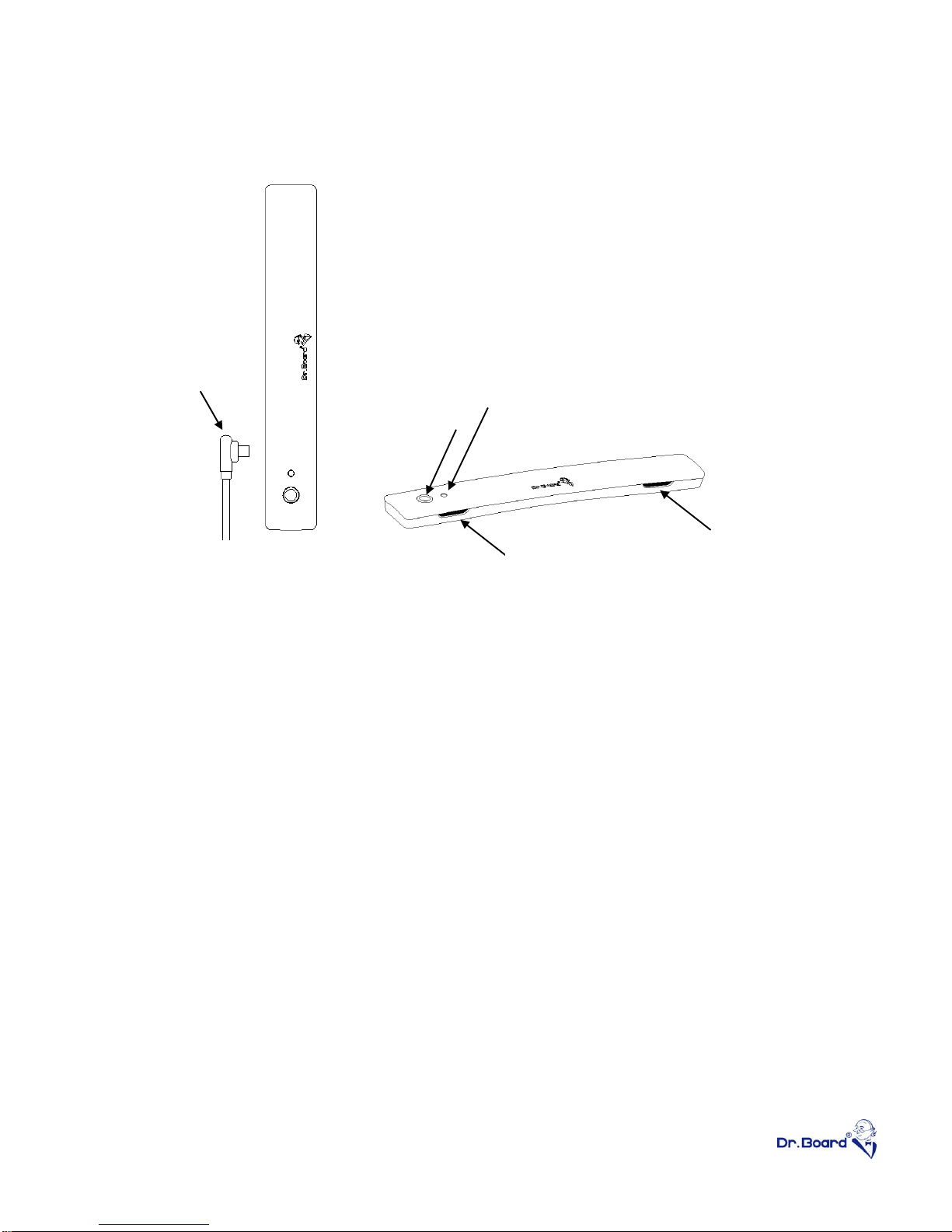
Specification –DB-02C Station
①Ultra Sonic Receiver –In order to get better writing performance, do
not block the two receivers when using the product.
②Mimi B USB-port –Connect the Station to computer with the USB
cable. USB extender will be needed if distance between computer and
the Station is over 5 meter.
③Blue LED indicator –Indicator will light up with good connection and
ready to use. Indicator will flash when station is receiving signal from
the stylus. If indicator remains dark when device is connected, contact
with distributor for trouble shooting.
④Calibration button –Call out calibration coordinators anytime when
needed. Noted that the calibration button will only function when driver
is installed and operating.
⑤Remove the transparent protectors from the black anti-slip sheets
under the Station before attach the device to the steel mounting plate.
(2)
①
(3)
(4)
(1)
(1)
①

—8 —
Specification –DB-02C Stylus
①Hover button- Perform normal writing function without touching the
screen by holding the “Hover button” and move the stylus around.
②Right click button- Mouse’s right key function.
③Click pen tip- Mouse’s left key function.
④The blue LED will light up on pen tip if user presses any button or the
pen tip. In order to prevent unintended operation to drain the battery,
power saving mode will be enable after 30 second continuous lighting,
⑤Station and stylus will automatically enter hibernation mode after 30
seconds standby. Click on any key or press pen tip to exit hibernation
mode.
⑥Featuring smooth and intuitional writing with short response time.
⑦Special and unique stylus design to avoid tumbling.
⑧Only one AAA battery is required. Alkaline battery is highly
recommended.
Please note the battery direction when installing battery. Battery
with”+” mark shall be inside the pen tube.
Hover button
Right click button
Battery cover
Pen tip

—9 —
⑨Pull out the pen tip perpendicularly and place the new pen tip into
stylus when the tip is badly worn.
⑩User is able to hang the ultrasonic stylus on the wall with hook. Please
make sure the hook is capable for 0.5kgs or heavier item.
⑪In order to get the best performance from DB-02C, the stylus shall be
perpendicular to the working area. Acceptable inclination shall be less
than 15ºwhen writing.
Less than 15゜

—10 —
Environment requirement
DB-02C is highly environmental dependent. Please select a suitable place in
order to get a high quality writing experience.
①Avoid using DB-02C under noisy environment. Sounds of metals may
interfere with the ultra sonic receiver and cause an unstable writing
performance.
②Infrared products such as Infrared camera or Halogen lamp may cause
operation interference. Avoid using this kind of device when operating
DB-02C.
③15~40℃is the recommended writing temperature. Please avoid any
direct wind blow at DB-02C or the working surface.
④USB extender will be needed if distance between computer and the
Station is over 5 meters.
⑤The working area can be up to diagonal size 100” maximum. Over
100”, the writing quality will be determine by the board surface. Smooth
surface such as glass will have the best result.
⑥Please make sure the working area is completely flat surface. The
surface with cloth or deadening surface will affect the writing quality.
Tabla de contenidos


