DOMUS LINE RC3 Manual de usuario

REMOTE CONTROLLER RC3
DOMUS Line Srl
Via Maestri del Lavoro, 1
33080 PORCIA _ PN _ Italy
phone
fax
e-mail
website
0039 0434 595911
0039 0434 923345
www.domusline.com Ref. 3482400_r2
MANUALE DI INSTALLAZIONE E USO
INSTALLATION MANUAL
INSTALLATIONSHANDBUCH
IT
EN
DE

The product must be disposed of separately from urban waste, delivering it to the collection centres established by the prevailing
standard. Adequate sorted waste collection contributes to preventing negative effects on the environment and health and favours
reuse and/or recycling materials. Incorrect disposal of the product implies the application of the administrative sanctions envisaged
by the prevailing regulation.
Die Leuchte muss getrennt vom Hausmüll entsorgt und entsprechend der geltenden Richtlinien, an den vorgesehenen
Sammelstellen abgegeben werden. Die angemessene getrennte Sammlung trägt dazu bei, eventuelle negative Auswirkungen auf die
Umwelt und die Gesundheit zu vermeiden und die Wiederverwendung und/oder das Recycling der Materialien zu begünstigen. Die
unsachgemäße Entsorgung bringt die Anwendung administrativer Strafen mit sich, die in den geltenden Richtlinien vorgesehen sind.
Il prodotto deve essere smaltito separatamente dai rifiuti urbani consegnandolo ai centri di raccolta previsti dalla normativa in
vigore. L'adeguata raccolta differenziata contribuisce ad evitare possibili effetti negativi sull'ambiente e sulla salute e favorisce il
reimpiego e/o il riciclo dei materiali. Lo smaltimento abusivo comporta l'applicazione delle sanzioni amministrative previste dalla
normativa vigente.

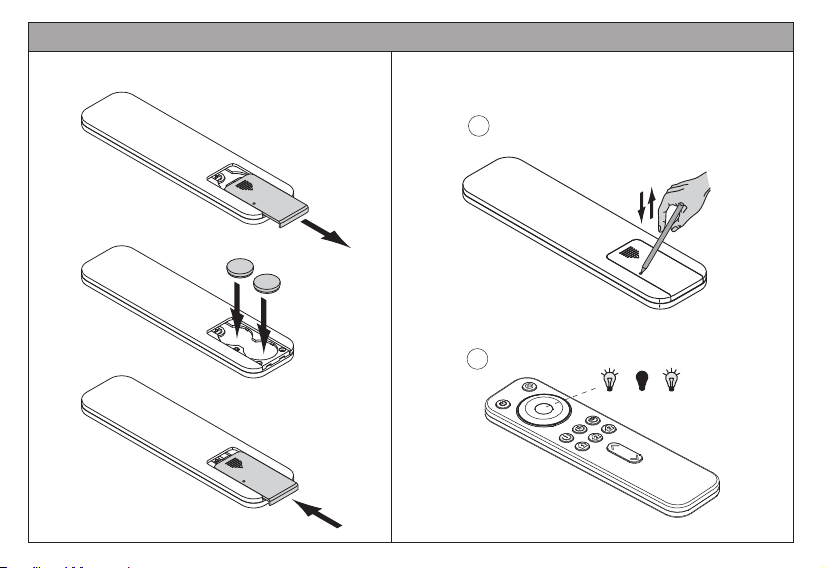
= 2 x CR 2032
-
-
Inserting - replacing batteries
1x
Setting DIMMER mode operation
.....
If the channel has already been set to TW or RGB mode,
follow steps 1 and 2. If this is the first time that this
channel has been used, or it has previously been set to
dimmer mode, skip steps 1 and 2.
1
2white white
INSTALLATION MANUAL EN

Example: selecting channel
Configuring with CALL-ME V17 receiver
Channel
Channel
5 sec.
II
blue blue
blue
1x
Example: selecting channel
dimmer operation
Channel
II
blue
1x
Example: selecting channel
Channel
Channel
Channel
5 sec.
II
blue blue
Configuration with X-DRIVER
II
X-DRIVER + CM2-XD
MODULE
IN
OUT
The blue LED turns off
INSTALLATION MANUAL EN
The blue LED turns off
Example: selecting channel
dimmer operation

Long press: store scene 1
Short press: recall scene 1
Press: to increase brightness
to decrease brightness
Clockwise:
Increase brightness
Anticlockwise:
Decrease brightness
Long press: store channel 1
Short press: recall channel 1
ON-OFF
General for all channels
DIMMER:
INSTALLATION MANUAL EN
Long press: store scene 2
Short press: recall scene 2
Long press: store scene 3
Short press: recall scene 3
Long press: store channel 2
Short press: recall channel 2
Long press: store channel 3
Short press: recall channel 3

Setting TW mode operation
yellow blue yellow blue
.....
3x
Long press:
Short press:
Press to change the colour temperature change mode
be twe en fl ash mod e and fad e mod e
Flash mode:
Fade mode :
fast = + ↑
slow = + ↓
1
2
If the channel has already been set to dimmer / RGB
mode, follow steps 1 and 2. If it has already been set in
the TW channel, skip steps 1 and 2.
the colour temperature of the lamp changes
without fading (hot, neutral, cold)
the colour temperature of the lamp attenuates
gradually from one colour hue to the other
Hold this button down and press "Dimmer" to select the
colour temperature change speed
Colour change
ON-OFF
General for all channels
INSTALLATION MANUAL EN
Long press: store scene 1
Short press: recall scene 1
Long press: store scene 2
Short press: recall scene 2
Long press: store scene 3
Short press: recall scene 3
Long press: store channel 1
Short press: recall channel 1
Long press: store channel 2
Short press: recall channel 2
Long press: store channel 3
Short press: recall channel 3
Press: to increase brightness
to decrease brightness
DIMMER:

Example: selecting channel
Magic Tune receiver
blue
1x
5 sec.
II
blue blue
blue
1x
Channel
5 sec.
blue blue
Configuring the MAGIC TUNE receiver Configuring with TW X-DRIVER
Channel
II
II
II
X-DRIVER TW + CM2-XDTW
MODULE
Example:selecting channel
Magic Tune tunable white operation
INSTALLATION MANUAL EN
Channel
Channel
The blue LED turns off
Example: selecting channel
Channel
Channel
Example: selecting channel
X-Driver tunable operation

INSTALLATIONSHANDBUCH DE
= 2 x CR 2032
-
-
Einsetzen - Austausch der Batterien
1x
Funktionseinstellung des DIMMER-Modus
.....
Wenn der Kanal bereits im TW- oder RGB-Modus eingestellt
wurde, die Schritte 1 und 2 ausführen. Wenn dieser Kanal
zum ersten Mal verwendet oder zuvor auf den Dimmer-
Modus eingestellt wurde, die Schritte 1 und 2 überspringen.
1
2weiß weiß

INSTALLATIONSHANDBUCH DE
Beispiel: Kanal auswählen
Konfigurierung mit empfang CALL-ME V17
Kanal
Kanal
5 sec.
II
Blaue Blaue
blaue
1x
Beispiel: Kanalauswahl
Dimmer-Funktion
Kanal
II
blaue
1x
Beispiel: Kanal auswählen
Kanal
Kanal
Kanal
5 sec.
II
Blaue
Konfigurierung mit X-Driver
II
X-DRIVER + CM2-XD
MODULE
Beispiel: Kanalauswahl
Dimmer-Funktion
IN
OUT
Blaue LED geht aus
Blaue LED geht aus
Blaue

INSTALLATIONSHANDBUCH DE
Lang gedrückt halten: Speicherung von Szenario 1
Kurz gedrückt halten: Aufrufen von Szenario 1
Press: um die Helligkeit zu erhöhen
um die Helligkeit zu verringern
Im Uhrzeigersinn:
Helligkeit erhöhen
Gegen den Uhrzeigersinn:
Helligkeit verringern
Lang gedrückt halten: Speicherung von Kanal 1
Kurz gedrückt halten: Aufrufen von Kanal 1
ON-OFF
Allgemein für alle Kanäle
DIMMER:
Lang gedrückt halten: Speicherung von Szenario 2
Kurz gedrückt halten: Aufrufen von Szenario 2
Lang gedrückt halten: Speicherung von Szenario 3
Kurz gedrückt halten: Aufrufen von Szenario 3
Lang gedrückt halten: Speicherung von Kanal 2
Kurz gedrückt halten: Aufrufen von Kanal 2
Lang gedrückt halten: Speicherung von Kanal 3
Kurz gedrückt halten: Aufrufen von Kanal 3
Tabla de contenidos
Idiomas:
Otros manuales de Mando a distancia de DOMUS LINE