
Digital Stream DHR8202U Manual de usuario
Twin HD Tuner Digital Terrestrial Recorder
User’s Guide
DHR8202U / DHR8203U / DHR8205U

V.1.0

Introduction
Copyright (Copyright 2010 Digital STREAM Technology Inc.)
Important care and safety advice
Thank you for purchasing a Digital Stream twin HD tuner digital recorder product. Following the
instructions in this manual will enable you to obtain optimum performance from your new product.
Equipped with the latest technology and design, the product is ideal for digital terrestrial broadcast
reception and recording. The simple installation and operation, user-friendly OSD, digital audio
output with Dolby Digital plus, and advanced video clarity made for TV and VCR are all designed
to enrich the viewer experience.
As a digital set-top box, it can receive free-to-air broadcasts. In addition to delivering more
services with its new highly sensitive tuner, the product boasts the EPG(Electronic Program
Guide) for detailed programme information on all services, and settings to enable subtitles and
teletext for an enriched user experience.
As a twin HD tuner PVR(Personal Video Recorder), you can use the PIP(Picture In Picture)
feature to watch two different programmes on one screen and you can record two different
services while watching another simultaneously. Furthermore, you can even playback a existing
recorded media while recording two different services simultaneously.
As a PVR, the product fully utilises the incorporated hard disk drive using the new preloaded
software functions. This allows various play modes/settings, diverse formats of recording, and
recording playback, all through the time shift recording function.
The preloaded software can be easily updated through USB memory. With the latest updates,
viewers are always sure to enjoy endless hours of extraordinary digital broadcasts and an
abundance of data.
If you have any difficulties concerning the operation of your PVR, please refer to the relevant
sections of this manual. This manual will provide you with useful information on using the product.
Please retain this manual for future reference.
The manual shall not be copied, used or translated in part or what so ever without Digital STREAM
Technology’s prior consent writing of ownership of copyright and copyright law.
The product has been manufactured to meet the international safety standards, but must be
handled with care for safely.
It is important that you read the safety instruction carefully.
1
Electrical Warning
Positioning the Product
If you have any problems about the installation, operation or safety of the product,
contact
Digital STREAM Technology
, as shown in the next page.
- Main Supply: 100-250V AC 50/60Hz
- The product contains high voltage which is sufcient to cause dangerous electric shock.
- The socket-outlet shall be installed near the equipment and shall be easily accessible.
- Never remove the product’s cover.
- There are no user-serviceable parts inside the product.
- Switch off the power supply switch on the real panel before connecting or disconnecting
any equipment from the product.
- Never push objects of any kind into the ventilation holes, slots or any other openings.
- The product and the leads should be placed properly so that they are not likely to be walked on
or pinched by items placed upon or against them.
- Do not expose your product to direct sunlight, extreme temperature
(above 40℃or below -5℃), high moisture levels, or dust.
- The apparatus shall not be exposed to dripping or splashing and that no objects lled with
liquids, such as vases, shall be placed on the product.
- The ventilation should not be impeded by covering the ventilation openings with items, such as
table-cloths, curtains, etc.
- Do not place the product on an unstable surface such as on a bed, sofa, rug or similar surface
as this may block the air ventilation and would cause it to overheat.
- Never place the product over a radiator or in an unventilated cabinet. No naked ame sources,
such as candles, should be placed upon the product.
- Do not block the ventilation holes of the product. Allow at least 10cm on all sides of the product
(including top but excluding the base) for ventilation.
The lightening flash with arrowhead symbol, within an equilateral triangle, is
intended to alert the user to the presence of un-insulated “dangerous voltage”
within the product’s enclosure that may be of sufcient magnitude to constitute a
risk of electric shock.
The exclamation point within an equilateral triangle is intended to alert the user
to the presence of important operating and servicing instructions in the literature
accompanying the appliance.
2

Cleaning the Product
Unplug when not in use
Use only authorized servicing if any of the following occurs
When needing service, carefully unplug the product from
the electrical outlet
Instruction about the ‘WEEE’ Symbol
- Always unplug the product before cleaning.
- Wipe with lint-free cloth or any cloth that has been slightly dampened with clean water.
Never use detergents or liquid cleaners.
When not in use for an extended period, unplug the product. Do not overload the wall outlets and
extensions adapters as this can cause a risk of re or electric shock.
- Any leads or plug is damaged.
- Liquid has spilled onto, or objects have fallen into the product.
- The product has been dropped or the casing has been damaged.
- The product does not operate normally.
- The warranty will not be guaranteed if the warranty void tape is removed.
- Contact the retailer/supplier who sold you the product.
- Call the helpline center on the last page of this manual.
This product should not be disposed with other household wasters
at the end of its working life. Please separate this from other types
of wastes and recycle it responsibly to promote the sustainable
reuse of material resources. This will prevent possible harm to the
environment or human health from uncontrolled waste disposal.
Domestic users: Please contact either the retailer where you purchased this product or their local
government ofce for details of where and how they can take this item for environmentally safe
recycling.
Business users: Contact your supplier and check the terms and conditions of the purchase
contract. This product should not be mixed with other commercial wastes for disposal.
3

Warning
Notice
End User License
Hard Disk Drive
- Do not move the product or turn the power off when the product is accessing the hard disk drive.
The company shall not be liable for any corruption of data on the hard disk drive caused by the
carelessness or the misuse of users.
- The company shall not be liable for problems caused by changing hard disk drive by user.
Manufactured under license from Dolby Laboratories.
Dolby and the double-D symbol are registered Trademarks of Laboratories.
This product contains propriety software and hardware that are licensed to the user as a single
product that cannot be separated.
It is intended as a domestic product for the purposes of receiving digital television services; any
other use is done so at the user’s risk.
In relation to the software the end user is prohibited from copying, transferring to a 3rd party,
modifying or otherwise attempting to derive the source code of any part or whole of the
propriety software in the product. This software is not sold, but licensed for use in the European
Union to the owner of the hardware. New software maybe transmitted to the box by the
manufacturer in which case the license transfers to the new software.
This product also contains Linux software which is licensed under the terms of the GNU General
Public License as published by the Free Software Foundation; version 3 or later. Copies of the
Linux source code contained within this unit can be obtained by mail order. To order a copy
please contact customer support. There may be a charge for this service.
This environment-friendly product does not contain the EU RoHS restricted substances (Pb, Hg, Cd, Cr6+, PBB
and PBDE).
RoHS(Directive 2002/95/EC) Compliant
4

Table of Contents
Installation Wizard
Basic Operation
Using Stand-by
Service List
Information Banner
Detailed Programme Information
Switching Service
Volume Control
Audio Language Selection
Subtitle Control
Interactive Services
Function Plus
PIP (Picture-in-Picture) Screen
5
Getting Started
Package contents
Front Panel Overview
Rear Panel Overview
Remote Control Overview
Conditional Access
Inserting a CI Module(with Smartcard)
7
7
8
8
9
10
10
11
11
11
11
12
12
13
13
13
14
14
15
15
16
17
18
18
18
19
20
20
21
21
21
21
22
22
23
23
24
24
24
24
25
25
25
25
26
27
27
27
28
Setup
Connecting the Aerial
Connecting the TV
Using HDMI Lead
Using SCART Lead
Using RCA Lead
Connecting the TV and VCR
Using SCART Lead
Using RF Lead
Connecting the Audio System
Powering On
Touch Panel and VFD Display
Touch Panel
VFD Display
PVR
Personal Video Recorder
Time Shifted Recording
Instant Replay
Quick Skip
Direct Jump
Repeat Mode
Repeat A-B
Instant Recording
Recording Two Programmes
Stop Recording(s)
Pause
Slow
Fast Forward and Fast Rewind
Bookmarks

Main Menu
Media
Information on the Media screen
JPEG Viewer
MP3 Player
Guide
Detailed information on Programme Guide
Using the record function in the Programme Guide
Searching Programmes
Schedule
Adding Manual Reservations
6
Others
Diagnostics
System Messages
System Information
Signal Information
Disk
Peripheral Devices
Maintenance
Preferences
AV Setup
Language
Time
Parental Control
Playback Settings
Power Management
Installation
Scan Services
Full Rescan
Update Scan
Manual Scan
Edit Services
Edit Service List
Edit Favourite List
Appendix
Specications
Trouble Shooting
Warranty Certicate
29
31
31
33
33
34
35
35
36
37
38
39
39
40
40
41
42
43
49
49
49
50
50
51
52
54
55
55
56
57
44
44
44
45
45
46
46
47
Getting Started
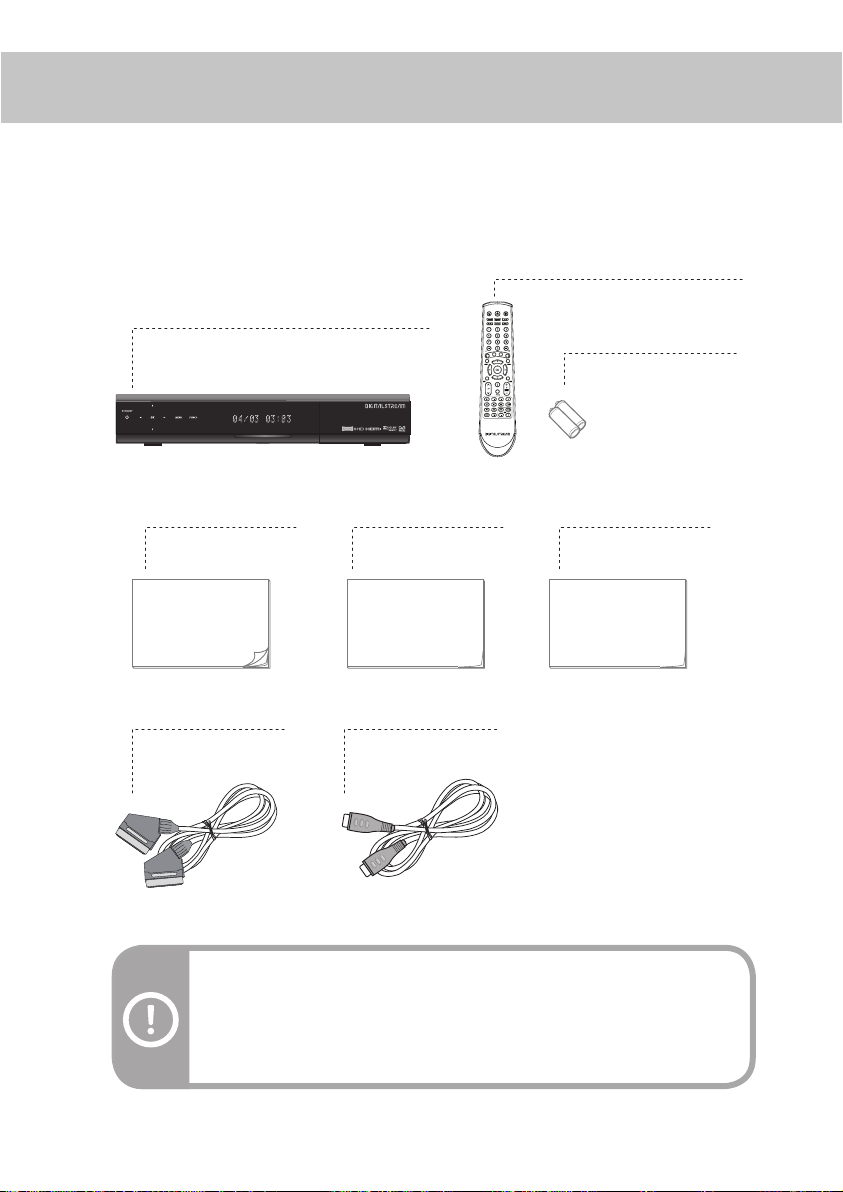
Package contents
Note: If anything is missing from the list above, do not attempt to install this product.
Please contact the careline center on the warranty certicate at the last page of this
manual.
Warning: The company shall not be liable for problems caused by changing
hard disk driver by user.
When you open the packaging, make sure you have the following :
User’s Guide Quick Start Guide Retune Guide
Digital Stream Twin HD Tuner Digital Terrestrial Recorder
Remote Control
HDMI-leadSCART-lead
User’s Guide Quick Start Guide Retune Guide
Batteries(AAA 1.5V Battery x 2)
7
Front Panel Overview
Rear Panel Overview
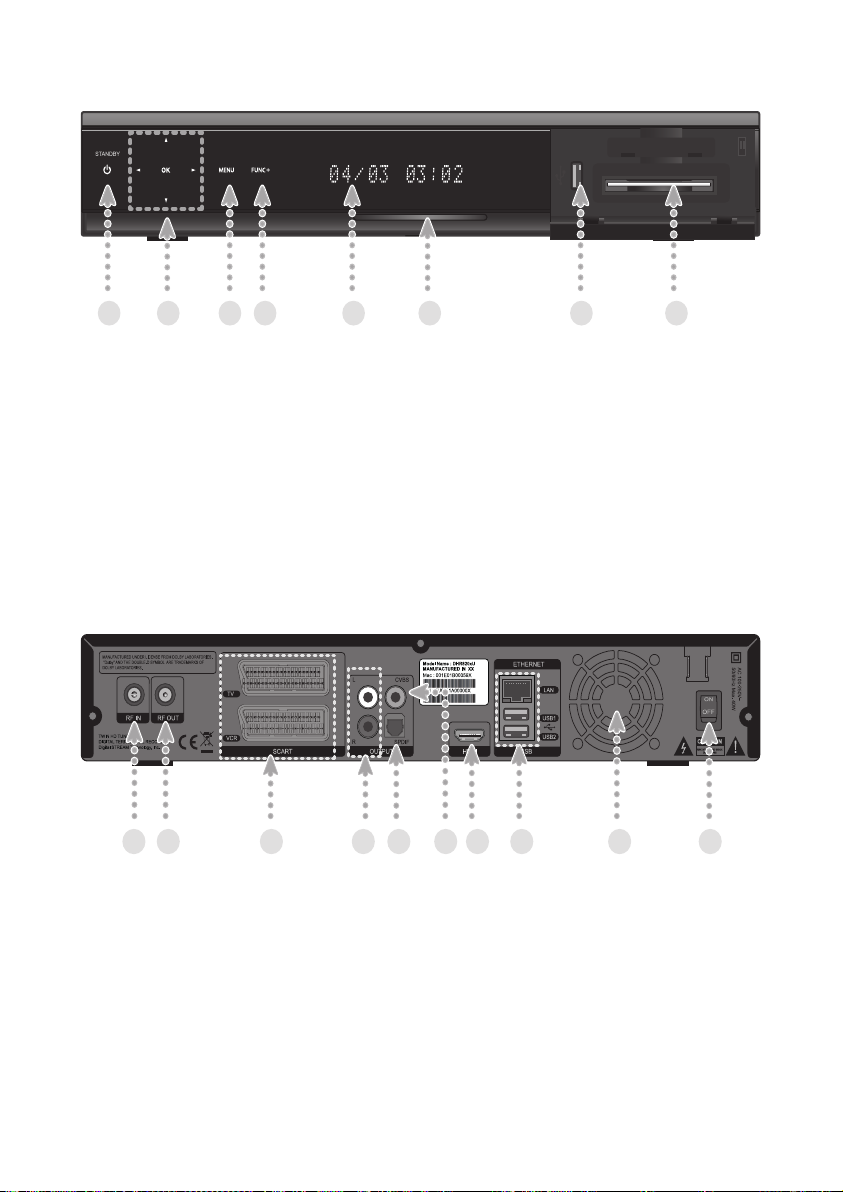
1. Standby Button: Sets the product to On or Standby.
2. Menu up/down Buttons: Works as arrow buttons, moving up and down.
Menu left/right Buttons: Works as arrow buttons, moving left and right.
OK Button: Can be used to select or to conrm menu options.
3. Menu Button: Can be used to access the menu.
4. FUNC+ Button: Allows access to various Menu items or key features easily.
The FUNC+ button can replace all of the colour buttons on the remote control.
5. Front Display: Displays Service Name, Time, Date and etc.
6. Blue LED: Indicates power status of the product.
7. USB: Used to connect USB memory device such as memory stick or HDD.
8. CI Module Slot: Used to connect CI Module.
1. RF IN: Used to connect your aerial.
2. RF OUT: Used to connect RF (ANT) input jack to your TV or VCR.
3. TV SCART: Used to connect to your TV SCART input.
VCR SCART: Used to connect to your VCR or DVD input.
4. Audio L/R: Used to connect audio signal to your TV or VCR.
5. SPDIF: The connector outputs digital audio signal.
6. CVBS: Used to connect composite video signal to your TV or VCR.
7. HDMI: Used to connect HDMI to your TV.
8. ETHERNET: Used for Ethernet port connection(for future use).
USB: Used to connect USB memory device such as memory stick or HDD.
9. FAN: Ventilation hole for FAN.
10. Power Switch: Power switch for your product.
1 2 3 4 5 6 7 8 9 10
1 2 3 4 5 6 7 8
8
Este manual sirve para los siguientes modelos
2
Tabla de contenidos


