Digisol DG-WU2008 Manual de usuario

1
DG-WU2008
User Manual
V1.0
2019-06-13
As our products undergo continuous development the specifications are subject to change without prior notice

DG-WU2008 User Manual
2
COPYRIGHT
Copyright 2019 by Digisol Systems Ltd. All rights reserved.
Company has an ongoing policy of upgrading its products and it may be possible that
information in this document is not up-to-date.
Please check with your local distributors for latest information. No part of this document
can be copied or reproduced in any form without written consent from the company.
Trademark
DIGISOL TM is a trademark of Digisol Systems Ltd. All other trademarks are the property
of the respective manufacturers.

DG-WU2008 User Manual
3
Table of Contents
CHAPTER 1 INTRODUCTION ........................................................................................................................................ 6
1.1 OVERVIEW .....................................................................................................................................................................................6
1.2 GET FAMILIAR WITH YOUR NEW CONTROLLER.......................................................................................................................7
1.3 PACKAGE CONTENT .....................................................................................................................................................................7
CHAPTER 2: HARDWARE INTRODUCTION..............................................................................................................8
HARDWARE: .........................................................................................................................................................................................8
CHAPTER 3: LOGIN WEB NETWORK MANAGEMENT...........................................................................................9
CHAPTER 4: WEB GUI CONFIGURATION............................................................................................................... 10
4.1 SYSTEM STATUS.........................................................................................................................................................................10
4.1.A DEVICE INFO ...........................................................................................................................................................................10
4.1.B INTERFACE STATUS ...............................................................................................................................................................11
4.1.C LAN IP FLOW.........................................................................................................................................................................12
4.1.D APPLICATION FLOW ..............................................................................................................................................................12
4.2 NETWORK CONFIGURE........................................................................................................................................ 13
4.2.A INTERFACE CONFIGURE ........................................................................................................................................................13
4.2.A.1 WAN CONFIGURE ..............................................................................................................................................................13
4.2.A.2 LAN/ DHCP.......................................................................................................................................................................14
4.2.A.3 PHYSICAL PORT DEFINITION............................................................................................................................................15
4.2.A.4 SUBINTERFACE CONFIGURE..............................................................................................................................................15
4.2.B ROUTE RULE ........................................................................................................................................................ 16
4.2.B.1 MULTI-LINE DEVERSION RULES ......................................................................................................................................16
4.2.B.2 STATIC ROUTE ....................................................................................................................................................................17
4.2.B.2.1 STATIC ROUTING.............................................................................................................................................................17
4.2.B.2.2 ROUTING INFORMATION................................................................................................................................................17
4.2.C DDNS ....................................................................................................................................................................... 18
4.2.D NAT/ PORT FORWARDING ............................................................................................................................. 19
4.2.D.1 PORT FORWARDING ..........................................................................................................................................................19
4.2.D.2 DMZ HOST .........................................................................................................................................................................20
4.2.D.3 SRC NAT.............................................................................................................................................................................20
4.2.D.4 DST NAT ............................................................................................................................................................................21
4.3 FLOW CONTROL POLICY...................................................................................................................................... 21
4.3.1 SMART FLOW CONTROL .......................................................................................................................................................21
4.3.2 BANDWIDTH CONTROL.........................................................................................................................................................22
4.3.3 FREE FLOW CONTROL...........................................................................................................................................................22
4.4 AC MANAGEMENT.................................................................................................................................................. 23
4.4.1 AP LIST....................................................................................................................................................................................23
4.4.2 AP CONFIGURE TEMPLATE ..................................................................................................................................................25
4.4.3 AP UPGRADE ..........................................................................................................................................................................26

DG-WU2008 User Manual
4
4.5 AUTH INTERNET ACCESS .................................................................................................................................... 27
4.5.1 AUTH CONFIGURE..................................................................................................................................................................27
4.5.1.A PPPOEAUTHENTICATION................................................................................................................................................27
4.5.1.B PORTAL AUTHENTICATION...............................................................................................................................................29
4.5.1.C IP AUTHENTICATION .........................................................................................................................................................31
4.5.1.D MAC AUTHENTICATION ...................................................................................................................................................32
4.5.1.E RADIUS BILLING..................................................................................................................................................................32
4.5.1.F NOTIFY PAGE.......................................................................................................................................................................33
4.5.2 USER MANAGEMENT.............................................................................................................................................................33
4.5.2.A AUTH USER..........................................................................................................................................................................33
4.5.2.B AUTH USER STATUS...........................................................................................................................................................34
4.5.2.C DEPARTMENT/LEVEL DEFINITION ................................................................................................................................35
4.6 BEHAVIOR CONTROL............................................................................................................................................ 36
4.6.1 APPLICATION FIREWALL.......................................................................................................................................................36
4.6.2 URL REDIRECT ......................................................................................................................................................................37
4.6.3 DOMAIN REDIRECT................................................................................................................................................................37
4.6.4 MESSAGE PUSH CONFIGURE ................................................................................................................................................38
4.7 OBJECT MANAGEMENT ........................................................................................................................................ 39
4.7.1 BASIC OBJECT.........................................................................................................................................................................39
4.7.1.A TIME OBJECT.......................................................................................................................................................................39
4.7.1.B SOURCE IP OBJECT.............................................................................................................................................................39
4.7.1.C PORT OBJECT.......................................................................................................................................................................40
4.7.1.D DESTINATION IP OBJECT ..................................................................................................................................................40
4.7.2 APPLICATION OBJECT ...........................................................................................................................................................41
4.7.2.1 BUILT-IN APPLICATION OBJECT ......................................................................................................................................41
4.7.2.1.A BUILT-IN APP OBJECT UPGRADE .................................................................................................................................41
4.7.2.1.B BUILT-IN APP OBJECT....................................................................................................................................................41
4.7.2.2 CUSTOM APPLICATION OBJECT........................................................................................................................................42
4.7.2.2.A CUSTOMIZE APP OBJECT ...............................................................................................................................................42
4.7.2.2.B DEFINE APP BY DOMAIN ...............................................................................................................................................42
4.7.2.2.C DEFINE APP BY OBJECTIVE IP +PORT........................................................................................................................43
4.8 SAFETY PROTECTION........................................................................................................................................... 43
4.8.1 IP-MAC BINDING..................................................................................................................................................................43
4.8.2 CONNECTION QUANTITY LIMIT...........................................................................................................................................44
4.8.3 LAN ABNORMAL DETECTION..............................................................................................................................................44
4.8.4 LAN ATTACK PROTECTION .................................................................................................................................................45
4.8.5 WAN PING FORBID/WAN LOGIN ....................................................................................................................................45
4.9 LOG RECORD............................................................................................................................................................ 46
4.9.1 LOG PARAMETERS .................................................................................................................................................................46
4.9.2 USER AUTH LOG.....................................................................................................................................................................46
4.9.3 ONLINE USER LOG .................................................................................................................................................................47
4.9.4 INTERFACE FLOW LOG..........................................................................................................................................................47
4.9.5 SYSTEM LOG ...........................................................................................................................................................................48
4.10 VPN........................................................................................................................................................................... 48

DG-WU2008 User Manual
5
4.10.1 PPTP.....................................................................................................................................................................................48
4.10.1.A PPTP VPN SERVER ........................................................................................................................................................48
4.10.1.B PPTP VPN ACCESS STATUS..........................................................................................................................................49
4.10.2 L2TP.....................................................................................................................................................................................50
4.10.2.A L2TP VPN SERVER ........................................................................................................................................................50
4.10.2.B L2TP VPN ACCESS STATUS ..........................................................................................................................................51
4.10.3 VTUNS.................................................................................................................................................................................51
4.10.3.1 VTUNS CONFIGURE .......................................................................................................................................................51
4.10.3.1.A PARAMETER SETTINGS ...............................................................................................................................................51
4.10.3.1.B TUNNEL MANAGEMENT..............................................................................................................................................52
4.10.3.2 VTUNS STATUS...............................................................................................................................................................53
4.11 BPN (THIS FEATURE IS FOR FUTURE USE)................................................................................................. 53
4.11.A BPN SERVER........................................................................................................................................................................53
4.11.B BPN ACCESS STATUS..........................................................................................................................................................54
4.12 DEVICE MAINTENANCE ..................................................................................................................................... 54
4.12.A FIRMWARE UPGRADE .........................................................................................................................................................54
4.12.B MODIFY PASSWORD............................................................................................................................................................55
4.12.C PING DETECTION .................................................................................................................................................................55
4.12.D CONFIGURE FILE MAINTENANCE .....................................................................................................................................56
4.12.E RESTART DEVICE................................................................................................................................................................57
4.12.F TIMED TASK ........................................................................................................................................................................58
4.12.G TIME SYNCHRONIZATION...................................................................................................................................................58
4.12.H CLOUD CONFIGURE (FOR FUTURE USE).........................................................................................................................59
CHAPTER 5 TROUBLESHOOTING.......................................................................................................................... 60
1WHY CAN’T ICONFIGURE THE CONTROLLER EVEN WHEN THE CABLE IS PLUGGED AND THE LED IS LIT?.................60
2WHAT CAN IDO IF MY ETHERNET CONNECTION DOES NOT WORK PROPERLY?..................................................................62

DG-WU2008 User Manual
6
Chapter 1 Introduction
1.1 Overview
DG-WU2008 is a CAPWAP based WLAN Controller with main functions as Router, AC
Controller, Management, VLAN Management functions.
When worked as a router, it can access into 512 end users, to do advertisement and
captive portal authentication.
When worked as a controller, it can manage 512 nos FIT wireless access points.
The network connectivity will be as shown below:
Acting as Router and Controller

DG-WU2008 User Manual
7
1.2 Get Familiar with your new Controller
1. Connect the controller with computer by wired connection.
2. The default IP address of this controller is 172.16.0.1. By default DHCP Server is enabled
only on LAN1 port (172.16.0.x/ 255.255.0.0).
This controller has individual IP address on each LAN port. For first time installation, connect
PC to LAN1 port of controller. Default username/ password is admin/ admin.
1.3 Package Content
DG-WU2008 WLAN Controller
Power Cable
Rack Mount Kit
QIG

DG-WU2008 User Manual
8
Chapter 2: Hardware Introduction
Hardware:
WAN1: WAN Port in Default mode.
WAN2/LAN5; WAN3/LAN4; WAN4/LAN3, LAN2: LAN Ports in default mode, but can set
up as WAN ports in gateway operation mode based on requirement.
LAN1: LAN Port as default
CONSOLE; Serial port
USB: Two for USB flash & USB keyboard, mainly to upgrade system.
Power: To power ON the device, Power LED indicator will be on;

DG-WU2008 User Manual
9
Chapter 3: Login Web Network Management
The default IP address of device is 172.16.0.1. Connect the PC to controller & PC will obtain
the IP address directly from AC controller DHCP server.
Input AC Controller’s IP address http://172.16.0.1:2011 into browser. It will display the
below page.
Input username/ password as admin/ admin.

DG-WU2008 User Manual
10
Chapter 4: WEB GUI Configuration
After logged into AC controller, following home page will be displayed:
4.1 System Status
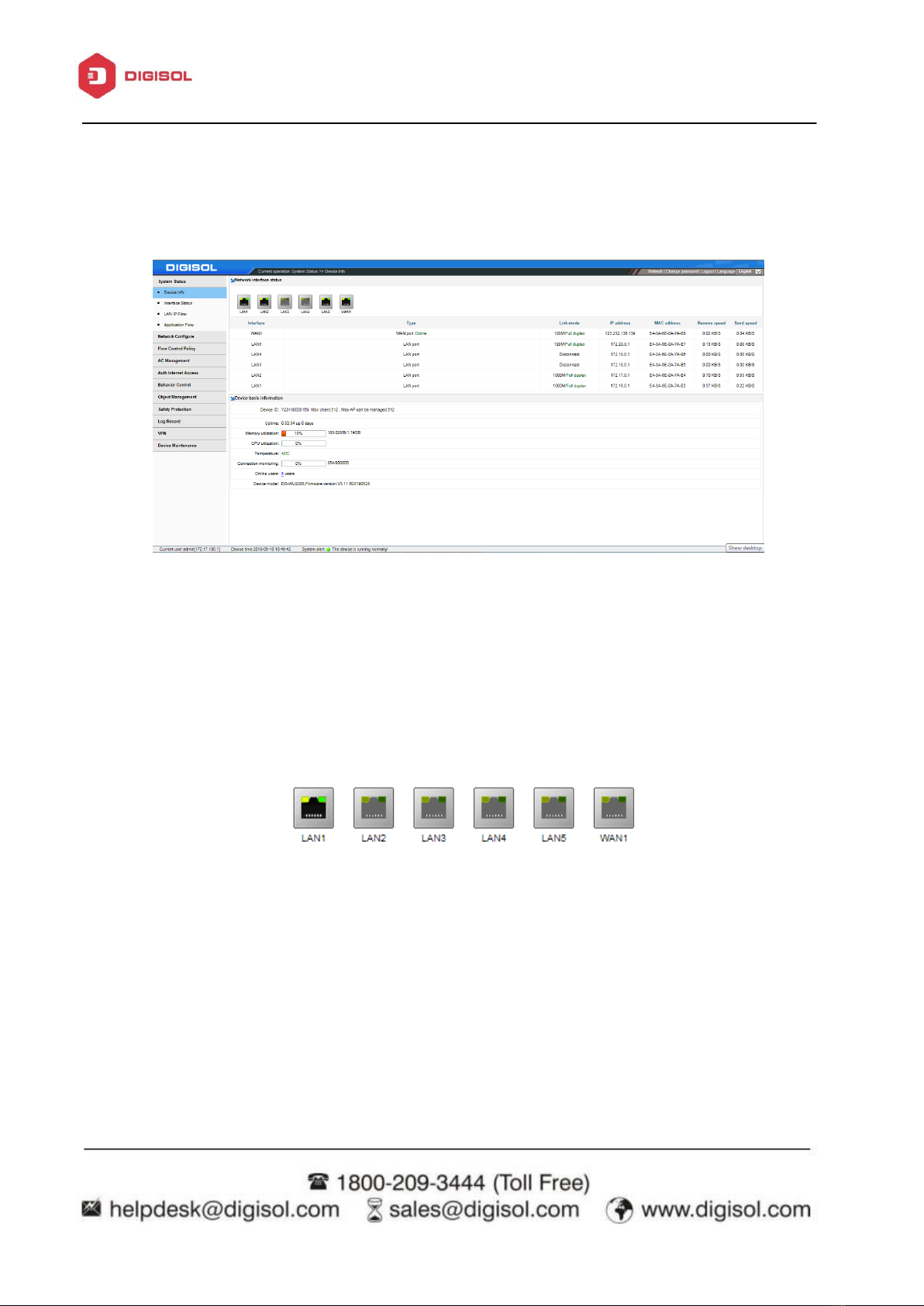
4.1.a Device Info
Display general information of Controller.
Network Interface Status: It displays the active interface port connectivity status, Link Speed,
IP address, Mac Address, Receive/ Send speed.
Display Ports Status. Grayed out means nothing connected to above ports & green means
connected.
Device Basic Information: Displays Device ID along with max User/ AP support detail.
It shows Device Uptime, CPU & Memory utilization, Temperature, Connection monitoring,
online users, Device model & Firmware Version.
Otros manuales para DG-WU2008
1
Tabla de contenidos
Otros manuales de Controladores de acceso IP de Digisol