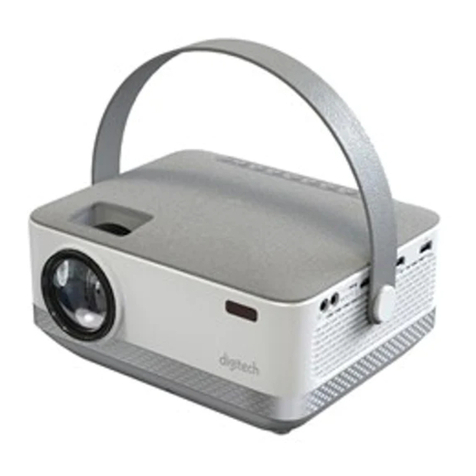
digi-tech AP4010 Manual de usuario

AP4010
Model:
Instruction Manual
Portable
HD LED Projector
with Built-in Speakers

1
Table of Contents
Portable HD LED Projector 2
In the Box 2
Mains Power 2
Top View 3
Rear View 4
Left Side View 4
Remote Control 5
Quick Setup 6
Picture Menu 6
Audio menu 7
Options Menu 7
Time Menu 8
Operation 9
Power 9
Projector Placement 9
Viewing Options 10
Ceiling Mount 11
Angle Adjustment 12
Image Adjustment 12
HDMI 13
Audio/Video Input 14
Micro SD & USB Storage Devices 15
Computer Video (VGA) 16
Headphone Jack/Audio Out 17
Troubleshooting 18
Technical Specifications 19

2
PORTABLE HD LED PROJECTOR:
In the Box
Carefully remove your HD LED Projector from the packaging.
Inside the box you will find:
• 1 x HD LED Projector
• 1 x Power Adapter
• 1 x Remote Control: requires 2 x AAA batteries (not included)
• Instruction Manual
Mains Power
Your HD LED Projector with uses a 24V/2.7A power adapter. Please ensure that your
mains supply is compatible before use. Disconnect the power cord from the mains
when not in use. Only use the supplied adapter to power the Projector.

3
PORTABLE HD LED PROJECTOR:
Top View
AProjector Lens
BFocus Adjustment
CKeystone Adjustment
DMenu
Press to access on-screen
menus and options
EPower
Press to turn ON/OFF the
projector
FArrows/OK
Press to navigate on-screen
menus and make selections
GReturn
Press to return to a previous
page or setting in the on-screen
menus.
HSource
Press to change media source
mode.

4
PORTABLE HD LED PROJECTOR:
Rear View
Left Side View
IVGA/PC Input
JRemote Sensor
Duplicated on the front of the
projector.
KHeight Adjustment Peg
L3.5mm Audio Output
M3.5mm AV Input
NMicro SD Card Port
OHDMI Input 1 & 2
PUSB Port
QDC Power Port

5
PORTABLE HD LED PROJECTOR:
Remote Control
OK
1 2 3
4 5 6
78 9
0
SOURCE
GOTO ZOOM
MENU
FLIP VOL –
EXIT
VOL +
1Power
Press to ON/OFF power.
2Mute
Press to mute volume.
3Previous / Next
Press to skip between chapters
or tracks.
4Back / Fwd
Press to search through an
individual chapter or track.
5Stop
Press to stop playback.
6Flip
Press to flip display image 180°.
7VOL+ / VOL-
Press to adjust audio level.
8Play/Pause
Press to play or pause an
individual chapter or track.
9Arrows/OK
Press to navigate and confirm
selections in Settings and other
menus.
10 Source
Press to select media source AV,
HDMI, SCREEN MIRRORING,
PC, MEDIA
11 Menu
Press to access projector
Settings.
12 Exit
Press to exit menus.
13 Go To/Number Keypad
Press to enter specific chapter
or track numbers. Use Play
button to begin playing.
14 Zoom
Press to zoom display image in
or out.
AAA/ UM4
AAA/ UM4
BATTERYDOOR
Batteries
Requires 2 x AAA
batteries (not included).

6
QUICK SETUP:
Picture Menu
1. Picture Mode: Select Dynamic, User (custom), Mild, or Standard.
2. Contrast, Brightness, etc: Set Picture Mode to “User” to adjust these settings.
3. Color Temperature: Select Warm, Cool, or Medium.
4. Aspect Ratio: 16:9, 4:3, Auto.
5. Noise Reduction: Select low, middle, high, default, off.
Select MENU
Enter
PICTURE
OPTION
AUDIO
TIME

7
QUICK SETUP:
Audio Menu
1. Sound Mode: Select Music, Movie, User (custom), Sports, or Standard.
2. Treble, Bass: Set Sound Mode to “User” to adjust these settings.
3. Auto Volume: Turn Auto Volume ON or OFF.
Options Menu
1. OSD Language: Select English, French, or Spanish for the On Screen Display.
2. Aspect Ratio: 16:9, 4:3 and etc.
3. Projection Mode: Flip and mirror the screen image.
4. Reset: Reset the projector & restore all of the default settings.
5. INFO: Show the version.
Select MENU
Enter
PICTURE
OPTION
AUDIO
TIME
16:9
Front
Aspect Ratio
Projection mode
Reset
Info
Select MENU Enter
PICTURE
OPTION
AUDIO
TIME

8
QUICK SETUP:
Time Menu
1. Sleep Timer
Select sleep timer to Off, 10min, 20min, 30min, 60min, 90min, 120min, 180min,
240min
2. Auto Sleep
Select auto sleep function to Never, 4 hours, 6 hours, 8 hours.
Select MENU Enter
PICTURE
OPTION
AUDIO
TIME

9
OPERATION:
Power
Plug the AC/DC power adapter
(included) into a standard wall
outlet and the DC power input
on the left side of the unit. After
connecting power, please allow
approximately 5 seconds to pass
before powering the unit ON.
Projector Placement
For best results, place the projector in a dark room or other dimly lit area. Use the
unit with a dedicated projector screen for best picture resolution. If placing the
projector behind the viewing screen (unit in front of/projecting toward viewers), a
special screen will be required. Projector screens are not included. If you are not
using the unit with a screen, a smooth, white or lightly colored surface will provide
the best results.
THE CENTER
OF LENS
72
"
60
"
50
"
45
"
37
"
The projector can
display up to 150”
Tabla de contenidos
Otros manuales de Proyector de digi-tech