
Diamond Multimedia TAB360W Manual de usuario

1
TAB360W
TAB360B

2
Important Safety Instructions
1. Read and keep this manual
Safety Information
1. Do not use this product near water or moisture.
2. This product is NOT weatherproof.
3. Clean only with a dry lint-free cloth. Do not use any chemicals or cleaners.
4. Do not install or use near any open flame or heat sources, such as
heaters, stoves, grills, and or any other devices that can produce heat.
5. Do not expose to direct sunlight.
6. Only use accessories specified by the manufacturer.
Product &Accessory
1. TAB360 steering wheel
2. TAB360 stand
3. Manual
4. 3D Rod Joint Spring *
*(One pre installed low tension spring and one optional high tension spring for those expert extreme gamers. The high tension spring is also for those
using the TAB360 primarily as a universal stand).
Feature
- Ergonomic design for ultra comfort and control
- Retractable clips for Tablets with all dimensions (7”-10.1”)

3
Installation
Assemble TAB360 wheel to base
1. Align the gear to assemble TAB360 wheel onto Base.
2. Press the button in the back to assemble TAB360 wheel and Base.
3. Release the button to complete assembly.
2. Attach Tablet to TAB360
1. Adjust the TAB360 Wheel horizontally.
2. Push the button to extend the clips to maximum.

4
3. Loosen the knob according to different thickness of Tablet.
4. Press the clips by hands to accommodate Tablets with different dimensions ( 7”~ 10.1”)
5. Adjust clip height by fastening the knob to accommodate Tablets with different thickness ( 9mm~18.5mm)
Note: Please ensure that you have fully secured your tablet by tightening the knobs

5
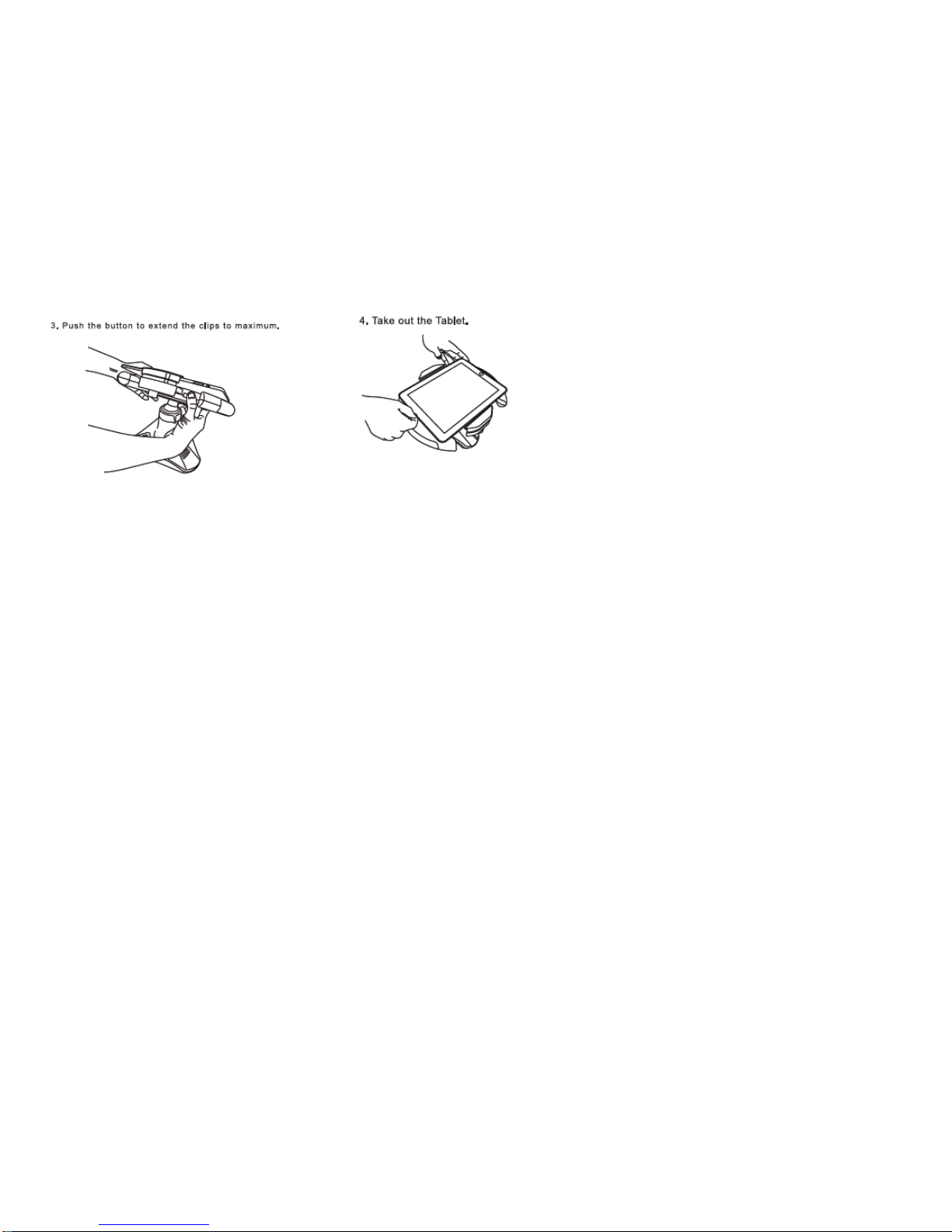
3. Remove Tablet from TAB360
1. Adjust the loaded TAB360 Wheel horizontally.
2. Loose the knob to adjust clip height to maximum.
Note: When removing your tablet from the stand please secure your tablet with your other hand ensuring that the tablet does not fall from the holder onto a
hard surface.
3. Push the button to extend the clips to maximum.
4. Take out the Tablet.
6

7
3. Changing the 3D rod tension spring on your TAB360
Note: For extreme tablet gamers and those whom use the TAB360 primarily as a stand, we have included a tighter 3D tension rod spring. Follow the steps
below on how to replace the tension spring.
1. Loosen the red flange by turning it counter clockwise.
2. Pull the rod straight up and out of the base.

8
3. Separate the spring from the spring base.
4. Attached the shorter spring to the spring base and re assemble the 3D rod ball joint back to the base.
5. Attached the steering wheel back onto the base.

9
Technical Support
Diamond Technical Support staff is here to help resolve any issues that you may be experiencing with the installation of the
Diamond product. Prior to contacting technical support please make sure you have the following information available.
1. Model #: (Printed on the bar code, located on the box)
2. A complete description of the problem that you are experiencing including any steps you have taken to try to resolve the
issue.
Technical Support Options
Free Telephone Support
888-238-2272
Mon - Fri, 8 - 4:30 PST
http://www.diamondmm.com

10
One Year Limited Warranty
The warranty described below is extended only to the original buyer and is not transferable.
PLEASE NOTE THAT THE PRODUCT YOU HAVE PURCHASED IS DISTRIBUTED AND WARRANTED BY DIAMOND
MULTIMEDIA ("DIAMOND")AS DESCRIBED BELOW. QUESTIONS REGARDING THIS WARRANTYAND
WARRANTY CLAIMS SHOULD BE MADE TO DIAMOND.
Diamond warrants to the original purchaser of the hardware product, that the product is free from defects in materials or
workmanship under normal use and service for a period of one (1) year from the date of purchase at retail.All cables and
accessories provided with a Diamond product are warranted to be free from defects in materials or workmanship under
normal use and service for a period of for (90) ninety days from date of purchase at retail. Diamond ’s sole obligation under this warranty shall be, at Diamond ’s option, to: (i) repair the defective
product or part; (ii) deliver to customer an equivalent product or part to replace the defective product.When a product or part is replaced or exchanged, the item becomes customer’s property and
the replaced or exchanged item becomes Diamond ’s property. When a refund or replacement product is given, the defective product becomes Diamond’s property. Replacement parts or products
may be new or include serviceable used parts with at least the same functional equivalence to the original product. If, at the time of repair, a product is "out of warranty" or within the last ninety (90)
days of the warranty period, Diamond warrants any repair for ninety (90) days. All software provided is subject to the terms of the associated software end-user license agreement.
WARRANTY EXCLUSIONSAND LIMITATIONS THIS WARRANTY IS ONLY APPLICABLE TO PRODUCTS SOLD BY DIAMONDAFTER MAY 1, 2007. THIS WARRANTY IS ONLY
APPLICABLE IF PRODUCT REGISTRATION IS RECEIVED WITHIN 30 DAYS OF THE DATE THE PRODUCT IS PURCHASED. TO BE ELIGIBLE FOR THIS WARRANTY, YOU MUST
REGISTER AT
diamondmm.com. THE ORIGINAL SALES RECEIPT SHOWING THE DATE OF PURCHASE OF THE PRODUCT IS
PROOF OF THE DATE OF PURCHASE. DIAMOND MAY REQUEST THE ORIGINAL SALES RECEIPT ORA COPYAS
PROOF OF DATE OF PURCHASE.
Diamond does not warrant third party products which Diamond distributes "AS IS" unless otherwise specified. Third party
products may be warranted by the third party. Diamond makes no warranty or representation that: (i) the operation of the product will beuninterrupted or error free; (ii) defects in the product will be
corrected; or (iii) that the product will meet Customer’s requirements or work in combination with any hardware or software provided by third parties.
TO THE FULLEST EXTENTALLOWED BY LAW, THE WARRANTIES, REMEDIES AND LIMITATIONS CONTAINED
HEREIN ARE EXCLUSIVEAND ARE IN LIEU OF ALL OTHER WARRANTIES, TERMS OR CONDITIONS, EXPRESS OR
IMPLIED, EITHER IN FACT OR BY OPERATION OF LAW, STATUTORY OR OTHERWISE, INCLUDING WITHOUT
LIMITATION, WARRANTIES, TERMS OR CONDITIONS OF MERCHANTABILITY, FITNESS FOR APARTICULAR
PURPOSE, QUALITY, CORRESPONDENCE WITH DESCRIPTION AND NON-INFRINGEMENT, ALL OF WHICH ARE
Este manual sirve para los siguientes modelos
1
Tabla de contenidos


