
DGC DHT-400PLUS Manual de usuario

INSTRUCTION MANUAL
HARDNESS TESTER DHT- 400PLUS
V1.0.0

CONTENTS
1.Summary ...............................................................................1
2. Principle of Leeb hardness testing method ............................1
2.1 History of Leeb hardness testing method.................................. 1
2.2 Definition of Leeb hardness...................................................... 1
2.3 Symbol of Leeb’s hardness values............................................. 2
3. Pre-treatment of work piece .................................................2
3.1 Work piece surface .................................................................. 2
3.2 Weight of work piece ............................................................... 3
3.3 Work piece surface hardened layer .......................................... 3
3.4 No strong magnetism on the work piece surface....................... 4
4. Selection and performance of impact device .........................4
4.1 Selection of impact device........................................................ 4
4.2 performance of impact devices................................................. 4
5. Functions of DHT-400PLUS ....................................................5
5.1 Technical specifications............................................................ 5
5.2 Nomenclature of DHT-400PLUS ................................................ 5
5.2.1 Main unit............................................................................................. 5
5.2.2 Display area......................................................................................... 6
5.2.3 Keypad ................................................................................................6
6. Operation instruction............................................................7
6.1 Power on................................................................................. 7
6.2 Parameters setting................................................................... 7
6.3 Data output through USB to PC .............................................. 14
6.4Deleting of wrong measuring data.......................................... 14
7. Repairing and Maintenance................................................. 14
7.1 Maintenance of battery ......................................................... 14
7.2 Maintenance of impact body tip............................................. 14
7.3 Maintenance of impact device cable....................................... 15
7.4 Maintenance of printer ribbon ............................................... 15
7.5 Maintenance of instrument.................................................... 15
8. Packing list.......................................................................... 16
9. Appendix ............................................................................ 16

Appendix 1:Measuring range: ...................................................... 16
Appendix 2: Features of impact devices ....................................... 17
Appendix 3:Material Applicable table .......................................... 18
Appendix 4: Supporting rings ....................................................... 19

Hardness Tester DHT-400PLUS
1
1. Summary
DHT-400PLUS Leeb hardness tester, based on the principle of Leeb theory, can
be used for hardness testing of various metals. With the feature of integrated
model, it is suitable for working on various circumstances. The Leeb hardness
values can be easily converted to HRC, HRB, HV, HS and so on. In order to
operate the instrument correctly and properly, users are required to read this
instruction manual completely before using it.
2. Principle of Leeb hardness testing method
2.1 History of Leeb hardness testing method
The Leeb hardness testing method was first introduced by Dr. Leeb in 1978.
It is defined as the quotient of an impact body’s rebound velocity over its
impact velocity, multiplied by 1000. Hard materials produce a higher rebound
velocity than that of softer materials. For a specific group of material (e.g.
steel, aluminum. etc.), Leeb hardness value represents a direct relationship to
its hardness properties. For ordinary metal, conversion curves of hardness HL
versus other standard static hardness (HB, HV, HRC, etc.) are available,
enabling you to convert HL into other hardness values.
2.2 Definition of Leeb hardness
An impact body with a spherical test tip made of tungsten carbide is propelled
against the sample surface by a spring force and then rebounds back. At a
distance of 1mm from the sample surface, the impact and rebound velocity of
the impact body are measured by the following method: A permanent magnet
embedded in the impact body, when passing through the coil in its coil holder,
induces in the coil an electric voltage proportional to the velocities of the
magnet. The Leeb hardness values are expressed by the following formula:
HL=1000×( Vb / Va )
Where:HL is Leeb hardness values
Vbis the rebound velocity of the impact body
Vais the impact velocity of the impact body
Figure 1 show the voltage produced during the impact and rebound of
impact body.

Hardness Tester DHT-400PLUS
2
Figure 1 Voltage features of output signal
The Leeb hardness values can be converted to other hardness scales directly,
such as HV, HRC, HRB, HB and HS.
2.3 Symbol of Leeb’s hardness values
Just like the other hardness scales, users will get different hardness values
with different impact devices, for example:
720HLD≠720HLC.
Owing to different converting curves obtained from different hardness scale,
when converting from hardness scale L to another hardness scale, the
notation for the converted hardness value should include the impact device
used. For example: the Leeb hardness value 510HLD should be expressed as
below when it is converted to Rockwell hardness scales HRC: 510, 20 HRCLD in
which:510 Leeb hardness values
20 converted hardness values
HRC means the converted object
L means the measuring method
D means D impact device
3. Pre-treatment of work piece
To get the accurate measuring results, pre-treatment of work piece is
required.
3.1 Work piece surface
Temperature of work piece should be less than 80℃;
The surface roughness requirements are listed in table 3.1.1
Table: 3.1.1
Impact Device
Work piece of surface roughness
D, DL
2um

Hardness Tester DHT-400PLUS
3
G
7um
C
0.4um
The small support ring or non-conventional support rings are required for
work piece with curved surface radius less than 30mm, for details please refer
to appendix 4.
3.2 Weight of work piece
No support is required for work piece weight more than 5kg.
Work piece with weight of 2-5kg and also heavier work piece with protruding
parts or thin walls should be placed on a solid support. In such a manner, they
do not move or flex during testing.
Work piece less than 2kg should be rigidly coupled with a non-yielding
support such as a heavy base plate.
Table 3.2.1 Work piece weight and thickness
Impact Device
Weight (KG)
Minimum thickness
of work piece (mm)
Need
coupled
Need
support
No
need
D/DL
0.1-2
2-5
> 5
3
G
0.5-5
5-15
>15
10
C
0.2-0. 5
0.5-1.5
>1.5
1
3.3 Work piece surface hardened layer
If the work piece surface hardened layer is too thin, the impact force of short
duration will go through the layer and make the L-value incorrect. The proper
depth surface hardened layer is listed below:
Tale: 3.3.1
Impact device
Minimum depth of surface hardened layer
D
0.8mm
C
0.2mm

Hardness Tester DHT-400PLUS
4
3.4 No strong magnetism on the work piece surface
Strong magnetism will affect the circuit winding greatly, and affect the
accuracy of testing results, so it is required to avoid strong magnetism during
testing.
4. Selection and performance of impact device
4.1 Selection of impact device
Before testing, users should correctly select the proper impact devices
according to testing requirement, work piece size and shape. For details
please refer to appendix 1.
4.2 Performance of impact devices
a) Loading
Press down the loading tube to lock the impact body.
b) Placement
Place the support ring on surface to be measured and make sure the distance
between two test points should be no less than 3mm.
c) Testing
Trigger the release button while the work piece and the impact body are all
stable, and the starting force coincides with the axis of the impact body.

Hardness Tester DHT-400PLUS
5
5. Functions of DHT-400PLUS
5.1 Technical specifications
Display:
128×64 matrix OLED display
Meas. Range:
HL 174-900 HRC 19.6-68.0
HRB 13.5-101.7 HS 32.5-99.5
HB 20-655 HV 80-940
Display accuracy:
Error 0.5%(HL=800), Repeatability 0.5%
Memory:
10 customized files X 200 data/each file
Power:
Li-rechargeable batteries,
continuous work 16 hours
Auto turn off:
1Min./ 2Min./ 5Min. and never shutdown
Working Temp.:
-20℃—+40℃
Storing Temp.:
-30℃—+60℃
Dimension:
215×145×46mm
Weight:
120g (with battery)
5.2 Nomenclature of DHT-400PLUS
5.2.1 Main unit
7
8
1. OLED display
2. USB port/Charging port/Reset
3. Impact device
4. Name plate (Back)/Indicator of charge
5. Keypad
1
3
4(BACK)
5
2
Hardness Tester DHT-400PLUS
6
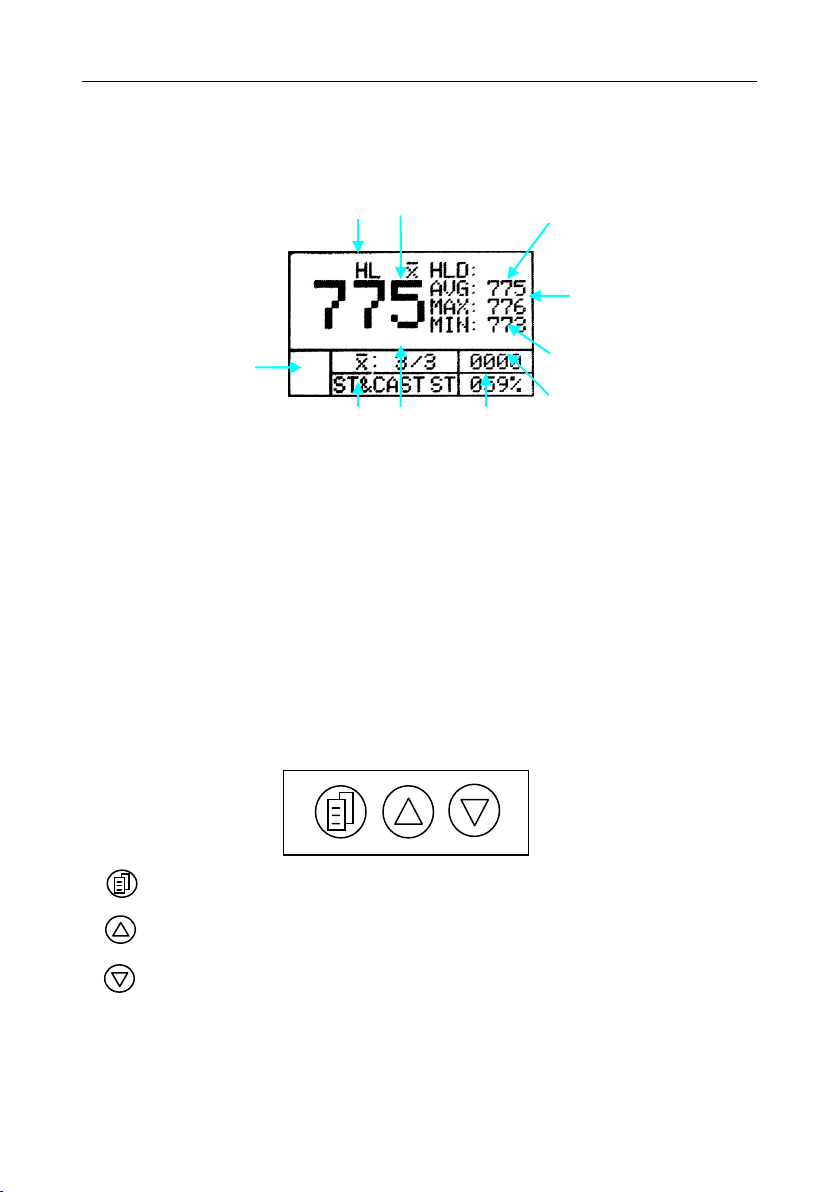
5.2.2 Display area
Hardness scale
Measuring value
Average value
Maximum value
Minimum value
Memory location
Battery power
Times of measurement/average
Material
Impact device type
5.2.3 Keypad
ON/OFF/Menu/Esc
Select/Move/Change the display to Big digit
Select/Move/Delete
D

Hardness Tester DHT-400PLUS
7
6. Operation instruction
6.1 Power on
Press key to power on. The following information is displayed.
1. Instrument model, Series No., Software version
2. Parameters of last setting
6.2 Parameters setting
Various parameter settings and management can be accomplished via the
instrument menu. Press key to Enter the menu, and press key or
key to select the setting items. Press key to confirm setting.
6.2.2 Average Times
The average times can be selected from 2 to 8.
- Press key and key to enter AVERAGE TIMES.
- Press key to enter this item,
- Press key or key for setting,
- Press key to confirm.
Notice: 3 or 5 average times are to be recommended.
Keys and
for setting,key for
confirmation
Tabla de contenidos
Otros manuales de Equipo de prueba de DGC


Manuales populares de Equipo de prueba de otras marcas

SMART
SMART KANAAD SBT XTREME 3G Series Manual de usuario

Agilent Technologies
Agilent Technologies BERT Serial Manual de usuario

Agilent Technologies
Agilent Technologies N3280A Manual de usuario

Vernier
Vernier Go Direct Voltage Manual de usuario

Lifeloc
Lifeloc R.A.D.A.R. Manual de usuario

Fluke
Fluke T5-600 Instrucciones de funcionamiento e instalación


