Operation instruction
FEATURES
Compatible with most 3.6-3.7V/7.2v digital camera, camcorder &
mobile phone Li-ion batteries
• Microprocessor identifies 3.6-3.7V/7.2-7.4V Li-Ion batteries
and NiMh/• NiCd cells and their +/- poles, and adjusts to
charge automatically.
• Controls fast/trickle charge accurately to ensure the batteries
charged swiftly and fully.
• Low-voltage battery activation.
• Over-voltage, short-circuit and over-time protections and
defective battery detection.
OPERATION INSTRUCTIONS
1 Power supply
• The charger is ready for use once the AC power adaptor is
connected to the main supply or the DC cigarette lighter
socket plug is connected to the charger, the red power
indicator will turn on.
• When using in car, connect the DC adaptor to the cigarette
lighter socket and the DC out-plug to the charger. Ensure that
current supply to the lighter socket is switched on. Some cars
require the ignition to be switched on.
2 Adjust the contact ports of the charger
(The step is for different battery to be charged. The same battery
goes to the step3 directly)
• Make sure of the + - contact plates position of the battery
(where there are signs)
• Withdraw the slip block to make the + - contact plates of the
battery closed to the one of the charger, then sandwich the
battery into the space.
• Make the contact ports of the charger adjusted to the
+ - contact plates of the battery with a thin and long thing
such as a pen.
3 Mounting the battery
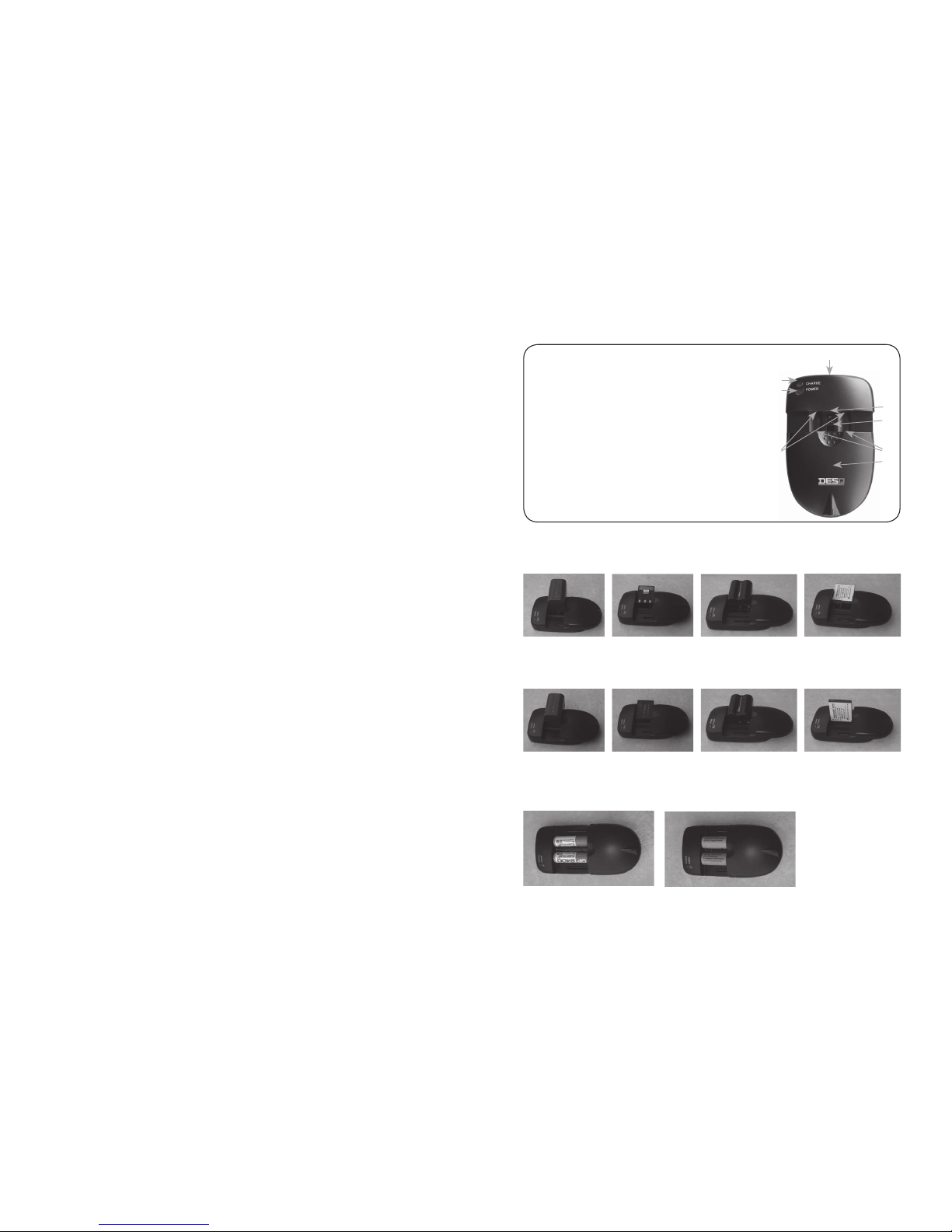
• Square Li-ion battery
Withdraw the slip block to make the + - contact plates of the
battery corresponded to the contact ports of the charger and
sandwiched into the space.(We summarize four types of
batteries in the market for you. Adjust the contact ports of
the charger and battery sandwiched method correspondingly.
See figures 2. According to your habit, you can also adjust the
contact ports and install the battery with left hand)
• Battery with pole on the back side
There is a anchor point for battery position to help you install
battery more easier and correct.(see the photos on the first page)
1 Make two marks with pen or else on both edge of opposite
side from 1. pole, be sure it is parallel with pole
2 Pull the slip cover of the charger down, and insert the battery
from the right or the left. Pole side is up
3 Adjust the two contacts of the charger to be parallel with the
positive and negative poles of the battery by a pen.
(Don’t take care of the right polarities.)
4 Pull down the slip cover again, and turn over the battery, and
then fix the battery poles on the top of the charger contacts
according to the anchor point for battery position and mark
which you have done at the first step, make them to be parallel
• AA/AAA NiMH/NiCD battery
Withdraw the slip block, make the + - contact plates of the
battery corresponded to the contact ports of the charger.
See figures 3.
CHARGING THE BATTERY
As soon as the battery is properly connected, charging begins, as
indicated by the green blinking light of the charge status indicator.
When charging is complete, the charge status indicator stops flashing
and remains solid green. At this point, the battery can be removed
for use. However it is recommended that you leave the battery con-
nected to the charger for another 30 minutes to ensure full-charge.