
Denwa Communications DW-V-AXT-ANDROID Manual de usuario


Content
Product Overview.......................................................................... 4
1. Product Description ............................................................................................4
2. Features...............................................................................................................5
3. Dimension ...........................................................................................................7
4. Installation height ...............................................................................................8
5. Adjust camera angle............................................................................................9
Web UI& Operation..................................................................... 11
1. Main interface...................................................................................................11
2. Calling out .........................................................................................................11
3. Unlock by password ..........................................................................................12
4. Unlock by RF card..............................................................................................13
Configuration in doorphone ........................................................ 14
1. Configure Address.............................................................................................15
2. Configure Password...........................................................................................16
3. Account .............................................................................................................17
4. Contact..............................................................................................................18
5. Time ..................................................................................................................19
6. Volume ..............................................................................................................20
7. Info ....................................................................................................................21
8. Lock ...................................................................................................................21
9. Await .................................................................................................................23
10. Lock Password.................................................................................................25
11. Restore ............................................................................................................25
12. AntiAlarm ........................................................................................................26
13. ReplaceRule..................................................................................................... 27
14. RF card.............................................................................................................28
15. Reboot.............................................................................................................31
16. RTSP.................................................................................................................32
17. Motion.............................................................................................................32
18. Device..............................................................................................................34
19. LED ..................................................................................................................35
Configuration in website ............................................................. 36
1.Status-> Basic .....................................................................................................36
2.Account-> Basic..................................................................................................37
3.Account-> Advanced ..........................................................................................39
4.Phone-> Call Feature..........................................................................................43

5.Phone-> Dial Plan->Replace Rule.......................................................................45
6.Phone-> Door Setting.........................................................................................46
7.Phone->Import/Export.......................................................................................50
8.Upgrade-> Basic .................................................................................................51
9.Upgrade-> Advanced..........................................................................................52
10.Security-> Basic ................................................................................................54
Troubleshooting .......................................................................... 55

Product Overview
1.Product Description
The Denwa DW-V-AXT-ANDROID is the video door phone, that you can connect with your
Denwa IP Phones for remote unlock control and monitoring. You can operate the indoor
handset to communicate with visitors via voice and video, and unlock the door if you
wish. Visitors can either enter password to unlock the door or dial room number to call
the host. It’s applicable in apartment, villas, Office, building and so on.

2.Features
Phone Features
HD Voice
2 Lines (support 2 SIP accounts)
Phonebook (1000 Contacts, 100 Groups)
Volume Adjustable
Auto Answer
Dial Replace Rule
Wideband Codec: G.722
Narrowband Codec: PCMA, PCMU, G.729
AGC, Echo Canceller
Full-Duplex Speakerphone
Support RF Key
Support Private Key
DTMF Code
Physical Features
Size: 317x130x23mm (HxWxD)
Weight: 1.34kg
Body material: all-aluminum
Display: 7” IPS LCD
Screen: 7” capacitive touch screen
Camera: 5 Mega pixels, automatic lighting
12V DC connector
Water-proof & Dust-proof: IP65
Collision-proof: IK06
SIP Features
SIP v1(RFC2543), SIP v2(RFC3261)
Audio codecs: G.711a, G.711μ, G.722
Video codecs: H.263, H.264
Echo Cancellation
Voice Activation Detection
Comfort Noise Generator
Video Features
Resloution: up to 1080p

Maximum image transfer rate: 1080p - 30fps
Video codecs: H.263, H.264
High intensity white LEDs for picture lighting during dark hours with internal light
sensor
Network Features
SIP V1(RFC2543), V2(RFC3261)
3 DTMF modes: In-Band,RFC2833,SIP INFO
HTTP Web Server for Management
Upgrade Firmware From Website
10/100 Mbps Ethernet connection
DHCP Client or Static IP
Network-Time-Protocol
Door Entry Features
Android OS for any 3rd party software or customization
Internal DPDT relay for controlling a door opener;
Relays controlled individually by DTMF tones or messages
Multi-way Unlock: IC Card, PassNumber, Guestures
G-sensor for self-defence alarm
Volume control for speaker
Gain control for microphone
Camera permanently optrational, not just during calls
White balance: auto
Viewing angle: 900
Auto-night mode with LED illumination
Minimum illumination: 1LUX (without LED illumination)
Max call length setting
Input DTMF code in talking interface

3. Dimension

4. Installation height
*It is recommended that the distance
between camera and ground remains
1.6m.

5. Adjust camera angle
Web UI & Operation
1. Main interface
The default screen after boot up is the password unlock screen,
touch to switch screen to dial pad.
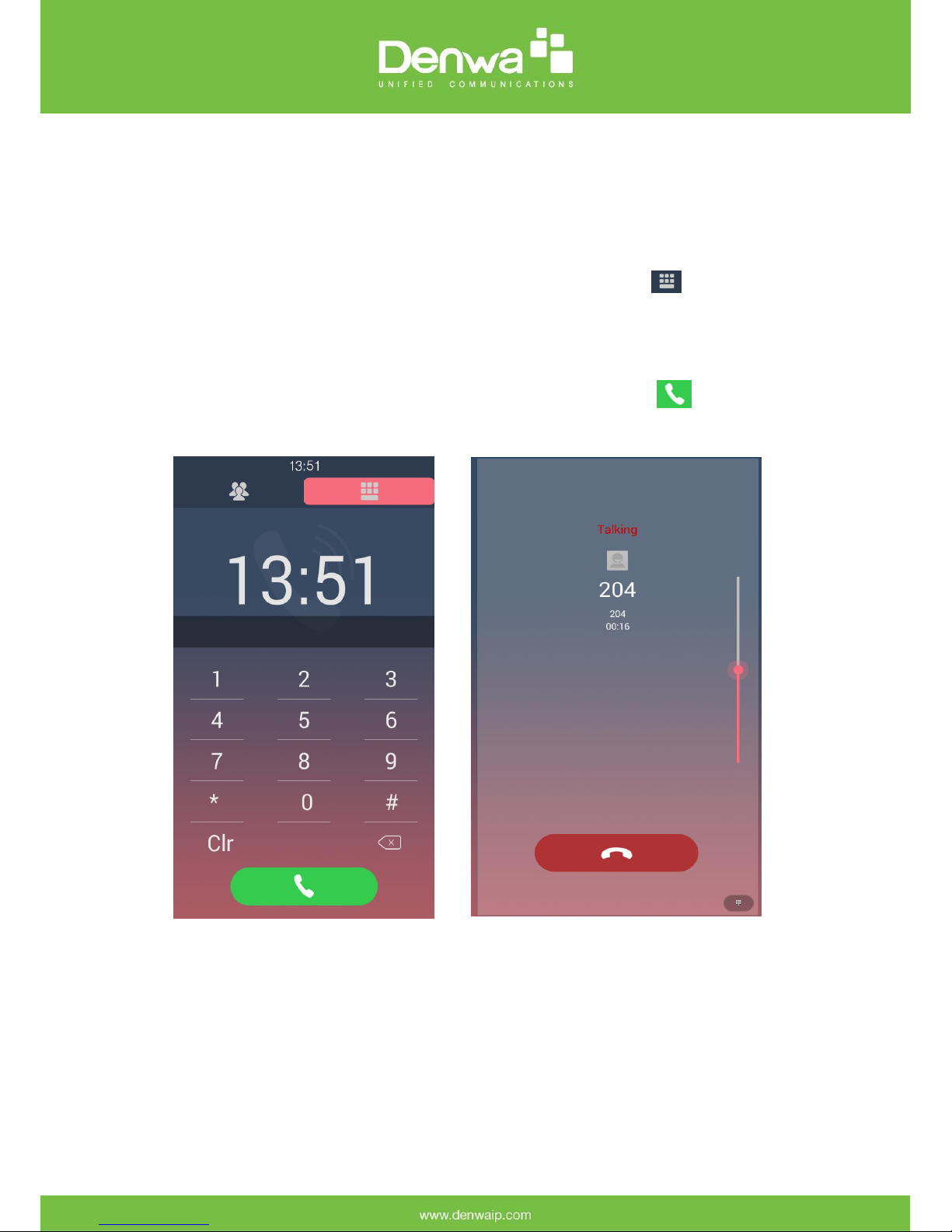
2. Calling out
In dial pad, input desired number than press to dial out. The screen
will turn to calling, or talking when there is a conversation.
3. Unlock by password
In password screen, input password to unlock the door. Once password correct, the
screen will prompt “Open Lock Success” and door will open. Otherwise, screen will
prompt “Open Lock failed”. To configure password, please refer to “Configure
password” in Configuration section.
Otros manuales para DW-V-AXT-ANDROID
1
Tabla de contenidos
Otros manuales de Sistema de intercomunicación de Denwa Communications


