
Denver HBO-6620Black Instrucciones de operación

Original Instruction
DENVER HBO-6620
www.denver-electronics.com
Before operating this vehicle, read all the instructions for safe assembly and operations.
User's manual can guide you through the functions and usage of the hoverboard. Before
using this hoverooard, familiarize yourself with how to operate, so that you can keep the
hoverboard in the best condition possible.
This appliance can be used by children aged from 8 years and above and persons with
reduced physical, sensory or mental capabilities or lack of experience and knowledge if

they have been given supervision on or instruction concerning use of the appliance in a
safe way and understand the hazards involved.
Children shall not play with the appliance. Cleaning and user maintenance shall not be
made by children without supervision.
Warning: Lithium battery inside

ENG 1
Chapter 1 General information
We urge owners of this hoverboard model to charge and store the
hoverboards in a safe place. To increase the safety and life of the batteries
associated with this model it is important not to charge this model if the
temperature is below 5°C or above 45°C. In addition, the charger must be
disconnected when the battery is fully charged. Only use the charger that is
packaged with the hoverboard model.
1.1. The risk of driving
WARNING!
- Learn how to drive safely before you drive fast on the hoverboard.
- Failing, losing control, crashing, including violating the rules in the user’s
manual can lead to injury.
- Speed and range may differ based on rider weight, terrain, temperature,
and driving style.
- Make sure to wear helmet and protective clothing before using the
hoverboard.
- Make sure to read the manual carefully before using the hoverboard.
- Only for use in dry weather.
- We do not recommend the use of any balance scooters on public roads.
For domestic use only.

ENG 2
1.2. The preparation before operation
Before using, the battery should be fully charged. Please check Chapter 6.
1.3. The weight limitation of the operator
The reason of the weight limitation: 1. guarantee the safety of the operator; 2. decrease the damage of
overloading.
Maximum load: 90kg.
Chapter 2 Operating the Balance scooter
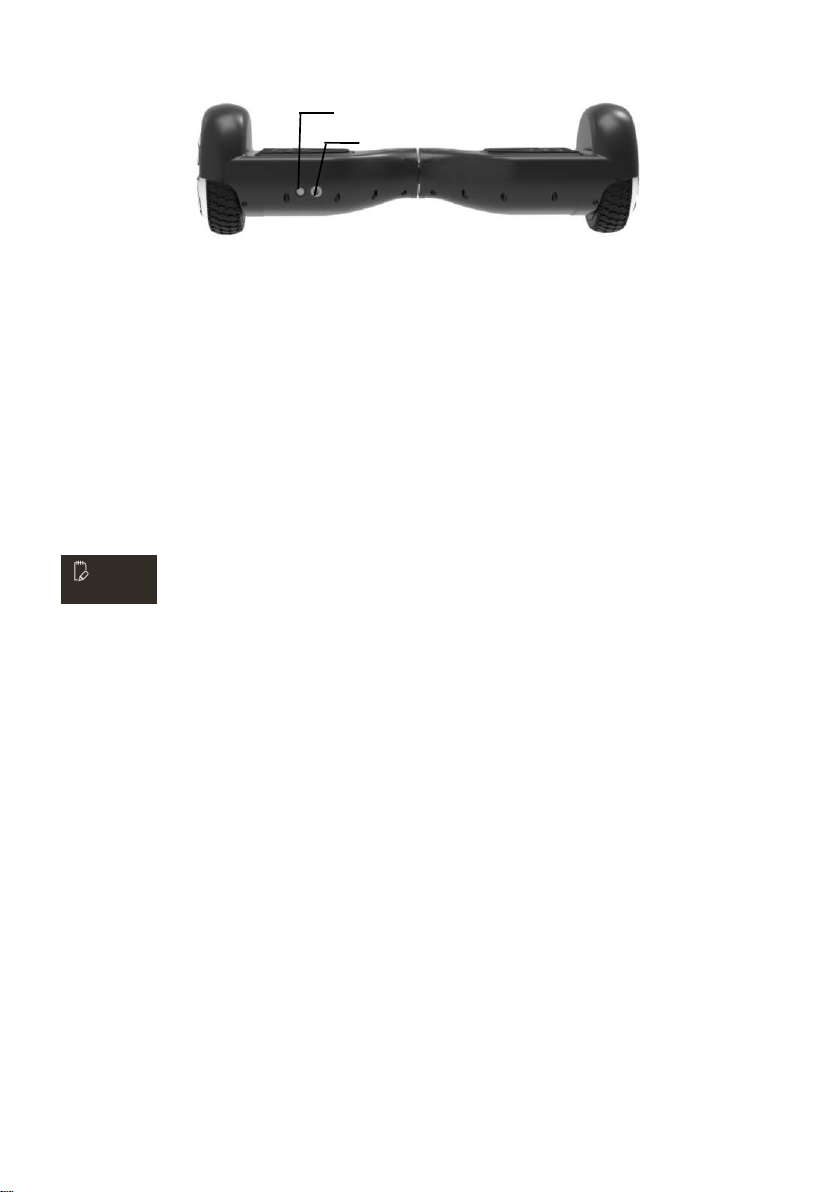
2.1. Description and identification
Protective cap for chassis
Decorative Light
Tire
Fender
Indicator
Pedal
ENG 3
2.2. Calibration
If your hoverboard seems to pull to the left or right, you may need to recalibrate its sensors. Step as below:
Step 1: Shut down/level the scooter.
Step 2: Press the Power button for more than 10 seconds until you see the light flashing 5 times.
Step 3: Shutdown scooter again.
Step 4: Power on, finished calibration.
NOTE:
Built in Self-Balance function, it is easy for driving.
2.3. Operating principal
- The hoverboard uses Dynamic equilibrium, using internal gyroscope and acceleration sensors. The status of
the hoverboard is controlled by the center-of gravity. It is adjusted by motor, which is controlled by the servo
control system. When you lean forward, it will sense your actions to accelerate. When you need to turn, slow
it down and move your foot forwards or backwards then the center-of gravity of the body moves left or right
therefore the hooverboard can sense moving left or right.
- The hooverboard has inertial dynamic stabilization system, so it can keep anterior-posterior balance but
cannot guarantee the left and right. So when turning, the scooter needs to be operated slowing, otherwise,
you may be injured.
DC Port
P
ower On/Off

ENG 4
2.4. Learn how to use it
Step 1: Press the power button to turn on the hoverboard.
Step 2: Put the hoverboard on a flat ground and make sure all safety measures are taken. Put one foot on the pad
that will trigger the pedal switch to turn on the operation indicator, after the system enters the selfbalancing mode,
put the other foot on the pad.
Step 3: Take control of the hoverboards’ forwards or backwards, do remember the movement of your body should
not be abrupt.
NOTE:
If you are not in a balanced condition when you trigger the foot-switch, the buzzer will alarm, and the warning LED
will light. The system is not in a self-balanced condition. Without a balanced condition, you should not operate the
hoverboard. Then you need to calibrate the sensors, see point 2.2.
Step 4: Control the left and right direction of the hoverboard.
Step 5: Before you get off, make sure that the hoverboard is still in balanced condition and stopped, then step off
one foot, then the other foot.

ENG 5
WARNING!
You should never turn violently when driving fast.
You should never ride sideways or turn on a slope. It will lead to a fall and injury.
2.5. Always react on alarms
Hoverboard will not operate in the following situations:
- During operation, if the system runs an error, the hoverboard will prompt operators in different ways such as
prohibit riding, alarm indicator lights, buzzer alarm beeps intermittently the system cannot enter selfbalancing
mode.
- When stepping on the hoverboard the platform moves forwards or backwards more than 10 degrees, the unit
will not operate.
- The voltage of the battery is too low.
- During charging.
- During operation, the platform turns upside down will prohibit operation.
- Over speeding.
Tilt right foot forward - Turn Left Tilt left foot forward - Turn Right

ENG 6
- The battery is not charged enough.
- Tire stall, two seconds later the scooter enters power off mode.
- The battery voltage is lower than the protection value, 15 seconds later the hoverboard enters into power off
mode.
- Continuing large current discharge (such as a long-time climbing a very steep slope)
WARNING!
When the hoverboard enters into the shutdown state (when the
battery is low), the system will lock down the machine automatically. It
can be unlocked when you press the power button. When the battery
has been depleted or the system gives out information with safety
shutdown, please do not continue to drive the hoverboard, otherwise,
the hoverboard cannot balance for the lack of battery. In this
condition, the driver is likely to be harmed. If the battery reaches the
minimum, the continued driving of the hoverboard will negatively
affect the battery’s life.
- The product should only be used in temperatures between -10℃ -
+45℃.
2.6. Riding practice
Before you drive the hoverboard, please make sure you are familiar with the skills of driving it. Always practice with
someone ready to hold/catch you.
- Use casual (but not loose) clothes and flat shoes in order to retain your body’s flexibility.
- Please go to open spaces to practice driving the hoverboard until you can easily get on/off.

ENG 7
- Make sure that the surface is level.
- When you are driving on different terrain, you must slow down.
- Hoverboard is a driving tool designed for a smooth road. Reduce speed if you drive the hoverboard on a
rough surface.
- Before driving: Read Chapter 4 on maximum speed and Chapter 5 on safe driving thoroughly
Chapter 3 Pedal Sensor and Indicator operation
3.1. Pedal sensor
The hoverboard has 4 sensors below the pedal, when the operator steps on the pedal, the hoverboard will adjust
itself to a balancing pattern automatically. When riding it, you have to make sure that the pedal is being fully
stepped on, please do not step on the parts outside the pedal. Do not put things on the pedals to make the
hoverboard operate by itself and increase the possibility of crashing and even cause personal injury and damage
to the hoverboard itself.
3.2. Battery & Operation Indicators
The indicator is located in the middle of the hoverboard. It is used for operation information.
- Battery indicator on the hoverboard will show green color as long as there is sufficient power on the battery to
drive.
- Battery indicator on the hoverbard will show red color when battery power is down (15-20% left) and you will
you need to stop driving and start to recharge the hoverboard.
- Battery indicator on the hoverboard will show RED and have WARNING ALARM SOUND when battery power
has run out and you must stop driving immediately. The hoverboard will now shut down without further notice
and the hoverboard will then loose balance. You may have risk to get injured if still try to keep driving.
- Operation indicator: When the pedal is triggered, the operation indicator will light then the system comes into
operating condition; when the system runs an error, the indicator will turn red.

ENG 8
Chapter 4 Range and speed
4.1. Range per charge
The range per charge is related to many factors, for example:
- Topography: On even roads the range per charge will be increased, on uneven terrain, it will be decreased.
- Weight: The weight of the operator can influence the driving distance.
- Temperature: Extreme temperature will decrease the driving distance.
- Maintenance: If the hoverboard is charged properly and the battery is kept in good condition, this will
maximize the driving distance.
- Speed and driving style: Keeping a steady speed will increase the driving distance, on the contrary, frequent
start, stop, acceleration, deceleration will reduce the distance.
4.2. Max. Speed
- The maximum speed of the hoverboard is rated at 14km/h but depends on the charging condition of the
battery, the condition/angle of the surface, wind direction, and the driver's weight. If the battery is fully
charged, the surface is very level or even angled downward, there is a tailwind, and the driver is not very
heavy, the maximum speed may exceed 15km/h.
- Approaching its maximum speed, the hoverboard emits a warning signal, and speed should be reduced. We
Este manual sirve para los siguientes modelos
3
Tabla de contenidos
Otros manuales de aerotabla de Denver

Denver
Denver HBO-6610 Instrucciones de operación

Denver
Denver DBO-6520BLUE Instrucciones de operación

Denver
Denver DBO-10001 Instrucciones de operación

Denver
Denver HBO-6750BLUE Instrucciones de operación

Denver
Denver DBO-6550 Instrucciones de operación

Denver
Denver DBO-8001 Instrucciones de operación

Denver
Denver HBO-6750 Instrucciones de operación


