
Denver Electronics BAS-24200M Manual de usuario

ENG-1
Insert the SIM card: The SIM card links to operator services
and stores information such asyour phone number, PIN code,
contacts and SMS messages. To access the SIM slot, turn off
the phone and lift up the cover starting from the slit on the
bottom left corner. Remove the battery. Insert the SIM card into
the slot with the gold contacts facing down.

ENG-2
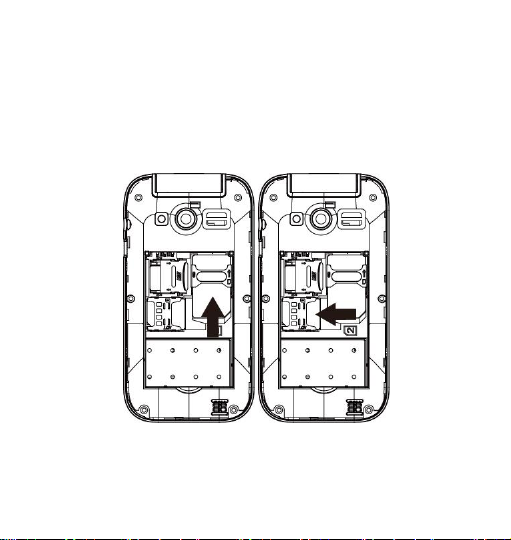
Insert a memory card: In order to use media player functions, a
micro-SD memory card is required (not included in the
package).The card must be placed into the SIM1 slot on the left
inside the rear of the phone. Insert the micro-SD card as below
shown, with the golden contacts facing down..Open the metal
shutter by pushing it towards "open", and lock it again after
inserting the card by pushing it in the opposite direction ("lock").

ENG-3
Turn ON / Turn OFF: To turn on and turn off the phone, press
and hold the red end call key.
Lock and unlock keypad: Press the left soft key and * key to
lock/unlock the phone.
Connect to a PC: Use an USB cable to connect the product to a
computer. Select Mass Storage on your phone. You can save
songs to play with the music player in "My Music" folder, in the
SD card.
Insert the battery: Your device is provided with a lithium-ion
battery and is designed to be used exclusively with original
batteries and chargers. The battery must be inserted into the
rear of the phone. Insert the battery into the battery
compartment with the contacts facing up corresponding to those
of the phone. When done, put the rear cover back into position
as shown in the following illustrations.

ENG-4

ENG-5
Charge the battery: Charge the battery before starting to use
the device. Connect the charger to a mains wall socket, and
then plug the jack into the charging base (wait for a moment until
an audio feedback notifies the charging starts) or put it directly
into the micro USB port. When charging has been completed, a
second audio feedback will be heard.
Attention: To preserve the functionality of the product and the
integrity of the warranty, were commend the use of the original
chargers. Please charge the battery indoors or in a dry and
favorable environment. It’s normal for the battery to get slightly
warm during the charging process. The battery will reach its full
capacity only after several complete charging cycles.

ENG-6
Phone description

ENG-7
1
Receiver
2
Display
3
Left soft key
4
Call button
5
Torch button
6
Number keys
7
* key: Press repeatedly to digit *,+,P,W. under text
insertion mode press to add a symbol. Under some menu
it is possible to use this key to move toward left.
8
0 key: Under text insertion mode press to add space;
9
# key: In standby mode press repeatedly to switch from
general to vibration mode and vice versa; under text
insertion mode press to change the writing method.
Under some menus it is possible to use this key to move
right.
10
Message button
11
SOS button
12
End call/Power on/off
13
Right soft key
14
Navigation key
15
Camera
16
Torch LED
17
Speaker
18
Earphone Jack

ENG-8
19
Micro-USB port
20
Desktop charging
21
Desktop charging
FM radio:BAS-24200M has an internal radio antenna so that no
headset is needed to listen to the radio. To listen to the radio,
access FM Radio from the main menu. By selecting Options
you have accessed to the following functions:
-Channel list:To manually browse saved channels
-Manual search:For the manual search of radio channels
-Automatic search:To automatically search for radio stations
-Settings:Background and loudspeaker options
Loudspeaker: Listen to the radio with the speaker instead of
the headphones (this option only appears when a headphone is
inserted)
Background: Keep playing in background even after exiting
from the radio app screen.
Use the * and # keys for adjusting volume.
Torch: to turn the torch on and off by pressing the shortcut torch
key.

ENG-9
Shortcuts: the UP selection key directly enters the Audio player,
the DOWN selection key for go to settings, the LEFT selection
key for Profiles, while the RIGHT selection key for Alarm.
Main menu:By pressing the left soft key to access the Main
Menu on your phone
-Messaging:To write and read SMS text messages
-Phonebook: To manage and save contacts
-Calls History: Missed calls and dialed calls etc.
-First Aid Settings:To enable and customize the SOS function
-Multimedia: Audio player, sound recorder, and file manager
-FM Radio:To turn on or turn off the radio
-Tools: With calendar, alarm, calculator,flashlight and STK etc.
-Settings: To customize your phone
-
Answer an incoming call: When there’s an incoming call, the
phone will notify you through vibration, ringing according to your
profiles settings. The name (if the contact is saved) and phone
number of the caller is shown on the screen.
Answer a call by pressing the call button.
Makea call: To make a call from the home screen, input the
desired number by using the keypad and then press the green
Tabla de contenidos
Idiomas:


