
DEL RollEasy Manual de operación y mantenimiento

RollEasy
SAFETY SLATTED AUTOMATIC COVER
INSTALLATION NOTICE Installation / Use / Maintenance / Safety Advice
SWIMMING POOL DEVELOPMENT AND INNOVATION
Notice Roll-Easy GB Non-Norm 2009 11:MP 07/01/2010 14:37 Page 1
www.delbrece.com.ua

PARTS INCLUDED IN THE DELIVERY
TRANSPORT
PACKING LIST
Description
THIS NOTICE MUST BE GIVEN TO THE POOL OWNER
PLEASE READ CAREFULLY AND KEEP IN A SAFE PLACE
Roll-Easy (2 boxes - Supports + Tube)
Slats (model, colour and number of boxes according to your order)
OPTION - Safety locking kit “according to your order” (1 box)
example - for a 5 x 10 m pool with Ø3 m step unit
Supports : 1 box of 0.50 x 0.45 x 0.35 m --- 20 Kg
Tube : 1 box of 0.20 x 5.30 m --- 25 Kg
Slats : 5 box of 0.25 x 0.20 x 5.00 m --- 250 Kg
Locking kit : 1 box of 0.30 x 0.20 x 0.20 m or 0.75 x 0.25 x 0.15 m --- 5 KG
Total weight : 300 Kg
In any event the consignment must be checked by the recipient upon receipt of the
delivery. Any damage or shortage should be reported to the supplier within 24 hours.
Motor
support
x1
Electric control panel
Spare parts bag
Free side
support
x1 x1 x1
Anodised aluminium tube Ø130 mm 4 mm thick
+ Tubular motor 120 Nm (in the tube)
x8
Screw
M10x60
x8
Sleeve
Ø12
x2
Screw
M5x20
x8
Washer
M10
x1
Key
(for automatic stops)
x1
Allen key
n°4
2 keys
Quick-Lock
3 fitting models : surface mounted - Insert mounted - Hanging mounted
Strap locking kit Lock-it Push-lock
69 mm slats 54 mm slats
2
Notice Roll-Easy GB Non-Norm 2009 11:MP 07/01/2010 14:37 Page 2
www.delbrece.com.ua

INFORMATION
For pools up to 5 x 11 m + Ø3 m step unit
The motor is located in the tube and must be installed
on the support equipped with the key switch.
The electrical supply comes
from the electric control
panel in the plant room.
Automatic stops are adjusted directly on the motor.
A torque limiter device protects the system in
case of any excessive resistance to the covers
operation.
The cover is made of watertight PVC slats that
float on the water.
Information
NECESSARY TOOLS - (INSTALLATION - 2 PERSONS)
THE ABOVE GROUND COVER
Ø8 - 12 - 20
n°13
n°17
OPTION
Safety locking kits
Gap between the
wall and the cover
Motor conform to
electrical standards
Key switch with
maintained contact
during locking
PVC slats
Tube
Nb
turn/mn
Torque
Dimension in cm
Serial nb
Voltage
Engine
power
Amps
21
48
35,2
12
IP45 3
Notice Roll-Easy GB Non-Norm 2009 11:MP 07/01/2010 14:37 Page 3
www.delbrece.com.ua

TUBE MOUNTING
MOTOR INSTALLATION
Installation
5 mm 5 mm
Tube adjustment
A too little adjustment does not allow dilatation in
case of temperature variation.
Screw
TFHC
M5x20
Insert the motor and move it around until it fits
inside the motor bearing
Automatic stops are
located upwards
Take the door of the motor side support off
4
Allen key n°4
Free side
Motor side
Tube
Notice Roll-Easy GB Non-Norm 2009 11:MP 07/01/2010 14:37 Page 4
www.delbrece.com.ua

TUBE INSTALLATION
LEVEL ADJUSTMENT
SETTLEMENT
With strap locking kits, Lock-it and Push-lock With Quick-lock
AA
Min A = 15 cm
Max A = 60 cm
Max
60 cm
cornerscorners
Adjust according to the pool corners and safety locking kits.
Locate the motor side support as per your order
Middle of the pool
AB
A = B
Motor side
Installation
5 mm 5 mm
Screw M10x60
Washer M10 Ø12
Sleeve Ø12
5
Notice Roll-Easy GB Non-Norm 2009 11:MP 07/01/2010 14:37 Page 5
www.delbrece.com.ua

ELECTRICAL DRAWING
Installation
4
+
-
5
6
3
2
Plug
Electrical supply 230 V
Torque limiter
device
Electric control
panel
Key switch
1 - Automatic stop supply
2 - Automatic stop supply
3 - Motor supply -
4 - Motor supply +
5 - Mains supply +
6 - Mains supply -
6
1
The electric control panel must be installed in a dry plant room.
The installation must comply with current electrical standards.
Ask your electrician or the electricity board for advice.
All our control panels are powered with single phase 230V (50Hz).
The input power required is 0.15 Kw.
Fit a circuit breaker equipped with a 30 mA RCD to protect the installation.
2 x 4 mm² - Up to 16 m long.
2 x 6 mm² - From 16 to 25 m long.
2 x 10 mm² - From 25 to 50 m long.
Notice Roll-Easy GB Non-Norm 2009 11:MP 07/01/2010 14:37 Page 6
www.delbrece.com.ua
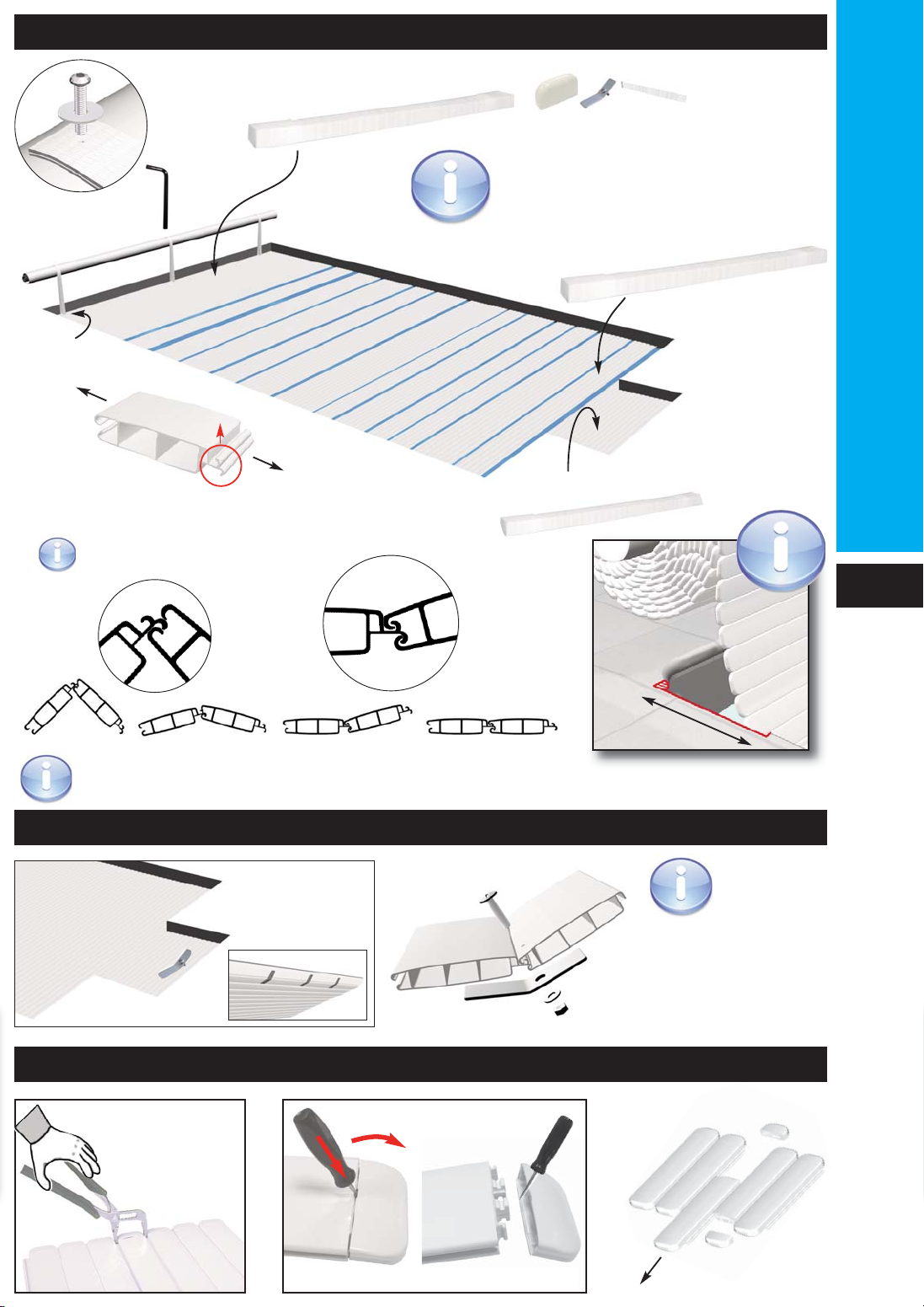
COVER INSTALLATION
SKI INSTALLATION
Installation
Allen key
n°4
Cut out
Box stickered «début de volet»
Box stickered «escalier»
Install the slats on the water and
clip them together.
Take care with the direction of
the cover over the pool.
Skis are
always
mounted on
the last slat. They
stop the cover
«diving» when closing
over the pool.
+
Last slat
Box stickered
«fin de volet»
“CLAC”
Fit the slats along
the whole length.
Repeat wiggling/handling of the slats may be needed.
HOW TO TAKE OFF A SLAT AND END CAPS ?
69 mm slats
with a small screw driver
54 mm slats
7
female
male
12
35 cm
If necessary, cut the coping stones
to stop the slats rubbing during
opening and closing of the cover.
Box stickered «fin de volet»
Notice Roll-Easy GB Non-Norm 2009 11:MP 07/01/2010 14:37 Page 7
www.delbrece.com.ua

TORQUE LIMITER DEVICE CONTROL CHECKING
AUTOMATIC STOP ADJUSTMENT
Installation
Key
Red arrows indicate the direction of the cover.
maintained contact
Turn the key in the + direction to increase
the movement in the direction of the arrow.
Turn the key in the - direction to decrease
the movement in the direction of the arrow.
If the key switch is incorrectly wired refer to page 6.
I
0
II
I
0
II
Cover
opening
Cover
closing
- Close the electronic card
- Check :
1234
closed
O
O
Temoin
Temoin
F
F
O
Temoin F
LEDS
(Switch PROG)
ELECTRIC CONTROL CHECKING
If the electric control is
installed incorrectly, reverse
cables 1 and 2 outside the
motor (See page 6).
I
0
II
I
0
II
Cover opening
Cover closing
maintained contact
8
Notice Roll-Easy GB Non-Norm 2009 11:MP 07/01/2010 14:37 Page 8
www.delbrece.com.ua

Installation
9
ADJUSTEMENT OF THE SENSITIVITY (SWITCH PROG)
CARD ADJUSTMENT (SWITCH REGLAGE)
CONTROL TIME ADJUSTMENT (SWITCH REGLAGE)
1234
l<= 3 m
1234
l<= 4 m
1234
l<= 5 m
1234
l<= 6 m
1234
l<= 7 m
1234
l<= 8 m
1234
l<= 9 m
1234
l<= 10 m
l= pool width
L= pool length step unit included
1234
Roll-Easy
1234 1234
L<= 12 m L> 12 m
30 seconds 60 seconds
maximum sensitivity minimum sensitivity
Key switch with maintained contact during + 3 seconds
=
the next opening of the cover will be protected by the
automatic stops
Key switch with maintained contact during - 3 seconds
=
the next opening of the cover will not be protected by the
automatic stops
ACTIVATION (SWITCH PROG)
TESTER
IMPORTANT
1234
Open
in the event of an unexplained
activation, reduce the sensitivity
level by selecting the setting for
the next width up.
A- Block the cover by hand or with safety kits and open the cover.
closing
closing
=> The motor is automatically stopped
(If necessary adjust the sensitivity of the switch activation)
+than 3 sec
-than 3 sec
If you do not activate the torque limiter device, serious damages might
happen on the motor, the electric control box, the slats, and the
guarantee might not be applicable.
Activated
card
Opening, control in progress
Opening whithout control
Closing
Protection ON
OF
Witness
I
0
II
I
0
II
Notice Roll-Easy GB Non-Norm 2009 11:MP 07/01/2010 14:37 Page 9
www.delbrece.com.ua

Installation
OPTIONAL SAFETY LOCKING KITS
LOCKING KIT POSITIONING
Quick Lock and Lock it cannot be installed on cut sides and rounded shapes,
except for the Roman end step unit.
Without step
unit With Roman
step unit
kit at the
end of the
step unit
2 kits at 50 cm
from the edge
kit at 50 cm
from the edge
1 kit centred if < 1 m
1 kit at 50 cm from the edge if < 2 m
2 kits if > 2 m
* X must not exceed 2 m
x* x x x
xxxx xxxx
x
With side step
unit With straight
or diagonal
step unit
Push-lock
Quick-lock
Lock-it
Strap locking
kit
Insert mounted Surface mounted
Surface mounted
Surface mounted
Surface mounted Hanging mounted
Hanging mounted
Hanging mounted
Hanging mounted
Insert mounted
Insert mounted
Insert mounted
10
Notice Roll-Easy GB Non-Norm 2009 11:MP 07/01/2010 14:37 Page 10
www.delbrece.com.ua
Tabla de contenidos


