
d3 Technologies 4U Manual de usuario

d3technologies.com
d3 4U v2.5
HARDWARE
GUIDE

d3technologies.com Unit D, 127-129 Great Suffolk Street, London SE1 1PP, UK. +44 (0)20 7234 9840
2
Index
• INDEX
• HARDWARE BACK PANEL DIAGRAM
• VIDEO OUTPUT
• DISPLAY PORT ADAPTORS
• GENLOCK
• VIDEO INPUT
• REMOVABLE MEDIA DRIVES
• AUDIO
• AUDIO BREAKOUT
• 4U v2.5 HARDWARE TECHNICAL DATA SHEET
• CARE PACKAGE
P 02
P 03
P 04
P 05
P 06
P 07
P 08
P 09
P 10
P 11
P12

d3technologies.com Unit D, 127-129 Great Suffolk Street, London SE1 1PP, UK. +44 (0)20 7234 9840
3
Hardware 4U v2.5
UTO SWITCHING POWER SUPPLY
(110 - 240 V A/C 50hz)
FIREWIRE 800 x 2
SDI LOOP THROUGH
FIREWIRE 400
SDI INPUT BOARD A INPUTS 1+2
SDI INPUT BOARD B INPUTS 3+4
SDI LOOP THROUGH
USB 2.0
USB 2.0
COM PORTS RS232
USB 2.0
DMX
ON-BOARD DVI (NOT IN USE)
DISPLAY PORT OUTPUTS (1-4)
VIDEO STEREO SYNC
FRAMELOCK RJ45 - IN
FRAMELOCK RJ45 - OUT
BLACKBURST/HOUSE SYNC- BNC
SPDIF I/O AES I/O
ADAT OUT
ADAT IN
ANALOGUE/MIDI OUT/IN
DATA
ON-BOARD AUDIO - MIC IN
ON-BOARD AUDIO - AUDIO LINE IN
ON-BOARD AUDIO - AUDIO LINE OUT

d3technologies.com Unit D, 127-129 Great Suffolk Street, London SE1 1PP, UK. +44 (0)20 7234 9840
4
YourV8800graphicscardcomespre-conguredforoptimalperformanceoutoftheboxbutshouldyou
needtoaccessthesettings,theycanbefoundintheCatalystControlCenter.
ToaccesstheCatalystControlCenter
• Right-clickontheWindowsdesktop
• SelectCatalystControlCenterfromthemenu
Settings for your V8800 graphics card
For further information on the graphics card settings for the V8800 please see the d3 User Guide
online at: http://www.d3technologies.com/support/user-guide/chapters/hardware-setup#graphics-card-
settings
Yourd34Uv2.5usesAMD’sFireproV8800graphicscard.Itiscapableofdriving4individualoutputsatup
to2560x1600pixelsusingtheDisplayPortinterface.
TheV8800graphicscardhas4DisplayPortconnectors,pleaseseeexamplebelow:
What graphics card does my d3 4U v2.5 machine have?
What connections does the V8800 graphics card have?
InordertousetheDVIinterfacepleaseusetheActiveDisplayPortadapterssuppliedwithyourd34uv2.5
system.
For further information on DisplayPort adapters please see Active DisplayPort Adapters page of this
document.
Video Output

d3technologies.com Unit D, 127-129 Great Suffolk Street, London SE1 1PP, UK. +44 (0)20 7234 9840
5
DisplayPort [DP] adapters are used to convert DP to DVI for use with equipment supporting the DVI
interface.
Yes, If you want to output up to 2560x1600 pixels you will need to use Active Dual Link adapters [not
included]ActiveDualLinkadapterswillalwayshaveanexternalUSBcableastheyrequireextrapower.
To purchase _Dual Link Active_ adapters please see Startech’s website at http://uk.startech.com/AV/
Displayport-Converters/DisplayPort-to-DVI-Dual-Link-Active-Converter-USB-Powered~DP2DVID
Pleasecontactd3supportforinformationconcerningtheuseofDatapathX4ortheMatroxTripleHead2Go
productswithd3.
Can I output more than 1920x1200 with DVI?
What is a DisplayPort adapter?
What DisplayPort adapters should I use?
TherearethreemaintypesofDPadapters:
• PassiveSingleLink
• ActiveSingleLink
• ActiveDualLink
WerecommendthatyouusetheincludedActiveDisplayPortadaters.
Yourd34uV2.5systemissuppliedwithfour[StartechDP2DVIS]ActiveSingleLinkAdapters,asshown
intheimagebelow:
Using Active DisplayPort adapters will allow you to output resolutions up to 1920x1200 pixels per DP
output.
ThesuppliedadaptershavebeenAMDGoldCertied.FormoreinformationonAMDGoldCertiedadapters
pleasevisittheAMDwebsiteat:http://support.amd.com/us/eyenity/Pages/eyenity-dongles.aspx
Pleasenote:IfyouusePassiveSingleLinkadaptersyouwillonlybeabletooutputontotwovideooutputs.
ThisisduetotheV8800’sclocktimings.IfpossiblealwaysuseActiveDisplayPortadaptersasitwillgive
youthebestperformanceandexibility.
For further information on DisplayPort adapters see the d3 User Guide online at:
http://www.d3technologies.com/support/user-guide/chapters/hardware-setup#displayport-adapters
Display Port Adapters

d3technologies.com Unit D, 127-129 Great Suffolk Street, London SE1 1PP, UK. +44 (0)20 7234 9840
6
FordetailedhelpontheS400card,pleaseseethein-builthelpcenterintheCatalystControlCenter.
ToaccesstheCatalystControlCenterHelppleasefollowthesesteps:
• Right-clickontheWindowsdesktop
• SelectCatalystControlCenterfromtheoptionsmenu.
• Selectthequestionmark[?]iconinthetoprightoftheCatalystControlCenterwindow.
Yourd34uv2.5usestheS400Genlockcard.TheS400cardisAMD’ssolutiontoachievesync[Genlock]
betweenmultiplegraphicscards[GPU’s]ortoenabletheGPUtobesyncedtoanexternalHouseSync.
EachS400cardhas1xBNCconnectionforBlackburstorHouseSyncand2xRJ45connectionsfordaisy
chainingmultipleS400cardstogether[1xIn&1xOut].
What Genlock card does my d3 4u v2.5 have?
What connections does my S400 card have?
Further information
For further information and to see all of the settings for the S400 card see the d3 User Guide online at:
http://www.d3technologies.com/support/user-guide/chapters/hardware-setup - 17.9 Genlock card settings
Genlock

d3technologies.com Unit D, 127-129 Great Suffolk Street, London SE1 1PP, UK. +44 (0)20 7234 9840
7
For further information on Capture Cards please see the d3 User Guide online at:
http://www.d3technologies.com/support/user-guide/chapters/hardware-setup#sdi-capture
Yourd34uv2.5d3systemisequippedwith2xActiveSiliconPhoenixPHX-D20HDSDIcapturecards.
ThesecardshavetheabilitytocapturelivevideofromeitherSD-SDIorHD-SDIvideosourceswithupto
fouruniqueSDortwouniqueHDfeedspermachine.
• 525 NTSC
• 625PAL
• 720p
• 1080i
• 1080p
InthestartmenuopentheprogramcalledActiveSiliconPhoenixCapture(32-Bit)application.Thisprogram
isabletocheckthestatusandcongurethecapturecardsinstalledinyourd34uv2.5system.
*GototheWindowsStartMenu
*SelectActiveSiliconPhoenixCapture(32-Bit)
*InthetoolbaratthetopoftheActiveSiliconPhoenixCapturewindowselectPhoenixControlCenter.
Tochecktheinput,selecttheboardnumberandchannelthatyoupluggedyourSDIsourceintothenfollow
thesesteps:
*Selectthecorrectcongurationledependinguponyourinput(PAL,NTSC,1080ior1080p)
*ClickCongure
*ThenclickLive
You should now see the SDI input in the camera window screen in the Active Silicon PhoneixCapture
Window
Tocheckthestatusofthecard;
• clickCongure.
What are the video inputs on my d3 4u v2.5?
What formats do my capture cards accept?
What connections do the capture cards have?
How do I test the live video input outside of d3?
Pleasenote:Ifanerrormessagepopsupitmaybenecessarytore-ashorupdatethedriversoftware.
Todosopleasecontactd3support.
Pleasenote:It’srecommendedthatyoucheckyourlivevideoinputoutsideofd3rst.
Pleasenote:LiveVideoinputinherentlyintroducesframelatencyduringplayback.Pleasecontactd3
supportforguidanceonperformancestandards.
Video Input
d3technologies.com Unit D, 127-129 Great Suffolk Street, London SE1 1PP, UK. +44 (0)20 7234 9840
8
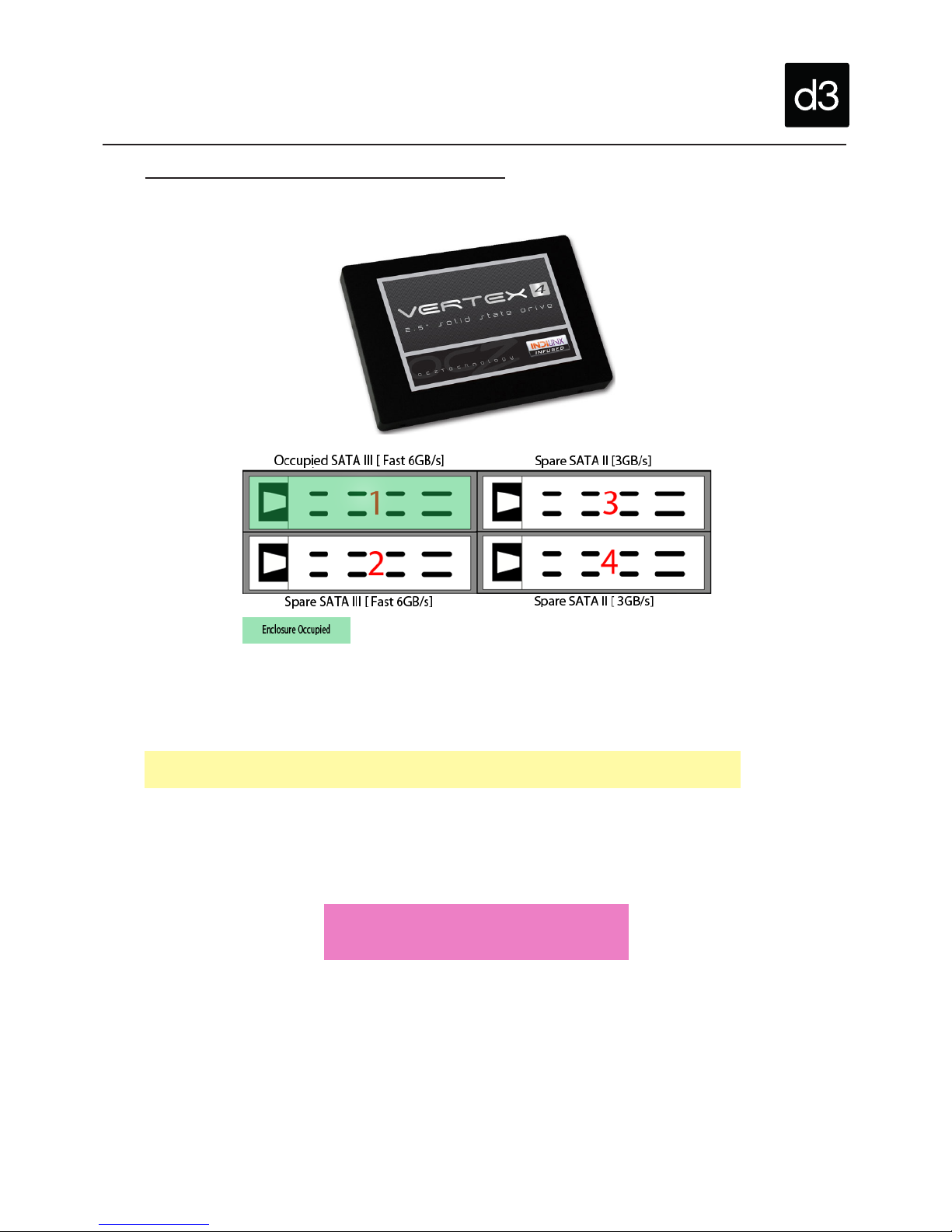
Yourd34uv2.5machineshipswithasingle512GbOCZVertex4SolidStateDrive(SSD)indrivebay1.
OutofthefourdrivebaystherearetwofastSATA3drivebays(bays1and2)andtwoSATA2drivebays
(bays3and4).Toensureoptimalperformancealwayspopulatebay1and2rst.
TheOCZVertex4iscapableof461.9MB/ssequentialreadand462.9MB/ssequentialwrite.
Pleasenote:Ifyoueverneedtoreplaceorexchangeyourmediadriveitisrecommendthatyouuseadrive
withsimilarread/writespeeds.Forfurtherinformationpleasecontactd3support.
WARNING:Donotremovedrives
whenthemachineison.
How are the removable drive bays arranged?
For more information on removable drive bays please see the d3 User Guide online at:
http://www.d3technologies.com/support/user-guide/chapters/hardware-setup#removable-media-drives
Removable Media Drives

d3technologies.com Unit D, 127-129 Great Suffolk Street, London SE1 1PP, UK. +44 (0)20 7234 9840
9
TheRMEcardhasfourconnections:
• AnalogIn/Out[ViaAnalogueBreakoutCable-supplied]
• DigitalIn/Out[ViaDigitalBreakoutCable-notincluded]
• ADATOut[8Channelsviaopticalcable-notincluded]
• ADATIn[8Channelsviaopticalcable-notincluded]
To connect the RME card to external devices, we recomend using the supplied Analogue Breakout
Cable. For more information on the Analogue Breakout Cable please see the Audio Breakout page of
thisdocumentoratourUserGuideonline:http://www.d3technologies.com/support/user-guide/chapters/
hardware-setup#audio-card-settings
Yourd34uv2.5usesaRMEHDSP9632HammerfallDSPproaudiocard,whichusesthelatest182kHz
AD-andDA-converters.
• GototheWindowsStartMenu
• TypeSoundinthesearchbarandthenselectSoundunderthecontrolpanelcategory.
• Right-clickthedevicenamedSpeakersRMEHDSP9632andselectSetasDefaultDeviceifitisnot
alreadyselected.
Which connections does the RME card have?
What audio card does my d3 4u v2.5 have?
RME card settings
For further information please see the d3 User Guide online at:
http://www.d3technologies.com/support/user-guide/chapters/hardware-setup#audio-card-settings
Audio

d3technologies.com Unit D, 127-129 Great Suffolk Street, London SE1 1PP, UK. +44 (0)20 7234 9840
10
Eachd3systemsissuppliedwithabreakoutcablefortheRMEHDSP9632audiocard.
1xHDSP9632/HDSPeAIO:Analogbreakoutcable,balanced(P/NBO9632XLRMKH)
Thisbreakoutcableprovidesthefollowinginputsandoutputs;
• 1xMidiin(5pinDIN)
• 1xMidiout(5pinDIN)
• 1xBalancedstereolineout(¼”TRS)
• 2xBalancedlineout(XLR)
• 2xBalancedlinein(XLR)
FormoreinformationontheRMEaudiocardpleaserefertotheAudioCardpageofthisdocument.
BelowisapictureoftheAnalogBreakoutCablesuppliedwithyourd3machine.
Forexibilityyourd34uv2.5comeswithanAnalogBreakoutCablewhichletsyouchoosewhichinput/
outputtouse.
ThereareseveralvariationsoftheAudioBreakoutCablesavailable.
PleaserefertoRME’swebsiteformoreinformation:http://www.rme-audio.íde/en_products_cables.php
Why do I need a breakout cable?
Are different Breakout Cables avaliable?
What connections does the breakout cable have?
For further information on the Analog Breakout Cable please see the d3 User Guide online at:
http://www.d3technologies.com/support/user-guide/chapters/hardware-setup#audio-card-settings
Audio Breakout
Tabla de contenidos


