
d2itsu APD-12CK Manual de usuario

Local air conditioner
Model: APD-12CK, APD-12HK
Thank you for choosing our product.
For proper operation, please read and keep this manual carefully.
If you have lost the Owner’s Manual, please contact the local agent or visit
sat.eurofredgroup.com.
USER'S MANUAL

Content
Operation Notices
Operation Environment ............................................................................................1
Safety Warning ........................................................................................................2
Part's Name .............................................................................................................3
Operation Guide
Operation Introduction for Control Panel .................................................................4
Use for air conditioner .............................................................................................6
Using the remote control .........................................................................................7
Buttons on Remote Controller .................................................................................8
Introduction for Icons on Display Screen .................................................................8
Introduction for Buttons on Remote Controller .........................................................9
Function Introduction for Combination Buttons .....................................................12
Operation Guide ....................................................................................................13
Replacement of Batteries in Remote Controller .....................................................
13
Maintenance
Clean and Maintenance.........................................................................................14
Malfunction
Malfunction analysis ..............................................................................................16
Installation Notice
Installation Precaution ...........................................................................................19
Preparation before Installation ...............................................................................20
Installation
Removing Collected Water ...................................................................................22
Installation in a double-hung sash window(Optional)............................................25
Installation in a sliding sash window(Optional)......................................................28
Install Wire Hook ...................................................................................................21
Operation Test .......................................................................................................34
Installation and Disassembly of Heat Discharge Pipe ...........................................31
Attached Sheet
Electric Schematic Diagram...................................................................................35
This marking indicates that this product should not be disposed with other household wastes
throughout the EU. To prevent possible harm to the environment or human health from un-
controlled waste disposal, recycle it responsibly to promote the sustainable reuse of mate-
rial resources. To return your used device, please use the return and collection systems or
contact the retailer where the product was purchased. They can take this product for envi-
ronmental safe recycling.
R410A(R32/125: 50/50): 2087.5
This appliance is not intended for use by persons (including children) with reduced physical, sensory
or mental capabilities, or lack of experience and knowledge, unless they have been given supervision
or instruction concerning use of the appliance by a person responsible for their safety.
Children should be supervised to ensure that they do not play with the appliance.

Explanation of Symbols
Indicates a hazardous situation that, if not avoided, will
result in death or serious injury.
Indicates a hazardous situation that, if not avoided, could
result in death or serious injury.
Indicates a hazardous situation that, if not avoided, may
result in minor or moderate injury.
Indicates important but not hazard-related information,
used to indicate risk of property damage.
Indicates a hazard that would be assigned a signal word
WARNING or CAUTION.
WARNING
CAUTION
DANGER
N OTIC E

1
Operation Environment
● This air conditioner can only be used for family, not for
commercial industry.
● The appliance is for indoor use only.
● The air conditioner must be operated within the temperature range:
16°C ~ 35°C.
● The appliance must be positioned so that the plug is accessible.
● Reserved space around the air conditioner should be 12″(30cm)
at least.
● Do not operate the air conditioner at humid environment.
● During operation, close doors and windows to improve cooling effect.
● Please keep air inlet and air outlet clean, no obstacles.
to avoid noise and vibration.
● Please put the air conditioner at smooth and flat ground for operation
● This air conditioner is equipped with castors. Castors should slide
at smooth and flat ground.
● Prohibit inclining or turning over the air conditioner. If there’s abnor-
mity, please disconnect power immediately and contact dealer.
● Avoid direct sunshine.
30cm 30cm
30cm

2
Safety Warning
● Before operation, please confirm whether power specification
● Before cleaning or maintaining the air conditioner, please turn off
air conditioner and pull out the power plug.
in order to avoid a hazard.
manufacturer or professional person.
complies with that on nameplate.
● Please use the grounded power. Make sure the gounding is reliable.
● If the supply cord is damaged, it must be replaced by the
manufacturer or its service agent or a similarly qualified person
● Do not insert or pull out the power plug with wet hands.
disconnect power at once and then contact local dealer.
● If abnormal condition occurs (e.g. burned smell), please
● If the power cord is damaged, it must be replaced by
● When nobody is taking care of the unit, please turn it off and
remove the power plug or disconnect power.
● Do not splash or pour water on air conditioner. Otherwise, it may
cause short circuit or damage to air conditioner.
unit without supervision.
●
If drainage hose is used, ambient temperature can't be lower than
0℃. Otherwise, it will cause water leakage to air conditioner.
● Prohibit inserting any objects into the air conditioner.
● Children shall not play with the appliance.
● Do not repair or disassemble the air conditioner by yourself.
● Do not put or hang dripping objects above the air conditioner.
● Keep children from playing or climbing on the air conditioner.
● Children and disabled people are not allowed to use the
● Far away from fire source, inflammable and explosive objects.
● Prohibit operating heating equipment around the air conditioner.
● Make sure the power cord hasn’t been pressed by hard objects.
● Do not pull or drag the power cord to pull out the power plug or
move the air conditioner.
● This appliance can be used by children aged from 8 years and
above and persons with reduced physical,sensory or mental
capabilities or lack of experience and knowledge if they have
been given supervision or instruction concerning use of the
appliance in a safe way and understand the hazards involved.
● Cleaning and user maintenance shall not be made by children
without supervision.

3
1Controller panel
2
Swing louver
3
Guide louver
4Castor
5
Plug of power cord
Wire-fixing hook
7Gastor
8Air inlet
9Joint A
10 Heat discharge pipe
11 Joint B+C
12 Remote controller hook
6
Part's Name
Installation accessories can't be discarded.
NOTICE:
1
2
3
4
Remote controller
11 10 9
6
7
8
5
12
FAN
AUTO
OPER
HEALTH
AIR
FILTER
TURBO
ON/OFF
X-FAN
HOUR
HUMIDITY
ON/OFF
MODE
FAN
X-FAN
TURBO
TEMP TIMER
SLEEP LIGHT
4
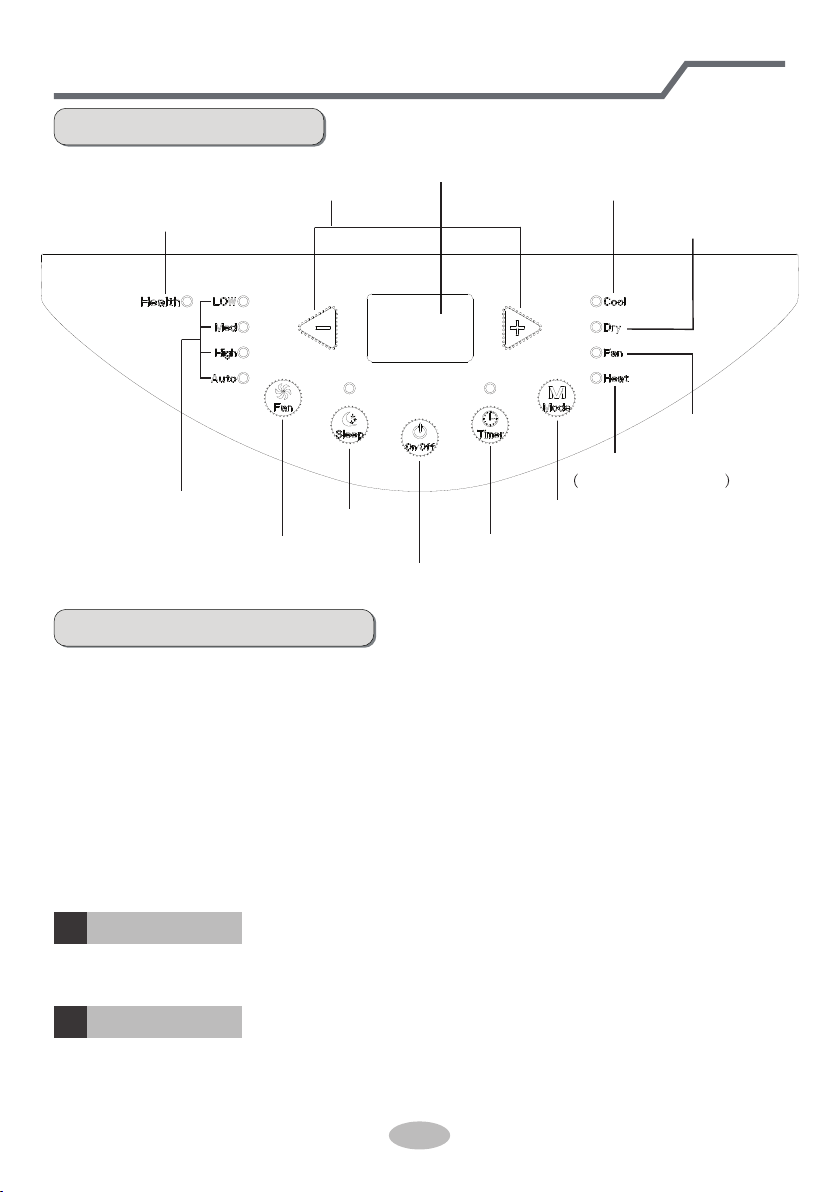
Name of control panel
ON/OFF button
Mode button
+ / - button
Dual-8 nixie tube
Fan mode indicator
Heat mode indicator
Cool&Heat Unit only
Cool mode indicator
Dry mode indicator
Sleep button
Fan button Timer button
Fan speed indicator
Health indicator(Optional)
Operation of control panel
NOTICE:
● After putting through the power, the air conditioner will give out a sound. After
that, you can operate the air conditioner by the control panel.
● Under ON status, after each pressing of the button on control panel, the air
conditioner will give out a sound. Meanwhile, corresponding indicator on control
panel will be bright.
● Under OFF status, dual-8 nixie tube on control panel won’t display.
Under ON status, dual-8 nixie tube on control panel will display set temperature
under cooling mode and Heating mode (Cool&Heat Unit only), while it won’t display
under other modes.
Pressing this button can turn on or turn off the air conditioner.
Under cooling mode, press “+” or “-” button to increase or decrease set temperature by
1°C(°F). Set temperature range is 16°C~30°C Under auto, drying or fan mode, this
button is invalid.
ON/OFF button
+ / - button
1
2
Operation Introduction for Control Panel

5
Press this button and the mode will circulate according to below sequence:
Cool→Dry→Fan→Heat Cool&Heat Unit only
Cool: Under this mode, cooling mode indicator is bright. Dual-8 nixie tube displays
set temperature. Temperature setting range is 16
°C
~30
°C
.
Dry: Under this mode, drying mode indicator is bright. Dual-8 nixie tube won’t
display.
Fan: Under this mode, the air conditioner only blow fan. Fan indicator is bright.
Dual-8 nixie tube won’t displa
Heat Cool&Heat Unit only : Under this mode, heating mode indicator is bright.
Dual-8 nixie tube displays set temperature. Temperature
setting range is 16°C~30°C.
y.
Mode button
3
Press this button and the fan speed will circulate as “low speed→ medium speed →
high speed→ auto fan→ low speed”.
Fan button
4
Timer
5
Press timer button to enter into timer setting mode. Under this mode, press " "
or " " button to adjust the timer setting. Timer setting will increase or decrease
0.5 hour by pressing " " or " " button within 10 hours, while timer setting will
increase or decrease 1 hour by pressing " " or " " button beyond 10 hours.
After timer setting is finished, the unit will display temperature if there’s no
operation for 5s. If timer function is started up, the upper indicator will keep the
display status. Others, it won’t be displayed. Under timer mode, press timer button
again to cancel timer mode.
+
+
+
-
-
-
Sleep
6
Press sleep button to enter into sleep mode. If the controller operates at cooling
mode, after sleep mode is started up, preset temperature will increase by 1°C
within 1 hour ;preset temperature will increase by 2°C within 2 hours and then the
unit will operate at this temperature all the
Sleep function is not available for fan mode, drying mode and auto mode. If sleep
time;
Press sleep button to enter into sleep mode. If the controller operates at heating
mode, after sleep mode is started up, preset temperature will decrease by 1°C
within 1 hour ;preset temperature will decrease by 2°C within 2 hours and then the
unit will operate at this temperature all the time;
function is started up, the upper indicator will keep the display status. Others, it
won’t be displayed.
Operation Introduction for Control Panel

6
Use for air conditioner
To change air flow direction
1. Up/down air flow direction
• Hold the horizental louvers as shown in the diagram and adjust the air flow
COOL or DRY mode with the fan speed set to Low for an extended period of
direnction.
time, Condensation may form on the louvers.
• Do not adjust the horizontal louvers to the lowest or the highest position in the
2. Left/right air flow direction Hold the vertical louver as shown in the diagram
and adjust the air flow direction.
DRY mode with the fan speed set to Low for an extended period of time.
Condensation may form on the louvers.
• Do not adjust the vertical louvers to the extreme left or right in the COOL or
CAUTION:

7
Using the remote control
How to use the remote control
Point the remote control toward the Signal receiver
This is a general use remote controller, it could be used for the air conditioners
with multifunction; For some function, which the model doesn't have, if press the
corresponding button on the remote controller that the unit will keep the original
running status.
and press the desired button. The unit generates
a beep when it receives the signal.
• Make sure nothing, such as curtains, blocks the
•The signal effective distance is 8m.
• Do not expose the receiver window to direct sunlight.
• Use of certain fluorescent lamp in the same room
• Do not leave the remote control in direct sunlight
signal receiver window.
This may adversely affect its operation.
may interfere with transmission of the signal.
or near a heater. Protect the remote control from
moisture and shock.
When attached, to remove the remote control from
the unit, lift the remote control up slightly and pull it
Remote control hook
out.
To prevent the remote control from being
misplaced, hook it to the unit when not in
use.
CAUTION:
Este manual sirve para los siguientes modelos
1
Tabla de contenidos
Idiomas:
Otros manuales de Acondicionador de aire de d2itsu


