
Cyber Acoustics CA-461 Manual de usuario

Digital Docking Speaker TM

1
This equipment has been tested and found to comply with the limits for a Class B digital device pursuant to Part
15 of the FCC Rules. These limits are designed to provide reasonable protection against harmful interference in
a residential installation. This equipment generates uses and can radiate radio frequency energy and if not
installed and used in accordance with the instructions may cause harmful interference to radio communications.
However there is no guarantee that interference will not occur in a particular installation. If this equipment does
cause harmful interference to radio or television reception which can be determined by turning the equipment
off and on the user is encouraged to try to correct the interference by one of the following measures:
- Reorient or relocate the receiving antenna.
- Increase the separation between the equipment and receiver.
- Connect the equipment into an outlet on a circuit different from that to which the receiver is connected.
- Consult the dealer or an experienced radio/TV technician for help.
FCC Caution: To assure continued compliance (example use only shielded interface cables when connecting
to computer or peripheral devices). Any changes or modifications not expressly approved by the party responsible
for compliance could void the users authority to operate this equipment.
This device complies with Part 15 of the FCC Rules. Operation is subject to the following two conditions: (1) This
device may not cause harmful interference and (2) this device must accept any interference received including
interference that may cause undesired operation
Ce matériel a été testé et déclaré conforme aux normes des appareils digitaux de Classe B conformément à
l'article 15 du Règlement de la FCC. Ces normes sont conçues pour fournir une bonne protection contre les
interférences nuisibles en installation domestique. Cet équipement génère utilise et peut radier des énergies de
fréquence radio et s'il n'est pas installé et utilisé conformément aux instructions il peut causer des interférences
nuisibles aux communications radio. Cependant il n'est pas garanti que des interférences ne se produiront pas
dans une installation particulière. S'il s'avérait que cet équipement produise des interférences nuisibles aux
réceptions de radio ou de télévision ce qui peut être vérifié en allumant et en éteignant l'équipement l'utilisateur
est encouragé à essayer de corriger les interférences à l'aide de l'une ou de plusieurs des mesures suivantes :
- Réorientez ou déplacez l'antenne de réception.
- Éloignez le matériel du récepteur.
- Connectez le matériel en question à une prise se trouvant sur un circuit différent de celui du récepteur.
- Consultez un technicien radio/TV compétent.
Avertissement FCC : Pour assurer une conformité continue (exemple utilisez uniquement des câbles d'interface
blindés lors de la connexion à un ordinateur ou à des périphériques). Toute altération ou modification sans l'accord
express des instances responsables de la conformité peut annuler l'autorisation octroyé à l'utilisateur d'utiliser
l'appareil.
Cet appareil est conforme à l'article 15 de la réglementation FCC. Son utilisation est soumise aux deux conditions
suivantes : (1) Cet appareil ne doit pas provoquer d'interférences nuisibles et (2) cet appareil doit accepter toutes
interférences reçues y compris celles qui pourraient provoquer un fonctionnement indésirable.
FCC Regulations
Reglement FCC

IMPORTANT SAFETY INSTRUCTIONS
1.Read Instructions - All the safety
and operating instruction should
be read before the product is
operated.
2.Retain Instructions - The safety
and operating instruction should
be retained for future reference.
3.Heed Warnings - All arning on
the product and in the operating
instructions should be adhered to.
4.Follo instructions - All operating
and use instructions should be
follo ed.
5. Cleaning - Unplug this product from
the all outlet before cleaning. Do
not use liquid cleaners or aerosol
cleaners. Use a damp cloth for
cleaning.
6.Attachments - Do not use
attachments not recommended by
the product manufacturer as they
may cause hazards.
7.Water and Moisture - Do not use
this product near ater - for
example, near a bath tub, ash
bo l, kitchen sink, or laundry tub;
in a et basement, or near a
s imming pool, and the like.
8.Accessories - Do not place this
product on an unstable cart, stand
tripod, bracket, or table. The
product may fall, causing serious
injury to a child or adult, and serious
damage to the product. Use only
ith a cart, stand, tripod, bracket,
or table recommended by the
manufacturer, or sold ith the
product. Any mounting of the
product should follo the
manufacturer? instructions, and
should use a mounting accessory
recommended by the
manufacturer.
12. Grounding or Polarization - This
product may be equipped ith a
polarized alternating-current line
plug (a plug having one blade
ider than the other). This plug
ill fit into the po er outlet only
one ay. This is a safety feature.
If you are unable to insert the plug
fully into the outlet, try reversing
the plug. If the plug should still
fail to fit, contact your electrician
to replace your obsolete outlet.
Do not defeat the safety purpose
of the polarizes plug.
Alternate Warnings - This product
is equipped ith a three- ire
grounding-type plug, a plug
having a third (grounding) pin.
This plug ill only fit into a
grounding-type po er outlet. This
is a safety feature. If you are
unable to insert the plug into the
outlet, contact your electrician to
replace your obsolete outlet. Do
not defeat the safety purpose of
the grounding-type plug.
13. Po er-Cord Protection - Po er
supply cords should be routed so
that they are not likely to be
alked on or pinched by items
placed upon or against them,
paying particular attention to cords
at plugs, convenience
receptacles, and point here they
exit from the product.
14. Protective Attachment Plug - The
product is equipped ith an
attachment plug having overload
protection. This is a safety feature.
See Instruction Manual for
replacement or resetting of
protective device. If replacement
of the plug is required, be sure
the service technician has used
a replacement plug specified by
the manufacturer that has the
same overload protection as the
original plug.
10. Ventilation - Slots and openings
in the cabinet are provided for
ventilation and to ensure reliable
operation of the product and to
protect it from overheating, and
these openings must not be
blocked or covered. The
openings should never be
blocked by placing the product
on a bed, sofa, rug, or other
similar surface. This product
should not be placed in a built-in
installation such as a bookcase
or rack unless proper ventilation
is provided or the manufacturer?
instruction have been adhered
to.
11. Po er Sources - This product
should be operated only from the
type of po er source indicated
on the marking label. If you are
not sure of the type of po er
supply to your home, consult your
product dealer or local po er
company. For products intended
to operate from battery po er, or
other sources, refer to the
operating instruction.
2
WARNING:
To reduce the risk of fire or electric shock do
not expose this appliance to rain or moisture.
CAUTION:
Use of controls or adjustments or performance
of procedures other than those specified may
result in hazardous radiation exposure.
The lightning flash with arrowhead
symbol within an equilateral triangle
is intended to alert the user to
presence of uninsulated dangerous
voltage within the products enclosure
that may be of sufficient magnitude
to constitute a risk of electric shock to
persons.
CAUTION - TO REDUCE THE RISK OF ELECTRIC
SHOCK DO NOT REMOVE COVER (OR BACK). NO
USER-SERVICING TO QUALIFIED SERVICE
PERSONNEL. The exclamation point within an
equilateral triangle is intended to alert
the user to the presence of important
operating and maintenance
(servicing) instructions in the literature
accompanying the appliance.
9.A product and cart combination
should be moved ith care. Quick
stops, excessive force, and uneven
surfaces may cause the appliance
and cart combination to overturn.

IMPORTANT SAFETY INSTRUCTIONS
18. Overloading - Do not overload
all outlets, extension cords, or
integral convenience receptacles
as this can result in a risk of fire
or electric shock.
19. Object and Liquid Entry - Never
push objects of any kind into this
product through openings as they
may touch dangerous voltage
points or short-out parts that could
result in a fire or electric shock.
Never spill liquid of any kind on
the product.
20. Servicing - Do not attempt to
service this product yourself as
opening or removing covers may
expose you to dangerous voltage
or other hazards. Refer all
servicing to qualified service
personnel.
21. Damage Requiring Service -
Unplug this product from the all
outlet and refer servicing to
qualified service personnel under
the follo ing conditions:
a) When the po er-supply cord or
plug is damaged,
b) If liquid has been spilled, or
objects have fallen into the
product,
c) If the product has been exposed
to rain or ater,
16. Lightning - For added protection
for this product during a lightning
storm, or hen it is left
unattended and unused for long
periods of time, unplug it from the
all outlet and disconnect the
antenna or cable system. This
ill prevent damage to the
product due to lightning and
po er-line surges.
15. Outdoor Antenna Grounding - If
an outside antenna is connected
to the receiver, be sure the
antenna system is grounded so
as to provide some protection
against voltage surges and built-
up static charges. Article 810 of
the National Electrical Code,
ANSI/NFPA 70, provides
information ith regard to proper
grounding of the mast and
supporting structure, grounding
of the mast and supporting
structure, grounding of the lead-
in ire to an antenna-discharge
unit, size of grounding
conductors, location of antenna-
discharge unit, connection to
grounding electrodes, and
requirements for the grounding
electrode.
GROUND
CLAMP
ELECTRIC
SERVICE
EQUIPMENT
ANTENNA
LEAD IN
WIRE
ANTENNA
DISCHARGE UNIT
(NEC SECTION 810-20)
GROUND CLAMPS
GROUND CONDUCTORS
(NEC SECTION 810-21)
POWER SERVICE GROUNDING
ELECTRODE SYSTEM
(NEC ART 250, PART H)
NEC - NATIONAL ELECTRICAL CODE
17. Po er Lines - An outside antenna
system should not be located in
the vicinity of overhead po er
lines or other electric light or
po er circuits, or here it can fall
into such po er lines or circuits.
When installing an outside
antenna system, extreme care
should be taken to keep from
touching such po er lines or
circuits as contact ith them might
be fatal.
22. Replacement Parts - When
replacement parts are required,
be sure the service technician
has used replacement parts
specified by the manufacturer or
have the same characteristics as
the original part. Unauthorized
substitutions may result in fire,
electric shock, or other hazards.
23. Safety Check - Upon completion
of any service or repairs to this
product, ask the service
technician to perform safety
checks to determine that the
product is in proper operating
condition.
24. Wall or Ceiling Mounting - The
product should be mounted to a
all or ceiling only as
recommended by the
manufacturer.
25. Heat - The product should be
situated a ay from heat sources
such as radiators, heat registers,
stoves, or other products
(including amplifiers) that produce
heat.
3
d) If the product does not operate
normally by follo ing the
operating instructions. Adjust only
those controls that are covered
by the operating instructions as
an improper adjustment of other
controls may result in damage
and ill often require extensive
ork by a qualified technician to
restore the product to its normal
operation.
e) If the product has been dropped
or damaged in any ay, and
f) When the product exhibits a
distinct change in performance -
this indicates a need for service.
See figure:

Congratulations on your choice of the CA-461 portable speaker system from Cyber Acoustics. This self
contained digital docking speaker is Ideal for iPod and other portable audio devices. Powerful enough
to fill a room with quality audio performance yet small enough for travel. The CA-461 is your lifestyle speaker.
Introduction
The Package
Yes get ready to enjoy!
Place the system on a firm flat surface.
The drivers in your
Cyber Acoustics
system are shielded and therefore limits the possibility of interference
to video and computer monitors. However it is a good idea to leave a reasonable distance between
the speaker system and these devices.
Your next step is to install the proper insert into the universal dock located on the front bottom portion
of the system. Each insert is marked so choose one which fits your iPod. To install the insert simply let it
snap into the connector well.
Get Ready
Contents of this system include:
Dock Inserts
3.5mm cable
Note:
iPod nano and iPod video come with their
own inserts that also fit into this universal well.
To remove insert guide
the screw driver into the
insert slot and gently pry
it upwards
Docking Well
3rd Generation iPod
with touch wheel and
buttons (10GB 15GB
and 20GB)
4th Generation iPod
with Click Wheel
(20GB and 30GB)
3rd Generation
iPod with touch
wheel and
buttons (30GB
and 40GB)
4th Generation
iPod with Click
Wheel (40GB)
iPod photo
iPod shuffle
iPod miniiPod nanoiPod with video
(30G)
iPod
®
with video
(60G)
This insert comes installed in the universal well. Remove this if this is not
the insert that best fits your iPod. Choose which insert does fit your iPod
and simply snap it into the universal well
*
*
Power Supply
Di ital Dockin Speaker
TM
Carry Pouch
4
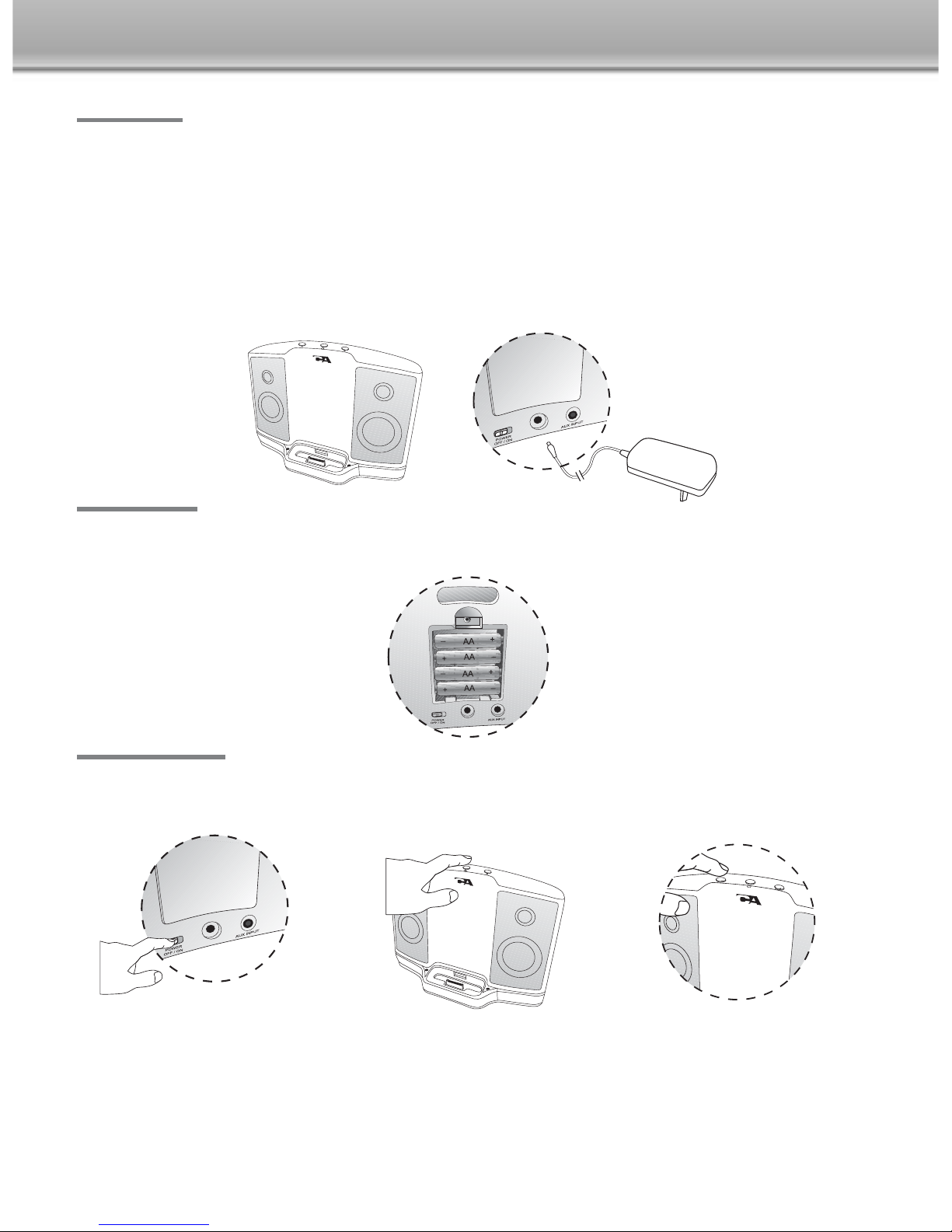
The CA-461 can also be powered by batteries making it a perfect portable solution. Simply install 4 AA
batteries in the battery compartment located at the back. Make sure to follow the battery indicators for
correct installation.
Using The System
Connections
Your iPod can be on or off when you place it into the dock connector. If your iPod is on and a music track
is playing you should hear sound immediately. If you dont hear anything recheck that the track is playing
and the volume on the system is turned up slightly. The volume can be turned up or down using the
volume + / - buttons on the front of the speaker.
NOTE: When using the speaker with batteries be sure and turn off the main power
switch when you are not listening to the speaker. Stand by mode will put a slight drain
on the batteries if the main power switch is not turned off.
The power supply cord plugs into the DC jack located on the back of the system. Plug the adapter into
your AC wall socket or surge protector.
For use with batteries simply install 4 AA batteries in the battery compartment in the back. Follow the
battery indicator (+/-) to ensure they are in the correct position. If The speaker is going to be used by an
AC source for a long period of time it is recommended to remove the batteries.
Once again make sure the correct insert for your iPod is in the universal well. Plug your iPod into the
connector pin that comes through the well/insert.
Turn the power switch on.
Battery Option
Rear panel
AC power adapter
Turn standby switch to the on position.
The LED indicator is red when in stand
by mode and is blue in on mode.
Rear panel
5

Your speaker system has a 3.5mm input jack located on the back. Just connect the 3.5mm plug cable
that comes with the system to the headphone output jack on your iPod shuffle or other music source.
Connecting to iPod Shu le or other source
Trouble Shooting
Warranty
No Power
Power adapter is not plugged in or there are no batteries inserted.
Power switch is not on
No Sound
iPod is not docked properly. Make sure you are using the proper insert that best fits your iPod.
Volume is turned down.
Music track on your iPod is not playing. Check the music isnt paused or in between tracks.
Check and make sure your iPod is running the proper software. The latest version.
Not Charging and No Sound
Make sure the iPod is seated properly in the insert / dock and that it is getting good contact
to the connector pin.
Cyber Acoustics warrants to the purchaser that this product shall be free from defects in materials or
workmanship for a period of one year from original purchase date. Proof of purchase is required. Please
retain your receipt. The warranty registration card should also be filled out completely and immediately
returned to Cyber Acoustics.
During the warranty period if this product is found to be defective under normal use and service
Cyber Acoustics shall at its option repair or replace it with new or reconditioned product.
This warranty does not cover defects resulting from accidents abuse misuse or unauthorized service.
This warranty gives you specific rights. You may have other legal rights which vary from state to state.
To obtain warranty service return the product with shipping prepaid to Cyber Acoustics. Cyber Acoustics
reserves the right to replace any discontinued product with one of equal value.
Note:
1) For technical support and questions please contact Cyber Acoustics
(UK) 0121 625 2850 (outside UK) 0044 121 625 2850 U.S.A. 360-823-4100
2) You can now register your Cyber Acoustics product on line through our web site in
lieu of filling out and mailing this card: www.cyberacoustics.com
Back of dock station iPod Shuffle
MP3 Player
NOTE: The unit only charges the i od when used with the power adapter. The i od
wont charge when used with batteries. This helps extend your speakers battery life.
6

Wir gratulieren Ihnen zur Wahl des tragbaren Lautsprechersystems CA-461 von Cyber Accoustics. Dieses
unabhängige digitale Docking-Lautsprechersystem ist für den iPod und andere portable Audiogeräte
geschaffen. Das Gerät ist leistungsfähig genug um ein Zimmer mit hochqualitativer Audio-Wiedergabe
zu füllen und doch klein genug für die Reise. Das CA-461 ist Ihr Life Style-Lautsprechersystem.
Ein ührung
Packungsinhalt
Vorbereitung zum Einsatz
Dieses System besteht aus den folgenden Komponenten:
Anschlussadapter
3,5mm Kabel
Zum Herausnehmen
fuhren Sie einen Schraubenzieher
in den Schlitz ein und drucken
Sie den Adapter vorsichtig nach oben.
Anschlusbuchse
iPod shuffleiPod miniiPod nanoiPod with video
(30G)
iPod with video
(60G)
Ein Buchsenadapter wurde ab Werk in der Universal-Dockingbuchse
installiert. Wechseln Sie den Einsatz gegen den Buchsenadapter aus
der sich am Besten für Ihren iPod eignet indem Sie diesen einfach in
die Universal-Dockingbuchse einrasten.
*
Netzadapter
Di ital Dockin Speaker
TM
tra en Sie Beutel
So bereiten Sie das Gerät für den Einsatz vor!
Stellen Sie das System auf einer stabilen ebenen Oberfläche auf.
Die leistungsstarken Lautsprecher-Treibermagnete Ihres
Cyber Acoustics
Systems sind magnetisch abgeschirmt
und das Auftreten von Störungen beim Betrieb in der Nähe von Video- und Computer-Monitoren wird dadurch
verringert. Wir raten Ihnen trotzdem eine ausreichende Distanz zwischen diesen Geräten und dem
Lautsprechersystem einzuhalten.
Als nächsten Schritt müssen Sie den korrekten Adapter in der "Universal-Dock" an der Vorderseite im unteren
Teil des Systems installieren. Jeder Adapter ist markiert und Sie sollten den Adapter für Ihr jeweiliges iPod-
Modell auswählen. Zur Installation lassen Sie den Adapter einfach in die Vertiefung des Anschlussdocks fallen.
Hinweis:
iPod nano und iPod video werden mit
speziellen Einsätzen ausgeliefert und passen
in diese Univeralbuchse.
iPod der 3.
Generation
mit Touch Wheel und
Bedientasten. (10GB
15GB und 20GB)
iPod der 4. Generation
mit Click Wheel
(20GB und 30GB)
iPod der 3.
Generation
mit Touch Wheel
und
Bedientasten
(30GB und 40GB)
iPod der 4.
Generation
mit Click Wheel
(40GB)
iPod photo
*
7

Das CA-461 Lautsprechersystem kann auch mit Batteriestrom betrieben werden und ist somit die perfekte
portable Lösung für die Reise. Legen Sie einfach 4 Batterien der Größe AA in das Batteriefach an der
Rückseite ein. Stellen Sie sicher dass die Batterien korrekt entsprechend den Polarisierungsangaben
eingelegt sind.
Der Einsatz des Systems
AnschlüsseAnschlüsse
Ihr iPod kann beim Anschluss an der Verbindungsbuchse ein- oder ausgeschaltet sein. Wenn Ihr iPod
eingeschaltet ist und ein Musiktitel abspielt dann sollten Sie sofort die Wiedergabe über die Lautsprecher
hören. Falls Sie keine Wiedergabe hören dann sollten Sie überprüfen ob ein Titel abspielt und es kann
sein dass Sie die Lautstärke etwas aufwärts einstellen müssen. Die Lautstärke kann mittels der "+/-
"Lautstärkeregler an der Vorderseite des Systems aufwärts oder abwärts eingestellt werden.
HINWEIS: Beim Einsatz der Lautsprecher im Batteriebetrieb sollten Sie sicherstellen,
dass der Hauptschalter in die Aus-Stellung gebracht wurde, wenn Sie keine Musik
hören. Auch im Bereitschaft-Modus werden die Batterien langsam entladen, wenn der
Hauptschalter nicht ausgeschaltet ist.
Das Netzkabel kann über die DC-Anschlussbuchse an der Rückseite des Systems angeschlossen werden.
Verbinden Sie den Netzadapter mit einer AC-Wandsteckdose oder einer abgesicherten Steckerleiste.
Legen Sie 4 Batterien der Größe AA in das Batteriefach an der Rückseite ein um das Gerät mit Batteriestrom
zu betreiben. Legen Sie die Batterien korrekt unter Beachtung der Angaben für (+/-) im Batteriefach ein.
Wenn das Lautsprechersystem voraussichtlich längere Zeit mit AC-Netzstrom betrieben wird dann empfehlen
wir die Batterien aus dem Batteriefach heraus zu nehmen.
Wir möchten Sie nochmals darauf hinweisen dass stets der korrekte Buchsenadapter für Ihren iPod in der
Universal-Dockingbuchse installiert sein muss. Verbinden Sie Ihren iPod mit dem Kontaktstift der aus der
Docking-Buchse
Schalten Sie Hauptschalter ein.
Batterie-Option
Bringen Sie den Bereitschaft-Schalter in
die Ein-Stellung. Der LED-Indikator
leuchtet Rot im Bereitschaft-Modus
und Blau wenn das Gerät im Ein-
Modus funktioniert.
Rückseite
AC-Netzadapter
Rückseite
8

Ihr Lautsprechersystem besitzt an der Rückseite eine 3 5mm Anschlussbuchse. Schließen Sie das mit dem
System ausgelieferte 3 5mm Klinkensteckerkabel an der Kopfhörerbuchse Ihres "iPod Shuffle" oder einer
anderen Signalquelle an.
Anschließen an iPod Shu le oder andere Signalquellen
Störungssuche
Kein Strom
Der Netzadapter ist nicht an der Netzdose angeschlossen oder es wurden keine Batterien eingelegt.
Der Hauptschalter befindet sich nicht in der Ein-Stellung
Kein Ton
Ihr iPod ist nicht korrekt an der Adapterbuchse angeschlossen. Stellen Sie sicher dass Sie den korrekten
Adapter für Ihren iPod verwenden.
Lautstärke ist zu niedrig eingestellt.
KKein Titel spielt auf Ihrem iPod ab. Prüfen Sie ob die Wiedergabe im Pause-Modus funktioniert oder
ob ein Titelsprung ausgeführt wird.
Stellen Sie sicher dass die korrekte Software der Version oder später auf Ihrem iPod installiert ist.
Kein Aufladen und kein Ton
Überprüfen Sie ob Ihr iPod korrekt an der Buchse/dem Adapter angeschlossen ist und der Kontakt
mit den Verbindungsstiften sichergestellt ist.
Rückseite des Lautsprechersystems iPod Shuffle
MP3 Player
Hinweis: Das Gerät lädt den i od während des Betriebs mit dem Netzadapter auf. Der
i od wird nicht aufgeladen wenn dieser Mit Batteriestrom betrieben wird. Dadurch
wird die Lebensdauer der Batterien verlängert.
Garantie
Cyber Acoustics garantiert dem Erstkäufer für einen Zeitraum von einem Jahr beginnend mit dem
Erstkaufdatum dass dieses Produkt frei von Material- oder Verarbeitungsfehlern ist. Das Kaufdatum muss
durch den Erstkaufbeleg nachgewiesen werden. Bitte bewahren Sie Ihren Kaufbeleg auf. Die Garantiekarte
sollte vollständig ausgefüllt und unverzüglich an Cyber Acoustics eingesandt werden.
Falls während der Garantiezeit im normalen Gebrauch und Einsatz des Gerätes Schäden festgestellt
werden dann gewährleistet Cyber Acoustics nach Ermessen das Gerät entweder zu reparieren oder
durch ein neues Gerät oder ein repariertes Gerät zu ersetzen.
Diese Garantie deckt Schäden nicht ab die durch Unfall Missbrauch Fehlbrauch oder unzulässige
Wartungsarbeiten entstanden sind. Diese Garantie gewährt Ihnen spezifische Rechte. Es kann sein dass
von Staat zu Staat noch andere Rechte bestehen.
Senden Sie das Produkt portofrei an Cyber Acoustics ein um Garantieleistungen in Anspruch zu nehmen.
Cyber Acoustics behält sich das Recht vor ausgelaufene Geräte durch Modelle gleichen Funktionsumfangs
zu ersetzen.
Note:
1) Für technische Unterstützung und Fragen treten Sie bitte mit Cyber Acoustics in Verbindung wie folgt:
(Vereinigten Königreichs) 0121 625 2850 (außerhalb des Vereinigten Königreichs)
0044 121 625 2850
2) Sie können Ihr Cyber Acoustics Produkt nun ersatzweise für die Einsendung der Registrierkarte auch
über das Internet auf unserer Webseite registrieren: www.cyberacoustics.com
9
Otros manuales para CA-461
2
Tabla de contenidos
Idiomas:
Otros manuales de Altavoces de acoplamiento de Cyber Acoustics


