CUTWORX Matrix Series Manual de usuario

Matrix Series User Manual
1
Table of Contents
Safety Introductions
1. Introduction.......................................................................................... 02
2. Specifications....................................................................................... 03
3. Safety Instructions and Environmental Requirements......................... 04
4. Control Panel Display (Single Sided Laminating)................................. 05
5. Control Panel Display (Foiling Mode)................................................... 06
6. Control Panel Display (Duplex Mode) .................................................. 07
7. Lamination Film Set-up......................................................................... 08
8. Foiling Set-up ....................................................................................... 12
9. Double Sided Lamination ..................................................................... 14
10. Double Sided Non Bursting................................................................ 18
11. Trouble Shooting ................................................................................ 19
12. Handy Hints for Foiling ...................................................................... 22
12. Warranty............................................................................................. 23
mybinding.com
1-800-944-4573

Matrix Series User Manual
2
Introduction
The Matrix Series Laminating & Foiling System is a high-performance machine with a
solid construction built to last.
Please read these instructions carefully before starting to use the system to ensure you get
the best results and are compentent at operation.
Should you experience any issues with you system, please contact our support team.
Phone - 469.758.2288
Integrated touch screen control panel
Film/Foil mandrel
Pneumatic control unit
Take up unit
Anti-curl device
Collection tray
Power/Air connections
Omni-flow feeder connection
Foot pedal socket
Duplex bottom film mandrel
Feed table
Steel laminating roller
mybinding.com
1-800-944-4573

Matrix Series User Manual
3
Models
Max Mechanuca Speed (m/ft/min)
Max Lamination Film Width (mm/inches)
Minimum Paper Thickness (gsm/lbs)
Maximum Sheet Width (mm/inches)
Warm-up Time (min)
Temperature Range (°C/°F)
Power Supply (V)
Power Supply Required (Amps)
Power Consumption (W)
Overall Dimensions (inches)
Gross Machine Weight (kg/lbs)
10m/33ft
Matrix Series Specifications
MX-370P MX-530P MX-370DP MX-530DP
340mm/14”
135gsm/90lbs
420mm/17”
10
0-140°C/32-284°F
220/240
20
2200
31x71x55”
210Kg/463lbs
10m/33ft
510mm/20”
135gsm/90lbs
550mm/22”
10
0-140°C/32-284°F
220/240
20
2400
35x81x55”
240Kg/529lbs
10m/33ft
340mm/13”
135gsm/90lbs
420mm/17”
10
0-140°C/32-284°F
220/240
30
4500
31x71x55”
220Kg/485lbs
10m/33ft
500mm/20”
100gsm/68lbs
550mm/22”
10
0-140°C/32-284°F
220/240
30
4500
35x81x55”
250Kg/550lbs
Specifications
Warning: If you are using your own air supply, please note the following:
mybinding.com
1-800-944-4573

Matrix Series User Manual
4
Saftey & Environmental Requirements
Please ensure that the voltages and phase of the power supply you are using match with the rated working voltages
before operating the system.
The power supply should be close to the system for convenient use.
The power supply should provide a reliable protective earthing connection.
This system must be earthed reliably as to ensure the safety of the system during operation.
Only the operators of this system should operate the electrical or mechanical components/controls.
Please don’t use damaged wires or sockets.
Please keep children away from touching or operating this system.
Please do not spray any liquids or cleaning products directly onto the system, this can cause a machine fault or electrical
shock.
During use please take care that no clothes, neckties, hair or jewellery etc are not overhanging near the system otherwise
injuries can occur.
Please don’t put burrs, sharp blades or thick rigid materials on, into or near any component especially rubber parts to
avoid damage.
Please shut down the system after laminating/foiling to avoid misuse.
At the end of each laminating /foiling job or the end of the working day always gape (lift up) the pneumatic rollers to
avoid flat spots and distortions of the rubber.
If the system needs to be moved, please turn of the power to the system and unplug from the socket.
Please be aware of the location of the wheels while moving the system as to avoid damage to any cables nearby and
personal injuries.
Always ensure the system is positioned on a flat and level floor.
Please be cautious of the foot pedal and cable position when operating or moving the system.
Only set the temperature to 80°C when first switched on as the temperature is designed to overshoot to maintain the heat
on the first run.
Environmental Requirements
Saftey Instructions
Ambient room temperature 10oC – 60oC / 50oF – 140OF, humidity 30% - 80%, ideal humidity 55%.
Do not place the system below air conditioning units, drafts, external doorways and windows as this can affect the accuracy
of the temperature sensors.
Due to the static adherence of the film, you should keep the environment clean from dust. A dust cover is provided with the
system.
Please do not keep the system in direct sunlight.
Enough space should be kept around the system to ensure safe operation. The minimum holding areas are 2.5m x 3m/8ft x 10ft.
•
•
•
•
•
•
•
•
•
•
•
•
•
•
•
•
•
•
•
•
•
•
mybinding.com
1-800-944-4573

Matrix Series User Manual
5
Control Panel (Single Side Lamination)
Display Screen Function/Settings Key 5 Memory Keys
Temperature Settings
Screen Brightness
Stop Key
Foot Pedal Reverse
Foot Pedal Forward
Forward Key
Anti-Curl Setting
Fine Tunning Key for
Cutting/Splitting Position
Paper Length Settings
Set Temperature
Sheet Counter
Forward/Foot
Pedal Mode
Screen Brightness
Actual Temperature
Paper Sensor
Anti-Curl (0-5)
Sheet Splitting/Cutting
Adjustment
Sheet Length
Running Speed
Guard Latch in Place
mybinding.com
1-800-944-4573

Matrix Series User Manual
7
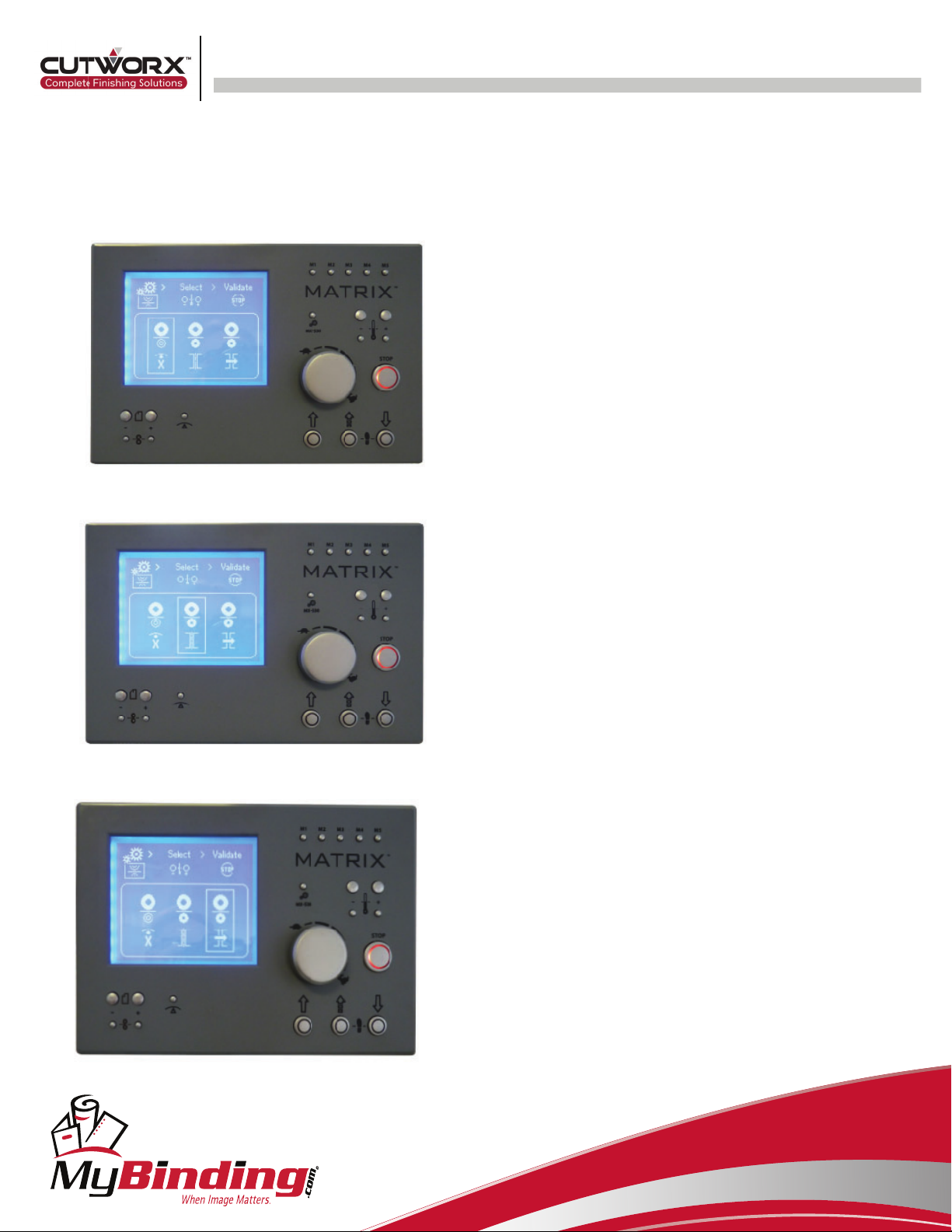
Control Panel (Duplex Mode)
Single Sided Mode
Double Sided Mode
Encapsulating/Foiling Mode
As explained on previous page, press the function/settings key to
enter this scree. Use the temperature buttons to select the
mode and press top to enter.
Ensure for foiling the bottom temperature is set to zero (off).
mybinding.com
1-800-944-4573

Matrix Series User Manual
8
Lamination Film Set-up
1. 2.
1. Turn the power on 2. Set paper length (exclude the desired overlap).
Set temperature to 80°C
3.1 3.2 3.3
3. Remove film mandrel of the system and loosen the core collar using the blue 5mm Allen key provided
4.1 4.2 4.3
4. Slide film onto the mandrel and centralize (4.1). Replace the core adaptor and tighten. Place the mandrel back onto the
system and tighten the mandrel lock (4.3).
5.1 5.2 5.3
5. Ensure the film feeds from the bottom (5.1) of the roll and mechanical anti-curl is set to zero (5.2). Remove safety guard (5.3).
mybinding.com
1-800-944-4573

Matrix Series User Manual
9
6. Place a plain thick (i.e. 300gsm) card into the back of the machine (6.1) taking care to go the middle of every roller (6.2) until
reaching the feed gate (6.3), then place another plain card and cover the top laminating roller (6.4)
Lamination Film Set-up
6.1 6.2 6.3
6.4
7.1 7. 2 7. 3 7.4 7. 5
7. If you have metallic model, please ensure the two idle bars are used (7.1). Holding the corners of the film (7.2). thread under the
patterned idle bar (7.3) and place back onto the film roll (7.4). Remove the card covering the roller (7.5). Now is the time to clean the
roller if there is any glue or marks. For steel roller we recommend using Amberklene ME-20 heavy duty solvent and for rubber
rollers use the Amberclens anti-static foamin cleaner. When using the cleaner please spray into a cloth/paper towel away from the
machine, then apply to the roller.
mybinding.com
1-800-944-4573
Este manual sirve para los siguientes modelos
4
Tabla de contenidos