
Cubot N1 Manual de usuario

Cubot N1
User Manual • Uživatelský manuál •
Užívateľský manuál • Használati utasítás •
Benutzerhandbuch

2
The product user guide contains product features, how to use, and the operating
procedure. Read the user manual carefully to get the best experience and avoid
unnecessary damage. Keep this manual for future reference.
If you need help or have damaged or missing parts, call the customer line:
✉www.alza.co.uk/kontakt
✆+44 (0)203 514 4411
Importer Alza.cz a.s., Jankovcova 1522/53, Holešovice, 170 00 Praha 7, www.alza.cz

3
An introduction to Device
Power key
1. Short press to brighten the screen
2. Long press to power on or off
Function key
Charging port
Heart Rate Sensing Area
Connect to the USB cable to charge
before turning on the smart
wartch for the first time.

4
APP Binding
Press and hold the power button to start the machine, scan the QR code to download
the GloryFit app for pairing and set the watch in the app.
Notes:
1. Please ensure that your mobile Bluetooth and GPS are turned on prior to connection;
2. Do not directly pair mobile Bluetooth with watch;
3. Support (1) Android 5.0 and more advanced systems; (2) IOS 10.0 and more advanced
systems.
1. Please turn your mobile
Bluetooth and GPS on;
2. Click “Select device" in
the app home page to start
searching for devices
Select product type: N1
Enter APP settings

5
Wear/Replace
Keep a certain distance away from carpus when wearing the watch and adjust to a
comfortable tightness.
Switch on and remove wrist strap.
Note:
1. Too loose wearing may affect the data accuracy of heart rate;
2. Keep its surface clean and dry. Interface Operation Instructions
Dial Plate Change
Long press the dial plate for 3s to enter the change interface

6
Interface Operation
Find your Phone, Alarm clock, Brightness Adjustment, Do not Disturb, About the Device
(model, MAC/version)
Status bar Main
Interface
Step
Counting
Sleep Heart Rate Message Bar
Remark: Slide right and left to enter the shortcut interaction interface; slide up to enter
the message notification bar interface and slide down to enter the status settings bar.
Remark: Slide left to exit under the sports mode.
7
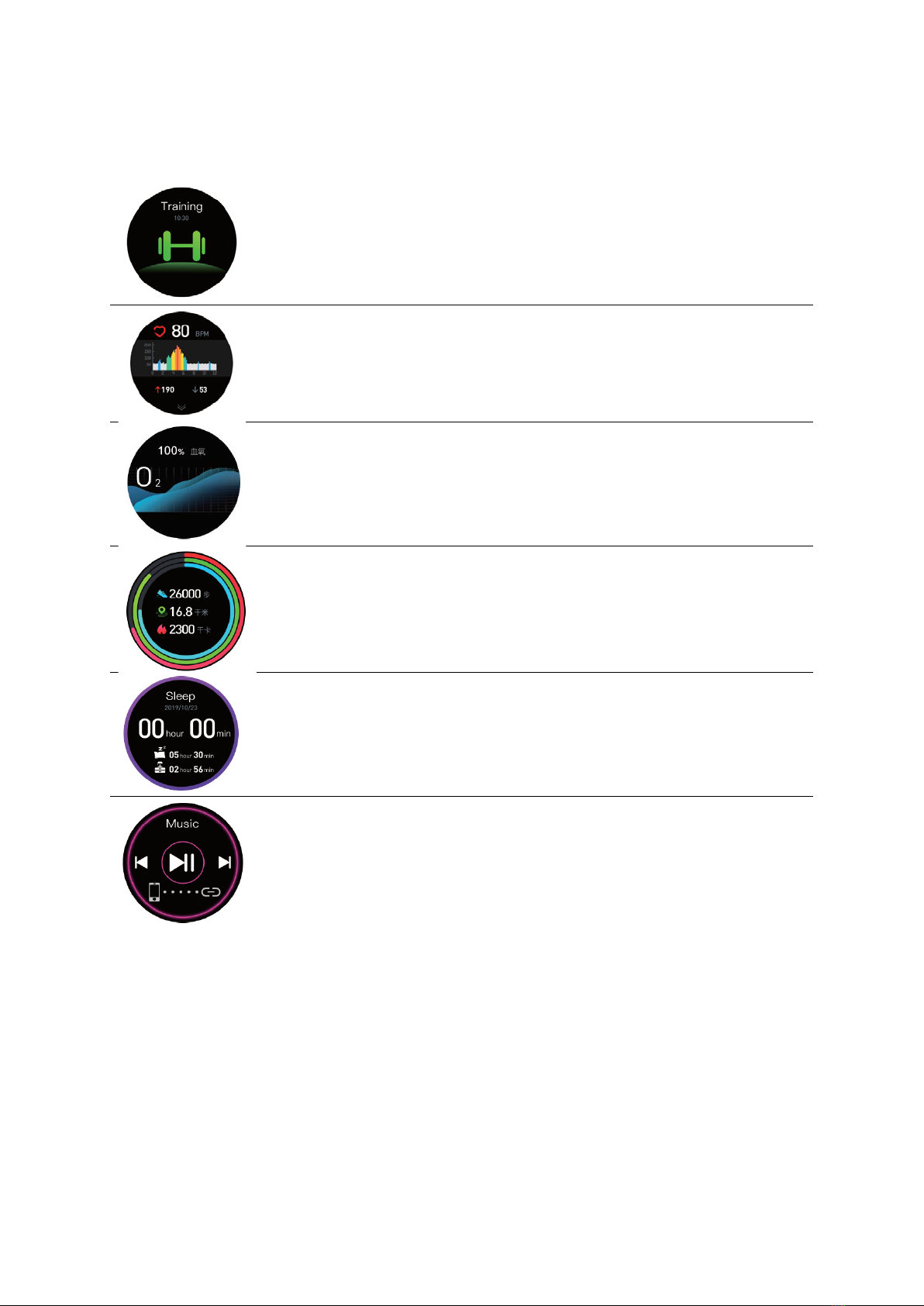
Function Introduction
Exercise (a variety of exercise modes are available, record the
relevant parameters in the process of exercise)
Heart rate (measure current heart rate and record maximum and
minimum data)
Blood oxygen (monitoring oxygen concentration in blood)
Status (record total steps, mileage, calories)
Sleep (record total sleep time, sleep status and awake status)
Music control (control the music playing in the mobile phone when
connect to the mobile phone)

8
Notes for Safety and Product Information
Battery Alarm
Do not damage battery via shape items, and do not disassemble it without
authorization.
Health Alarm
If you are wearing implantable electronic devices such as pacemakers, please consult
your doctor before heart rate measurement; Equipped optical heart rate sensor flashes
green light. If you have epilepsy or are sensitive to flickering light, please consult your
doctor whether you can use the product; The device will track your daily activities
according to the sensor with the aim of offering data involving your daily activities such
as steps, mileage, calorie, sleep and heart rate. Please note that they may not be
completely accurate; The device, accessories, heart rate sensor and other related data
are for entertainment and fitness, instead of medical purpose. They can’t help you
diagnose, monitor, treat and prevent any disease or symptom. The heart rate data is for
reference only. We aren’t liable for all results caused by data deviation.
Traffic Safety
Please keep great judgement and ensure driving safety. Do not carry out all
activities that may divert your attention; malfunction may occur due to the
interference of radio. Please contact the manufacturer to consult about
detailed information.
Operating Environment
Do not wear the watch when showering, diving and etc.;
Do not wear the watch too tight, and keep the part that touches skin dry;
Do not make kids or pets bite the device or its accessories to avoid any damage;
The watch isn’t waterproof to acid, alkaline solutions, chemical reagent and other
corrosive liquid;
Please use the device within 0-35℃. Too high or too low environment temperature may
bring device malfunctions.
Unauthorized battery change will lead to explode;
Please handle used battery accordingly.

9
Notice
By using this product, you agree that the measurement is indicative, cannot be taken
into account and does not in any way replace therapy! Therefore, do not evaluate the
measured values yourself and do not determine the therapy yourself according to them.
Follow your doctor's instructions and trust his diagnosis. Take your medicine as
instructed by your doctor and never change the dose. The measured values determined
by you can only be used for your information - they do not replace a medical
examination! Discuss your measured values with your doctor, definitely do not make
any medical decisions based on them (for example, the use of drugs and their dosage)!
The importer is not liable for the measured values.
Equipped optical heart rate sensor flashes green light. If you have epilepsy or are
sensitive to flickering light, please consult your doctor whether you can use the product;
Do not use the watch at extreme temperatures (below 0 °C and above 35 °C).
Reassembling or modifying the product impairs its safety. All modifications and repairs
to the equipment or accessories must be carried out by a specialist workshop. Never
open or repair the product yourself! Handle the product carefully. It can be damaged by
blows, blows or falling from a height.
Technical specifications are subject to change without notice. Never heat the battery
above 50 ° C and do not dispose of in fire, risk of explosion / fire! Do not short-circuit the
battery. Do not subject the battery to mechanical stress. Avoid dropping, bumping,
bending, twisting or cutting the battery. If the battery overheats, stop charging
immediately. A battery that overheats or deforms during charging is defective and
should not be used. Never discharge the battery completely, as this will shorten its life.
Store out of direct sunlight at room temperature.
Keep the product out of the reach of small children - risk of suffocation by small parts.
Do not place the device near heat sources.
Connect to the correct power sources.

10
Warranty Conditions
A new product purchased in the Alza.cz sales network is guaranteed for 2 years. If you
need repair or other services during the warranty period, contact the product seller
directly, you must provide the original proof of purchase with the date of purchase.
The following are considered to be a conflict with the warranty conditions, for
which the claimed claim may not be recognized:
•Using the product for any purpose other than that for which the product is intended
or failing to follow the instructions for maintenance, operation and service of the
product.
•Damage to the product by a natural disaster, the intervention of an unauthorized
person or mechanically through the fault of the buyer (e.g. during transport, cleaning
by inappropriate means, etc.).
•Natural wear and aging of consumables or components during use (such as
batteries, etc.).
•Exposure to adverse external influences, such as sunlight and other radiation or
electromagnetic fields, fluid intrusion, object intrusion, mains overvoltage,
electrostatic discharge voltage (including lightning), faulty supply or input voltage and
inappropriate polarity of this voltage, chemical processes such as used power
supplies, etc.
•If anyone has made modifications, modifications, alterations to the design or
adaptation to change or extend the functions of the product compared to the
purchased design or use of non-original components.
Tabla de contenidos
Idiomas:
Otros manuales de Mirar de Cubot


