Cross SwitchUPS SU1000 Manual de usuario

Uninterruptible Power System
SU1000,1400,1400XR,1800,
2200/SU RM Series
User’s Manual
www.switchups.com
Part Number 2001-0110 / Revised 01/2001

Page2
Table of contents
1. Introduction
2. Safety precaution
3. Presentation
4. Installation
5. Operation
6. UPS monitoring
7. Battery cartridge replacement
8. Difficulty
9. Storing the UPS
10. Specifications.

Page3
Important safety instructions!
Please read this manual!
Thank you for selecting this CROSS Uninterruptible Power System (UPS). It has
been designed for many years of reliable, maintenance free service. This manual
provides safety, installation and operating instructions that will help you derive the
fullest performance and service life that the UPS has to offer.
PLEASE SAVE THIS MANUAL! It includes important instructions for the safe
use of this UPS and for obtaining factory service should the proper operation of the
UPS come into question. Down the road, service or storage issues may arise and
require reference to this manual.
Please save or recycle the packaging materials!
The UPS’s shipping materials were designed with great care to provide protection
from transportation related damage. The shipping materials will become invaluable
to you in case the UPS must be returned to the factory for service (damages
sustained in transit when shipped from the user are not covered under warranty).
WARNING: Changes or modifications to this unit not expressly approved by the
party responsible for compliance could void the user’s authority to operate the
equipment.

Page4
EMI/RFI
FILTER
CONVERTER
AC INPUT
+-
BATTERY
LOAD
INNVERTER
DC
AC
1. Introduction
Overview
This SwitchUPS is a high performance standby uninterruptible power system
(UPS) designed to provide clean, reliable AC power to computer loads and
electronic devices. When utility failure, low or high voltage intermittently, UPS
can feed your computer or electronic appliances without any interruption. It
can keep you away from brownouts, spikes, lightning and high frequency
interference. It can automatically save your computer data, protect your
software, even the hardware, to ensure your computers or precision equipment
work functionally and efficiently.
1.1 Operation principle
1.1.1 Utility normal: The UPS offers the pure and stable AC output power by
the synchronous voltage regulator and EMI/RFI filter. A unique mode of
operation, named AutoBoost, serves to regulate the load voltage by
compensating for brownouts or sags, and AutoTrim allows continuous
on-line operation during over line voltage conditions. This is
accomplished without the need to draw power from the UPS’s battery.
In anticipation of utility failure, the UPS continuously monitors the line
and prepares the inverter frequency for synchronous transfer of the
load.

Page5
1. Introduction
1.1.2 Utility failure or abnormal: Upon occurrence of utility voltage failure
such as a blackout, severe brownout or an over-voltage condition, the
UPS transfers the load to power derived from battery. Transfer to the
“On-battery”mode of operation takes place typically within 2
milliseconds. The inverter’s output voltage wave shape is a low
distortion sine wave. Resynchronization and retransfer to on-line
operation is automatic upon recovery of the line voltage to within
normal limits.
1.2 Products features
1.2.1 AutoBoost/AutoTrim
AutoBoost/AutoTrim allows continuous on-line operation during
extended brownouts or low/high line voltage conditions. The UPS
compensates for the reduced/increased line voltage by
boosting/trimming the load voltage to a value 10% above the input.
Reliability is enhanced because the limited battery capacity is saved for
complete utility failures.
1.3.2 Battery replacement indicators and test
The UPS provides both visual and audible Replace Battery indications.
The Indications are based on the result of an actual load test on the
battery. By exercising the UPS’s battery during a startup test, the UPS
is able to detect a weak battery before it is put into service. In
applications where the UPS is not turned off daily, or where the UPS is
purposely left operating unattended, the UPS automatically conducts this
self test.
EMI/RFI
FILTER
Auto Boost
/Auto Trim
CONVERTER
AC INPUT
+-
BATTERY
LOAD
INVERTER
DC
AC
MICROPROCESSOR
Test
&Load
Button
Front
LED
Display
Volage
Start
Selector
Monitor &
Protection
RS-232
DATA
Communication
SNMP
Communication
Line operation
Backup operation
Microprocessor soperation

Page6
1. Introduction
1.3.3 Remote interfaces
The UPS provides a remote computer interface capable of full bi-
directional RS-232 communications. When combined with UPS
monitoring software and a serially connected local PC, power quality
related events can be logged. UPSilon2000 offers all the features of
UPS monitoring and management software, plus the ability to control
orderly and unattended network or multi-user computer system
shutdown during an extended power outage. Also available for the UPS
is the SNMP (Simple Network Management Protocol) Adapter to provide
load type independent remote monitoring and management across
Ethernet or Token Ring based LANs or WANs capable of routing IP
messages. Using any standard Network Management System (NMS)
and the SNMP Adapter, the UPS becomes manageable through a single
familiar interface-from across your building to across the world.
UPSilon2000 software provides complete data protection for most
operating systems such Windows, Linux, Unix, Win NT, LAN manager.
This software is a background process that monitors the UPS through a
RS-232 serial port on the host.
1.3.4 Input and output frequency
The UPS allows any of input frequency, 50Hz or 60Hz. Via the UPS’s
microprocessor, the input frequency can be internally selected. Also
the UPS provides the pure and stable output frequency.

Page7
2. Safety
2.1 Connect the UPS to a two-pole, three-wire grounding mains receptacle.
The receptacle must be connected to appropriate branch protection (fuse
or circuit breaker). Connection to any other type of receptacle may result
in a shock hazard and may violate local electrical codes.
2.2 To reduce the risk of electric shock, disconnect the UPS from the mains
before installing computer interface signal cable (when used). Reconnect
the power cord only after all signaling interconnections have been made.
2.3 Do not open the UPS cabinet without the instruction from the local service
center, or UPS will not be valid for warranty.
2.4 This UPS has an internal energy source (the battery) that cannot be de-
energized by the user. The output may be energized when the unit is not
connected to a mains supply.
2.5 To properly de-energize the UPS in an emergency, move the rear panel I/O
switch to O (off) position and disconnect the power cord from the mains.
2.6 Avoid installing the UPS in locations where there is water or excessive
humidity.
2.7 Do not allow water or any foreign object to get inside the UPS. Do not put
objects containing liquid on or near the unit.
2.8 To reduce the risk of overheating the UPS, avoid exposing the unit to the
direct rays of the sun. Avoid installing the unit near heat emitting
appliances such as a room heater or stove.

Page8
Inlet
Electronics enclosure
3. Presentation
3.1 Front view I (Display features shall cover all models of SwitchUPS.)
3.2 Rear view I (for Models SU1400XR/SU1800/SU2200)
UPS Enable/On switch Input protection fuse
Output couplers
Computer interface port
Battery enclosure
Option switches
Display features
See section
5.1
Capacity of input protection fuse (250V of rating)
1kVA 1.4kVA 1.8&2.2kVA 3kVA
7Amps 10Amps 15Amps 20Amps
Ventilator
Note : output couples are manufacthrer’s Standard, and it shall be changed according to customer’s requirements
Extensional battery pack coupler

Page9
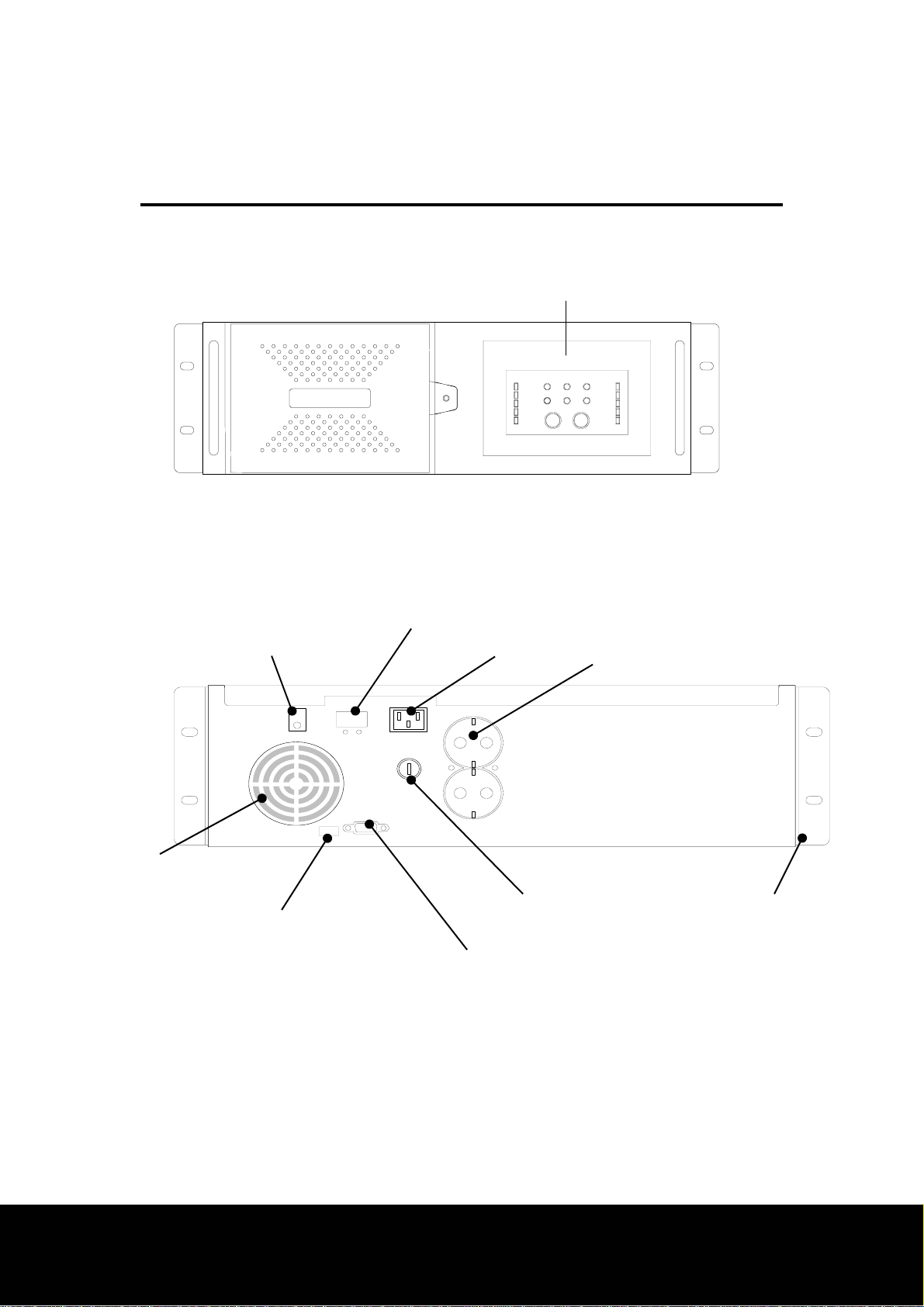
UPS Enable/On switch Inlet Output couplers
Input protection fuse
Computer interface port
Option switches
Rack-mounting clamp
Ventilator
Battery enclosure
3. Presentation
3.3 Front view II (19”Rack mount models)
3.4 Rear view II
(for Models SURM1000/SURM1400/SU1400XR/SURM1800/SURM2200)
Display features
See section
5.1
Extensional battery pack coupler

Page10
Computer interface port
Input protection fuse
Output couplers
UPS Enable/On switch
Inlet
Option switches
Extensional battery pack coupler
Ventilator
3. Presentation
3.5 Rear view III (for Models SU1000/SU1400)
Este manual sirve para los siguientes modelos
5
Tabla de contenidos
Otros manuales de Unión Postal Universal de Cross
Manuales populares de Unión Postal Universal de otras marcas

Pylontech
Pylontech Victron & Pylontech US5000 Manual de usuario

Tecnoware
Tecnoware EVO DSP PLUS MM 6.8 Manual de usuario

Mecer
Mecer ME-1000-WTU Manual de usuario

Mustek
Mustek PowerMust 530(B) Plus Manual de instalación y operación

Emerson
Emerson Liebert NXL series Manual de usuario

MAKELSAN
MAKELSAN BOXER SERIES Manual de usuario