Crestron CAGE2 Manual de usuario

Crestron CAGE2
3-Card Expansion Cage for AV2
Installation Guide

This document was prepared and written by the Technical Documentation department at:
Crestron Electronics, Inc.
15 Volvo Drive
Rockleigh, NJ 07647
1-888-CRESTRON

Crestron CAGE2 3-Card Expansion Cage for AV2
Contents
3-Card Expansion Cage for AV2: CAGE2 1
Description.................................................................................................................................1
Functional Description ................................................................................................1
Physical Description....................................................................................................1
Leading Specifications...............................................................................................................3
Installation .................................................................................................................................3
SIMPL Windows Programming ................................................................................................9
Problem Solving ......................................................................................................................10
Troubleshooting ........................................................................................................10
Further Inquiries........................................................................................................10
Future Updates ..........................................................................................................10
Return and Warranty Policies.................................................................................................. 11
Merchandise Returns / Repair Service ......................................................................11
CRESTRON Limited Warranty ................................................................................11
Installation Guide - DOC. 5964 Contents •i


Crestron CAGE2 3-Card Expansion Cage for AV2
3-Card Expansion Cage for AV2:
CAGE2
Description
Functional Description
The CAGE2 is an optional field-upgradeable card cage chassis for the Crestron
AV2 integrated control system. When installed, the CAGE2 provides three slots that
accept any combination of 2-Series Y-BUS and/or CNX series plug-in control cards
to expand and add versatility to the AV2. The plug-in expansion cards are secured to
the CAGE2 with two thumbscrews that are attached to the faceplate of each card.
NOTE: The CAGE2 accomodates only 2-Series Y-BUS control cards that serve as
the pipeline for IR, serial communications, and relays. Z-BUS cards provide super
high-speed control card applications such as 10/100 Ethernet, USB, USBII,
FireWire, disk drive arrays and more.
NOTE: Due to the different interconnect connectors, the CAGE2 and CNXCAGE
are not interchangeable. Do not attempt to install a CNXCAGE into the AV2.
Physical Description
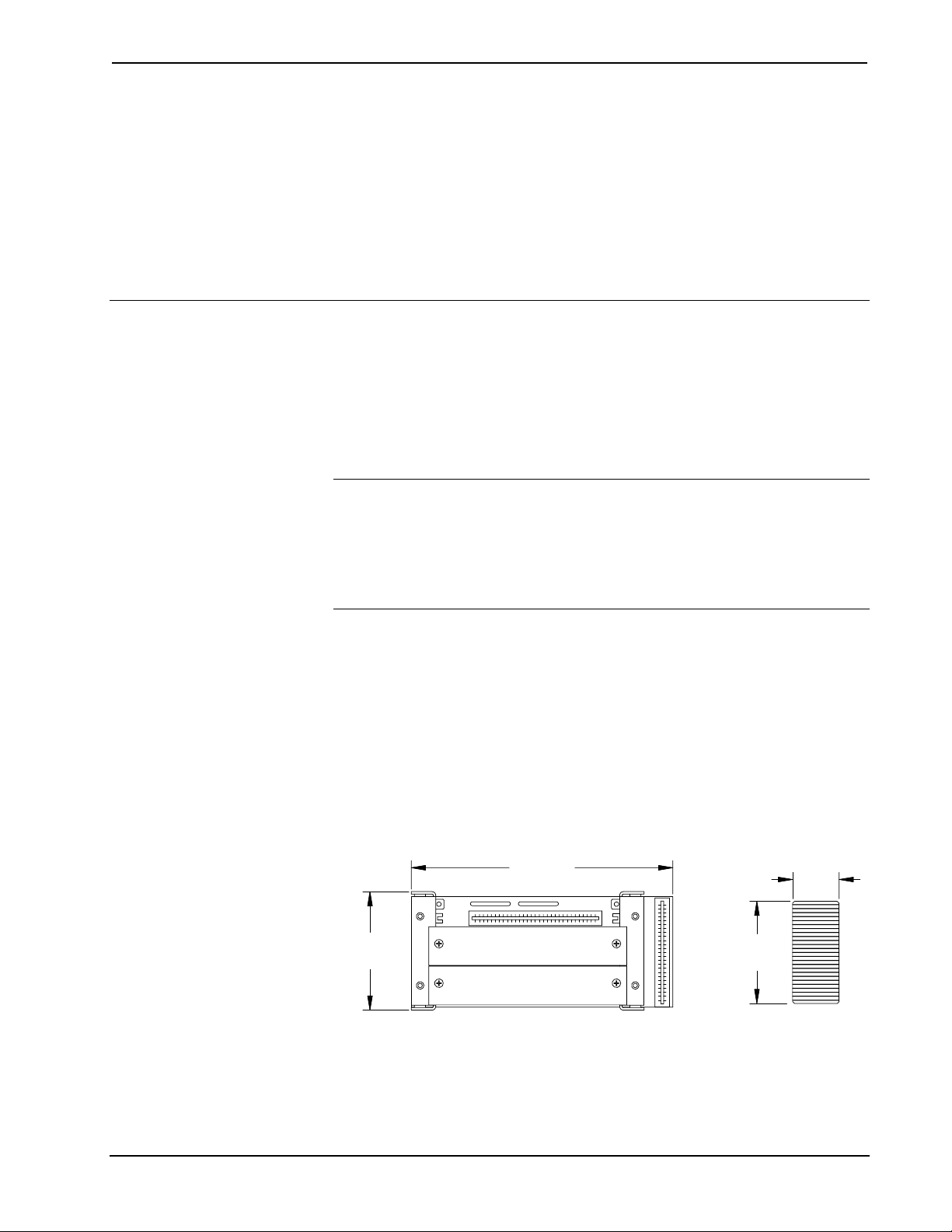
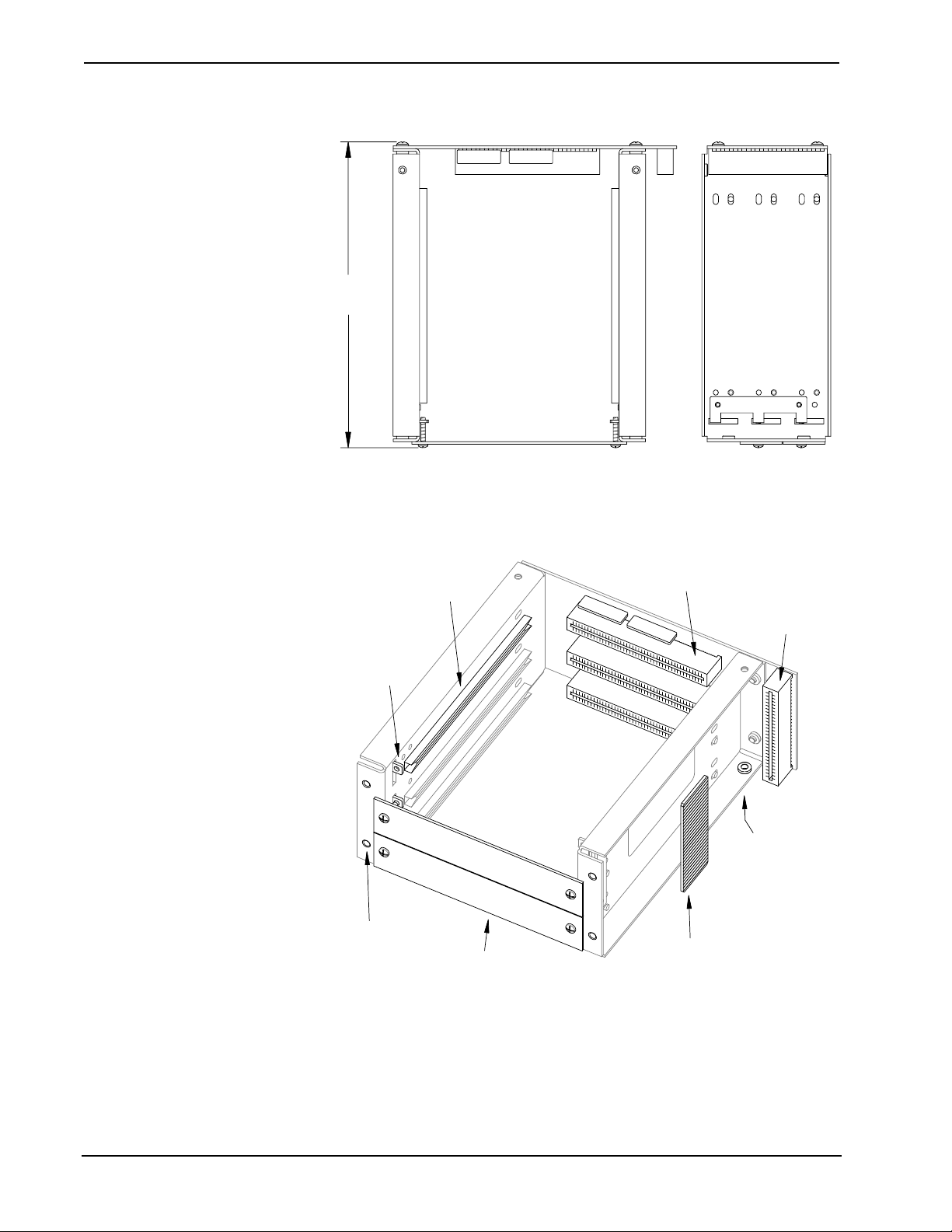
The CAGE2, shown below, contains three 62-pin connectors that accept the plug-in
expansion cards and card guides support each side of the individual cards. A single
50-pin connector provides signal interconnect between the CAGE2 to the AV2
processor board. A double-sided printed circuit board (PCB) interconnect jumper is
provided with the CAGE2. Two blank faceplates are attached to the CAGE2 when
shipped. If more than one plug-in expansion card is to be utilized in the AV2,
additional face-plate(s) must be removed. The expansion cards contain two
thumbscrews that secure the card faceplate through the CAGE2 faceplate mounting
brackets.
CAGE2 Rear View (As Installed) and PCB Interconnect Jumper
6.60 in
(16.77 cm)
3.00 in
(7.62 cm)
1.18 in
(2.98 cm)
PCB THICKNESS =
0.06 in
(
0.16 cm
)
2.60 in
(6.57 cm)
Installation Guide - DOC. 5964 3-Card Expansion Cage for AV2: CAGE2 •1

3-Card Expansion Cage for AV2 Crestron CAGE2
CAGE2 Top and Side Views
7.12 in
(18.08 cm)
CAGE2 Reference Diagram
FACEPLATE
MOUNTING
BRACKET
(TWO PER SLOT)
CAGE2 TO AV2
CONNECTOR
REAR
MOUNTING
HOLES
(FOUR TOTAL)
UNDERSIDE
MOUNTING
HOLES
(ONE PER SIDE)
EXPANSION CARD
CONNECTORS
EXPANSION
CARD GUIDE
(TWO PER SLOT)
BLANK
FACEPLATES
PCB
INTERCONNECT
JUMPER
J3
J4
J2
J1
2 •3-Card Expansion Cage for AV2: CAGE2 Installation Guide - DOC. 5964

Crestron CAGE2 3-Card Expansion Cage for AV2
Leading Specifications
The table below provides a summary of leading specifications for the CAGE2.
Dimensions and weight are rounded to the nearest hundredth unit.
Leading Specifications of the CAGE2
SPECIFICATION DETAILS
SIMPL™ Windows®Version 2.00 or later 1
2-Series Control System Update File 2Version 1.000.CUZ or later 3
Dimensions & Weight Height: 3.00 in (7.62 cm)
Width: 6.60 in (16.77 cm)
Depth: 7.12 in (18.08 cm)
Weight: 11.70 oz (0.36 kg) 4
1 The latest software versions can be obtained from the What’s New page (SIMPL
Windows section) or Downloads page (SIMPLWIN Library) of Crestron’s website
(www.crestron.com). New users are required to register in order to obtain access to the
FTP site.
2 Crestron 2-Series control systems include the AV2, AV2 with Card Cage, CP2, CP2E,
PAC2, PAC2M, PRO2, and RACK2.
3 Filenames for 2-Series control system update files have a CUZ extension and can be
obtained from the What’s New page (Control Systems Update Files section) or
Downloads page (OPSYS Library) of Crestron’s website.
4 The listed weight includes the CAGE2, two blank faceplates and PCB interconnect
jumper.
Installation
The tools required for installation are a #2 Phillips tip screwdriver, a 1/4-in nut
driver or wrench, and a grounding strap. Follow the procedure after this paragraph.
CAUTION: The AV2 contains electro-static discharge (ESD) sensitive devices.
Perform the following procedure while wearing a grounding strap that is properly
grounded or on a grounded workstation to avoid damaging the AV2.
CAUTION: To prevent stripping of screw heads, threads, or mounting holes, do
not overtighten screws. Tighten only to the specification listed in the individual
step(s).
NOTE: Due to the different interconnect connectors, the CAGE2 and CNXCAGE
are not interchangeable. Do not attempt to install a CNXCAGE into the AV2.
NOTE: During this installation procedure, all screws removed from the AV2 must
be retained to install the CAGE2.
NOTE: It is assumed that the AV2 rack ear brackets are not attached and power has
been disconnected during this installation procedure.
Installation Guide - DOC. 5964 3-Card Expansion Cage for AV2: CAGE2 •3

3-Card Expansion Cage for AV2 Crestron CAGE2
1. Refer to the diagram below. Using a #2 Phillips screwdriver, remove
four cover top screws.
CAGE2 Installation (1 of 11) - Remove Cover Top Screws
NOTE: The AV2 cover top screws are 0.250 in long and the cover side screws are
0.375 in long. Keep the screws separate to ease reassembly.
2. Refer to the diagram below. Using a #2 Phillips screwdriver, remove
six cover screws from each side of the AV2.
CAGE2 Installation (2 of 11) - Remove Cover Side Screws
3. Lift and remove AV2 cover.
4 •3-Card Expansion Cage for AV2: CAGE2 Installation Guide - DOC. 5964

Crestron CAGE2 3-Card Expansion Cage for AV2
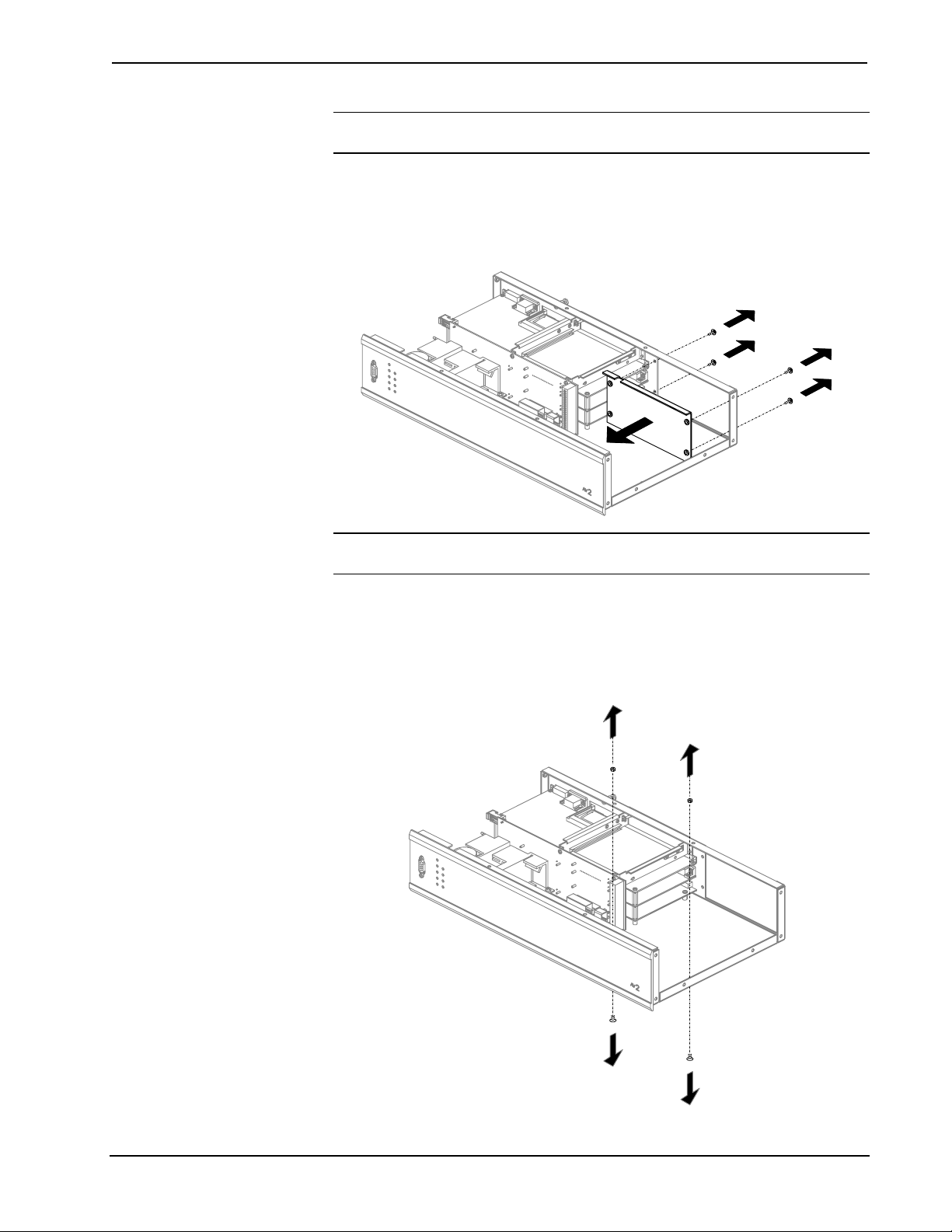
NOTE: During the next step, the four SEM (attached washer) screws must be
retained to install the CAGE2. However, the blank plate will not be reused.
4. Refer to the diagram below. Use a #2 Phillips screwdriver to remove
four rear-mounting SEM screws that secure the AV2 blank plate and
remove the plate.
CAGE2 Installation (3 of 11) - Remove Rear-Mounting SEM Screws & AV2 Blank Plate
NOTE: During the next step, the two screws must be retained to install the CAGE2.
However, the two nuts will not be reused.
5. Refer to the diagram below. From inside the AV2, use a 1/4-in hex-
driver or wrench to hold the nut of one of the bottom-mounting screws.
From the underside of the AV2, use a #2 Phillips screwdriver to
remove the mounting screw. Repeat for second nut and screw.
CAGE2 Installation (4 of 11) - Remove Bottom-Mounting Screws & Nuts
Installation Guide - DOC. 5964 3-Card Expansion Cage for AV2: CAGE2 •5

3-Card Expansion Cage for AV2 Crestron CAGE2
6. Refer to the diagram below. Attach either long-edge of the supplied
PCB jumper to the interconnect connector (J1) on the CAGE2.
CAGE2 Installation (5 of 11) - Attach PCB Interconnect Jumper to CAGE2
J1
7. Refer to the diagram below. Rotate the CAGE2 assembly until the
CAGE2 connector backplane is towards the AV2 front panel and
position into AV2.
CAGE2 Installation (6 of 11) - Position CAGE2 Assembly into AV2
6 •3-Card Expansion Cage for AV2: CAGE2 Installation Guide - DOC. 5964
Tabla de contenidos
Otros manuales de Otro de Crestron

Crestron
Crestron iLux CLSI-C6 Manual de usuario

Crestron
Crestron VT-3500IMW Manual de instrucciones

Crestron
Crestron CNIRT-32 Manual de usuario

Crestron
Crestron CNIRT-32 Manual de usuario

Crestron
Crestron Media Manager Guía del usuario

Crestron
Crestron CAT5 Manual de usuario

Crestron
Crestron CNPCI-8 Manual de usuario

Crestron
Crestron CNWP-32 Manual de usuario

Crestron
Crestron TPS-FPAR2000L Manual de usuario

Crestron
Crestron CAT5 Manual de usuario