
CPO Science DataCollector Manual de usuario


Copyright © 2004 CPO Science
6/04
DataCollector designed by: Dr. Thomas C. Hsu
Thomas S. Narro
David Zucker
in conjunction with: PRI
Darren Garnier

Table of Contents
Introduction . . . . . . . . . . . . . . . . . . . . . . . . . . . . . . . . . . . . . . . . . . . . . . . . . . . . . . . . 1
Overview . . . . . . . . . . . . . . . . . . . . . . . . . . . . . . . . . . . . . . . . . . . . . . . . . . . . . . . . . . . . . . 1
Kit Contents . . . . . . . . . . . . . . . . . . . . . . . . . . . . . . . . . . . . . . . . . . . . . . . . . . . . . . . . 5
Warnings and Precautions . . . . . . . . . . . . . . . . . . . . . . . . . . . . . . . . . . . . . . . . . . . . 6
Getting Started . . . . . . . . . . . . . . . . . . . . . . . . . . . . . . . . . . . . . . . . . . . . . . . . . . . . . 7
Features of the DataCollector . . . . . . . . . . . . . . . . . . . . . . . . . . . . . . . . . . . . . . . . . . . . . 7
Connecting the Zire Handheld . . . . . . . . . . . . . . . . . . . . . . . . . . . . . . . . . . . . . . . . . . . . . 7
Powering the DataCollector . . . . . . . . . . . . . . . . . . . . . . . . . . . . . . . . . . . . . . . . . . . . . . . 8
Connecting CPO Science Photogates . . . . . . . . . . . . . . . . . . . . . . . . . . . . . . . . . . . . . . . . 9
Connecting Other Probes & Adapters . . . . . . . . . . . . . . . . . . . . . . . . . . . . . . . . . . . . . . . 9
Setting up a Computer for use with the DataCollector . . . . . . . . . . . . . . . . . . . . . . . . . 10
Using the DataCollector . . . . . . . . . . . . . . . . . . . . . . . . . . . . . . . . . . . . . . . . . . . . . 11
Using the Zire Handheld . . . . . . . . . . . . . . . . . . . . . . . . . . . . . . . . . . . . . . . . . . . . . . . . . 11
Starting the DataCollector Application . . . . . . . . . . . . . . . . . . . . . . . . . . . . . . . . . . . . . . 11
Setting Up a New Experiment . . . . . . . . . . . . . . . . . . . . . . . . . . . . . . . . . . . . . . . . . . . . . 13
Navigating within the DataCollector Application . . . . . . . . . . . . . . . . . . . . . . . . . . . . . . 18
Application Menus . . . . . . . . . . . . . . . . . . . . . . . . . . . . . . . . . . . . . . . . . . . . . . . . . . . . . . 24
Downloading Data to a Computer . . . . . . . . . . . . . . . . . . . . . . . . . . . . . . . . . . . . 26
Mac OS 9.x and Mac OS X . . . . . . . . . . . . . . . . . . . . . . . . . . . . . . . . . . . . . . . . . . . . . . . 26
Windows . . . . . . . . . . . . . . . . . . . . . . . . . . . . . . . . . . . . . . . . . . . . . . . . . . . . . . . . . . . . . 26
Technical Information . . . . . . . . . . . . . . . . . . . . . . . . . . . . . . . . . . . . . . . . . . . . . . . 28
Analog Sensor Pinout . . . . . . . . . . . . . . . . . . . . . . . . . . . . . . . . . . . . . . . . . . . . . . . . . . . . 28
Digital Sensor Pinout . . . . . . . . . . . . . . . . . . . . . . . . . . . . . . . . . . . . . . . . . . . . . . . . . . . . 29
Accessory Information . . . . . . . . . . . . . . . . . . . . . . . . . . . . . . . . . . . . . . . . . . . . . . . . . . . 30
Software Updates and Website Information . . . . . . . . . . . . . . . . . . . . . . . . . . . . . . . . . 30
Glossary . . . . . . . . . . . . . . . . . . . . . . . . . . . . . . . . . . . . . . . . . . . . . . . . . . . . . . . . . . 31


1
DATACOLLECTOR HANDHELD USER’SGUIDE
Chapter 1: Introduction
The CPO Science DataCollector is a device used to view and record data from
various sensors, including analog sensors from Fourier Systems and Vernier, as
well as photogates from CPO Science.
The DataCollector consists of a palmOne Zire™1handheld computer, and a “sled”
(referred to in this manual as “the hardware”) into which the handheld fits. Sensors
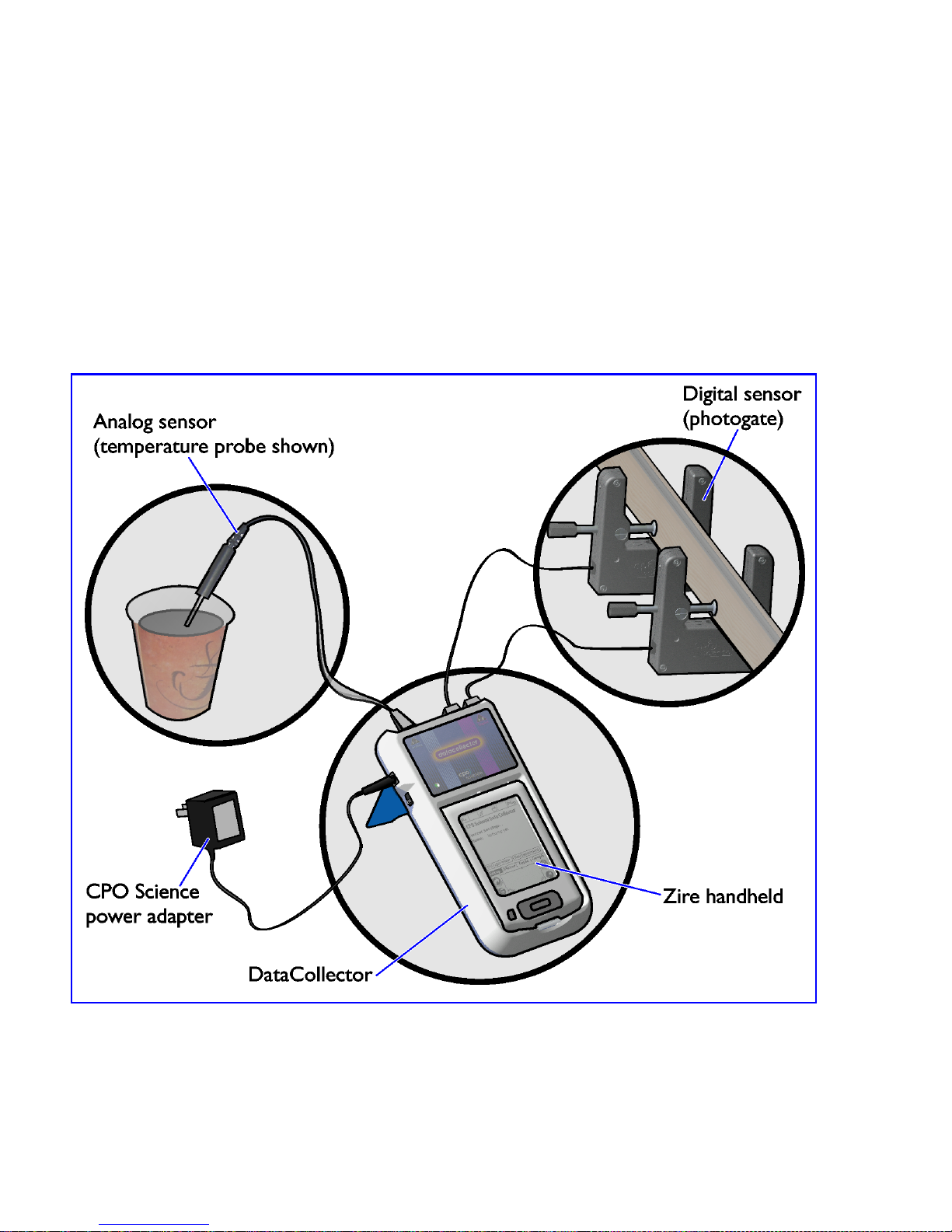
plug in to the hardware. See Figure 1 on page 2.
Once data has been collected, it can be analyzed in graph or table form on the
handheld computer, or transferred to a PC (via the Palm HotSync Utility and the
DataCollector Conduit included with your kit) for further analysis. See Figure 2 on
page 3.
Overview
Several components are involved in collecting and analyzing data with the CPO
Science DataCollector. They can be grouped according to two primary activities:
collecting data on the DataCollector and transferring data to and from the com-
puter.
Collecting Data
Using software running on the Zire handheld, data are recorded in tabular form.
During an experiment you can:
• start and stop data collection
• view live data
• view a live graph of the data
• view the experiment name and details
1. Zire is a trademark of palmOne, Inc.
2
Figure 1 shows the components used to collect data. They are:
• the DataCollector hardware
• the Zire handheld computer
• the CPO Science AC adapter
• analog sensors (a temperature sensor is shown)
• digital sensors (CPO Science photogates are shown)
See Table 2 on page 5 for a list of kit configurations.
Figure 1: Data Collection Components

3
DATACOLLECTOR HANDHELD USER’SGUIDE
Transferring and Analyzing Data
Figure 2 shows the components used to transfer and analyze data. They are:
• the Zire handheld computer
• the USB synchronization cable
• a Mac or Windows-based PC
• the HotSync Manager software
• the CPO Science DataCollector conduit software
After completing an experiment, the data can be transferred to a personal computer
for further analysis and manipulation. Each experiment from the Zire handheld is
saved on the PC as a comma separated value (CSV) file, readable by Microsoft
Excel, Mathworks Matlab, and many other programs.
Figure 2: Synchronization Components

4
Table 1 lists the software components involved in the transfer and analysis process.
Table 1: Software Components
Software Purpose Runs on... Source
DataCollector
App
Records data from
sensors and presents
graphs and tables
Zire
Handheld
DataCollector
Resource CD-ROM
or Support Website
HotSync
Manager
Performs HotSync oper-
ation between Zire
handheld and desktop
computer through USB
cable
Desktop
Computer
Zire Desktop
Software CD-ROM
DataCollector
Conduit
Transfers experimental
data from Zire handheld
to desktop computer as
part of a HotSync oper-
ation
Desktop
Computer,
in conjunc-
tion with
HotSync
Manager
DataCollector
Resource CD-ROM
or Support Website
Data Analysis
Software (such
as Microsoft
Excel or
Matlab)
Further analyze experi-
mental data using more
sophisticated graphical
or statistical methods
Desktop
Computer
Independent Soft-
ware Vendor (not
supplied with
DataCollector)

5
DATACOLLECTOR HANDHELD USER’SGUIDE
Chapter 2: Kit Contents
There are three different configurations of the DataCollector available. These are
summarized in Table 2 below.
Table 2: DataCollector Kits
DataCollector
Solo
DataCollector
Standard Kit
DataCollector
Starter Kit
Part #792-1500
Includes:
• 1 AC adapter
• 1 User's Guide
• 1 DataCollector
Software CD-ROM
Part #792-1503
Includes:
• 1 Hard carrying case
• 1 DataCollector Unit
• 1 AC adapter
• 1 User's Guide
• 1 Software CD-ROM
• 1 Zire handheld
• 1 Zire accessory pack
(Palm AC adapter,
software CD-ROM,
HotSync cable, etc.)
Part #792-1505
Includes:
• 1 Hard carrying case
• 1 DataCollector Unit
• 1 AC adapter
• 1 User's Guide
• 1 Software CD-ROM
• 1 Zire handheld
• 1 Zire accessory pack
(Palm AC adapter,
software CD-ROM,
HotSync cable, etc.)
• 2 CPO Science
Photogates
• 2 Telephone Cords
• 1 Voltage Probe

6
Chapter 3: Warnings and Precautions
Please make note of the following warnings and precautions. Failure to follow
these guidelines can result in damage to your DataCollector and possibly bodily
harm.
IMPORTANT: The AC adapter that comes with the Zire handheld
will not work with the DataCollector. Use only the 9V DC adapter
with the DataCollector that has the CPO Science name/logo on it.
IMPORTANT: Do not over-tighten the thumbscrew on the
photogates. Over-tightening can flex the body of the photogate
enough that the light emitter and receiver twist out of alignment,
causing the photogate to malfunction.
WARNING: Do not plug any lines from the telephone system in to
the DataCollector’s Analog or Digital ports. Telephone rings (also
present with modems) generate large voltages that can damage or
destroy the DataCollector.
WARNING: Computer data cables have the same (RJ-11) connec-
tors and look like the telephone cords used with photogates, but
are wired differently inside. Using a data cable will ruin the
photogates.
WARNING: When using the DataCollector, be sure not to exceed
the specifications on the voltage, current or other sensor(s) being
used. This can damage the sensor or cause serious injuries.
Tabla de contenidos


