Welcome
Thank you for purchasing our NVR!
This quick start guide will help you become familiar with our NVR in a very short time.
Before installation and operation, please read the following safeguard and warningcarefully!
Important Safeguard and Warning
All installation and operation here should conform to your local electrical safetycodes.
We assume no liability or responsibility for all the fires or electrical shock caused by improper
handling or installation.
We are not liable for any problems caused by unauthorized modifications or attemptedrepair.
Improper battery use may result in fire, explosion, or personalinjury!
When replace the battery, please make sure you are using the samemodel!
Note: All the installation and operations here should conform to your local electric
safety rules.
1. Check Unpacked NVR
When you receive the NVR from the forwarding agent, please check whether there is any visible
damage. The protective materials used for the package of the NVR can protect most accidental
clashes during transportation. Then you can open the box to check the accessories.
Please check the items in accordance with the list. (Remote control is optional). Finally, you
can remove the protective film of the NVR.
2. About Front Panel and Rear Panel
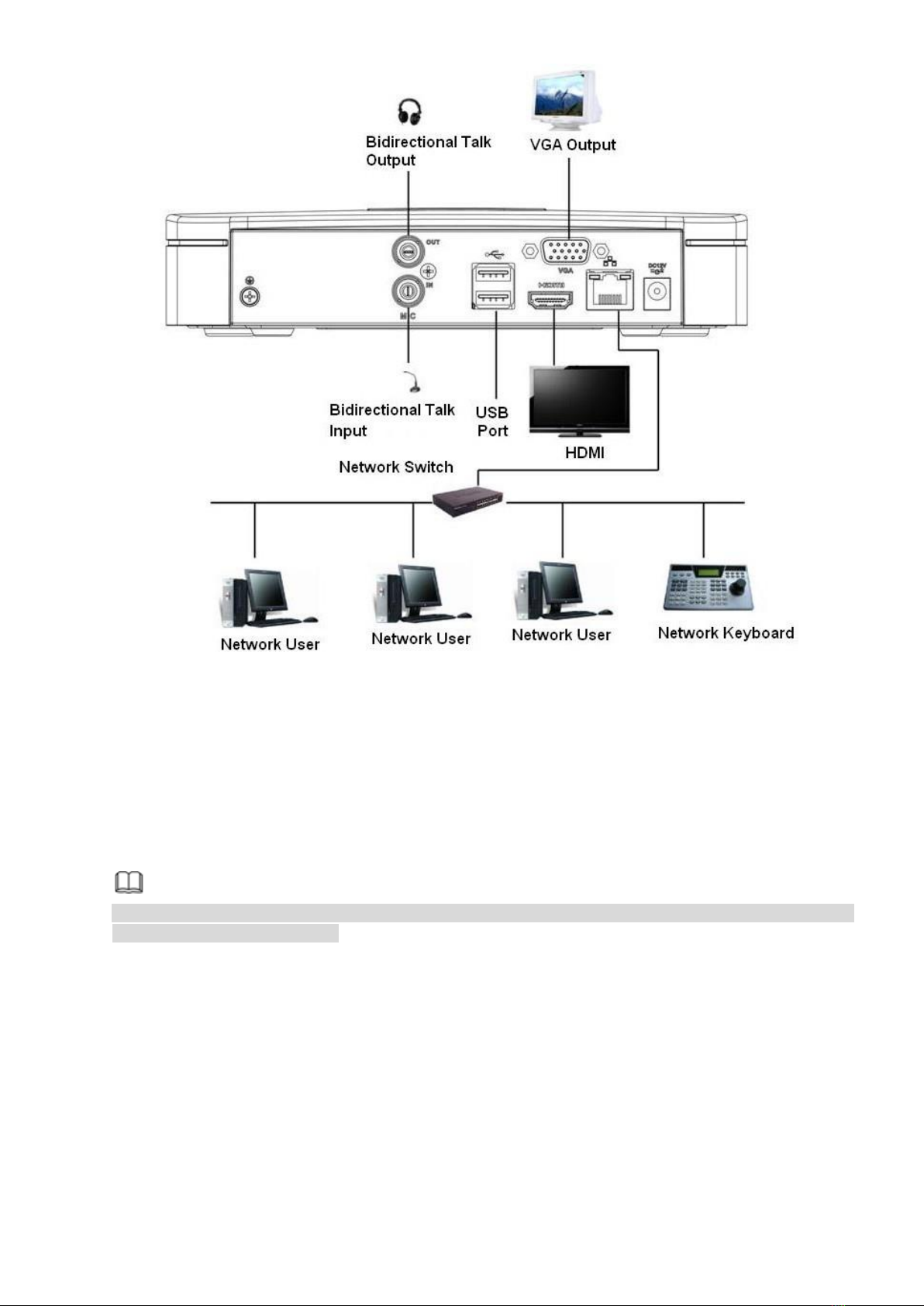
For detailed information of the function keys in the front panel and the ports in the rear panel,
please refer to the User’s Manual included in the resource CD.
The model in the front panel is very important; please check according to your purchase order.
The label in the rear panel is very important too. Usually we need you to represent the serial
number when we provide the service after sales.