
cowin SE8 Manual de usuario

Owner’s Guide
Bedienungsanleitung
Guía del usuario
Notice d’utilisation
Manuale di istruzioni
COWIN SE8
ANC Wireless Headphones

ENGLISH 5
CONTENTS
What’s in the Carton
Contents ................................................................................................................................ 6
Headphone Controls
Power on ............................................................................................................................... 7
............................................................................................................................... 7
Headphone functions.......................................................................................................
Cowin Active Noise Cancelling
8
Media playback and volume functions
..............................................................
8
Call functions
...............................................................................................................
8
NOISE CANCELLATION & AMBIENT SOUNR
Noise Cancelling Modes
...................................................................................................
9
Ambient Sound Modes ................................................................................................... 9
Switch Between Noise Cancellation and Ambient Sound Modes 9
9
Battery Charging
Charge the headphones.................................................................................................. 9
Charging time
..............................................................................................................
9
Status Indicators
Bluetooth® indicator ......................................................................................................... 10
Battery indicator ............................................................................................................... 10
Bluetooth Connections
Connect using the Bluetooth menu on your mobile device
.....................
.....................
10
Disconnect a mobile device........................................................................................... 11
Reconnect a mobile device............................................................................................ 11
Connect another mobile device................................................................................... 11
Clear the headphone pairing list..................................................................................
..................................................................................
11
Wired Connections
Connect the audio cable................................................................................................. 12
Care and Maintenance
Store your headphones ................................................................................................... 12
Clean the headphones ..................................................................................................... 12
Warranty
................................................................................................................
12
Troubleshooting
Common solutions ............................................................................................................ 13
ENGLISH 6
WHAT’S IN THE CARTON
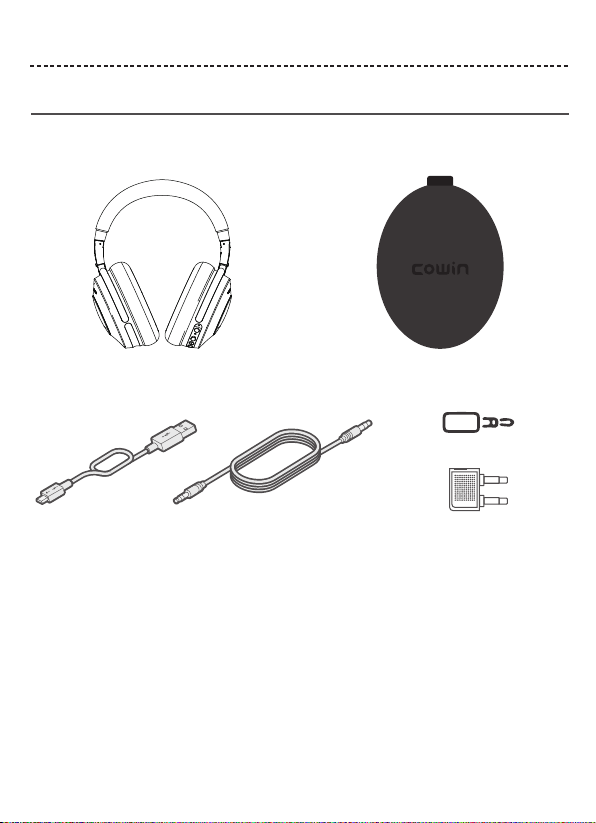
Contents
Confirm that the following parts are included:
USB cable 3.5 mm audio cable
Note: If any part of your product is damaged, do not use it. Contact your authorized COWIN customer service.
E-mail: [email protected]
Phone: +1 (929) 359-6668 ( Mon-Fri 9:00 a.m. to 5:30 p.m. PST ) Recommend
Website: https://www.cowinaudio.com (Support live chat)
Facebook: https://www.facebook.com/cowinelectronics
Instagram: https://www.instagram.com/cowinaudio
Youtube: https://www.youtube.com/channel/UCQIHuG8eYKa8AFyzOa98RiA
Twitter: https://twitter.com/cowinaudio
COWIN SE8
active noise cancelling Bluetooth headphones
Carry case
Airline headphone adapter
3.5mm to 6.5mm audio converter

ENGLISH 7
HEADPHONE CONTROLS
Noise cancellation on/Off switch
Volume up / Skip forward button
Power / Bluetooth / Call control button
Volume down / Skip backward button
USB charging port
Audio jack
Press and hold for 1.5 seconds, until the indicator light
on blue one second and hearing the "power-on" tones.
Press and hold for 3.5 seconds, until the indicator light
on red one second and hearing the "power-off" tones.
Power on
Power o

Short press the button
Short press the button
Press and hold for one 2 seconds
While on a call, press once
While on a call, press and hold for 2 seconds
With two active calls, press and hold for 2 seconds
Short press the Multi-function button
Long press the button
Long press the button
Short press the button
Short press the button
The Multi-function button and microphone are located on the back of the right earcup.
ENGLISH 8
HEADPHONE CONTROLS
Headphone functions
Media playback and volume functions
Call functions
The headphone controls are located on the right earcup.
Function What to do
Play /Pause
Skip forward
Skip backward
Volume up
Volume down
Function What to do
Answer a call
End a call
Decline an incoming call
Answer a second incoming call
and put the current call on hold
Decline a second incoming call
and stay on current call
Switch between two calls

NOISEC ANCELLATION & AMBIENT SOUNR
Noise Cancelling Modes
Active Noise cancellation (ANC) reduces unwanted noise providing a clearer, more lifelike audio performance. You can choose the noise
cancelling mode based on your listening preferences and environment.
Ambient Sound Modes
Turn on Ambient modes to control how much surrounding noise you let in. With Quick Ambient Mode, you can listen in on street traffic,
catch flight announcements, and hear when your kids or coworkers call out to you.
Summary: Turn on the noise Cancellation function of your headphones if you want to listen to music without the interruption of
surrounding noise. Turn on Ambient Sound Mode if you want to hear the sounds around you.
Switch Between Noise Cancellation and Ambient Sound Modes
Cowin Active Noise Cancelling
Active Noise Cancelling (ANC) mainly focuses on cancelling out lower frequency sounds like engines, aviation environment, trains,
traffic noise, etc, so our valuable customers can focus on their music, movies, or books without being disturbed by outside noises. Our
ANC headphones incorporate a microchip that measures ambient sound and generate a waveform that is an exact negative of the
ambient sound and mix it with any audio signal our customers desires. Making it possible to listen to audio content without raising the
volume excessively. Please do note, ANC does not cancel out noises like snoring, talking, music or high-frequency sounds, etc.
BATTERY CHARGING
Charge the headphones
Notes:
• While charging, the battery indicator red. When the battery is fully charged, the battery indicator blue.
• If the power is lower than 10%, you will hear the "Battery Low" tone, prompting every 3 minutes, until the battery is completely
used up and automatically shuts down.
Notes:
• When only use Bluetooth without noise cancelling, a full charge powers the headphones for up to 25 hours.
• When use Bluetooth with noise cancelling, a full charge powers the headphones for up to 20 hours.
ENGLISH 9
Charging time
Allow up to 5 hours to fully charge the headphones.
1. Plug the small end of the USB cable into the micro-USB connector on the left earcup.
2. Plug the other end into a USB wall charger or computer that is powered on.
1, Please make sure headphone is turn on;
2, Short press the NC button, enable the noise canceling function;
3, Short press the NC button again, switch to Ambient Sound Mode;
4, Short press the NC button again, both noise canceling function and Ambient Sound Mode is off.
Tip: Each press of the NC button changes the function. Loop in turn.

ENGLISH 10
STATUS INDICATORS
BLUETOOTH CONNECTIONS
Connection method
You can connect your mobile device with your headphones using Bluetooth wireless technology.
Note: If connected to an Apple device, the device displays the headphone battery level near the upper right corner of the screen.
Note: The devices must be within range (49.2 ft. or 15 m) and powered on.
Tip: Once powered on, the LED flashes blue and red alternately.
Tip: Once paired, you hear “Connected” and see the indicator flash blue slowly.
Choose “COWIN SE8” to connect
2. On your mobile device, enable the Bluetooth feature.
Tip: The Bluetooth feature is usually found in the Setting menu.
3. Select your headphones from the device list.
1.Turn on the headset. If connecting for the first time, the headphone will
enter the pairing mode automatically after it is powered on.
COWIN SE8
Solid green Noise cancellation ON
Indicator Light Display
Flashing blue and red alternately
Flashing red
Solid red
Solid blue
Flashing blue slowly
System status
Power on & In pairing mode
Low Battery
Charging in Process
Fully Charged
Paired
Indicator Light Display System status
Connect using the Bluetooth menu on your mobile device

ENGLISH 11
BLUETOOTH CONNECTIONS
Disconnect a mobile device
Reconnect a mobile device
Connect another mobile device
1. Use the Bluetooth menu on your mobile device to disconnect your mobile device.
2. Power off headphones.
When powered on, the headphones try to reconnect with the last-paired device.
Note: The devices must be within range (49.2 ft. or 15 m) and powered on.
1.Disconnected on your first mobile device.
2.Connected on your second mobile device.
Note: You only can connect one device at a time.
Clear the headphone pairing list
1. Press and simultaneously and hold for 3.5 seconds.
2. Delete your headphones from the Bluetooth list on your mobile device. All devices are cleared and the headphones are ready to
connect.
If you still have issue, contact COWIN customer service.
E-mail: [email protected]
Phone: +1 (929) 359-6668 ( Mon-Fri 9:00 a.m. to 5:30 p.m. PST ) Recommend
Website: https://www.cowinaudio.com (Support live chat)
Facebook: https://www.facebook.com/cowinelectronics
Instagram: https://www.instagram.com/cowinaudio
Youtube: https://www.youtube.com/channel/UCQIHuG8eYKa8AFyzOa98RiA
Twitter: https://twitter.com/cowinaudio

ENGLISH 12
WIRED CONNECTIONS
CARE AND MAINTENANCE
Clean the headphones
Warranty
If you still have issue, contact COWIN customer service.
Your headphones may require periodic cleaning.
• Wipe the outside surfaces with a soft, dry cloth.
• Don’t allow moisture to get inside the earcups or the audio input connector.
Your headphones are covered by 18-month warranty. Visit our website at www.cowinaudio.com for details of the warranty.
To register your product, visit www.cowinaudio.com for instructions. Failure to register will not affect your limited warranty rights.
E-mail: [email protected]
Phone: +1 (929) 359-6668 ( Mon-Fri 9:00 a.m. to 5:30 p.m. PST ) Recommend
Website: https://www.cowinaudio.com (Support live chat)
Facebook: https://www.facebook.com/cowinelectronics
Instagram: https://www.instagram.com/cowinaudio
Youtube: https://www.youtube.com/channel/UCQIHuG8eYKa8AFyzOa98RiA
Twitter: https://twitter.com/cowinaudio
Connect the audio cable
Use the 3.5 mm cable (provided) to connect a non-wireless device or to continue using the headphones.
Airline Headphone Adapter3.5mm to 6.5mm Audio Converter
Store your headphones
Place the headphones flat into the case.
Notes: • Make sure to power off the headphones when not in use.
• Before storing the headphones for more than a few months, make sure the battery is fully charged.
3.5mm 6.5mm

ENGLISH 13
TROUBLESHOOTING
Common solutions
If you experience problems with your headphones:
• Check the state of the status indicators (see page 10).
• Charge the battery (see page 9).
• Increase the volume on your headphones, mobile device and music app.
• Try connecting another mobile device (see page 11).
If you could not resolve your issue, see the table below to identify symptoms and solutions to common problems. If you are unable to
resolve your issue, contact COWIN customer service.
If you still have issue, contact COWIN customer service.
Symptom Solution
Headphones don’t power on Charge the battery.
Poor sound quality
• Use a different music source.
• Connect another mobile device (see page 11).
• Disconnect the second device.
• Move your mobile device closer to the headphones and away from any
interference or obstructions.
Headphones don’t connect
with your mobile device
• Check the state of the status indicators(see page 10).
• Disconnect the back-up audio cable.
• Disconnect the USB charging cable.
• On your mobile device:
- Disable the Bluetooth feature and then re-enable.
- Delete your SE8 from the Bluetooth list on your device. Connect again.
• Move your mobile device closer to the headphones and away from any
interference or obstructions.
• Connect another mobile device (see page 11).
• Visit www.cowinaudio.com to see how-to videos.
• Clear the headphone pairing list (see page 11) and connect again.
E-mail: [email protected]
Phone: +1 (929) 359-6668 ( Mon-Fri 9:00 a.m. to 5:30 p.m. PST ) Recommend
Website: https://www.cowinaudio.com (Support live chat)
Facebook: https://www.facebook.com/cowinelectronics
Instagram: https://www.instagram.com/cowinaudio
Youtube: https://www.youtube.com/channel/UCQIHuG8eYKa8AFyzOa98RiA
Twitter: https://twitter.com/cowinaudio
Otros manuales para SE8
1
Tabla de contenidos
Otros manuales de Auriculares de cowin

cowin
cowin KY02 Manual de usuario

cowin
cowin E9 Manual de usuario

cowin
cowin Apex Pro Manual de usuario

cowin
cowin HE8 Manual de usuario

cowin
cowin Apex Pro Manual de usuario

cowin
cowin E7 Manual de usuario

cowin
cowin KY03 Manual de usuario

cowin
cowin E7 PRO Manual de usuario

cowin
cowin Apex Elite Manual de usuario

cowin
cowin E7 PRO Manual de usuario


