
Coltech 18-1339 Manual de usuario

Important!
Read the entire instruction manual carefully
and make sure that you fully understand
it before you use the equipment. Keep the
manual for future reference.
Viktig information:
Läs hela bruksanvisningen noggrant och
försäkra dig om att du har förstått den
innan du använder utrustningen. Spara
bruksanvisningen för framtida bruk.
Viktig informasjon:
Les disse anvisningene nøye og forsikre deg om
at du forstår dem, før du tar produktet i bruk.
Ta vare på anvisningene for seinere bruk.
Tärkeää tietoa:
Lue nämä ohjeet huolellisesti ja varmista
että olet ymmärtänyt ne, ennen kuin alat
käyttää laitetta. Säilytä ohjeet myöhempää
tarvetta varten.
Wichtiger Hinweis:
Vor Inbetriebnahme die komplette
Bedienungsanleitung durchlesen und
aufbewahren.
ENGLISHSVENSKANORSKSUOMIDEUTSCH
Startpaket för smarta hem
Startpakke, Smarte hjem
Aloituspakkaus älykotiin
Startpaket Smart Home
Art.no
18-1339
36-6260
Smart Home
Starter Pack
Ver. 20160523
Original instructions
Bruksanvisning i original
Originalbruksanvisning
Alkuperäinen käyttöohje
Original Bedienungsanleitung

2
ENGLISH
Quick Start Guide for the Smart Home
Starter Pack
Art.no 18-1339, 36-6260
Please read theentire instruction manual before using theproduct and then save
it for future reference. Wereserve theright for any errors in text or images and any
necessary changes made to technicaldata. Intheevent of technical problems or other
queries, please contact our Customer Services (see address details on theback).
What is a smart home?
Asmart home is asemi-automatedhome. Thisincludes everything from remote
controlling your lighting to automating your entire home and managing it from
aninternet connection, from wherever youare. Thisstarter pack contains
theessentials necessary to set up abasic smart home system:
1 pc. TellStick Net
Gateway which connects to your router and links your
remote switches with theInternet. Usingthis, you can put
your remote control to one side and use your smartphone
or computer to turn your lights on and off locally or from
another location. Youcan even set up your lights to switch
on and off after aschedule or at dawn or dusk, or even to
come on and send you anelert when adoor is opened.
Theaddition of awireless thermometer (sold separately)
will also enable you to keep track of theindoor/outdoor
temperature or temperature inside afreezer, wherever you
maybe. Theseare just afew examples of what you can
do; thesystem has great potential depending on which
accessories you buy, how you want to control your smart
home and which functions youwant.
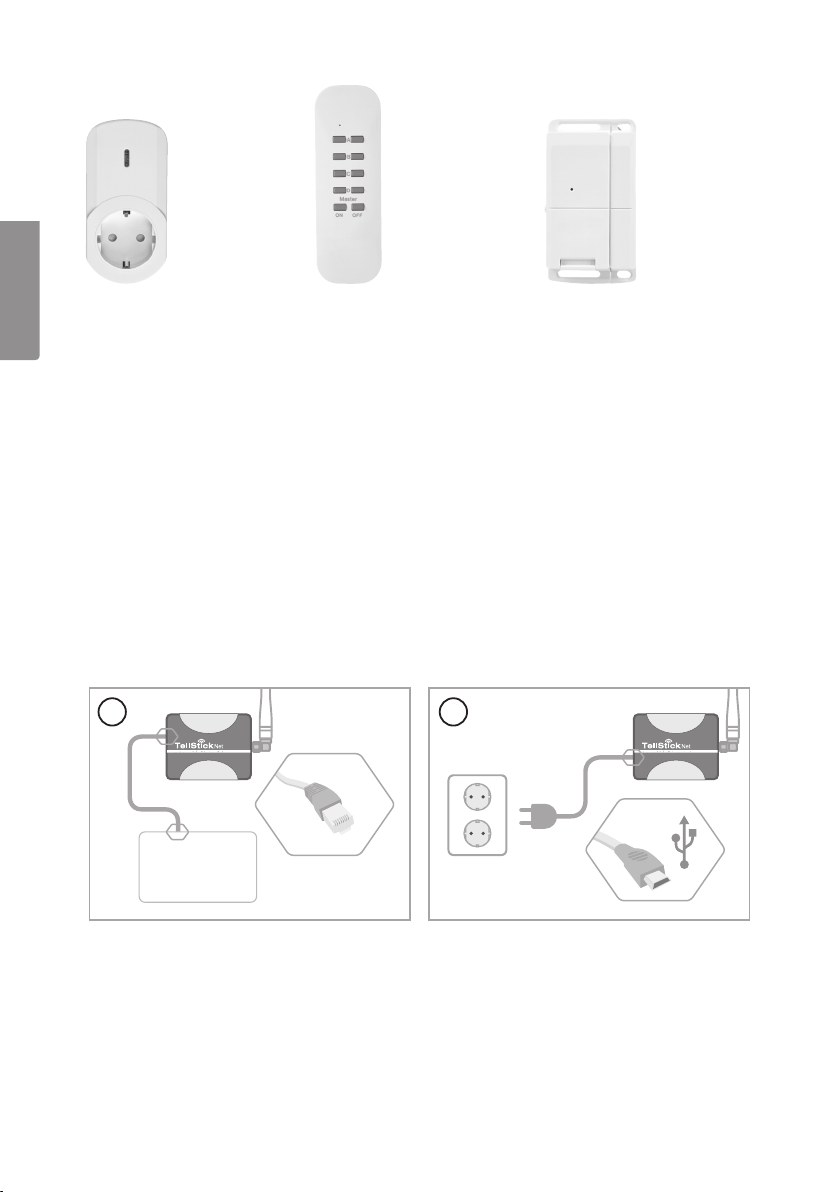
2 pcs remote on/off switch receivers
Plug straight into thewall socket. Eachswitch receiver
has 6 memory slots which means that it can be controlled
by up to 6 different transmitters/controllers (TellStick Net,
remote control, magnetic switch, etc).

3
ENGLISH
230 V
Internet connected
ROUTER
1 2
1 pc. remote dimmer
switch receiver
Plugs straight into thewall
socket. Eachswitch
receiver has 6 memory
slots which means that it
can be controlled by up
to 6 different transmitters/
controllers (TellStick Net,
remote control, magnetic
switch, etc).
1 pc. remote
control
Has 4 channels for
controlling up to
4different remote-
controlled on/off or
dimmer switches.
Master control button
for turning all channels
on/off simultaneously.
Battery: 1×CR2032
(included).
1 pc. magnetic switch
Used for activating adevice
(turning alight on) when
adoor or window is
opened. Whenfor example
adoor is opened, aswitch
on-command is sent to
whichever remote switch
receiver themagnetic switch
is connectedto. Battery:
1×CR2032 (included).
Forindooruse.
Activating TellStick Net
Connect TellStick Net

4
ENGLISH
login.telldus.com
No account?
Create a new account
First name: John
Smith
Last name:
E-mail address:
Send me news and updates from Telldus:
login.telldus.com
Register!
Password
1-15 min
www.telldus.com/support/index
live.telldus.com
live.telldus.com
Didn't receive any e-mail?
At the bottom of page
login.telldus.com
•••••••••••Password:
Login
live.telldus.com
live.telldus.com
1
3
5
2
4
6
Create a Telldus Live! account*
* Recommended web browsers: Google Chrome, Firefox.

5
ENGLISH
Note!
live.telldus.com
In rare cases the auto detection can fail. If this should
happen, follow step 2 – 5 to manually activate your
TellStick Net. If the auto detection have worked you can
skip steps 2 – 5.
A TellStick Net has been detected. Click to activate it »
http://live.telldus.com
live.telldus.com
live.telldus.com
live.telldus.com
live.telldus.com
Add a new location
My Locations
Manage
Scheduler
Trigger
Events
Setup
Locations
live.telldus.com
live.telldus.com
Name this location: My Home*
If this information is correct, click Accept below.
A TellStick Net wants to link itself with your account.
Accept Deny
* Any name may be used
live.telldus.com live.telldus.com
live.telldus.com
Activation code: XXXXXXXXX *
TellStick Net
Back side
Code for activation: XXXXXXXXX Activate »
CONFIRM LOCATION
In just a few short moments you'll be able to automate your
home from anywhere in the world.
If you're ready then go ahead and click here.
CONGRATULATIONS!
* The code is unique
1
2
4
6
3
5
7
Activate TellStick Net
In some cases, theautomatic
detection does notwork. Ifit
does not work, follow steps
2–5 to activate theTellStick
Net manually. Iftheautomatic
detection has worked, skip
steps 2–5.

6
ENGLISH
live.telldus.com
live.telldus.com
live.telldus.com
Add a new device
live.telldus.com
Device name: Livingroom lamp*
Device
Select device type
GroupType:
Device Type:
live.telldus.com
Save
* Any name may be used
My Devices
Manage
Scheduler
Trigger
Events
Setup
Locations
live.telldus.com
live.telldus.com
Dimmer
Livingroom lamp Learn
within
10 sec
My Devices
Manage
Scheduler
Trigger
Events
Setup
Locations
1
3
5
7
2
4
6
8
Adding a device
Go tohttp://live.telldus.com/help/guides for more guides, manuals and FAQs about
Telldus Live!

7
SVENSKA
Snabbstartsguide för
Startpaket för smarta hem
Art.nr 18-1339, 36-6260
Läs igenom hela bruksanvisningen före användning och spara den sedan för fram-
tidabruk. Vireserverar oss förev. text- och bildfel samt ändringar av tekniskadata.
Vidtekniska problem eller andra frågor, kontakta vår kundtjänst (se adressuppgifter
påbaksidan).
Vad är ett smart hem?
Ettsmart hem är etthem där du inte behöver göra alltsjälv. Alltfrån att tända lampor
med fjärrkontroll till att automatisera hela hemmet och kontrollera det över internet,
var du än befinnerdig. Idetta startpaket har vi samlat de produkter du behöver för att
snabbt och enkelt kommaigång:
1 st. TellStick Net
Gateway som ansluts till din router och förbinder dina
fjärrströmbrytare med internet. Medden kan du lägga fjärr-
kontrollerna åt sidan och istället tända och släcka lampor
med din smartphone, surfplatta eller dator, hemma eller
på distans. Dukan även låta lamporna tändas och släckas
automatiskt efter scheman eller solens upp- och nedgång,
eller varför inte skapa scenarion som tänder enlampa
och skickar ennotis när endörr öppnas? Ansluter du
entrådlös termometer (säljs separat) kan du hålla koll på
temperaturen inomhus, utomhus eller ifrysboxen, var du än
befinnerdig. Dethär är bara exempel på vad du kan göra,
möjligheterna är stora beroende på vilka tillbehör du köper
till, hur du vill styra ditt smarta hem och vilka funktioner du
villha.
2 st. fjärrströmbrytare på/av
Ansluts direkt till vägguttaget. Varjefjärrströmbrytare har
6minnesplatser, vilket betyder att de kan styras av upp till
6olika sändare (TellStick Net, fjärrkontroller, magnetbry-
tareetc.).
8
SVENSKA
230 V
Internet connected
ROUTER
1 2
1 st. fjärrström-
brytare dimmer
Ansluts direkt
till vägguttaget.
Varjefjärrströmbrytare
har 6 minnesplatser,
vilket betyder att de
kan styras av upp till 6
olika sändare (TellStick
Net, fjärrkontroller,
magnetbrytareetc.).
1 st. fjärrkontroll
4 olika kanaler för
styrning av upp till 4olika
fjärrströmbrytare, antingen
på/av eller dimmer.
Masterkanal som kan
slå på/av alla kanaler
samtidigt. Batterityp
1×CR2032 (ingår).
1 st. magnetkontakt
Används för attt.ex. tända
belysning när endörr
eller ettfönster öppnas.
Närdörren öppnas skickas
ettpå-kommando till den
eller de fjärrströmbrytare
som magnetkontakten
kopplatstill. Batterityp
1×CR2032 (ingår).
Förinomhusbruk.
Aktivera TellStick Net
Anslut TellStick Net

9
SVENSKA
login.telldus.com
No account?
Create a new account
First name: John
Smith
Last name:
E-mail address:
Send me news and updates from Telldus:
login.telldus.com
Register!
Password
1-15 min
www.telldus.com/support/index
live.telldus.com
live.telldus.com
Didn't receive any e-mail?
At the bottom of page
login.telldus.com
•••••••••••Password:
Login
live.telldus.com
live.telldus.com
1
3
5
2
4
6
Skapa ett Telldus Live!-konto*
* Rekommenderade webbläsare: Google Chrome, Firefox.

10
SVENSKA
Note!
live.telldus.com
In rare cases the auto detection can fail. If this should
happen, follow step 2 – 5 to manually activate your
TellStick Net. If the auto detection have worked you can
skip steps 2 – 5.
A TellStick Net has been detected. Click to activate it »
http://live.telldus.com
live.telldus.com
live.telldus.com
live.telldus.com
live.telldus.com
Add a new location
My Locations
Manage
Scheduler
Trigger
Events
Setup
Locations
live.telldus.com
live.telldus.com
Name this location: My Home*
If this information is correct, click Accept below.
A TellStick Net wants to link itself with your account.
Accept Deny
* Any name may be used
live.telldus.com live.telldus.com
live.telldus.com
Activation code: XXXXXXXXX *
TellStick Net
Back side
Code for activation: XXXXXXXXX Activate »
CONFIRM LOCATION
In just a few short moments you'll be able to automate your
home from anywhere in the world.
If you're ready then go ahead and click here.
CONGRATULATIONS!
* The code is unique
1
2
4
6
3
5
7
Aktivera TellStick Net
Ivissa fall fungerar inte den
automatiska detekteringen.
Omden inte fungerar, följ steg
2–5 för att manuellt aktivera
din TellStick Net. Omden
automatiska detekteringen
fungerade, hoppa över
steg2–5.
Este manual sirve para los siguientes modelos
1
Tabla de contenidos


