
CO/Tech LBC 36 Manual de usuario

Ver. 200801
Important information:
Read the instruction manual carefully and
make sure that you understand everything
before you use the product, save it for future
use.
Viktig information:
Läs hela bruksanvisningen noggrant och
försäkra dig om att du har förstått den innan
du använder utrustningen och spara den för
framtida bruk.
Viktig informasjon:
Les disse anvisningene nøye og forsikre deg
om at du forstår dem før du bruker enheten og
oppbevar dem for senere bruk.
Tärkeää tietoa:
Lue nämä ohjeet huolellisesti ja varmista että
olet ymmärtänyt ne, ennen kuin alat käyttää
laitetta. Säilytä ohjeet myöhempää tarvetta
varten.
English 2
Svenska 11
Norsk 20
Suomi 29
No: 30-7803
Model PT 260
Planer & Thicknesser
Rikt- och Planhyvel
Avretter og tykkelseshøvel
Oiko- ja tasohöylä PT

2
English
Planer & Thicknesser, article number: 30-7803,model: PT260
Please read the entire instruction manual before using and save it for future use. We apologise for any text or
photo errors and any changes of technical data. If you have any questions concerning technical problems please
contact our Customer Service Department (see address on reverse.)
Safety
Warning! When using this tool fundamental safety measures must be observed to decrease the risk of re, electric
shock and personal injury. Read all of these instructions before using the product and retain these instructions.
1. Keeptheworkplaceclean.
Cluttered areas and work tables are accidents waiting to happen.
2. Taketheworkingenvironmentintoconsideration.
Do not expose the tools to rain. Do not use the tools in damp or wet spaces. Keep the working area well-lit.
Do not use the tools in the proximity of inammable liquids or gases.
3. Avoidelectricshocks.
Avoid physical contact with earthed objects such as water pipes, radiators, kitchen cookers and fridges.
4. Keepeveryoneatadistance.
Do not let anyone, especially children, who is not participating in the work touch the tool or any of the
extensions. Keep everyone at a distance from the work place.
5. Storethetoolinasafespace.
When the tool is not being used, store it in a dry, locked space out of the reach of children.
6. Donotforcethetool.
It carries out the job more efciently and safely at the intended feed speed.
7. Usethecorrecttool.
Do not force small tools to do big jobs which require powerful tools. Do not force a tool or auxiliary equipment
to carry out work for which it is not designed; e.g. do not use a circular saw to cut down branches or timber.
8. Wearappropriateclothing.
Do not wear any loose clothing or jewellery as they can get caught in rotating parts. When working outdoors,
non-slip shoes are recommended. Wear a hairnet (or similar) if you have long hair.
9. Alwayswearprotectiveequipment.
Wear safety goggles. Use a protective mask if the work creates a lot of dust.
10. Usedustcollectingequipment.
If it is possible to attach a dust collector to the tool, ensure that it is tted and used properly.
11. Donotmanhandlethepowercable.
Instead of tugging at the cable, disconnect it by pulling the plug out of the socket. Ensure that the power cable
does not come into contact with heat, oil or sharp edges.
12. Securetheworkpieceproperly.
When possible, use clamps or a vice to secure the workpiece. That is safer than holding the workpiece with one
hand.
13. Donotoverreach.
Ensure that you stand safely and with good balance at all times.
14. Keepthetoolsinworkingorder.
Ensure that they are clean and that the cutting edges are sharp for an optimal and safe result. Follow the rec-
ommendations in the manual regarding lubrication and change of ttings. Check the power cable regularly. If
it is damaged it should be changed by a qualied service technician. Check all extension cables regularly to
ensure that they are not damaged. Ensure that the handles and controls of the machinery/tools are dry, clean
and completely free from oil, grease etc.
15. Switchthepoweroff.
Pull out the plug and press the emergency stop button before servicing and when changing ttings such as
planer tools, drill bits, tools, abrasive belts or blades.

3
English
16. Removeallkeysandservicetools.
Make a habit of checking that all keys and service tools are removed from the machinery before switching on
the power.
17. Avoidstartingunintentionally.
Do not carry a tool with your nger on the switch/trigger if the cable is plugged into a socket. Ensure that the
switch is in the off position when connecting the plug.
18. Usethecorrectextensioncables.
When using extension cables outdoors, only use those which are intended for outdoor use. Use extension
cables with sufcient conductivity. Uncoil the entire cable.
19. Usecommonsenseandbecareful.
Think twice before carrying out a working operation so that you can carry it out in a safe manner. Do not use
the machinery/tool when you are tired, under the inuence of medication etc.
20. Beforestartingthemachinerycheck:
- That all covers and other parts are undamaged and in working order.
- That all moving parts can rotate freely and are correctly set.
- That no moving parts can jam.
- That no defects have arisen.
- Other circumstances which could inuence the manner in which the work is carried out.
A safety guard or other part that has been damaged must be repaired by a service technician or changed.
Damaged power cables and switches must always be changed by a qualied technician. Never use the tool if
you cannot switch it off or start it in a safe manner.
21. Userecommendedttings.
Using ttings that have not been recommended may cause accidents and personal injury.
22. Mustberepairedbyaqualiedtechnician.
The machinery conforms to current safety requirements. Repairs on the machinery must always be carried
out by a qualied technician using genuine replacement parts. Otherwise the tool may cause accidents or
personal injury.
Specific safety instructions for the planer & thicknesser
• Never use the machine unless the protective covers are undamaged, correctly installed, and adjusted.
• Never use dull plane irons as this will increase the risk of kickback.
• When surface planing, the unused part of the cutter must be covered by the cutter guard.
• When surface planing short workpieces, a push stick should be used.
• The surface plane should not be used when planing grooves, sinks, tenons, or proles.
• The operation of the anti-kickback mechanism and the feed rollers should be checked regularly to assure safe
operation.
• Whether surface planing or thicknesing, a dust extractor should be attached to the plane.
Product labelling
Read the entire operations manual.
Always use protective goggles or a visor and a dust mask.
Always use ear protection.

4
English
2. Assembly
2.1 Attach the legs to the body secure them with hexagon bolt
M8 x 16, spring washer B8, and hexagon nut M8.
2.2 Attach the rubber pads to the legs.
2.3 Attach the dust extractor by using the four plate screws
(included).
2.4 Detach the fastening splints for the feed table for thickness
planing, assemble the table, and secure it with the splints.
2.5 Add the output table and attach it with the two locking arms.
2.6 Attach the fence attachment to the feed table with 2 M8
hexagon screws.
Pull the lever outwards to
allow it to swing right or
left.
2.7 Push the screw heads into the groove of the fence and attach it to the segment with the two self-locking
nuts M6. Then attach the cover plate to the fence attachment with 2 M4x8 screws with cylinder heads and
washers.
2.3 2.4 2.5
2.1
2.6
2.7 2.7

5
English
2.8 Disassemble the two upper dome nuts and washers. Attach the locking bolt of the power switch to the
screws. Attach the washers and tighten the dome nuts.
3. Adjustment of the fence
Turn the setscrews of the fence in and out as needed to achieve the exact segment stop of 45° and 90°.
Note:Lubricateallslidingareas.
4. Electrical connection
• Double-check that the voltage agrees with that indicated on the label on the motor rating plate.
• Connect the machine to an earthed wall socket through an earthed extension cord.
5. Power switch
All power switches have zero voltage tripping to prevent the plane from starting after a power outage.
Please note:
• There are two power switches on the panel.
• The one on the right is the main switch with zero
voltage tripping.
• The one on the left is the program lever to change
between surface and thickness planning .
• For your safety, always set the lever to “0” when the
machine is not in use.
2.8 2.8
3.0 3.0
5.1

6
English
6. Dust extraction
The package includes a sleeve coupling connectable to a diame-
ter of 100 mm. Always use some form of dust extraction when
planing.
7. Surface planing
The following measures must be taken before level planing.
7.1 Set the program lever to surface planing .
7.2 Set the thickness planer table to approximately 2/3 of its
full capacity and attach the dust hood. Raise the table and
lock the hood. Make sure that the socket on top of the dust
hood locks against the spindle above.
NOTE:Unless the dust hood is installed, the safety switch
will not work and the machine will not start.
7.3 Make sure that the surface planer table, which can be dis-
assembled, is locked so that the safety breaker is free to
operate.
NOTE: Unless the locking arms are in the right position,
the plane will not start.
If the machine still does not start, please contact our Cus-
tomer Service Department.
7.4 Adjust the height with the lever to the left of the plane.
After lifting the locking lever, you can adjust the cutterguard
sideways to the correct gap for the workpiece when surface
planing. Lower the locking lever to lock the cutterguard in
position. Push the workpiece against the feed table and set
the cutter guard to the height of your left hand. (The work-
piece should barely t through the gap.) Start the motor
and slowly and steadily feed the workpiece across the cut-
ter. Let your hands glide across the cutter guard.
7.5 When level planing edges, start by loosening the locking
lever to the cutter guard and setting the gap to the width of
the workpiece. The springing plastic piece at the right edge
of the guard should be lightly pressed to the workpiece.
Lock the guard in position and start the motor.
Feed the workpiece slowly and steadily across the cutter.
Make sure the fence is at a 90° angle exactly (or other
angle desired) to the output table and push the workpiece
to the fence and downward during feeding.
7.3
7.4 7.4
7.5
7.1
7.2

7
English
8. Thickness planing
The following measures should be taken before thickness
planing.
8.1 Set the program lever to thickness planing .
8.2 Wind the surface planer height adjustment crack handle
anticlockwise and remove the dust hood.
8.3 Fold out the locking arms for the surface planing table and
remove the table. Pull the cutter cover outside the table
and set it to its top position.
8.4 Turn in the output hood across the cutter and attach the
dust hood. Lock it with the cutter cover. The dust hood
acts as a cutter cover when thickness planing.
NOTE:Neveroperatethemachineunlessthedust
hoodisinstalledandlocked.
A circuit breaker prevents start with an improperly installed
dust hood.
8.5 Change the setting of the machine to thickness planing
as described above. Set the thickness planing table to the
desired thickness of the workpiece.
Maximumcuttingthickness:3mm.(NOTE:Measure
atbothendsoftheworkpiece.)
Start the machine and feed in the workpiece with the
planed surface facing downwards and push slowly until
the feed rolls grip If the workpiece is wedge-shaped, feed
in the thickest end rst.
8.2
8.3
8.4
8.4
8.4

8
English
9. Replacing/adjusting disposable cutter irons
Note:Unplugthedevicebeforeservice.
Remove the fence. Loosen the hexagon screws on the locking wedge (pushing the cutter iron against the cut-
ter) with the included 10 mm spanner by turning these clockwise inwards. Remove the cutter iron and the locking
wedge from the groove of the cutter. Clean the wedge, groove, and cutter iron of debris, shavings, and dust with
an oily cloth.
Turn the cutter iron or replace it. Reinstall the iron and wedge back in the groove and lock them in position by
turning the screws anticlockwise (but turn only slightly so that they do not fall out.) Check how far the cutter iron
protrudes above the output table by laying a ruler on the output table or by using a setting guage.
Maximumprotrusionabovetheoutputtable:0.1mm.Repeatwiththeothercutteriron.
Adjust the cutter protrusion using the included 3 mm allen key by turning the wedge`s three setscrews in and
out as desired. After achieving the correct setting, tighten the hexagon screws again. Start with the screw in the
middle.
Note:Donotusea10mmspannerwithashaftlongerthanthatwhichisincludedtoavoidtheriskof
damagingthegrooves.Immediatelyreplacealockingwedgehavingwithdamagedgrooves.
3 mm allen key
Setting guage
9.0 9.0
9
English
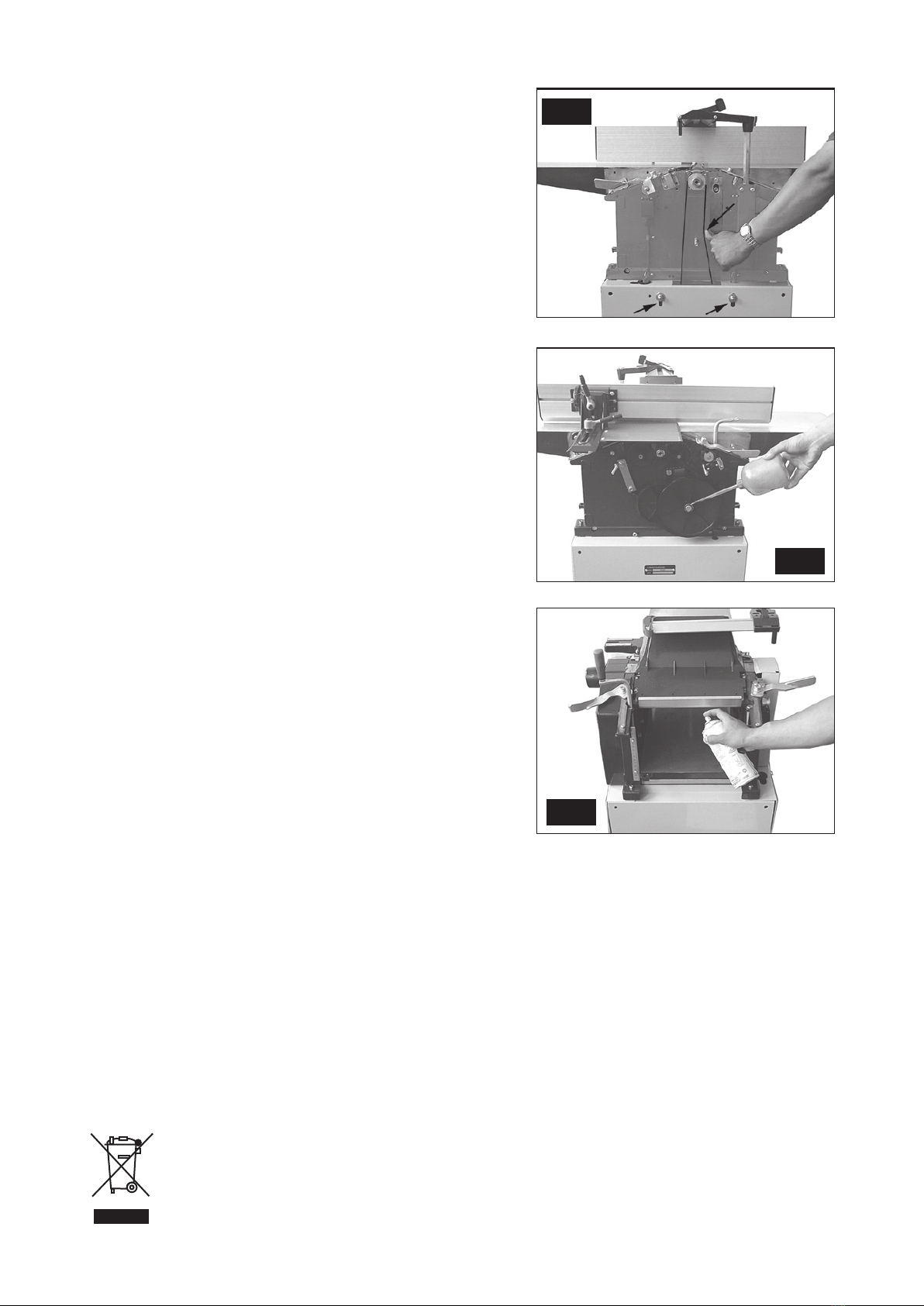
10. Drive belt tension
Check the drive belt tension after the rst ve machine hours.
Remove the dome nut holding the belt cover (215) in place.
Check the tension by pushing the belt as illustrated. It should be
possible to push the belt about 15 – 20 mm.
11. Maintenance
Regularly clean the feed gears of the thicknessing plane with a
brush or compressed air. Regularly lubricate all grease areas
and chains with a few drops of motor oil. Make sure that no oil
or other greasing agent comes in contact with the driving belt
of the gears.
11.1 Regularly clean the thicknessing plane tables spindles and
lubricate them with an oil spray, such as WD 40. Do not
use regular motor oil.
11.2 Assure that the feed and output tables, plus the surface
plane table, are free of resins. Clean them regularly, and
then wax them with a suitable lubricant spray so that the
workpieces will glide easily.
12. Responsibility of the user
This machine functions according to the description in this operations manual if installed, used, maintained, and
repaired in accordance with the instructions herein.
The machine must be checked regularly. Defective equipment (including connecting cables) must not be used.
Defective, missing, worn, deformed, or otherwise damaged parts must be replaced immediately.
If such repairs or replacements are necessary, we recommend the use of a qualied technician.
The machine, or the parts of the machine, should not be modied. The user of the machine has the sole respon-
sibility for any faulty functions that may be caused by violations of the instructions for use, unauthorized modica-
tions, faulty maintenance, damages, or faulty repairs.
13.Disposal
Follow local ordinances when disposing of this product. If you are unsure about how to dispose of this
product contact your municipality.
10.0
11.0
11.1

10
English
14. Technical data
Table surface, surface plane: 260 x 1000 mm
Table surface, thickness plane: 250 x 400 mm
Max. planing width: 260 mm
Max. height, thickness planing: 155 mm
Max. chip size: 3 mm
Cutter diameter: 63 mm
Planing irons: 2 pairs
Cutter revolutions: 6500 RPM
Feed (surface plane): 5 m/min
Motor revolutions: 2800 RPM
Max. angle of the fence: 45°
Table height: 860 mm
Weight: 60 kg
Noise level: 75.7 dB (A) unloaded, 90.3 dB (A) loaded
Motor: 2.2 kW/3hp, 230V, 50Hz
Otros manuales para LBC 36
3
Tabla de contenidos
Idiomas:
Otros manuales de Cepilladora de CO/Tech


