
CNC4PC C10 Manual de usuario

User’s Manual Page i
USER’S
MANUAL
VER.2
C10- PARALLEL PORT INTERFACE CARD
BOARD Rev. 11.3
APRIL, 2019

User’s Manual Page ii
USER'S MANUAL
TABLE OF CONTENTS
Contents Page #
1.0 OVERVIEW....................................................................................................................iii
2.0 FEATURES....................................................................................................................iii
3.0 SPECIFICATIONS ..........................................................................................................1
4.0 BOARD DESCRIPTION..................................................................................................1
5.0 SPECIFICATIONS ..........................................................................................................2
5.1 Power Requirements.................................................................................................2
6.0 POWER TERMINAL .......................................................................................................2
6.2 Enable pin. .................................................................................................................3
7.0 LED INDICATOR ............................................................................................................3
8.0 CONFIGURATION JUMPERS........................................................................................4
8.1 Using the COM configuration jumper.......................................................................4
8.2 Using the Pins 2-9 direction jumper.........................................................................4
8.3 Using the Pull-up or Pull-down selection jumper for pins 2-9................................5
8.4 Using the Pull-up or Pull-down selection jumper for pins 10, 11, 12, 13 and 15. ..5
9.0 FUNCTIONAL BLOCK DIAGRAMS ...............................................................................6
9.1 Bidirectional pins simplified block diagram............................................................6
9.2 Dedicated Inputs simplified block diagram .............................................................6
10.0 WIRING DIAGRAMS.......................................................................................................7
10.1 Connecting Switches or push button.......................................................................7
10.2 Connecting NPN sensors..........................................................................................7
10.3 Connecting in parallel NPN sensors. .......................................................................8
10.4 Connecting PNP sensors........................................................................................10
11.0 DIMENSIONS................................................................................................................11

User’s Manual Page iii
1.0 OVERVIEW
This card provides an easy way of interfacing your inputs and outputs from you parallel
port. It provides terminals for the connections and conditions the signals for use in CNC
applications.
2.0 FEATURES
•IEEE 1284 Standard compatible.
•PULL-UP or PULL-DOWN selection for inputs.
•Buffered inputs and outputs.
•Bidirectional pins 2-9.
•Output pins 1, 2, 3, 4, 5, 6, 7, 8, 9, 14, 16, 17. Or 1, 14, 16, 17.
•Input pins 10, 11, 12, 13, 15. Or 2, 3, 4, 5, 6, 7, 8, 9, 10, 11, 12, 13, 15.
•Input and output pins with close by ground or +5vdc connections
.
•Input pins 10, 11, 12, 13, 15.
•Input and output pins with close by ground or +5vdc connections
•External Enable Pin (EN).
•Works directly with popular CNC hardware and software.
•All TTL 5VDC signals.
•Screw-On connections for all terminals.
•Status LEDs for enable.

User’s Manual Page 1
3.0 SPECIFICATIONS
DIGITAL INPUT SPECIFICATIONS
On-state voltage range
2 to 5V DC
Maximum off-state voltage
0.8V
Maximum operation frequency
4 MHz
Typical signal delay
10nS
DIGITAL OUTPUT SPECIFICATIONS
Maximum output voltage
(5V power supply voltage) +
0.5V
Typical output current
24mA
Maximum off-state voltage
0.44 V
Maximum operation frequency
4 MHz
Typical signal delay
10 nS
Time of transition to high impedance state
12 S*
4.0 BOARD DESCRIPTION

User’s Manual Page 2
5.0 SPECIFICATIONS
5.1 Power Requirements
Regulated +5VDC@ 500mA is required to power this board.
WARNING
Check the polarity and voltage of the external power source and connect the 5VDC and
GND. Overvoltage or reverse-polarity power applied to these terminals can cause
damage to the board, and/or the power source.
6.0 POWER TERMINAL

User’s Manual Page 3
6.2 Enable pin.
The card must be provided with a 5VDC signal to enable operation. This feature has been added
to externally control the status of the outputs. An external switch or a Safety Charge Pump can
be added to provide the enabling signal. When the enable signal is not present, output signals
sent high impedance state. If this function is not required, a jumper can be placed between +5vdc
and the EN terminal. It has an internal 4.7kOhm pull-down resistor
7.0 LED INDICATOR
The power LED lights to indicate that the system is ready but disabled. When Status
LED, (Green LED) lights, it indicates that the system is enabled.

User’s Manual Page 4
8.0 CONFIGURATION JUMPERS
8.1 Using the COM configuration jumper
There is a jumper that allows you to select +5VDC or GND for the COM pins.
1-2: COM= GND 2-3: COM= +5VDC
8.2 Using the Pins 2-9 direction jumper
There is a jumper to select the pins 2-9 direction.
1-2: OUTPUTS 2-3: INPUTS

User’s Manual Page 5
8.3 Using the Pull-up or Pull-down selection jumper for pins 2-9.
Jumper allows to change the input configuration for 2-9. Using the Pull-up or Pull-down
selection jumper for pins 2-9 the input voltage is pulled through a 4.7Kohm resistor to up
or down in this way:
1-2: PULL-DOWN 2-3: PULL-UP
8.4 Using the Pull-up or Pull-down selection jumper for pins 10, 11,
12, 13 and 15.
Jumper allows to change the input configuration for pins 10, 11, 12, 13 and 15. Using
the Pull-up or Pull-down selection jumpers for those pins will pull them up or down
through a 4.7Kohm resistor:
1-2: PULL-DOWN 2-3: PULL-UP

User’s Manual Page 6
9.0 FUNCTIONAL BLOCK DIAGRAMS
9.1 Bidirectional pins simplified block diagram
Fig. 1 Simplified functional block diagram for the 2-9 pins.
A Pull-up or Pull-down selection jumper allows selecting the configuration for the all
bidirectional pins (2-9) when they are set as inputs.
9.2 Dedicated Inputs simplified block diagram
Fig. 2 Simplified functional block diagram for the inputs.
A Pull-up or Pull-down selection jumper allows selecting the configuration for the all
dedicated inputs (pins 10, 11, 12, 13 and 15).
User’s Manual Page 7
10.0 WIRING DIAGRAMS
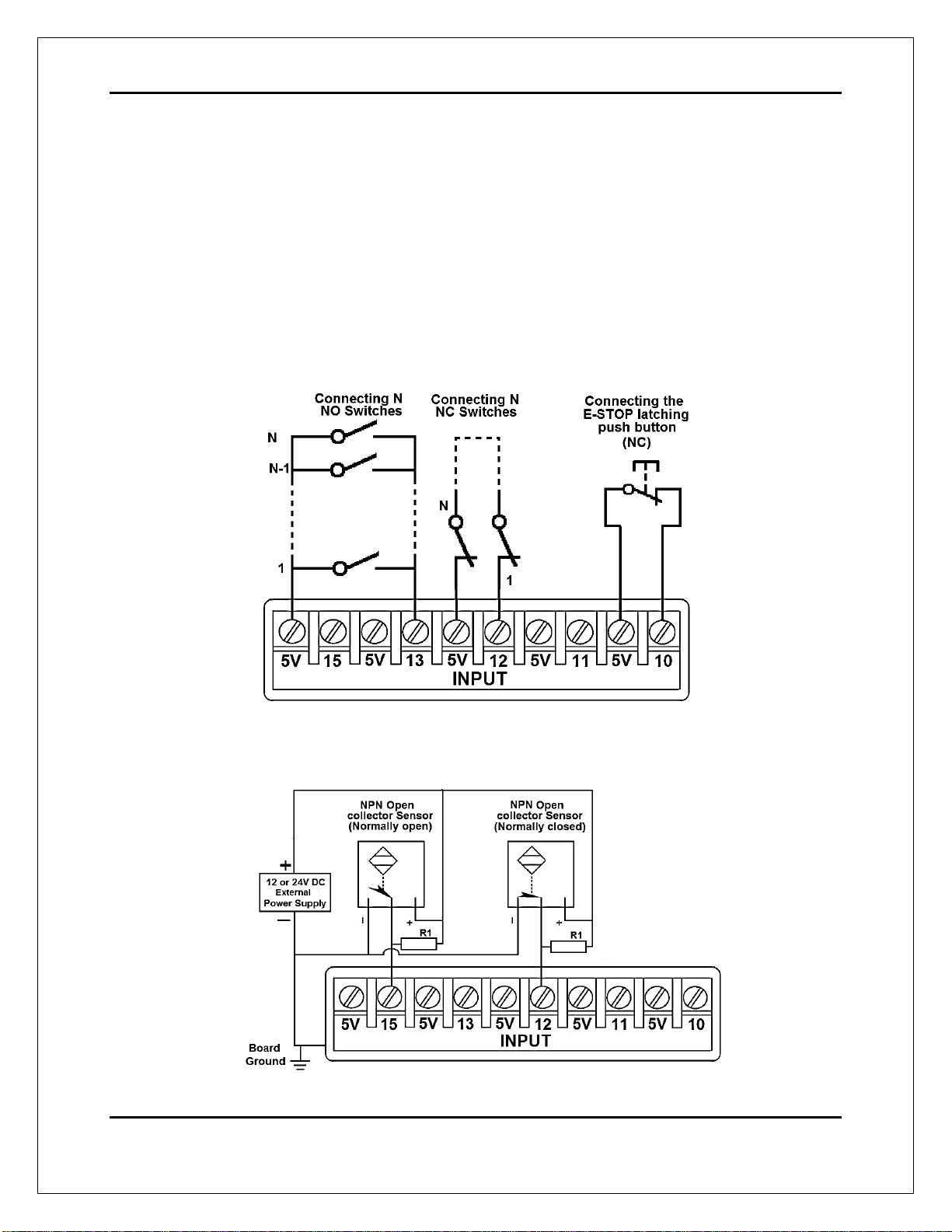
While this board supports only TTL +5VDC signals, different kind of sensors, switches
using different voltages can be connected using the diagrams that follow:
Note. This board has two possible inputs banks, (bidirectional pins: 2-9) and (dedicated inputs: pins 10, 11,
12, 13 and 15), and all the inputs of the same bank have the same configuration. The below wiring diagrams
are an example, any input can be used for the connections.
Note. The bellow wiring diagrams require setting the inputs to use pull-down resistor.
10.1 Connecting Switches or push button.
Fig. 3 Wiring diagram to connect switches.
10.2 Connecting NPN sensors.
Fig. 4 Wiring diagram to connect NPN open collector proximity sensors.
Tabla de contenidos
Otros manuales de Equipo de grabación de CNC4PC

Manuales populares de Equipo de grabación de otras marcas


Strymon
Strymon NIGHTSKY Manual de usuario

Mitsubishi Electric
Mitsubishi Electric 16CH DIGITAL RECORDER DX-TL5000U Manual de usuario

Tews Technologies
Tews Technologies TPMC465 Manual de usuario

Honeywell
Honeywell Excel 50 Manual de usuario

SeaLevel
SeaLevel COMM+8.LPCI Manual de usuario

Arturia
Arturia AUDIOFUSE STUDIO Manual de usuario


