Circutor CEM M-RS485 Manual de usuario

INSTRUCTION MANUAL
(M014B01-03-15A)
Communications interface
CEM M-RS485

2
CEM M-RS485
Instruction Manual

SAFETY PRECAUTIONS
DISCLAIMER
CIRCUTOR, SA reserves the right to make modi cations to the device or the unit speci ca-
tions set out in this instruction manual without prior notice.
CIRCUTOR, SA on its web site, supplies its customers with the latest versions of the device
speci cations and the most updated manuals.
www.circutor.com
DANGER
Warns of a risk, which could result in personal injury or material damage.
ATTENTION
Indicates that special attention should be paid to a speci c point.
Follow the warnings described in this manual with the symbols shown below.
If you must handle the unit for its installation, start-up or maintenance, the following
should be taken into consideration:
Incorrect handling or installation of the unit may result in injury to personnel as well as damage
to the unit. In particular, handling with voltages applied may result in electric shock, which may
cause death or serious injury to personnel. Defective installation or maintenance may also
lead to the risk of re.
Read the manual carefully prior to connecting the unit. Follow all installation and maintenance
instructions throughout the unit’s working life. Pay special attention to the installation stan-
dards of the National Electrical Code.
Refer to the instruction manual before using the unit
In this manual, if the instructions marked with this symbol are not respected or carried out correctly, it can
result in injury or damage to the unit and /or installations.
CIRCUTOR, SA reserves the right to modify features or the product manual without prior noti cation.
3
Instruction Manual
CEM M-RS485

CONTENTS
SAFETY PRECAUTIONS ���������������������������������������������������������������������������������������������������������������������������������������3
DISCLAIMER ����������������������������������������������������������������������������������������������������������������������������������������������������������3
CONTENTS�������������������������������������������������������������������������������������������������������������������������������������������������������������4
REVISION LOG�������������������������������������������������������������������������������������������������������������������������������������������������������5
1�- VERIFICATION UPON RECEPTION����������������������������������������������������������������������������������������������������������������� 6
2�- PRODUCT DESCRIPTION��������������������������������������������������������������������������������������������������������������������������������6
3�- UNIT INSTALLATION ����������������������������������������������������������������������������������������������������������������������������������������7
3�1�- PRELIMINARY RECOMMENDATIONS ����������������������������������������������������������������������������������������������������� 7
3�2�- INSTALLATION ������������������������������������������������������������������������������������������������������������������������������������������8
3�3�- UNIT TERMINALS��������������������������������������������������������������������������������������������������������������������������������������9
3�4�- CONNECTION DIAGRAM������������������������������������������������������������������������������������������������������������������������10
4�- OPERATION ��������������������������������������������������������������������������������������������������������������������������������������������������� 11
4�1�- OPERATING PRINCIPLE������������������������������������������������������������������������������������������������������������������������� 11
4�2�- LED INDICATORS������������������������������������������������������������������������������������������������������������������������������������ 11
4�3�- OPTICAL COMMUNICATIONS PORT ����������������������������������������������������������������������������������������������������� 12
4�4- RS-485 COMMUNICATIONS���������������������������������������������������������������������������������������������������������������������12
4�4�1�- MODBUS PROTOCOL���������������������������������������������������������������������������������������������������������������������� 12
4�4�2�- READ COMMANDS �������������������������������������������������������������������������������������������������������������������������� 12
4�4�3�- WRITE COMMANDS ������������������������������������������������������������������������������������������������������������������������� 13
4�4�4�- VARIABLES MODBUS���������������������������������������������������������������������������������������������������������������������� 14
5�- TECHNICAL FEATURES ��������������������������������������������������������������������������������������������������������������������������������19
6�- MAINTENANCE AND TECHNICAL SERVICE������������������������������������������������������������������������������������������������ 21
7�- GUARANTEE���������������������������������������������������������������������������������������������������������������������������������������������������21
8�- CE CERTIFICATE��������������������������������������������������������������������������������������������������������������������������������������������22
NB: The images of the units are solely for the purpose of illustration and may differ from the
original unit.
4
CEM M-RS485
Instruction Manual

REVISION LOG
Table 1: Revision log�
Date Revision Description
07/14 M014B01-03-14A Initial Version
01/15 M014B01-03-15A Changes in the following sections:
4.4.4.
5
Instruction Manual
CEM M-RS485

1�- VERIFICATION UPON RECEPTION
Check the following points upon receiving the unit:
a) The unit meets the specications described in your order.
b) The unit has not suffered any damage during transport.
c) Perform an external visual inspection of the unit prior to switching it on.
d) Check that it has been delivered with the following:
- An installation guide,.
If any problem is noticed upon reception, immediately contact the transport
company and/or CIRCUTOR's after-sales service.
2�- PRODUCT DESCRIPTION
The CEM M-RS485 optical-electric interface converts the optical service port of any unit of the
CEM range into an RS-485 port with MODBUS protocol.
The unit features:
- 3 indicator LEDs: POWER, LINK and COMS.
The unit is installed on 2-step DIN rails, on the left of any unit of the CEM range.
6
CEM M-RS485
Instruction Manual

3�- UNIT INSTALLATION
3.1.- PRELIMINARY RECOMMENDATIONS
In order to use the unit safely, it is critical that the individuals who handle it fol-
low the safety measures set out in the standards of the country where it is being
used, use the necessary personal protective equipment and pay attention to the
various warnings indicated in this instruction manual.
The CEM M-RS485 unit must be installed by authorised and qualied staff.
The power supply plug must be disconnected before handling, altering the connections or
replacing the unit. It is dangerous to handle the unit while it is powered.
Also, it is critical to keep the cables in perfect condition in order to avoid accidents, personal
injury and damage to installations.
The manufacturer of the unit is not responsible for any damage resulting from failure by the
user or installer to observe the warnings and/or recommendations set out in this manual, nor
for damage resulting from the use of non-original products or accessories or those made by
other manufacturers.
If an anomaly or malfunction is detected in the unit, do not use the unit to take any measure-
ments.
Inspect the work area before taking any measurements. Do not take measurements in dan-
gerous areas or where there is a risk of explosion.
Disconnect the unit from the power supply (unit and measuring system power
supply) before maintaining, repairing or handling the unit's connections.
Please contact the after-sales service if you suspect that there is an operational
fault in the unit.
7
Instruction Manual
CEM M-RS485

3.2.- INSTALLATION
On the side of the unit are all of the indications adjusted to the CEI 62052-11 standard.
The unit is installed on a DIN rail.
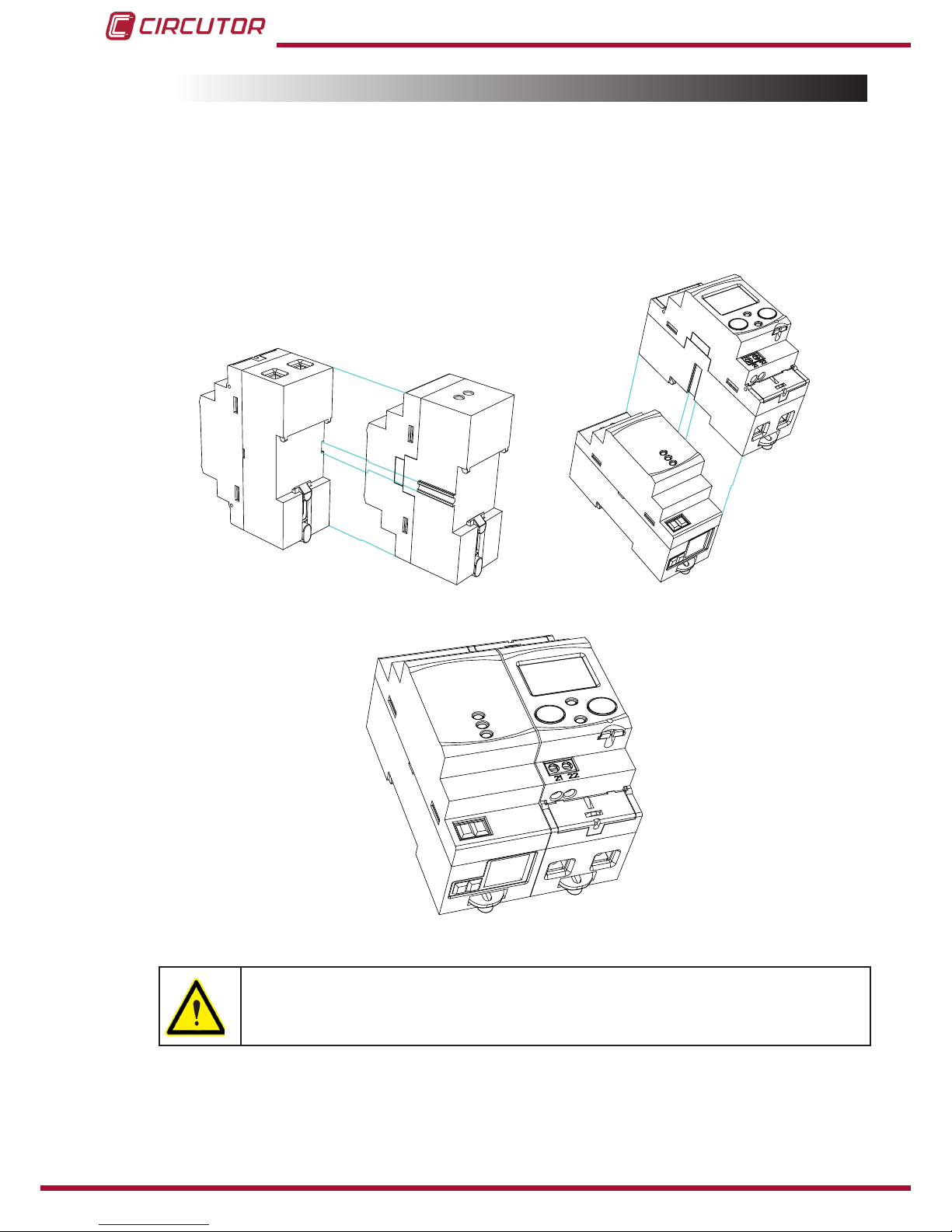
Before connecting the unit, you must couple it to a CEM energy meter as shown in Figure 1
and Figure 2.
Figure 1: Coupling the CEM M-RS485 to a CEM energy meter�
Figure 2: Coupled CEM M-RS485 and CEM�
Terminals, opening covers or removing elements can expose parts that are
hazardous to the touch while the unit is powered. Do not use the unit until it is
fully installed.
8
CEM M-RS485
Instruction Manual

The unit must be connected to a power circuit that is protected with gL fuses (IEC 269) or
M fuses, with a rating of 0.5 to 2 A. It must be tted with a circuit breaker switch or equiva-
lent device for disconnecting the unit from the power supply mains.
The RCCB or equivalent device must be in the immediate vicinity of the unit and must be
easily accessible.
The power circuit is connected with a cable with a section measuring up to 2.5 mm2.
The RS-485 connector enables cables of up to 1.5 mm 2 to be inserted.
The unit's operating temperature is between -25ºC and +70ºC; always use con-
nection cables that can withstand these temperatures.
3.3.- UNIT TERMINALS
Table 2:List of CEM M-RS485 terminals�
Unit terminals
1: Auxiliary power supply. 3: A(+), RS-485
2: Auxiliary power supply. 4: B(-), RS-485
1 2
3 4
Figure 3:CEM M-RS485 terminals�
9
Instruction Manual
CEM M-RS485

3.4.- CONNECTION DIAGRAM
The RS-485 cable must be made up of a twisted pair cable with a braided shield with a
maximum distance of 1,200 metres between the CEM M-RS485 and the master unit.
A maximum of 32 units can be connected to this bus.
Use an intelligent RS-232 to RS-485 network protocol converter to establish communications
with the master unit.
PC
B(-)A(+)
RS-485
CEM M-RS485
Alimentación
Power Supply
A(+) B(-)
RS-232 / USB / Ethernet / Profibus ...
RS-485
RS-485
RS-232
USB
Ethernet
Profibus
...
Figure 4: CEM M-RS485 connection diagram�
10
CEM M-RS485
Instruction Manual
Tabla de contenidos
Otros manuales de Equipo de grabación de Circutor
Manuales populares de Equipo de grabación de otras marcas

Strymon
Strymon NIGHTSKY Manual de usuario

Mitsubishi Electric
Mitsubishi Electric 16CH DIGITAL RECORDER DX-TL5000U Manual de usuario

Tews Technologies
Tews Technologies TPMC465 Manual de usuario

Honeywell
Honeywell Excel 50 Manual de usuario

SeaLevel
SeaLevel COMM+8.LPCI Manual de usuario

Arturia
Arturia AUDIOFUSE STUDIO Manual de usuario