
Chamberlain MC100 Manual de usuario

To prevent possible SERIOUS INJURY or DEATH from a moving gate or door:
• ALWAYS keep remote controls out of reach of children. NEVER permit children to operate, or play with remote control
transmitters.
• Activate gate or door ONLY when it can be seen clearly, is properly adjusted and there are no obstructions to door travel.
• ALWAYS keep gate or door in sight until completely closed. NEVER permit anyone to cross path of moving gate or door.
Universal Mini Remote Control
Read instructions thoroughly BEFORE beginning.
If using the Universal Mini Remote Control with residential door openers, the remote control must be used only
with door openers manufactured after 1993 that utilize photoelectric sensors. The photoelectric sensors are
always located on or near the bottom of the door track.
STOP
MODEL MC100
TABLE OF CONTENTS
GETTING STARTED ........................................................................... 2
LOCATE THE PROGRAM/LEARN BUTTON......................................3-7
Chamberlain®products................................................................ 3
LiftMaster®products.................................................................... 4
Overhead Door®products ............................................................ 4
Genie®products............................................................................ 5
Linear®products........................................................................... 6
Wayne Dalton®products.............................................................. 6
Stanley®products......................................................................... 7
GARAGE DOOR OPENERS ..............................................................8-9
Programming to a garage door opener with a
Program/LEARN button ................................................................ 8
Programming to a Genie®Intellicode®2
garage door opener...................................................................... 9
COMMERCIAL DOOR OPERATORS ................................................. 10
Programming to a commercial door operator
with a Program/LEARN button................................................... 10
GATE OPERATORS.......................................................................... 11
Program to a gate operator
with a Program/LEARN button................................................... 11
EXTERNAL RECEIVERS................................................................... 12
Programming to an external receiver
with a Program/LEARN button................................................... 12
MYQ LIGHT CONTROLS .................................................................. 13
NEED HELP? ................................................................................... 14
BATTERY ........................................................................................ 15

2
GETTING STARTED
The Universal Mini Remote Control can be programmed to activate up to two products, such as a garage door opener, MyQ®light
controls, gate operator, or commercial door operator. Each button on the remote control works independently of the other and must be
programmed separately. The images throughout this manual are for reference only and your product may look different.
Bottom Button
Top Button
Garage Door Opener Commercial Door OperatorGate Operator
LED
Key Ring Holder
You will need to locate the Program/LEARN button on your product before you start programming.
GARAGE DOOR OPENERS
The Program/LEARN button is typically located on the back or side panel
of your garage door opener. Newer garage door openers may have a
Program/Learn button located on the door control. Your Program/LEARN
button may have a different name (SMART button, SET button, etc.). For
help locating your Program/LEARN button refer to the Table of Contents
in this manual or contact your garage door opener manufacturer.
COMMERCIAL DOOR OPERATORS
The Program/LEARN button is typically located on the logic board of your
operator. Your Program/LEARN button may have a different name
(RADIO button, XMITTER button, etc.). For help locating your Program/
LEARN button contact your door operator manufacturer.
GATE OPERATORS
The Program/LEARN button is typically located on the control board of
your operator. Your Program/LEARN button may have a different name
(RADIO button, XMITTER button, etc.). For help locating your Program/
LEARN button contact your gate operator manufacturer.
EXTERNAL RECEIVER
Some products do not
have a Program/LEARN
button. In this case, the
Program/LEARN button
will be located in an
external receiver. The
receiver will be located on
the product or mounted
nearby. Follow the
programming instructions
for an external receiver.

LOCATE THE PROGRAM/LEARN BUTTON
CHAMBERLAIN PRODUCTS
3

LOCATE THE PROGRAM/LEARN BUTTON
OVERHEAD DOOR PRODUCTS
LIFTMASTER PRODUCTS
Yellow Learn
Button
Purple Learn
Button
Orange Learn
Button
Green Learn
Button
Learn Code
Button
4
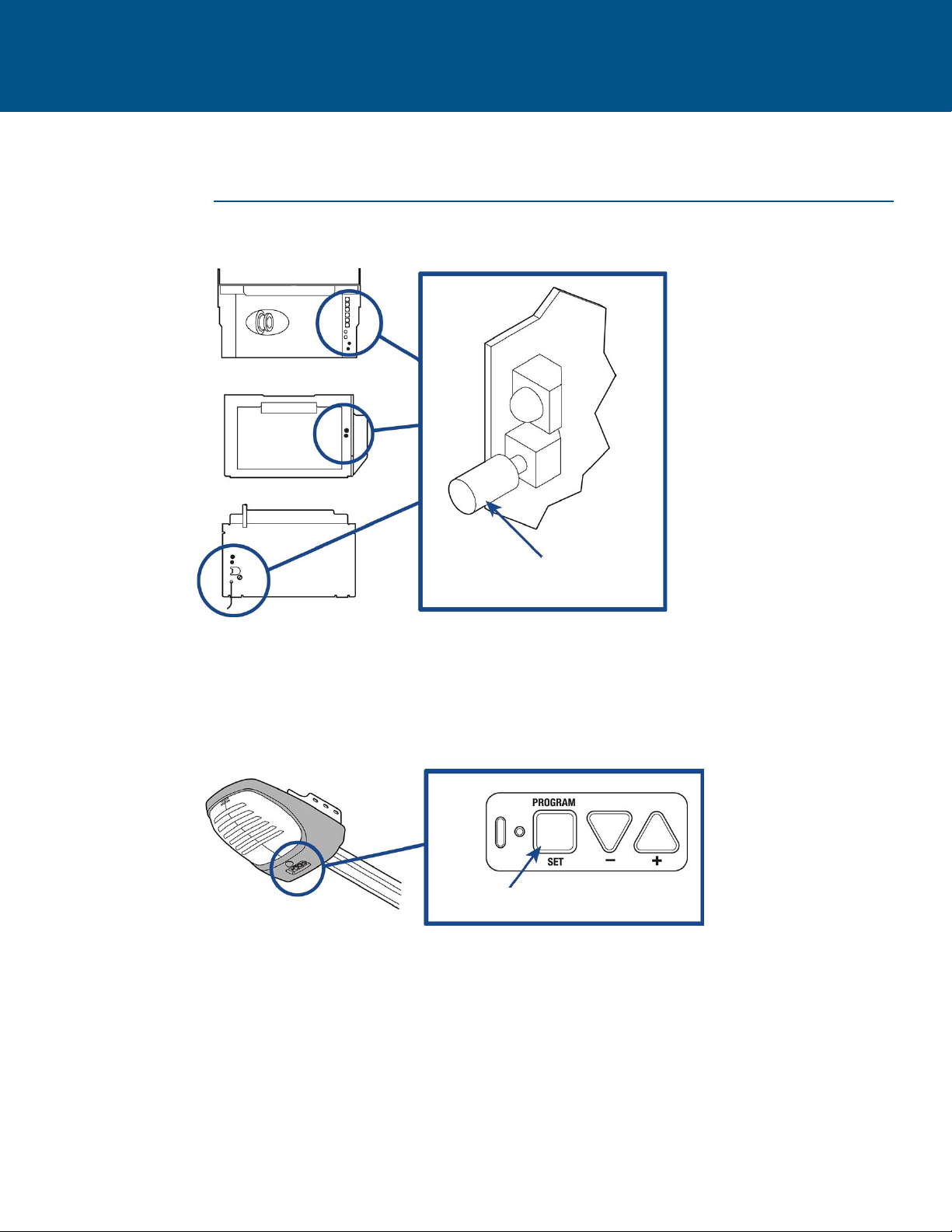
LOCATE THE PROGRAM/LEARN BUTTON
Learn Code
Button
Program Set Button
GENIE PRODUCTS
5

LOCATE THE PROGRAM/LEARN BUTTON
LINEAR PRODUCTS
Learn
Button
Learn
Button
Program SW
Button
WAYNE-DALTON PRODUCTS
6

LOCATE THE LEARN BUTTON
STANLEY PRODUCTS
Learn Button
7

GARAGE DOOR OPENERS
Programming to a Garage Door Opener with a Program/LEARN Button
The Program/LEARN button is typically located on the back or side panel of the garage door opener or an external receiver. For help
locating your Program/LEARN button refer to the Help section in this manual or contact your garage door opener manufacturer.
The Mini Remote Control is pre-programmed to work with a Chamberlain garage door opener with a yellow learn button. Press and
release the yellow learn button, then press and hold the button on the remote control you would like to use. If programming is not
successful, proceed through the steps below.
If you have a Genie®Intellicode®2 garage door opener go to the next page. If you have an external receiver, see External Receivers
page 12.
The images throughout this manual are for reference only and your product may look different.
Bottom Button
1Start with your garage door closed. 2Press and hold bottom button on the remote control until
the blue LED stays solid (approximately 15 seconds) then
release the button.
3Press and release the Program/LEARN button on your
garage door opener. or 2 times on your door control.
4On the remote control, press and release the button that
you would like to program twice. The blue LED will blink
and the remote control will begin sending the
preprogrammed codes to the garage door opener.
Transmission can take up to 60 seconds.
5 6
When the garage door begins to open, immediately press
and release either of the buttons on the remote control to
confirm the code and exit programming.
LED
Test the remote control by pressing the button you
programmed in step 4. If the garage door opener does not
activate, repeat the programming steps.
IMPORTANT: The remote will activate your garage door during
programming. Ensure garage door is clear of ALL obstructions.
LED
8

Programming to a Genie®Intellicode®2 Garage Door Opener
Before starting, you MUST have an existing Genie®Intellicode®2 remote control programmed to the garage door opener. For help
programming a Genie Intellicode 2 remote control to your Genie operator, see your Genie owner’s manual.
The images throughout this manual are for reference only and your product may look different.
GARAGE DOOR OPENERS (continued)
1 2
34
On the garage door opener, press and hold the
Program/Set button until both the long and short LED’s
light up BLUE.
56
Press and release the Program/Set button and the long
LED will flash PURPLE.
78
On the Genie®remote control, press and release the
button that is already programmed to the garage door
opener. Both LED’s will flash PURPLE.
Bottom Button
Start with your garage door closed. Press and hold bottom button on the remote control until
the blue LED stays solid (approximately 15 seconds) then
release the button.
On the remote control, press and release the button that
you would like to program 3 times. The blue LED will blink
for up to 60 seconds.
Wait for the garage door to open, then press and release
either of the buttons on the remote to complete
programming.
LED
Test the remote control by pressing the button you
programmed in step 6. If the garage door opener does not
activate, repeat the programming steps.
IMPORTANT: The remote will activate your garage door during
programming. Ensure door is clear of ALL obstructions.
LED
9

COMMERCIAL DOOR OPERATORS
Programming to a Commercial Door Operator with a Program/LEARN Button
The Program/LEARN button is typically located on the logic board of the operator or an external receiver. For help locating your
Program/LEARN button contact your commercial door operator manufacturer.
The Mini Remote Control comes pre-programmed to work with a Chamberlain branded Commercial Door Operator with a yellow learn
button. Press and release the yellow learn button, then press and hold the button on the remote control you would like to use. If
programming is not successful, proceed through the steps below.
If you have an external receiver, proceed to the External Receiver programming page. See the Table of Contents for page location. The images throughout this manual are
for reference only and your product may look different.
Program/LEARN
Button*
Program LED
Program/LEARN
Button*
* Depending on your product, the Program/LEARN button may have a different
name (use the button for programming remote controls).
Bottom Button
1Start with your commercial door closed. 2Press and hold bottom button on the remote control until
the blue LED stays solid (approximately 15 seconds) then
release the button.
3Press and release the Program/LEARN button* on your
commercial door operator. The program LED will
illuminate.
Wait for the program LED on the commercial door
operator to blink, then press and release the Program/
LEARN button to exit program mode.
4On the remote control, press and release the button that
you would like to program twice. The blue LED will blink
for up to 60 seconds.
5 6 Wait for the commercial door to open, then press and
release either of the buttons on the remote.
LED
Test the remote control by pressing the button you
programmed in step 4. If the commercial door operator
does not activate, repeat the programming steps.
IMPORTANT: The remote will
activate your commercial door
during programming. Ensure
door is clear of ALL
obstructions.
7
LED
10
Otros manuales para MC100
2
Este manual sirve para los siguientes modelos
1
Tabla de contenidos
Otros manuales de Control remoto universal de Chamberlain


