
Century C12-100XLi Manual de usuario

1
LITHIUM LITHIUM
PROPROPROPROPROPROPROPROPROPROPROPROPROPRO
USER MANUAL

2
General Information
Century Lithium Pro batteries are designed to provide long lasting power in recreational deep cycle
applications.
To ensure proper safe use, optimum performance, durability, and reliability of your Century Lithium Pro battery,
please read through this user manual carefully and completely before use.
A technical data sheet and a material safety data sheet (SDS) are also available as additional information on
the Century Batteries website.
Australia: centurybatteries.com.au/lithium
New Zealand: centurybatteries.co.nz/lithium
If you have any questions concerning safety precautions, installing, or using the battery please contact
Century Yuasa Batteries. AU 1300 361 161 or NZ 0800 93 93 93
Disclaimer: All rights reserved. Information contained in this user manual is subject to change without notice or obligation.
Any information provided in or omitted from this user manual in any circumstances resulting in incidental or consequential damages or
injuries is the responsibility of the consumer and does not constitute additional liability of Century Yuasa Batteries Pty Ltd.
Any information provided in or omitted from this user manual in any circumstances resulting in incidental or consequential damages or
esponsibility of the consumer and does not constitute additional liability of Century Yuasa Batteries Pty Ltd.
ADVANCED LiFePO4 TECHNOLOGY
LITHIUM PROLITHIUM PRO
PRO
PRO
PROPROPROPROPROPROPRO
PROPROPROPROPROPROPRO
PROPROPROPROPROPROPRO

3
Table of Contents
1. Introduction.................................................. 4
1.1 Product Description ............................. 4
1.2 Terminology.......................................... 5
2. Safety............................................................ 6
3. Handling and Installation ............................ 7
4. Operating Use.............................................. 8
4.1 Operating conditions............................ 8
4.2 Bluetooth connection .......................... 9
4.3 Charging............................................. 14
4.4 Discharging ........................................ 15
5. Troubleshooting......................................... 16
6. Care & Maintenance.................................. 17
7. Storage ....................................................... 17
8. Transportation ........................................... 18
9. Disposal & Recycling ................................ 18
ADVANCED LiFePO4 TECHNOLOGY
LITHIUM LITHIUM
PROPROPROPROPROPROPRO
PROPROPROPROPROPROPRO
PROPROPROPROPROPROPRO
1. Introduction
1.1 Product Description
The Century Lithium Pro C12-100XLi is 12.8V lithium-ion battery incorporating Lithium Iron Phosphate (LFP
or LiFePO4) technology and is designed for recreational cyclic applications. It contains 4 cells connected in
series, equipped with an internal battery management system (BMS) to monitor each single prismatic cell for
correct operation of the battery, as well as the loads and charge source that are connected to the battery.
This LFP battery is suitable for replacement of deep cycle lead acid batteries, used in RV, camper trailer,
caravan, 4WD (AUX/boot), marine, and mobility applications. This LFP battery should not be used in any
applications other than those described in this user manual. It is important to read and follow the information
provided before installation, operation, and maintenance of this battery.
MODEL
Voltage (V)
CAPACITY (Ah)
STANDARD
CHARGE
CURRENT (A)
MAX CHARGE
CURRENT (A)
MAX
DISCHARGE
CURRENT (A)
PULSE
CURRENT (A)
(<3S)
DIMENSIONS
L * W * H (MM)
TERMINAL
WEIGHT (Kg)
C12-
100XLi 12 100 50 100 100 350 307 * 172
* 217 M8 13.5
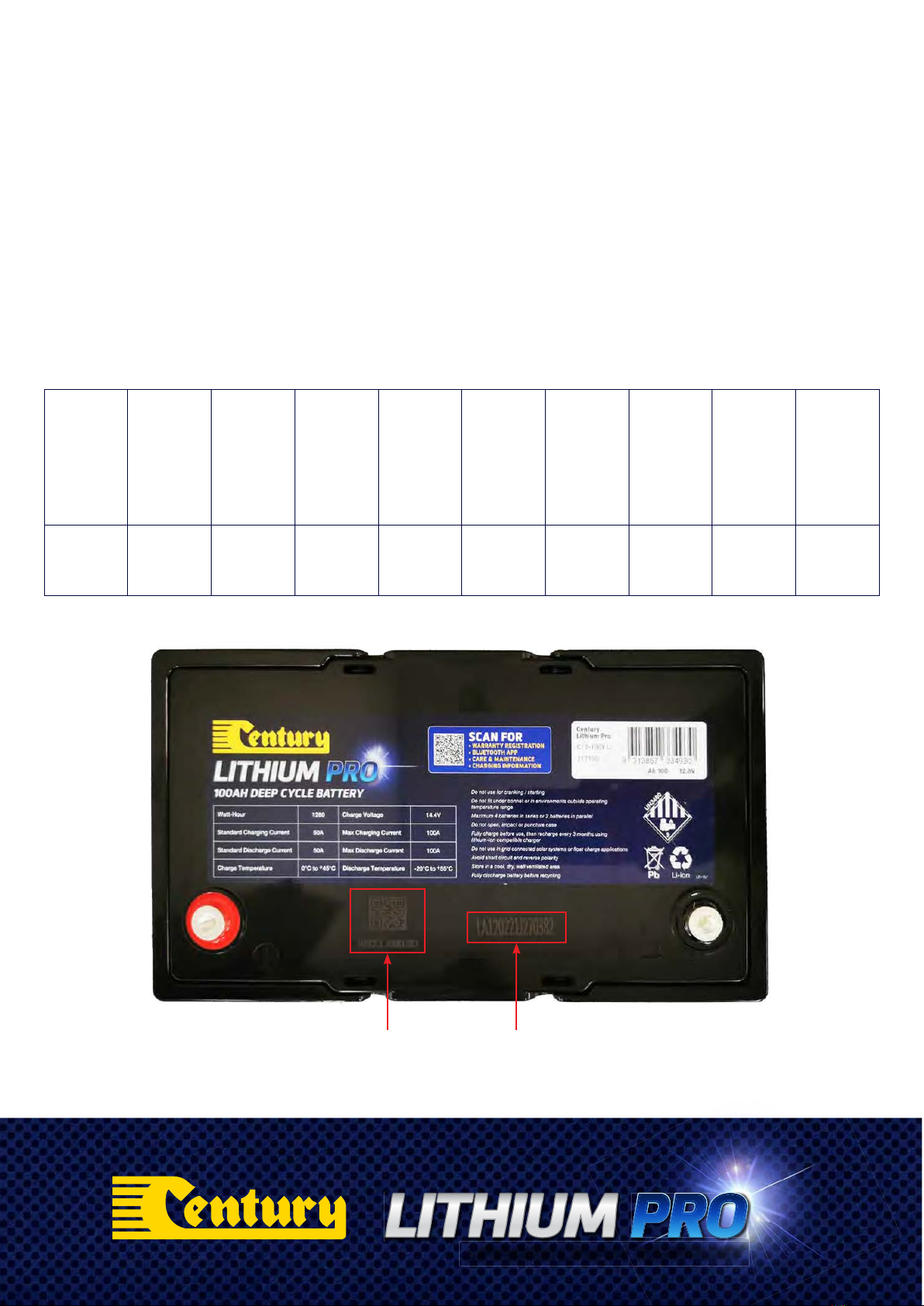
Bluetooth QR Scan
& BMS Code
Manufacturing
Code
ADVANCED LiFePO4 TECHNOLOGY
LITHIUM PROLITHIUM PRO
PRO
PRO
PROPROPROPROPROPROPRO
PROPROPROPROPROPROPRO
PROPROPROPROPROPROPRO
4

1.2 Terminology
BMS Battery Management System
DOD Depth of Discharge
OCV Open Circuit Voltage
SOC State of Charge (%)
°C Degree Celsius in temperature
VVolt
AAmpere
Ah Capacity in Ampere-hour
M8 8mm nut insert terminal
Series Connection Batteries connected to increase
voltage by connecting positive
terminal of one battery to
negative terminal of the next
battery
Parallel Connection Batteries connected to increase
overall capacity by connecting
positive terminal of one battery
to positive terminal of the next
battery
Components
& Construction
1. Handle
2. Positive terminal, M8 nut insert
3. Negative terminal, M8 nut insert
4. Top cover: Flame Retardant ABS/PC
5. Positive connecting copper bar
6. Epoxy board Insulator
7. Negative connecting copper bar
- Module to BMS
8. Connecting aluminium bars
- Prismatic cells
9. Battery module hold-down bracket
10. Electrical insulating sheet
11. Prismatic cells
12. Epoxy board insulator
13. BMS
14. Battery case: Flame Retardant ABS/PC
15. Negative connecting copper bar
ADVANCED LiFePO4 TECHNOLOGY
LITHIUM LITHIUM
PROPROPROPROPROPROPRO
PROPROPROPROPROPROPRO
PROPROPROPROPROPROPRO
5

2. Safety
Warning! Risk of fire, explosion, or burn.
Failure to install or use according to the instructions in this manual may result in early battery
failure or cause risk of electrical or fire damage to the battery and surrounding property and may
cause personal injuries.
The Century Lithium Pro LFP battery is designed with an integrated BMS to prevent internal damage to
the battery under various conditions. When this occurs in connected equipment, power can be abruptly
interrupted to the system which may cause undesirable consequence. The system installer must understand
the automatic safety shutdown functions of the BMS and shall assume all responsibility and liability for any
damages if these functions are not properly applied.
Do’s
• The battery must be kept in the original packaging until use.
• Wear personal protective equipment (eye protection and gloves) before handling.
• Keep sparks and open flames away from the battery.
• Use insulated tools when working on or with the battery.
• Secure connections with correct torque setting.
• Only connect the charger in line with recommended settings. Always disconnect the charger when working
on batteries.
• Charge the battery before installing.
• Remove charger immediately and contact the dealer if any abnormal smell or noise while on charge or when
a discharge is detected.
Don't s
• Do not drop, impact, or puncture the battery. The battery must be protected from mechanical impacts.
• Do not store the battery below 30% SOC.
• Do not use for cranking/starting applications.
• Do not install under the bonnet or engine compartment.
• Do not use the battery outside the specified temperature range.
• Do not expose to direct sunlight for extended period. During storage, the battery must be protected from
direct sunlight.
• Do not submerse in water or expose to rain for any extended periods. The battery should be stored in a cool
and dry environment.
• Do not install near heat source or flammable materials.
• Do not disassemble or modify the outer casing of the battery.
• Do not dispose of in fire, household waste or landfill
• Do not connect LFP batteries from different manufacturers, different brands, capacity, size, or type in series
or parallel.
• Over-voltage charging, incorrect wiring, reverse polarity connection or short circuits of the terminals may
damage the battery.
-voltage charging, incorrect wiring, reverse polarity connection or short circuits of the terminals may
ADVANCED LiFePO4 TECHNOLOGY
LITHIUM PROLITHIUM PRO
PRO
PRO
PROPROPROPROPROPROPRO
PROPROPROPROPROPROPRO
PROPROPROPROPROPROPRO
6

3. Handling and Installation
• Before connecting the battery, check that the battery voltage is ≥13.3V. Recharge as required.
• Ensure that the cable connecting the battery terminals is correctly sized and in length.
• Ensure that the bolts on the terminals are firmly fastened to the recommended torque of 10~12Nm to avoid
loosening during operation.
• Ensure the maximum output voltage of any charging device connected to the battery does not exceed 14.6V
before connecting. Recommended charging voltage is 14.4V
• Side mounting with terminals on the upper side is acceptable but not recommended.
Where feasible, always install upright to optimise the performance under a dynamic condition
such as vibration.
• Fully charge each battery before use and if connecting them in series or parallel.
• When connecting in series or in parallel, ensure the capacity and voltage between each battery is consistent.
Any variance should be below 100mV. Do not connect different batches, types, old or new batteries in
series or parallel.
• To optimise batteries with balanced cells, it is advisable not to mix batteries from a different batch for series
or parallel connection. Each battery is labelled with a sequential production code i.e., number N-1 (such as
1-1, 1-2, 1-3, 1-4,) which shows the selected cells they are grouped with during the manufacturing process.
The first number is the batch number, and the second number is the sequence within the batch.
• The battery can be connected in series up to 4 batteries, or in parallel up to 2 batteries. For example, four
12V100Ah batteries connected in series can create a 48V100Ah battery bank; and 2 batteries connected in
parallel can create a 12V200Ah battery bank (note: maximum discharge current remains 100A).
• Parallel batteries can only increase the capacity of the battery system and increase the working time of the
connected electrical devices. However, the maximum or peak discharge current can only be in accordance
with a single battery (100A).
• The total maximum configuration in a string of series and parallel (i.e., 4S2P) is 8 batteries.
• Due to small variations in new LFP battery capacity, LFP batteries may be slightly unbalanced when
unpacked for multiple connection in series or parallel. BMS interruption of charging is likely to occur during
the initial charging which is considered normal. If the charger trips out, reset the charger until charging
continues normally. For best result, each battery should be charged individually before being connected in
series or parallel. Contact Century Yuasa Batteries for any further assistance.
ADVANCED LiFePO4 TECHNOLOGY
LITHIUM LITHIUM
PROPROPROPROPROPROPRO
PROPROPROPROPROPROPRO
PROPROPROPROPROPROPRO
7

4. Operation Use
Caution: Improper use will cause irreversible damage to the battery and could cause battery
swelling and smoke in extreme cases.
4.1 Operating Conditions
The Century LFP battery is in sleep mode when not in use to reduce self-discharge. It will go into sleep mode
after 24 hours when the charge or discharge current is below 1A.
A charge or discharge will activate the battery from this sleep mode:
• Charge activation – Connect a charger with 1.2V above the battery voltage
• Discharge activation – Connect a load (<5kΩ)
The following operating ambient temperatures and humidity must be followed:
• Charging at between 0°C~45°C
• Discharging at between -20°C~55°C
• Ambient humidity: ≤85%
Reduce current when charging battery at temperatures <10°C and >35°C
TEMPERATURE EFFECT ON CAPACITY
Capacity (%)
110
105
100
95
90
85
80
75
70
65
60 -20 -10 0 10 20 30 40 50 60 70
Temperature (ºC)
ADVANCED LiFePO4 TECHNOLOGY
LITHIUM PROLITHIUM PRO
PRO
PRO
PROPROPROPROPROPROPRO
PROPROPROPROPROPROPRO
PROPROPROPROPROPROPRO
8

4.2 Bluetooth Connection
The Century C12-100XLi battery has an integrated wireless Bluetooth monitoring function.
The Century Lithium Pro Bluetooth App is available for iOS and Android portable smart devices and can be
downloaded from Apple App Store or Google Play Store
Through the Century Lithium Pro Bluetooth monitoring system, the following information can be read or
monitored:
• Battery Capacity • Battery State of Charge (SOC)
• Battery Voltage • Battery Current
• Individual Cell Voltage • Battery Status
• Battery State of Health • Battery Temperature
• Battery Cycle • Battery Alarm
• Battery Event Information
4.2.1 Installation and Pairing App on iOS or Android.
Download the App ‘Century Lithium Pro’.
Ensure Bluetooth is enabled on the smart device before pairing. Ensure the battery is in ‘WAKE-UP’ mode
before pairing. Activate the Bluetooth connection by charging or discharging the battery.
There are two options for pairing or connecting, by scanning the Bluetooth QR code and by the unique ID
both of which are located on the top of each battery.
Bluetooth QR Scan & BMS Code
ADVANCED LiFePO4 TECHNOLOGY
LITHIUM LITHIUM
PROPROPROPROPROPROPRO
PROPROPROPROPROPROPRO
PROPROPROPROPROPROPRO
9

a. Search the battery from the listed battery Bluetooth ID(s) on the smart device, then toggle it ON:
b. Scan the QR code on the battery and the battery Bluetooth ID will appear:
The Bluetooth Monitoring System provides point to point connection. Only one battery can be connected
to one device at a time. If more than one battery is configured in series or in parallel, each battery can be
checked in turn, one by one, on the same smart device. Simply follow the pairing/connection process for
each individual battery.
After being connected, the battery can be renamed from its ID code by the user on the smart device.
All connected batteries will appear on the first screen when accessing the App next time.
Pairing
Established
Pairing
Established
ADVANCED LiFePO4 TECHNOLOGY
LITHIUM PROLITHIUM PRO
PRO
PRO
PROPROPROPROPROPROPRO
PROPROPROPROPROPROPRO
PROPROPROPROPROPROPRO
10
Tabla de contenidos
Otros manuales de Accesorios para cámaras de Century


