
Cassida Omni-ID Manual de usuario


H
This manual contains important information on safety
measures and operational features of the Cassida
Omni-ID. Please read it carefully before operating your
counterfeit detector and ID verier. Keep this manual
handy for future reference.

Cassida Omni-ID Counterfeit Detector / UV Verier 1
Table of contents:
1. INTRODUCTION
1.1 About the Cassida Omni-ID _______________________________________________ 2
1.2 Box contents_____________________________________________________________ 2
1.3 Front and rear views______________________________________________________ 3
1.4 Specications ____________________________________________________________ 5
1.5 Important safety notes ___________________________________________________ 5
2. GETTING STARTED
2.1 Powering up _____________________________________________________________ 6
2.2 Checking a bill’s condition________________________________________________ 6
2.3 Authenticating a bill______________________________________________________ 7
2.4 Authenticating an ID _____________________________________________________ 8
3. MAINTENENCE AND WARRANTY
3.1 Maintenance ___________________________________________________________ 9
3.2 Troubleshooting________________________________________________________10
3.2 Warranty ______________________________________________________________11
3.3 Shipping_______________________________________________________________11
3.4 Contact information ___________________________________________________11

Moving money forward
®
2
1.1 About the Cassida Omni-ID
Congratulations on your purchase of the Cassida Omni-ID, which incorporates
the most powerful counterfeit detection technology available to the industry,
including both ultraviolet and magnetic security marking detection. Additionally,
the Omni-ID immediately illuminates UV security markings on drivers’ licenses,
state-issued ID cards and credit cards.
Verifying the authenticity of currency is easy – simply pass a bill through the
detector.
• If a bill is valid: The green PASS indicator will light up, a conrming beep
will emit and the bill will be returned forward of the machine.
• If a bill is suspicious: The red FAIL indicator light will ash, three warning
beeps will emit and the bill will be returned forward of the machine
Verifying the authenticity of an ID or credit card is also easy:
• Place the ID card in the area below the bill platform.
• The unit’s LED lights will automatically illuminate and showcase the hidden
UV security markings that cannot be seen with the naked eye.
The Omni-ID features an array of ultraviolet (UV) LEDs to allow for checking the UV
security features on ID cards, credit cards or any other item that has UV markings.
1.2 Box contents
• Cassida Omni-ID counterfeit detector
• DC power converter with AC power cord
• User manual
• Window sticker
INTRODUCTION
1.
Cassida Omni-ID Counterfeit Detector / UV Verier 3
1.3 Front and rear views
1
2
3
4
5
6
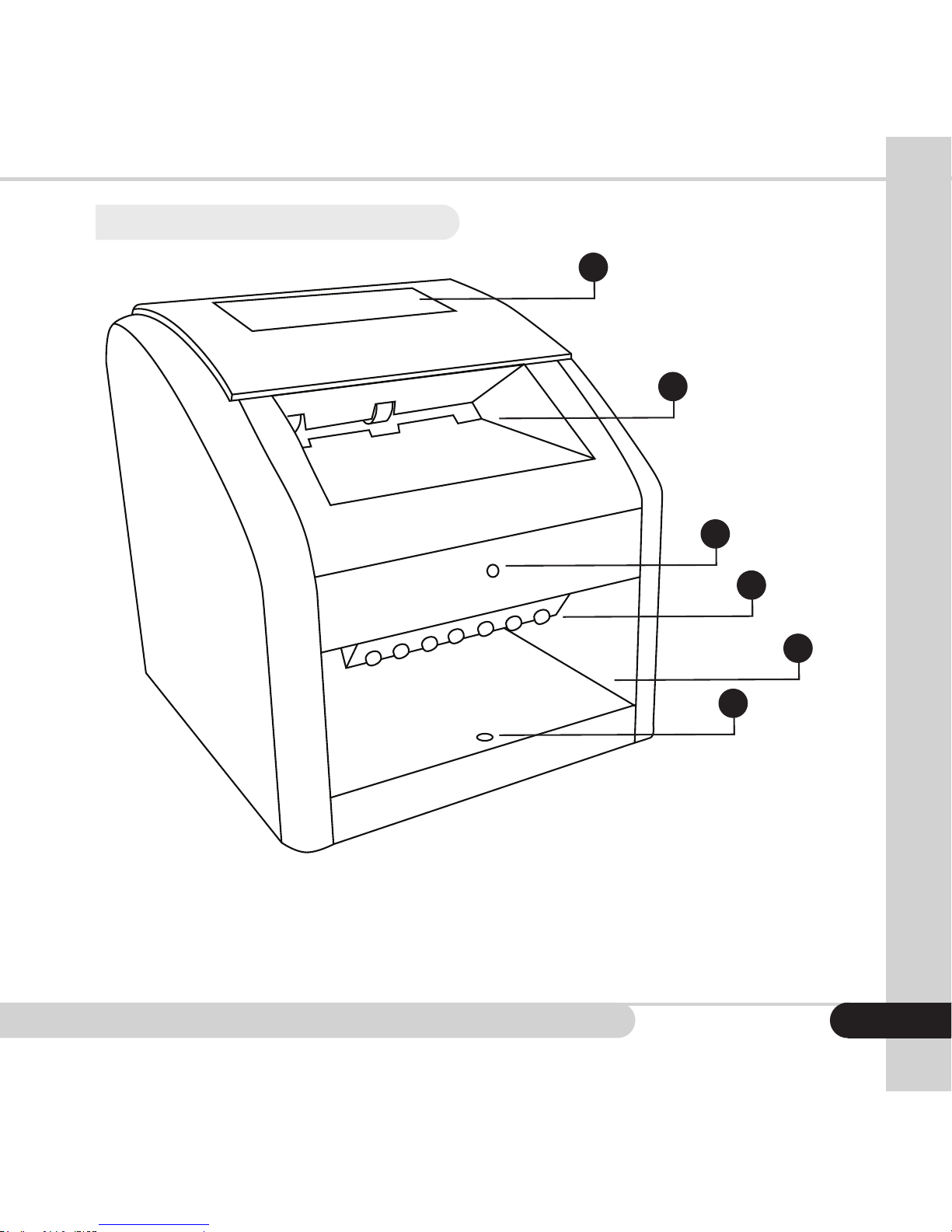
1 PASS/FAIL indicator
2 Front slot
3 UV power indicator
4 UV LEDs
5 UV viewing area
6 UV automatic on/off sensor

Moving money forward
®
4
1 Rear slot
2 PC connection jack
3 AC adaptor power jack
4 ON/OFF power switch

Cassida Omni-ID Counterfeit Detector / UV Verier 5
1.4 Specications
Net Weight: 1.25 lbs
Dimensions: 5.1” x 4.2” x 4.75” (L x W x H)
Sensors: Internal IR and MG sensors, external UV sensors
UV Type LED
Power Consumption: <10 watts
Power Supply: AC/DC adapter, 12 vdc output
Input voltage 100 VAC
Applicable currency: United States dollars
1.5 Important safety notes
When operating this unit, please observe the following basic safety procedures:
• WARNING - UV LED radiation can cause harm to your eyes. Do not look into
UV lights.
• Use only the AC/DC adapter provided with the unit. The use of other AC/
DC adapters may result in electrical shock, re or cause serious damage to
the unit.
• Do not use the unit if the power cord is damaged, or if the plug socket
contact is loose. Failure to follow these instructions may result in electrical
shock or re.
• Do not use this unit in areas where it may be exposed to water or any other
liquids.
• Unplug the unit from the wall outlet before cleaning.
• To reduce the risk of electrical shock, do not disassemble this product.
Opening or removing covers may expose you to dangerous voltages or
other risks. Incorrect reassembly can cause electrical shock when the
appliance is used again.
• When service or repair work is required, take the unit to a qualied service
technician.
• Do not operate the unit in areas with high temperatures or high humidity.
These conditions may prevent it from working properly.
• When not in use for an extended period of time, remove the power plug
from the wall outlet.

Moving money forward
®
OPERATION
2.
2.1 Powering up
Connect the AC/DC adapter to the Cassida Omni-ID unit and plug the adapter
plug into the power outlet. Turn the Cassida Omni-ID on by pressing the ON/OFF
switch on the rear of the unit (see 1.3, rear view). The unit will emit a beep and
conduct a short self-test. The screen shows both FAIL and PASS lights and will
then go black, indicating it is ready to operate.
2.2 Checking a bill’s condition
Avoid inserting bills that are torn, heavily worn or crumpled. Do not insert bill with
staples attached or bills that are covered by adhesive tape. Do not insert wet
or heavily stained bills.
6

Cassida Omni-ID Counterfeit Detector / UV Verier
2.3 Authenticating a bill
After the bill is positioned in the insertion slot, the detector will automatically feed
and scan the bill. If a bill is recognized as authentic, the following will occur:
1. The green PASS light will illuminate
2. The detector will emit a single conrmation beep
3. The bill will be ejected through the insertion slot at the front of the unit.
If the bill is NOT recognized, the following will occur:
1. The red FAIL light will illuminate and ash three times
2. The detector will emit a triple warning beep
3. The bill will be rejected through the insertion slot at the front of the unit
7

Moving money forward
®
2.4 Authenticating an ID
Position the ID card into the ID reader area. Once the ID is inserted, the green
indicator light will illuminate above the ID insertion area signaling that UV lights
are activated. The card will only need to be inserted approximately 1/2 inch into
the unit for the UV lights to activate.
View the ID under the UV lights and look for orescent designs depicted in the
background or foreground of the ID that are visible only under the UV light. Visit
www.cassidausa.com/state-uv.html to see many illustrations of UV features.
Be certain to check both sides of the ID for UV security markings.
Note: Of the 50 United States and District of Columbia, only four states (as of this
publish date) do not use UV security markings on their drivers’ licenses: Maine,
New Hampshire, North Dakota and Tennessee.
8
Tabla de contenidos


