
BROAD TD4000 Manual de usuario

1
2-YEAR WARRANTY
OPERATION AND
MAINTENANCE MANUAL
2020 08 English
TD4000 / TD5000
BROAD PURIFIER

1
GENERAL INFORMATION
CO2Concentration
Normal level 400~1200 ppm.
CO2concentration greater
than 1200 ppm indicates indoor
O2 deciency, at which time
ventilation is needed.
Air Volume Adjustment
Page Down
Power
Adjustable Range 20~50 Hz.
(30 HZ for daily use)
How to achieve the highest level
of purication?
Note
Non-stop operation 24 hrs /365 days
● Designed life span of 20 years (some
electrical components have a shorter
life but are easily replaced)
●
This purier has a low power consumption,
see “Technical Parameters” for exact
power consumption
● The purier is not water-proof
● Keep the purier away bathrooms and
sources of steam
● Do not block the air outlet and inlet

2
Note: The fault interface will be displayed
automatically when there’s fault, and it won’t return
to the main interface until any operation is done.
If the fault is not eliminated, the fault interface will
be displayed again after 2 minutes. The cleaning
prompt will disappear automatically after the purier
is powered off
ALERTS AND PROMPTS
Indoor O2 Deciency
Please open the window or turn on the fan for
ventilation immediately
● The purifier will alert if the CO2concentration
continuously exceeds the upper limit for 30 minutes,
or exceeds 1800 ppm for 5 minutes
● Press any key to clear the alert
Cleaning Prompt Appears
Clean the electrostatic cleaner asap
●
If you open the machine door or power off after
the prompt appears, regardless whether the
electrostatic cleaner has been cleaned or not, the
system will regard it has having been cleaned, and
the cleaning cycle will be reset
● Press any key to clear the prompt
Component Fault Alert
● For CO2 sensor /fan/ electrostatic cleaner fault, the
faulty component icon will ash
● Seek help from BROAD or BROAD designated
service provider immediately
Fault Alert
Faulty electrostatic cleaner
The CO2 concentration is too high,
open the window!
The electrostatic cleaner is too dirty,
clean it!
Faulty CO2sensor
Reset
3
ELECTROSTATIC CLEANER CLEANING
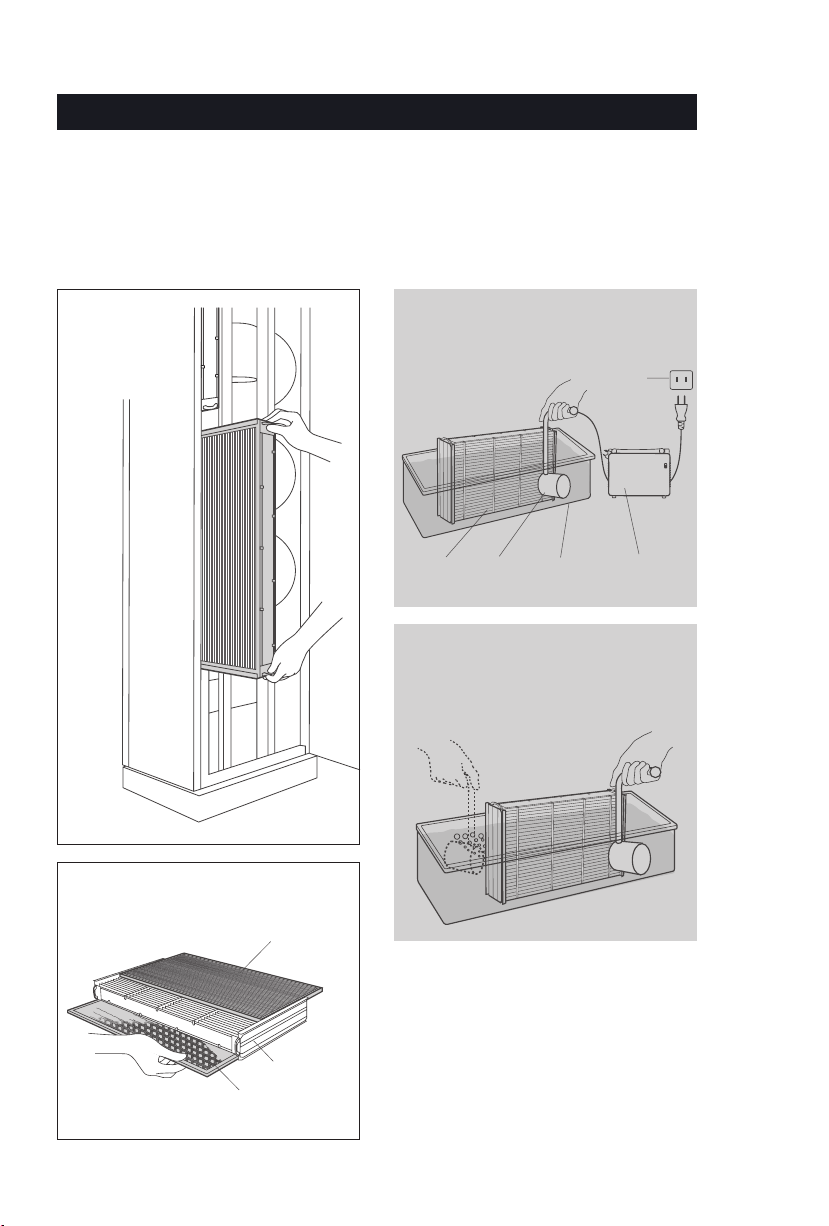
To keep the highest purication efciency, clean the electrostatic cleaner every month.
The electrostatic cleaner must be cleaned if it has collected over 1.5 mm of dust.
Remove the electrostatic cleaner
electrostatic
cleaner
Connect to the power and start cleaning
Immerse the electrostatic cleaner and the
ultrasonic head in water
ultrasonic
generator
ultrasonic
head
electrostatic
cleaner
basin
power outlet
All-directional Cleaning
Direct the ultrasonic head to the electrostatic
cleaner, keep a 20 mm (or one inch) distance
between the cleaner and the ultrasonic head.
(clean for 3~10 minutes)
Remove the lter and the active carbon sheet
Note that the active carbon sheet should not
come into contact with water
Open the door,
remove the
electrostatic
cleaner
When the cleaning is done, power off
Note:
Detergent can be used if the electrostatic
cleaner is heavily soiled.
Rinse the electrostatic cleaner with clean
water (cool or warm), then blow-dry (As
shown in the right page)
Cleaning Method 1:
Ultrasonic Cleaning
Filter
active
carbon lter

4
ELECTROSTATIC CLEANER CLEANING
Cleaning Method 2:
Detergent Cleaning
Blow Dry the Electrostatic Cleaner
Shake the water off and
dry the electrostatic
cleaner with a blower
or in the sun thoroughly
Replace the active carbon sheet
(every 1~2 months)
Clean the fan and the inner shell at
least every six months
Spray the detergent over
the electrostatic cleaner
and the lter
Best to spray in a tub
Use the special brush to brush clean the grille
Rinse the electrostatic
cleaner with clean
water (cool or warm)
Pay attention not to scrape off the tungsten lament

5
PARAMETER SETTING
● Press the page down icon on the main
interface to enter the “Parameter
Setting” interface, then select the
corresponding item to set
●
Only one timing mode can be selecte
d
(the black dot in the center of the
circle shows effective selection)
●
Multiple time periods can be set for daily
start-stop time (“√" indicates effective
selection)
● Press the time in the box to trigger the
numeric keypad, set the desired time
period
● Press "Conrm"
●
Press the time in the box to trigger
the
numeric keypad, revise the
date & time
● Press "Conrm"
Setting
Timing
Date & Time
Parameter Setting
Period 1 8 am ~ 12 am
Period 2 2 pm ~ 6 pm
Period 3 8 pm ~ 11 pm
Timing
Date & Time
Conrm
Every Day
Work Days (Monday to Friday)
Daily On/Off Timing
Only Once
Date
Time
Conrm

6
Ozone Switch
Ozone
Generating
Sheet
Ozone Concentration Adjustment
Ozone Generator Operation Recommendations
Ozone Disinfection Time
Ozone Concentration Switch
ppm
No.Indoor spaces with many people Public health emergency response level
Ⅰ Ⅱ Ⅲ Ⅳ N/A
1Single family residences, apartments, small ofces,
kindergartens and primary schools 0.08~0.12 0.04~0.08 0.02~0.05 No limit
2Dormitories, hotel guest rooms, ofce areas, schools 0.12~0.24 0.08~0.12 0.04~0.08 0.02~0.05
3Shopping malls, restaurants, meeting rooms, lobbies,
wards, delivery rooms 0.24~0.4 0.12~0.24 0.08~0.12 0.04~0.08
4Public transport (vehicles, ships, aircraft), express
transit warehouses 0.24~0.4 0.12~0.24 0.08~0.12
5Disinfection cabins at the entrances of stations,
airports, hospitals (1 minute) 25~30 15~20 8~12
6Infectious disease wards, operation rooms, burn
wards, laminar ow ward 0.3~0.5
Recommended Indoor Ozone Concentration Levels:
Ozone Switch Application
Note
Off 4 seasons Ozone generator is
not in use, and the
electrostatic cleaner
produces a trace
amount of ozone
Low Level Flu
season
Ozone generator
runs for 0.3 minutes
every 10 minutes
Medium Level
Severe
plague
Ozone generator
runs for 2 minutes
every 10 minutes
High level
Unoccupied
room
Ozone generator
runs for 10 minutes
every 2 minutes
Time Switch
Disinfection Time
0.5 Hours Ozone disinfection lasts for 0.5 hrs
2 Hours Ozone disinfection lasts for 2 hrs
8 Hours Ozone disinfection lasts for 8 hrs
Always on Non-stop disinfection
1.
If the indoor concentration is too low, the effect
of ozone disinfection will not be achieved, while
if too high, it leads to a sore, dry throat. The
ozone generator should be continuously on
if no one stays in the room, and be off at intervals
when there is people inside
2. The indoor ozone concentration is related to
the running time of the ozone generator, as
well as whether the window is opened, the
fresh air volume and the room size. Please use
the ozone meter or test paper to measure
the ozone concentration several times a day.
Adjust the ozone concentration to below levels.
Cleaning of Ozone Generating Sheet
Clean carbon deposits on the surface of the
ozone generating sheet with alcohol pads after
100 hours of use. Pay attention not to leave a
cotton thread.
O3
Move the ozone switches up and down to select
ozone concentration and disinfection time
HIGH 0.5 Hours
MIDDLE 2 Hours
LOW 8 Hours
OFF Always
On

7
Installation Location
Determine the installation location
according to the room layout and indoor
air circulation requirements, and stake
out (bolt xing holes)
Unit installation
Fix the unit on the ground with expansion
bolts according to the installation
position
Power connection
Connect the power cable to the terminal
board of the unit and x it
Commissioning
● After installation, check the parameter
settings one by one as per this manual
● Check whether the noise from the fan
and CO2concentration are normal
● After one-day running, take out the
electrostatic cleaner and check
whether there is dust. If no, there must
be problem, please inform BROAD to
deal with it
Direction of each air outlet can be
adjusted manually according to the
requirement of indoor air circulation
● Adjustment range: within 45 ° in any
direction
● Air supply distance: 25m (operation in
50Hz)
● Adjust the outlet direction as below:
Power Diagram
Installation Process
N
PE L
NL
Control box
110V~ 50-60 Hz
Power supply
Air outlet adjustment
INSTALLATION

8
No. Problem Cause & Solution
1 The fan is making noise If there is a metal friction sound or other abnormal sound,
it indicates the fan bearing is faulty *
2The fan is not working
1. The door is not closed
2. The power plug is loose
3. The fan is faulty *
3 The screen interface is garbled If cutting the power and powering up again does not
restore a normal screen, there must be a fault *
4
The purier does not absorb
dust (there is an alert for faulty
electrostatic cleaner)
1. Mosquitoes or other substances entered
the electrode grid, which can be cleaned
2. The tungsten lament is broken
3. The electrode grid is bent
4. Power failure *
5 Bad dust absorption performance If the dust absorption performance is poor after 5 day’s
operation, operate according to No. 4
6Poor indoor purication efciency
Check if the electrostatic cleaner is covered with dust. If
the duct thickness exceeds 1.5mm (0.06 inches), clean it
immediately
7The electrostatic cleaner does
not t
The electrostatic cleaner is backward, the arrow direction
should be inward
8The cleaning prompt
appears repeatedly
If the cleaning prompt appears repeatedly while the
electrostatic cleaner is not covered with dust, extend
the “cleaning cycle” in setting (note: the electrostatic
cleaner will be regarded as having been cleaned if you
open the door or power off after the prompt appears)
9 There is a cracking sound
1. If the sound occurs the minute the electrostatic cleaner
is reinstalled, it is probably because the electrostatic is
not dried thoroughly. Remove it and blow dry
2. If the sound occurs after the purier has operated for a
while, the electrostatic cleaner might have collected
too much dust. Clean it
3. The tungsten lament is broken or bent, cut off the
lament or replace the cleaner
4.
The electrode grid is bent, try to bend it back into shape
10 There is no ozone released
1. The ozone generator is not on. Check the power
2. The ozone generator is damaged, replace it *
3. The fuse is burned out, the voltage is too high, the line is
short, or the ozone generator is damaged. Check the
power, the line, or replace the ozone generator *
Note: for items marked with *, seek help from BROAD or BROAD designated service
provider immediately
TROUBLESHOOTING
9
Model TD4000 TD5000
Puried Air Volume m3/h 4000 5000
Applicable Area m290~180 110~220
Power Consumption W 80~360 110~500
Weight kg 144 176
Technical Parameter
● TD4000
4 expansion bolts (M12 * 100)
9 activated carbon lters
18 dust brushes
● TD5000
4 expansion bolts (M12 * 100)
12 activated carbon lters
24 duster brushes
Standard Accessories
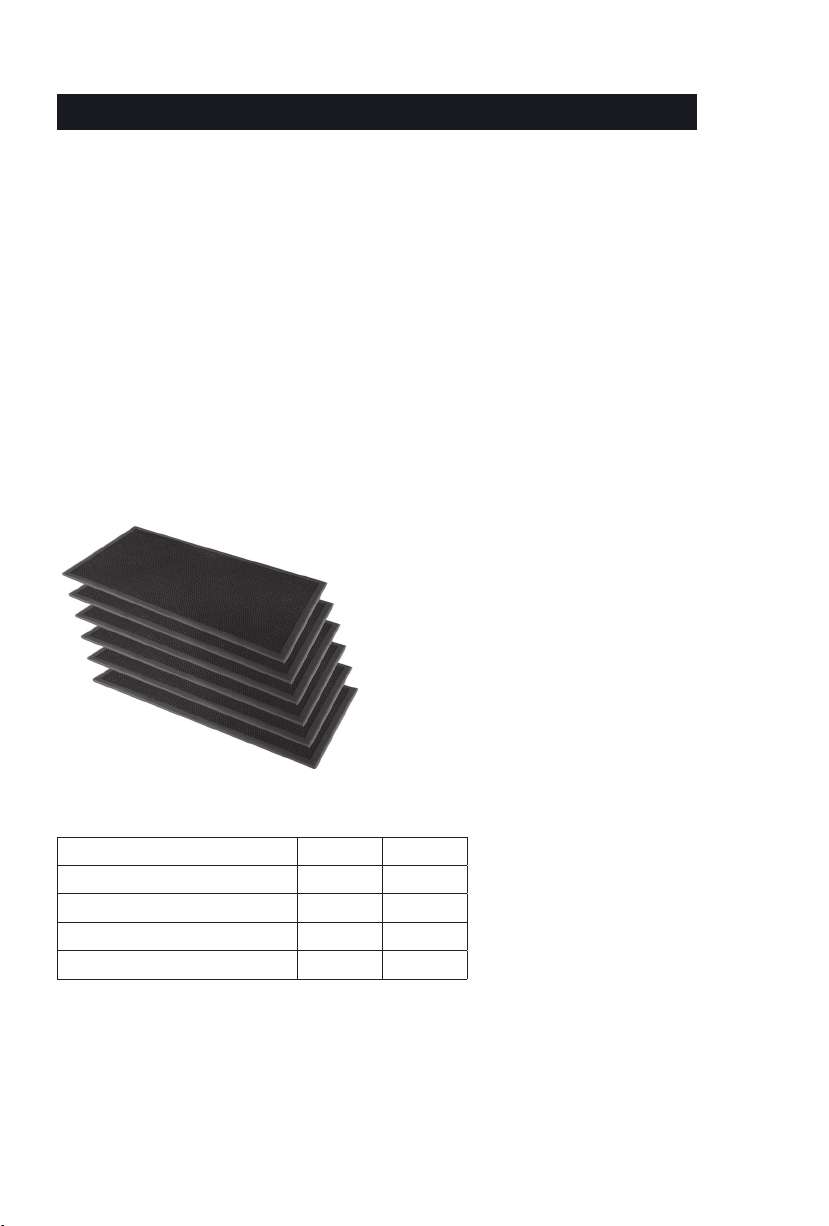
Consumable Material: active carbon sheet
Warranty
The factory provided active carbon sheets
can only last a few months, and can be
purchased at any BROAD exclusive store or
on-line shop, at a low price
2-year warranty from the date of purchase.
For problems caused by design, manufacturing
or factory transportation, free repair or replacement
shall be provided. Repair work will be charged
for other causes.
ACCESSORIES AND WARRANDY
Este manual sirve para los siguientes modelos
1
Tabla de contenidos


