
Brainzsquare SECUDRIVE USB CAD Manual de usuario

SECUDRIVE USB CAD
User Guide
Brainzsquare, Inc.
2013-12-23
Doc Ver. 2.0.5.383

SECUDRIVE USB CAD User Guide
2
Table of Contents
1. Overview ...............................................................................................................................................3
1.1 Features ...............................................................................................................................................................................3
1.2 Product .................................................................................................................................................4
1.3 Glossary ...............................................................................................................................................................................4
2. How to use SECUDRIVE USB CAD ....................................................................................................5
2.1 Running the Login Program Manually..................................................................................................................5
2.2 Agreeing to the End User License Agreement (EULA)..................................................................................5
2.3 Setting up the Password .............................................................................................................................................6
2.4 User Info..............................................................................................................................................................................6
2.5 Auto-notification .............................................................................................................................................................7
2.6 DRM Policy Management Setting...........................................................................................................................8
2.7 Setup Complete...............................................................................................................................................................8
2.8 Features of USB CAD ....................................................................................................................................................9
2.9 Login .....................................................................................................................................................................................9
2.10 How to Use the Vaccine Program........................................................................................................................ 10
2.11 SECUDRIVE USB CAD Menu ................................................................................................................................... 13
2.12 USB Settings Tab .......................................................................................................................................................... 16
2.13 DRM Settings Tab ........................................................................................................................................................ 20
2.14 Unlocking the USB Flash Drive.............................................................................................................................. 28
2.15 Running the Product with Administrator Privileges in Windows Vista / 7....................................... 29
3. How to Uninstall SECUDRIVE Agent ...............................................................................................30

SECUDRIVE USB CAD User Guide
3
1. Overview
The portable USB drive is a very efficient method to carry data. Important data saved on the USB
drive however, is vulnerable to being copied to the local PC or other removable storage devices by
unauthorized personnel.
SECUDRIVE USB CAD is a secure USB flash drive with copy prevention to solve this problem.
All of the saved data is automatically encrypted by the embedded AES 256-bit crypto chip. Also, the
data is prevented from illegal copy, screen capture, and print and it is possible to view a detailed
event log of the files.
1.1 Features
Login: To use the USB flash drive, a user must login by typing in the correct password. A
person without the correct password cannot access the data on the device. When the USB flash
drive is lost, it prevents the data from being copied by an unauthorized third party.
Prevent Copy & Paste: Data saved in the USB stick is prevented from being copied to a local disk
or other removable disks.
Prevent Save As: Saving a file in SECUDRIVE USB CAD to a local PC with another name (Save
As) is also denied.
Prevent clipboard copy & paste: For data saved in the device, clipboard copy & paste by
opening the file, copying it to the clipboard, and pasting is denied.
Print protection and watermark printing: Printing of the file saved in the USB flash drive can be
allowed or restricted. Printing with watermarks is also available.
Screen capture prevention: Attempts to capture the screen with capture tools, including the Print
Screen Key, are disabled.
Prevent file transfer over the network: Data saved in the device is prevented from being
transferred over the network by email attachment or messengers.
Setting the valid period and maximum usage: Validity period and maximum usage of the USB
flash drive can be set, which limits usage. When it exceeds the limit, the user cannot log in to the
device and the USB stick is not available any more.

SECUDRIVE USB CAD User Guide
4
1.2 Product
SECUDRIVE USB CAD flash drive
SECUDRIVE USB CAD master token
The master token is an optional product and should be purchased separately.
1.3 Glossary
The terms used throughout this manual have the following meaning.
USB: SECUDRIVE USB CAD flash drive
Administrator: Person in charge of setting the DRM security policy of the device.
User: Person who uses SECUDRIVE USB CAD.
Policy setup PC: The designated PC where the DRM policy can be set for the device. Or the PC
where the master token connected. For both options, the product runs in administrator mode.
User PC: User’s PC where SECUDRIVE USB CAD is connected to.
Secure zone: Data saving area of SECUDRIVE USB CAD. A user can only access this area by
executing the login program with the correct password.
CD area: Is displayed automatically when connecting SECUDRIVE USB CAD to the PC. CD area
contains a login program to accessing the secure zone.

SECUDRIVE USB CAD User Guide
5
2. How to use SECUDRIVE USB CAD
2.1 Running the Login Program Manually
License agreement or the login window automatically displays when SECUDRIVE USB CAD is
connected to PC. If either the license agreement or the login window does not appear, you should
manually run the login program.
Right click on SECUDRIVE CD area below and select “Open”.
Run “Login.exe” below.
2.2 Agreeing to the End User License Agreement (EULA)
When using the product for the first time, you should agree to the terms by selecting ‘I accept the
agreement’ and then click “OK”.

SECUDRIVE USB CAD User Guide
6
2.3 Setting up the Password
At your first use of the product, you should set up your login password to access the secure zone.
The password must be more than 6 alphanumeric characters.
2.4 User Info
Fill out your user information for the USB. You can choose to show the info at login by pressing the

SECUDRIVE USB CAD User Guide
7
check box near the bottom. Click ‘Next’ to continue.
This section is optional so click ‘Next’ to skip this section.
2.5Auto-notification
Choose whether or not you wish to have automatic notifications for the latest updates for USB CAD.
Click “Next” to continue.

SECUDRIVE USB CAD User Guide
8
2.6 DRM Policy Management Setting
After setting the password, click OK and the DRM Policy Management window is displayed.
Use this PC for DRM policy management: DRM policy setup and change is only available on the
current PC where the USB flash drive is connected to. In other PCs, setup or change is impossible.
Use Token for DRM policy management: DRM policy and change is available on any PC where
the master token is connected to.
On the policy setup PC, copy protection does not work.
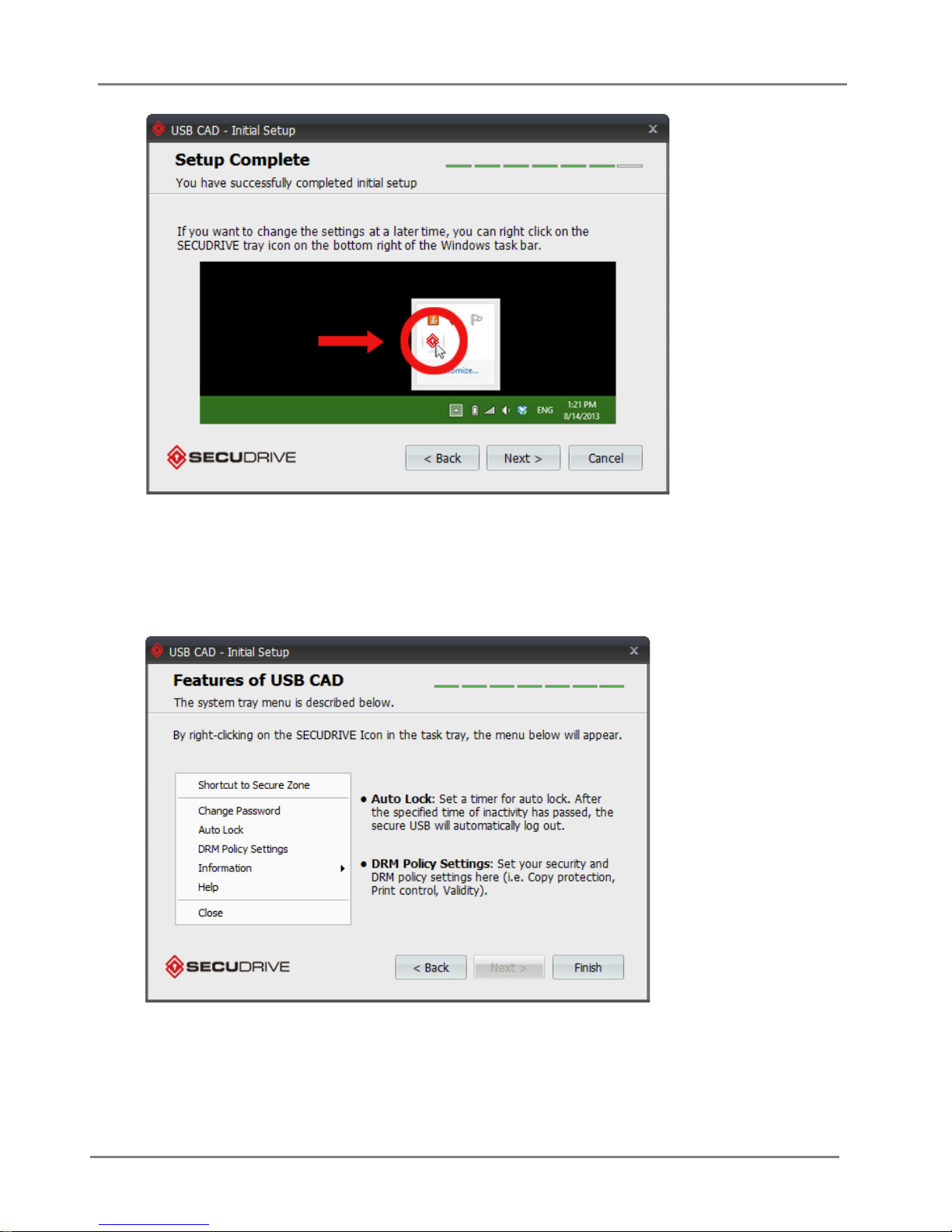
2.7Setup Complete
If you want to change any of these settings at a later time, right click on the SECUDRIVE icon in
Windows Task bar.
Click “Next” to continue.
SECUDRIVE USB CAD User Guide
9
2.8 Features of USB CAD
To change the auto lock and DRM policy settings, right-click on the SECUDRIVE icon in the windows
task bar.
Click “Finish” to proceed to login.
2.9 Login

SECUDRIVE USB CAD User Guide
10
The login window will be displayed as follows.
Enter the configured password and click “OK” to login.
To execute the device in read-only mode, check “Login as read-only” and login.
After 10 consecutive incorrect password inputs, the USB flash drive is locked and unavailable.
The locked device can be unlocked on the policy setup (Administrator’s) PC.
When you have successfully logged in, you will see a removable disk called “SECUDRIVE”.
This is the secure zone and all the data will be encrypted by the AES 256-bit crypto chip and saved
into this area.
The login program will be displayed as an icon in the system tray as follows.
2.10 How to Use the Vaccine Program
When using the product for the first time, accept the terms of the license agreement of the vaccine
program and click “Activate”.
Tabla de contenidos
Manuales populares de Almacenamiento de otras marcas


Spectra Logic
Spectra Logic T-Series Spectra T50e Manual de usuario

Panasonic
Panasonic LKM-F931-1 Manual de usuario

Tabernus
Tabernus Enterprise Erase E2400 Manual de usuario

Rocstor
Rocstor COMMANDER 3F series Manual de usuario

HP
HP P9000 Manual de usuario

Western Digital
Western Digital Ultrastar Data60 Manual de usuario