
Bosean Electronic Technology BH-4S Manual de usuario

BH-4S
Portable Multi-gas Detector
User Manual
Ver:BSA20150424001
Bosean Electronic Technology Co.,Ltd
ISO9001-2008
Bosean Electronic Technology Co.,Ltd www.bosean.com
Tel:86-371-86533226 Email: sales03@bosean.com
- 1 -
Brief Introduction
BH-4S portable multi-gas
detector could detect
combustible gas, O2 and other
two types toxic gases
continuously and simultaneously.
It is widely used in the area
where explosion-proof is required
or toxic gas leaks, like
underground channels or mining
industry, so as to protect the
workers’ life and avoid damage
on the relevant equipments.
1. Main features
*Natural diffusion sampling method and high-sensitivity sensor,
with high sensitivity and repeatability.
* 32-bit built-in MCU, high reliability and self-adaptation ability.
* Full functions, easy operation.
* CSTN colorful LCD, more intuitionistic, abundant and clear
indication.
* Compact design, easy carrying.
* High strength engineering plastics and compound anti-slippery
rubber; high strength, water-proof, dust-proof and explosion-proof.

Bosean Electronic Technology Co.,Ltd www.bosean.com
Tel:86-371-86533226 Email: sales03@bosean.com
- 2 -
2. Structure & Function
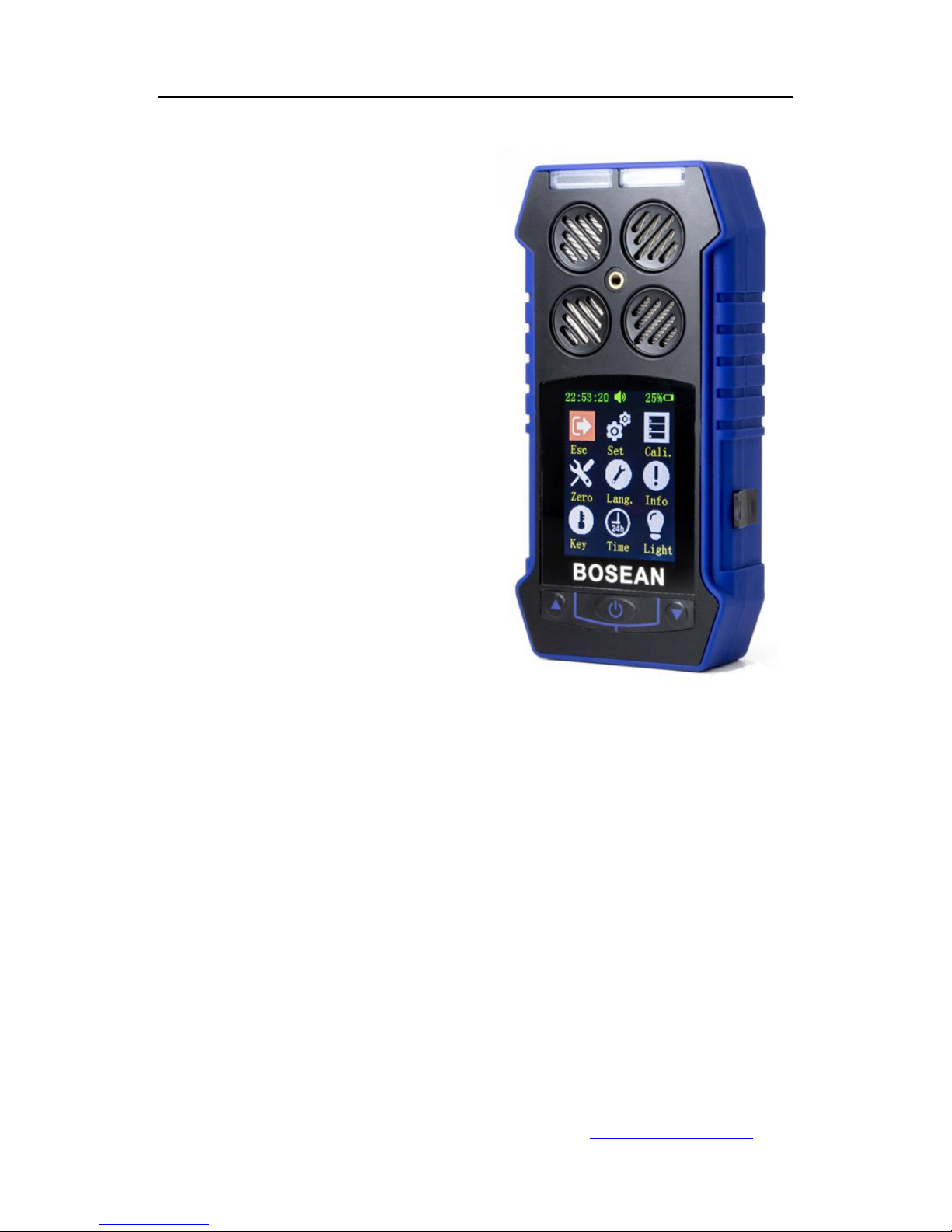
2.1 Appearance
Fig. A
2.2 Detector structure: the main shell, circuit boards, batteries,
display, sensors, chargers of the components.
2.3 Principle: Electrochemical and Catalytic sensor.
3. Technical Data
Target Gas
Range
Low alarm
High alarm
Resolution
LEL
0~100%LEL
20%LEL
50%LEL
1%LEL
H2S
0~100ppm
10ppm
35ppm
1ppm
CO
0~999ppm
50ppm
150ppm
1ppm
O2
0~30%vol
19.5%vol
23.5%vol
0.1%vol
Other gases needed, please contact supplier
Gas sampling method: Natural diffusion
Detecting gas: Combustible gas, H2S, CO, O2
No.
Name
No.
Name
1
Alarm light
4
Buzzer
2
Button
5
Sensors
3
LCD screen

Bosean Electronic Technology Co.,Ltd www.bosean.com
Tel:86-371-86533226 Email: sales03@bosean.com
- 3 -
Accuracy: ≤±5% F.S.
Response Time: ≤30s
Indication: LCD displays real-time and system status;
LED, audio and vibration alert for gas leakage, fault and low
voltage.
Working environment: -20℃~50℃,<95%RH (no dew)
Power Source: DC3.7V Li-on battery, 2000mAh
Charging time: 6h~8h
Working time: ≥ 8h continuously (without alarming)
Gas Sensor Life: 2 years
Explosion-proof grade: Ex ib IIB T3 Gb
Protection Grade: IP65
Weight: Appr. 400g (with battery)
Dimensions: 130mm×67mm×30mm(L × W × H)
4. Operation & Function
4.1 Turn on
Press the button for 3s and then release it. After the buzzer
gives short sound once, the detector is turned on. After 10
seconds, it enters detecting status. At this time, it displays the
concentration of O2, H2S, CO and Combustible gas in the
environment as figure 1.
Fig.1

Bosean Electronic Technology Co.,Ltd www.bosean.com
Tel:86-371-86533226 Email: sales03@bosean.com
- 4 -
4.2 Turn off
Under power on status, press button for more than 3s, With
the buzzer issued a "beep" sound, the LCD screen prompts the
user to shut down the interface shown in Figure 2, the user
through the ▲▼keys to select whether to shut down, if you
choose to shut down, the screen no longer display any information,
the detector into the shutdown state.
Fig. 2
4.3 Button function
Detector in the normal detection state as shown in Figure 3:
Fig. 3
21:18:04
40%
SHUT DOWN
YES NO

Bosean Electronic Technology Co.,Ltd www.bosean.com
Tel:86-371-86533226 Email: sales03@bosean.com
- 5 -
Press any key to open the back light (user can set back light time)
Press " " key to enter the menu;
Press "▲" key to enter the alarm record;
press "▲ ▼" key to select the alarm log to view the alarm record
details.
Press "▼" key to enter the gas concentration curve display
interface;
press "▲ ▼" key to view the different gas type concentration
value curve.
4.3.1 When the detector detects the gas concentration is lower
than the pre-set low alarm value (Note: when the concentration of
oxygen is higher than the low alarm value and lower than the high
alarm value), the detector is in the normal state, No alarm at this
state.
4.3.2 When the detected gas concentration is higher than the
preset low alarm value and less than the high alarm value (Note:
when the oxygen concentration is lower than the low alarm value),
the detector is in a low alarm state, the buzzer sends out every 1s
"beep, beep" alarm sound, the red light flashes synchronously,
and the gas concentration value on the screen changes the color
to yellow, the back light and the vibrator are also open, indicate
low alarm; press " " key to mute, but still shows the alarm
information. Until the new alarm is triggered, the buzzer is
resumed and the alarm light, the vibrator are restored. When the
detector detects the gas concentration value below the low alarm
value, the gas concentration value color turns green, the alarm
signal will be released automatically. Alarming state shown in
Figure 4.

Bosean Electronic Technology Co.,Ltd www.bosean.com
Tel:86-371-86533226 Email: sales03@bosean.com
- 6 -
Fig. 4
4.3.3 When the detected gas concentration is higher than the
pre-set high alarm value, the detector is in the high alarm state,
then the buzzer sends every 1s "Di Di Di Di, ... Di Di Di Di" And the
red indicator light flashes synchronously, the change of the gas
concentration value is displayed on the screen. The color
becomes red, the back light and the vibrator are also on, indicate
high alarm; press " " key to mute, but still Display alarm
information. Until the new alarm is triggered, the buzzer is
resumed and the alarm light, the vibrator are restored. When the
detector detects the gas concentration value below the low alarm
value, the gas concentration value color turns green, the alarm
signal will be automatically released. the alarm signal will be
released automatically. Alarming state shown in Figure 5.
Fig 5.

Bosean Electronic Technology Co.,Ltd www.bosean.com
Tel:86-371-86533226 Email: sales03@bosean.com
- 7 -
4.3.4 When the detected gas concentration is higher than the test
range, the buzzer sounds "beep, beep", the LCD screen is on, the
vibrator is on, and the screen Display the maximum range of gas,
indicating over range. Press the " " key to release the alarm.
4. 3.5 Normal monitoring interface under the first line shows the
time, alarm signs ( it occurs when there is alarm, yellow color
with low alarm, red color with high alarm), the buzzer instructions
(normal , mute ), battery percentage, battery power, date and
temperature,
Note: The alarm sound above can be manually cleared by
pressing the " " key. After clearing, the alarm information is still
displayed normally. If the alarm is triggered again, the
corresponding alarm sound information can be issued again.
4.4 Use and set functions
The detector has a total of alarm record function, gas
concentration curve display, gas parameters setting, calibration,
zero calibration, language settings, information viewing, back light
settings, time settings and other functions. Press the " " button
to enter the function selection, in the function selection interface to
move the cursor to “return” words, continue to press " " to
return to the normal monitoring interface as shown in Figure 6.
Fig. 6

Bosean Electronic Technology Co.,Ltd www.bosean.com
Tel:86-371-86533226 Email: sales03@bosean.com
- 8 -
4.4.1 Alarm record and alarm curve
a. Alarm record function:
Detector in the normal detection of the main interface, press ▲to
enter the alarm recording interface, the record includes the alarm
sensor name, alarm type, alarm value, alarm time. As shown in
Figure 7: This feature can view the gas alarm history, easy
checking.
As shown in the following table:
Sensor
Type
Value
No.
Remark
O2
↑(H)
30
1/4(Current/Total)
Ex
↑(H)
80
2/4(Current/Total)
H2S
↑(H)
58
3/4(Current/Total)
CO
↓(L)
127
4/4(Current/Total)
2016-06-16 12:15:35 Alarm time
The alarm log value is the maximum alarm value in the alarm
interval (O2 is the lowest). The maximum number of record groups
is 500.
b. Curve display function:
The detector in the normal detection of the main interface, press
the ▼to enter the curve display interface, this time through the
▲ ▼ button to view each channel sensor gas concentration
curve. Each channel sensor has a curve display.
Oxygen as an example:

Bosean Electronic Technology Co.,Ltd www.bosean.com
Tel:86-371-86533226 Email: sales03@bosean.com
- 9 -
Fig.7
Description
The abscissa X axis is the time,
the current record within 9s of
the curve
The vertical axis Y is the sensor
value, data of the sensor can be
seen from the Y axis
Note: the axis and the data is green, the data curve is blue, the
low alarm line is yellow, high alarm line is red.
4.4.2 Detector menu settings
In the normal detection mode, press " " key to enter the menu,
then press ▲ ▼ key to select the setting of gas parameters,
calibration, calibration zero, language settings, information view,
back light settings, time setting function. These function menus
can be displayed cyclically and can be selected by cursor
movement.
The menu function is as follows:
Description
Operation
Return
Press ▲▼key to move the cursor to the
return function, press " " to return to the main
interface.
Setting
Four sensor parameters can be set, including
the gas type, unit selection, high alarm and low
alarm, range settings.
Calibration
Can be calibrated for the sensors
Zero
Zero calibration
Tabla de contenidos


