
Bluetti B300S Manual de usuario

BLUETTI B300S
User Manual


Canada
USA
Mexico
Australia
Germany
Italy
Spain
South Africa
Nigeria
UK Sweden
Austria
Switzerland
Japan
China
Malaysia
Singapore
Philippines
New Zealand
Thank You
Thank you for making BLUETTI a part of your family.
From the very beginning, BLUETTI has tried to stay true to a sustainable future through green
energy storage solutions for both indoor and outdoor use while delivering an exceptional
eco-friendly experience for our homes and our world.
That's why BLUETTI makes its presence in 70+ countries and is trusted by millions of customers
across the globe.

CONTENTS
Before You Begin
Safety Instructions
General Safety
Maintenance
Handling & Storage
What's In The Box
Standard Packaging
Product Overview
Diagram
Specifications
Operation
Powering On/Off
BLUETTI App
Charging
Capacity Expansion
Appendix
FAQs (Frequently Asked Questions)
FCC Warning
Technical Support
5
6
6
7
7
8
8
10
10
11
12
12
12
13
15
17
17
18
19
4

Before You Begin
The information contained herein is subject to change without notice.
For the latest version, please visit https://www.bluettipower.com/pages/user-guides.
•The user manual contains instructions and notes on the operation and use of this unit.
•BLUETTI recommends that you use genuine accessories from BLUETTI.
•BLUETTI shall not be responsible for any damage or expense that might result from the use of
parts other than genuine parts from the BLUETTI.
•For your safety and benefit, please read carefully before using and keep it handy for future
reference.
5

BLUETTI products are developed to be safe and reliable. Please read this guide for important
safety information about your device. The guide is intended to help you be more comfortable
and productive while using this device. Failure to follow theseguidelines for proper set up, use,
and care for your device may cause damage to this unit and injury to yourself or others.
SAVE THESE INSTRUCTIONS!
•Always operate or store the unit in accordance with specified temperature range.
•DO NOT expose the unit to fire, liquids, sweat, dirt or other contaminants, as that may
cause the battery to explode or leak flammable liquid or gas.
•DONOT place the uniton an unstable or tilted surface.
•Make sure the place where you are using the unitis well ventilated and spacious.
•Keep away from children and pets.
•DO NOTmodify, attempt to insert foreign objects into the battery, or immerse or expose
it to water or other liquids. Batteries may explode if damaged.
•Battery fluid is corrosive and may be toxic. If a battery leaks, keep the leaked fluid from
touching your skin, eyes, clothes, or other surfaces. Immediately flush the affected areas
with water, or seek medical help.
•DO NOT ignore those warning signson components or products made by manufacturers.
•DO NOTdismantle, cut, crush, puncture, or otherwise damage the unit in any way.
•DO NOT insert foreign objects into the fan, vents, ports, or other openings.
•NEVER use a damaged batteryor component. Improper use or misuse of damaged batteries
may cause damage to your device or injury to yourself as a result of battery fluid leakage,
fire, overheating, or explosion.
Safety Instructions
General Safety
6

•Use approved battery and accessories ONLY. Improper use, or use of unapproved or
incompatible batteries or components may result in a risk of fire, explosion, or other hazards,
and may invalidate any approval or warranty.
•Turn off the unit IMMEDIATELY in case of malfunction.
•Use dry powder fire extinguisher in case of fire.
•DO NOT attempt to modify, replace the internal battery or any other component of the
unit by anyone other than qualified personnel. If necessary, take it to an authorized service
center as incorrect reassembly may result in a risk of fire or electric shock.
SAVE THESE INSTRUCTIONS!
•When not using the unit for extended periods of time, power off the unit and disconnect
the AC adapter from the outlet.
•Charge the unit to 80% SOC every 3-6 months for long-term storage.
•Clean the unit with a dry cloth gently and carefully.
Maintenance
•Use mechanical assistance as needed (e.g. trolleys and adjustable height workbenches).
•DO NOT stack anything on top of the unit either in storage or in use.
•Recommended storage temperature: -4-104°F/-20-40°C.
Handling and Storage
7
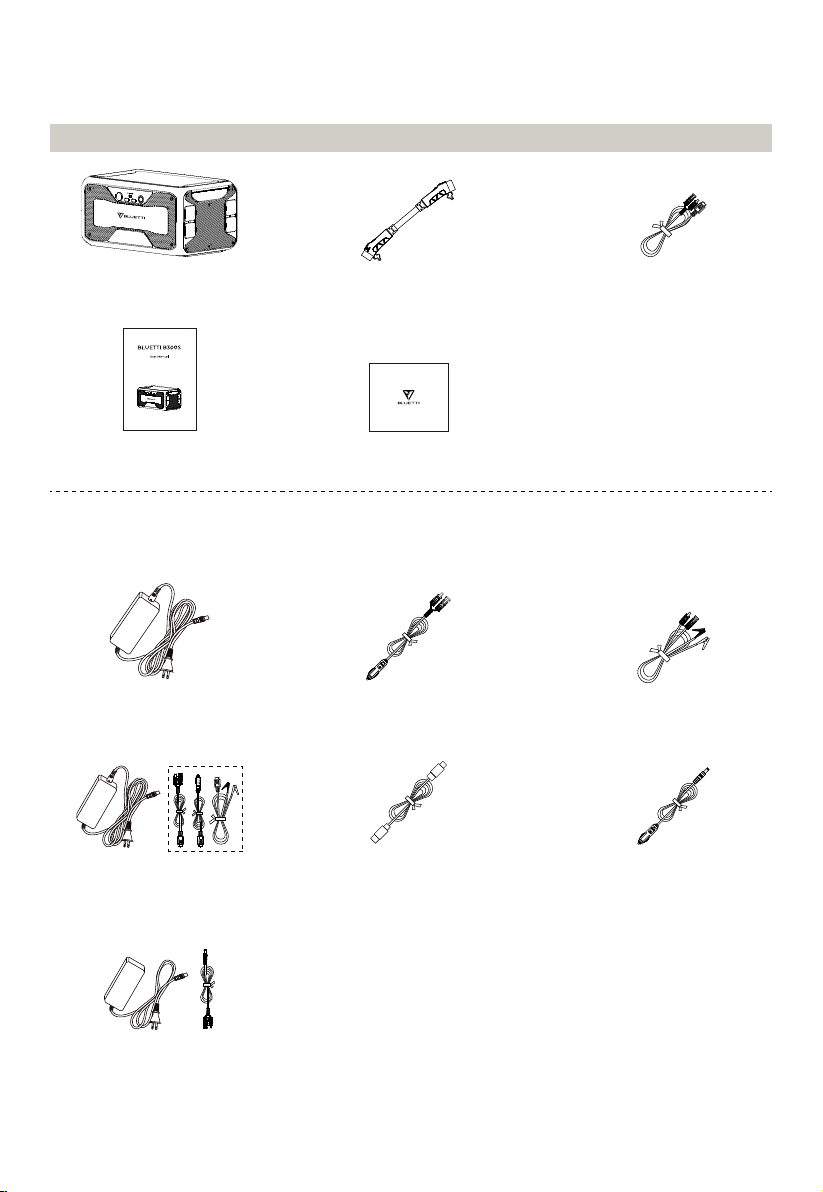
What's In The Box
Standard Packaging
* Below accessories are not included in standard packaging and can be purchased separately at
https://www.bluettipower.com/.
DC Input CablePortable Power Station P150D Battery
Expansion Cable
Warranty Card
User Manual
USB-C to USB-C Cable
Car Charging Cable Lead-acid Battery
Charging Cable
Cigarette Lighter-F to
DC5521 Cable (12V)
AC Adapter
AC Adapter (No cable included)
+ MC4 to DC7909 Cable
D050S Charging
Enhancer Kit
8

Note: All measurements are for reference only.
Package details are subject to change without prior notice.
Works with D050S DC charging enhancer and connects to the adapter input port.
Connects B300S directly with the lead-acid battery.
* P150D Battery Expansion Cable: 31.5in/80cm.
DC Input Cable: 27.6in/70cm. MC4 to XT90.
AC Adapter: 118in/300cm.
Car Charging Cable: 59in/150cm. Cigarette lighter port to MC4.
Lead-acid Battery Charging Cable: 20in/50cm. Clamp to MC4.
D050S Charging Enhancer Kit: D050S: 47in/120cm.
PV Charging Cable: 27.6in/70cm. MC4 to DC7909
Car Charging Cable: 20in/50cm. Cigarette lighter port to DC7909.
Lead-acid Battery Charging Cable: 20in/50cm. Clamp to DC7909.
USB-C to USB-C Cable: 79in/200cm.
Cigarette Lighter-F to DC5521 Cable (12V): 28in/72cm.
AC Adapter (No cable included) + MC4 to DC7909 Cable: 47in/120cm; 5.5in/14cm.
9

Product Overview
* These lights represent the power level, one light for 20%. When it drops to 20%, please
recharge the B300S for extended lifespan.
Diagram
1. Power Indicator*
2. Cigarette Lighter Port
3. USB-C PD3.0
4. DC Power Button
5. 18W USB-A Port
6. Power Button
7. Battery Expansion Port
8. PV Input
9. Adapter Input
6
1
2
3
4
5
7
9
8
10
Otros manuales para B300S
1
Tabla de contenidos
Otros manuales de Accesorios para cámaras de Bluetti


