
Bluebird RT101 Manual de usuario

user
manual
RT101
BLUEBIRD
version 1.0

This user manual is protected by copyright.
Copyright © 1995-2017 Bluebird Inc. All rights reserved.
Bluebird Inc. is the designer and manufacturer of Bluebird handheld mobiles.
This manual and the programs in this device are protected under international copyright laws,
and may not be copied, distributed, translated, or removed by any means.
Registered Trademark
BLUEBIRD is an emerging global brand, striving to lead the market
in performance and mobility. Their products represent reliability,
innovation, and innovative technology. Bluebird is a registered
trademark from the global brand of Bluebird Inc. and is copyright
protected.
t Bluebird and stylized Bluebird Logo are registered trademarks and symbols of Bluebird Inc.
t Qualcomm®IZat™ is a registered trademark of Qualcomm Atheros, Inc.trademark of
Qualcomm Atheros, Inc.
t Adobe®is a registered trademark of Adobe Systems Inc.
t All other trademarks and copyrights are the property of their respective owners.
User’s Guidance
Device type User’s guidance
Class B Device
(Household Information &
Communication)
This device has qualified the electromagnetic wave suitable
registration and can be used as a household device at a
residential area as well as any other areas.
Type Registration This wireless device may cause propagation interference,
and so, it cannot be used for life-saving services.

Safety Information
Symbols
This manual uses the following symbols to indicate hazards and additional information.
Symbol Name Description
Warning Indicates situations that could cause injury to yourself or others.
Caution Indicates situations that could cause damage to your device or
other equipment.
Note Indicates additional information that can help you get the most
out of the device.
Please read this safety precaution information carefully. Failure to follow the information
provided may result in fire, electric shock, or other property damage or bodily injuries.
Device
t Do not press the Power button on the device if the device is wet or do not touch
adapter or power cord with wet hands. There is risk of electric shock.
t Do not use your device in an explosive danger zone.
t If your device becomes wet, do not put your device in heaters, microwaves, etc. to
dry it. There is a risk of explosion or malfunction.
t Do not scratch the device’s touchscreen. Use only your fingers or a compatible pen.
Never use an actual pen, or any other sharp object on the touchscreen.
t Although this device is very sturdy, do not drop, hit, bend, or sit on it on purpose. It
can be broken.
t Do not modify, take apart, or repair the device. Contact to your customer service
center. Failure to do so will void your warranty.
t Do not attempt to modify your hardware or software. It may cause device
malfunction and void your warranty.
t You may not be able to use this wireless device in basements, open fields,
skyscrapers, or other places where the signal is weak.
t Backup the data and information from your device. Your data, such as ringtones,
texts, and voice messages, may be erased during repairs or upgrades.
t Do not paint your device. It can damage your screen or your device’s exterior.
t Avoid using or storing this device at extreme temperatures. This device is designed
to work at temperatures between -10°C and 50°C (-2°F and 122°F), and humidity
level between 5% and 95%.

Safety Information
Environment
t Do not use the device while driving or operating heavy machinery. Doing so may
result in death or serious injury.
t Do not use the device in locations with combustible goods. Doing so may result in
an explosion.
t Do not use the device in dusty or hot locations. Doing so may damage the device.
t Do not expose your device to direct sunlight such as on the dashboard of a car for
extended periods of time.
t Do not use the device in humid locations. Doing so may damage the device and void
the warranty.
t Do not keep the device close to air conditioner vents. Corrosion within the device
may occur due to condensation from changes in temperature.
t Do not allow children to play with the device.
Battery and Charging
t Improper battery use may cause fire, explosion, or other hazard.
t If the battery is removed due to impact, heat, submersion, or other damage, there is
a risk of explosion. Keep away from children and animals.
t Do not allow the battery’s contacts to touch things like necklaces, coins, or electric
conductors. Do not give any impact with sharp objects. There is a risk of explosion.
t Use only the approved battery and charger. Using an incompatible battery or charger
may cause device malfunction or other damage, such as fire.
t When you are not using the device for a long period, take out the battery and keep
the device and the battery in a dry, cool place. Also, charge the battery at least
once a year. If you keep it without charging for a long time, it may cause device
malfunction.
Distraction
In some situations, using your device may distract you and cause serious injuries and
damages. For example, avoid talking on the phone or texting while driving or riding a
bicycle. It is strictly prohibited by law in some jurisdictions. If you cannot avoid using
your device while driving, stop your vehicle or use hand-free kit.
Frequency Interference
t This wireless device may cause radio frequency interference, so use Airplane mode
or turn off the device when prohibited.
t The device emits an electromagnetic fields. It may interfere with your medical
devices.
t Do not place credit cards, phone cards, bankbook, and tickets next to the device.
The magnetic field of the device can damage their magnetic strips.

Package Contents
Package Components
The device includes the following components. If any of these components
are missing, please contact the retailer who sold you the device.
RT101 tablet Micro USB cable Power adapter
The images in this manual may not reflect the color and shape of the actual device.
These illustrations are intended for descriptive purposes only.
Cradle Set (Optional)
Cradle Power adapter AC power cord

Your Device
Device Front
1
2
3
5
4
No. Name Description
1Front camera Captures pictures and video (2.0 megapixels).
2Battery LED
Indicates the status of the battery.
t The battery LED turns red when the battery is
charging.
t The battery LED turns off when the battery is fully
charged.
t The battery LED blinks red at 1 second intervals
when the battery has a problem, such as it being
too hot or too cold.
3Light sensor Detects the ambient light to automatically adjust the
brightness of the screen and the exposure of the camera.
4Microphone Captures sound for video conferencing, voice recording, and
speech recognition.
5Screen
Displays programs and acts as a multi-touch interface.
The default resolution is 1280 × 800.
Your Device
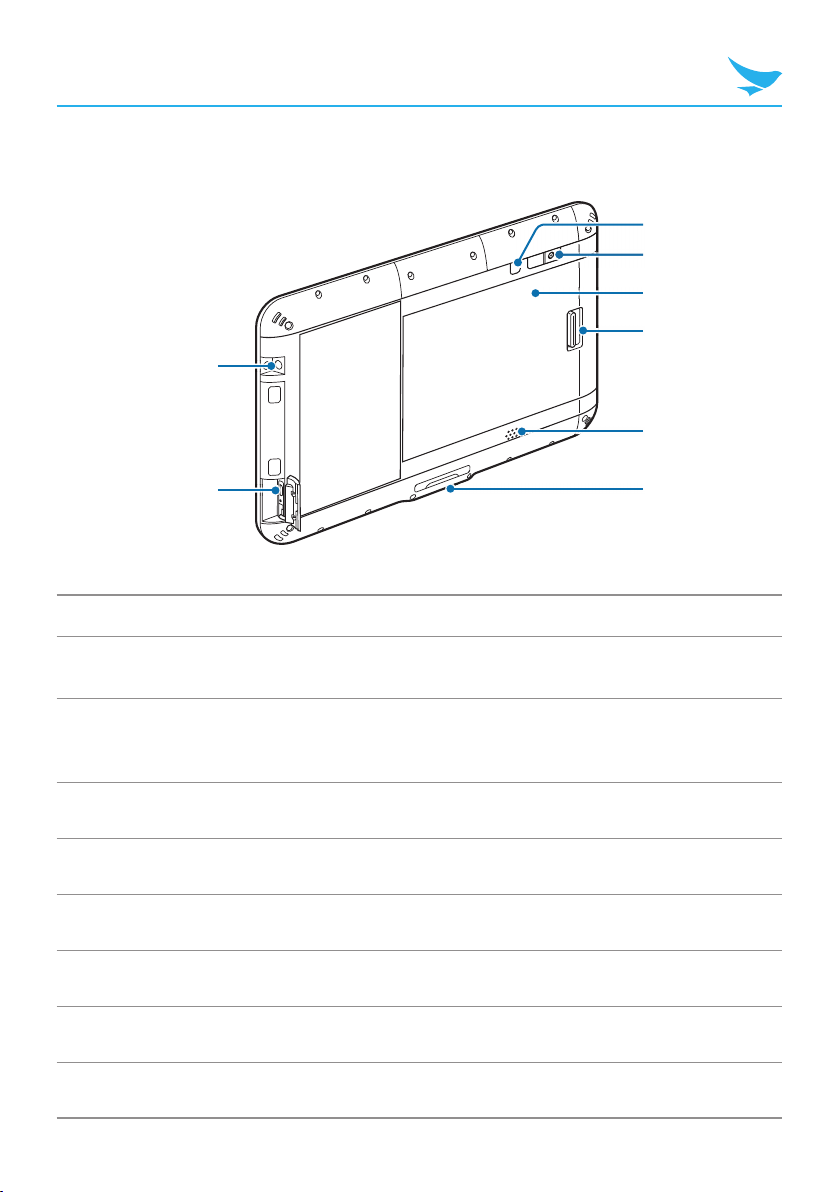
Device Back
1
2
7
8
4
6
5
3
No. Name Description
1Audio jack Connects to the 3.5 mm adapter on headphones or
computer speakers.
2USB port
Connects to the power adapter to charge the device.
Connects to USB devices, such as memory sticks,
keyboards, and external hard drives.
3Power button Turns on the device.
4Rear camera Captures photos and video (8 megapixels).
5Battery area 6000 mAh, inner part of the device.
6Battery locker Locks the battery.
7Speaker Emits sound.
8Cradle connector Connects the device to a cradle (optional).

Your Device
Cradle Front (Optional)
1
No. Name Description
1Connector Connects the cradle to a device.
Cradle Bottom (Optional)
3
4
1
2
No. Name Description
1DC OUT port Connects another power source. For details about available
devices, contact Bluebird customer service.
2USB port Connects to USB devices, such as memory sticks,
keyboards, and external hard drives.
3DC IN port Connects a power cable.
4Ethernet port Connects an ethernet cable.

Device Specification
Physical Characteristics
Dimensions (L x W x D) 262.0 x 178.2 x 14.65 mm
Weight 810g
Display 10.1 inch, HD (1280 X 800)
Battery User replaceable Battery
3.8V, 6000mAh
Expansion slot MicroSD 64GB SDHC
SIM slot 1 SIM
Audio Speaker, microphone
Camera Rear : 8MP Autofocus
Front : 2MP Fixed Focus
GPS A-GPS, GLONASS (for WWAN only)
Barcode scanner 1D&2D imager (w/ the Smart Plug)
Sensor Android : Gyroscope, Accelerometer, e-compass
Windows : Accelerometer
Performance Characteristics
Processor Android : 2.0 GHz Octa Core Processor
Windows : 1.92 GHz Quad Core Processor
OS Android 7.x (64bit)
Windows 10 IoT Enterprise (64bit)
System memory Android : 2GB
Windows : 4GB
Built-in storage Android : 32GB
Windows : 32GB / 64GB
Interface Docking Connector
1 x USB Typc C (3.0) (OTG)

Device Specification
User Environment Characteristics
Durability
1.2m / 4 ft. to drop per MIL STD 810G
1.5m / 5 ft. to drop per MIL STD 810G
(w/ the Rugged Plug)
Operating temperature -10 °C to 60 °C (14 °F to 140 °F)
Storage temperature -20 °C to 65 °C (-4 °F to 149 °F)
Humidity 90% non-condensing
Communication Options
WWAN Radio (optional) LTE, HSPA+/HSPA/UMTS, EDGE/GPRS
WLAN Radio 802.11 a/b/g/n (802.11n 2.4GHz and 5GHz)
Indoor use only in 5150 MHz ~ 5250 MHz band.
WPAN Radio Bluetooth 4.0 LE , Class 2
Please ask your sales representative for the specifications not listed above or for the
future upgradeable specifications.
Tabla de contenidos
Otros manuales de Tableta de Bluebird

Bluebird
Bluebird ST100 Manual de usuario

Bluebird
Bluebird EF550 Manual de usuario

Bluebird
Bluebird ET100 Manual de usuario

Bluebird
Bluebird BP50 Manual de usuario

Bluebird
Bluebird ST102 Manual de usuario

Bluebird
Bluebird RT080 Manual de usuario

Bluebird
Bluebird PT550 Manual de usuario

Bluebird
Bluebird ET100 Manual de usuario

Bluebird
Bluebird RT100 Manual de usuario


