
Black Box Jido Manual de usuario

USER MANUAL
One-Stop Asset Management Solution
Version 2.2
Manual & Electronic Lock GPS Container Tracker User Manual

Page 1of 23
BLACK BOX
TABLE OF CONTENTS
1. JIDO –Web Application .................................................................................................2
1.1 Login ............................................................................................................................................2
1.2 Dashboard...................................................................................................................................2
1.3 Settings .......................................................................................................................................3
1.3.1 Company Creation..............................................................................................................3
1.3.2 Container..............................................................................................................................4
1.3.3 Device...................................................................................................................................5
1.3.4 Device Assignment.............................................................................................................6
1.3.5 Alerts ....................................................................................................................................6
1.4 User Management .....................................................................................................................7
1.4.1Role........................................................................................................................................7
1.4.2 Users.....................................................................................................................................7
1.5 Vendor Management.................................................................................................................8
1.6 Route Management ...................................................................................................................8
1.7 Trip Management.......................................................................................................................9
1.8 Real Time tracking...................................................................................................................10
1.9 History Playback ......................................................................................................................10
1.10 Geo-Fence Creation (Unloading Points).............................................................................11
1.11 Reports....................................................................................................................................12
2. JIDO –Mobile App.......................................................................................................14
2.1 JIDO –Lock and Unlock Process..................................................................................................14
1. Steps to Activate Device to Use...................................................................................21
2. SPECIFICATIONS .........................................................................................................21
3. OVERVIEW ...................................................................................................................22
3.1. Available Models ................................................................................................................22
3.2. What’s Included ..................................................................................................................22
3.3. Solution Architecture .........................................................................................................22
4. ALERTS GENERATING FROM DEVICE ..........................................................................23

Page 2of 23
BLACK BOX
1. JIDO –Web Application
Jido Web application’s user interface and step by step user guide is as below
1.1 Login
User can login to the system by using user name and password.
1.2 Dashboard
After login user can be able to view their container status at a glance, how many devices are
active and inactive.

Page 3of 23
BLACK BOX
1.3 Settings
After Login as Company User, Users can be able to view below Menus
Settings contains below sub menus:
1. Container
2. Device
3. Material
4. Route Management
5. Transporter
6. Trip Management
1.3.1 Company Creation
After login as a Distributor user can be able to add Company in this module.

Page 4of 23
BLACK BOX
1.3.2 Container
All the containers details can be added from here. User all can edit the container detail if
required. Device Assignment with container part also can be handled from here itself.
Add Container to click here

Page 5of 23
BLACK BOX
1.3.3 Device
After login as a system admin user (Company) can be able to add Jido devices in the stock.
To Edit & Assign Devices click here
Click to add device(s)

Page 6of 23
BLACK BOX
1.3.4 Device Assignment
After login as a system admin user (Company User) can be able to assign Jido devices to
Distributor from the stock.
1.3.5 Alerts
Different kind of Alert description can be modified from this module.

Page 7of 23
BLACK BOX
1.4 User Management
1.4.1Role
Different Types of Role can be added under this module.
1.4.2 Users
Different types of user can be added under Users module. Roles can also be assigned to
Users from here.
Page 8of 23
BLACK BOX
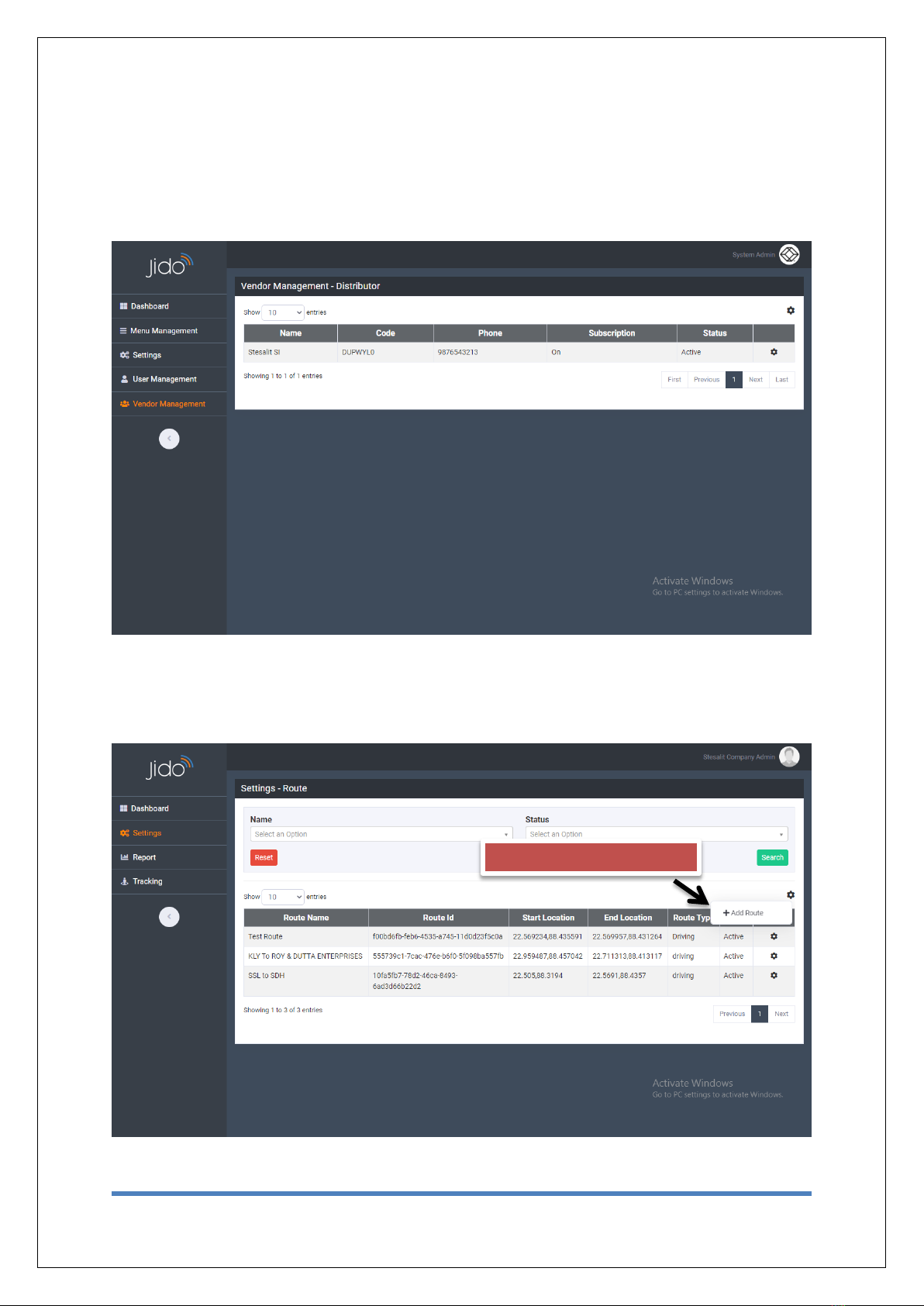
1.5 Vendor Management
After login as a System Admin (Company User), OEM can add all the Distributors detail using
this module.
1.6 Route Management
User can be able to create route based on Starting point and Destination Point and minimum
one via Point.
Click to add Route

Page 9of 23
BLACK BOX
Created Route can be viewed on Map.
1.7 Trip Management
User can be able to create Trip against the route. User can also add Driver detail, Trip Start
and End time.
Tabla de contenidos


