
Behringer Fridge-tag 3 Manual de usuario


User Manual Fridge-
tag 3
1 — Last update: Aug 18, 2021
Berlinger & Co. AG
Copyright © 2021 Berlinger & Co. AG

Table of Contents
1. Home .................................................................................................................................................. 2
2. Display explanations ......................................................................................................................... 3
3. State of delivery / sleep mode .......................................................................................................... 4
4. Read out information prior to activation (in sleep mode) ............................................................... 5
5. Inserting a SIM card .......................................................................................................................... 7
5.1. Installation of the SIM card......................................................................................................... 8
5.2. Enter the SIM card pin code ..................................................................................................... 10
6. Initial device configuration ............................................................................................................. 11
7. Placing the external sensor ............................................................................................................ 13
8. Activation process .......................................................................................................................... 14
8.1. Activation of the device ............................................................................................................ 15
8.2. Setting the calendar format ...................................................................................................... 16
8.3. Using the READ and the SET buttons ...................................................................................... 17
8.4. Auto date ................................................................................................................................. 18
8.5. Setting the date........................................................................................................................ 19
8.6. Setting the time ........................................................................................................................ 22
8.7. Connection error (external sensor only).................................................................................... 24
9. Read and change settings / How to correct setting mistakes....................................................... 25
9.1. Initial menu (read and change settings).................................................................................... 26
10. Screen displays during measurement mode................................................................................ 28
11. Readout and settings options via SMS ........................................................................................ 30
11.1. Assigning administrator rights ................................................................................................ 31
11.2. Adding alarm recipients.......................................................................................................... 32
11.3. Delete alarm recipients........................................................................................................... 33
11.4. Changing alarm limits via SMS............................................................................................... 34
11.5. Weak battery alarm status...................................................................................................... 35
11.6. SMS commands and error messages ..................................................................................... 36
11.7. Example of an alarm notification............................................................................................. 37
11.8. Status query........................................................................................................................... 38
11.9. Confirmation of alarm status................................................................................................... 39
12. Alarm trigger function ................................................................................................................... 40
12.1. Alarm display and confirmation options .................................................................................. 42
12.2. Cumulative daily time above/below the limit ........................................................................... 45
12.3. Not confirmed alarms ............................................................................................................. 46
13. Remote Alarm Notifications .......................................................................................................... 47
14. Audio alarm (optional factory setting).......................................................................................... 48

15. Reading the history / Readout mode ............................................................................................ 49
15.1. Option 1: Read out day per day directly on the device (30-day history) .................................. 50
15.2. Option 2: Read out alarms directly on the device – use the Alarm Super Jump function (30-day
history) .................................................................................................................................................. 53
15.3. Option 3: Read out data from the files generated by the Fridge-tag 3 by connecting it with a
computer ............................................................................................................................................... 55
15.4. PDF report explanation .......................................................................................................... 58
15.5. Autoscaling of graphs in PDF ................................................................................................. 61
15.6. Temperature record duration (optional factory setting) ........................................................... 62
15.7. Verification process................................................................................................................ 63
16. Explanations of terms ................................................................................................................... 65
17. Expire code explanation................................................................................................................ 66
18. Important Information ................................................................................................................... 67
19. Regulatory information ................................................................................................................. 69
20. Firmware ........................................................................................................................................ 71
21. FAQ / Glossary .............................................................................................................................. 72

1. Home
Berlinger Fridge-tag 3
Real-time alerts when it matters most
From anywhere to everywhere
Thanks to a programmable built-in cellular module, it enables operators all around the world to receive
automatically generated real-time alerting or warning messages by SMS. Additionally it can be easily
integrated into a web based server application.
In case of a temperature deviations, the Fridge-tag 3 sends immediately a notification by SMS to
predefined person(s) in charge. A fully comprehensive emergency plan can now be activated in order to
prevent damage of the goods.
• Built-in cellular module
• Real-time alert
• Notification by SMS and E-Mail
Technical Specification
Product Information Overview
Berlinger & Co. AG User Manual Fridge-tag 3 - 1
Page 2 of 72

2. Display explanations
1. OK symbol or alarm symbol
2. Daily HIGH/LOW alarm indicators (showing the history of the last 30 days)
3. Operation indicator (colon is flashing)
4. Battery indicator (indicates the remaining capacity of the battery)
5. Additional warning symbol . Indicates that one or more alarms are not confirmed.
6. Time, duration and text display
7. Date and text display
8. Display of measured minimum/maximum temperature
9. Temperature display
10. Display of the temperature measurement unit (°F/°C)
11. Display of the activated sensor:
Int. = internal sensor
Ext. = external sensor (cable with temperature sensor)
12. Cellular signal strength
13. SIM card indicator (displayed = no SIM card inserted)
14. Data transfer indicator
Berlinger & Co. AG User Manual Fridge-tag 3 - 1
Page 3 of 72
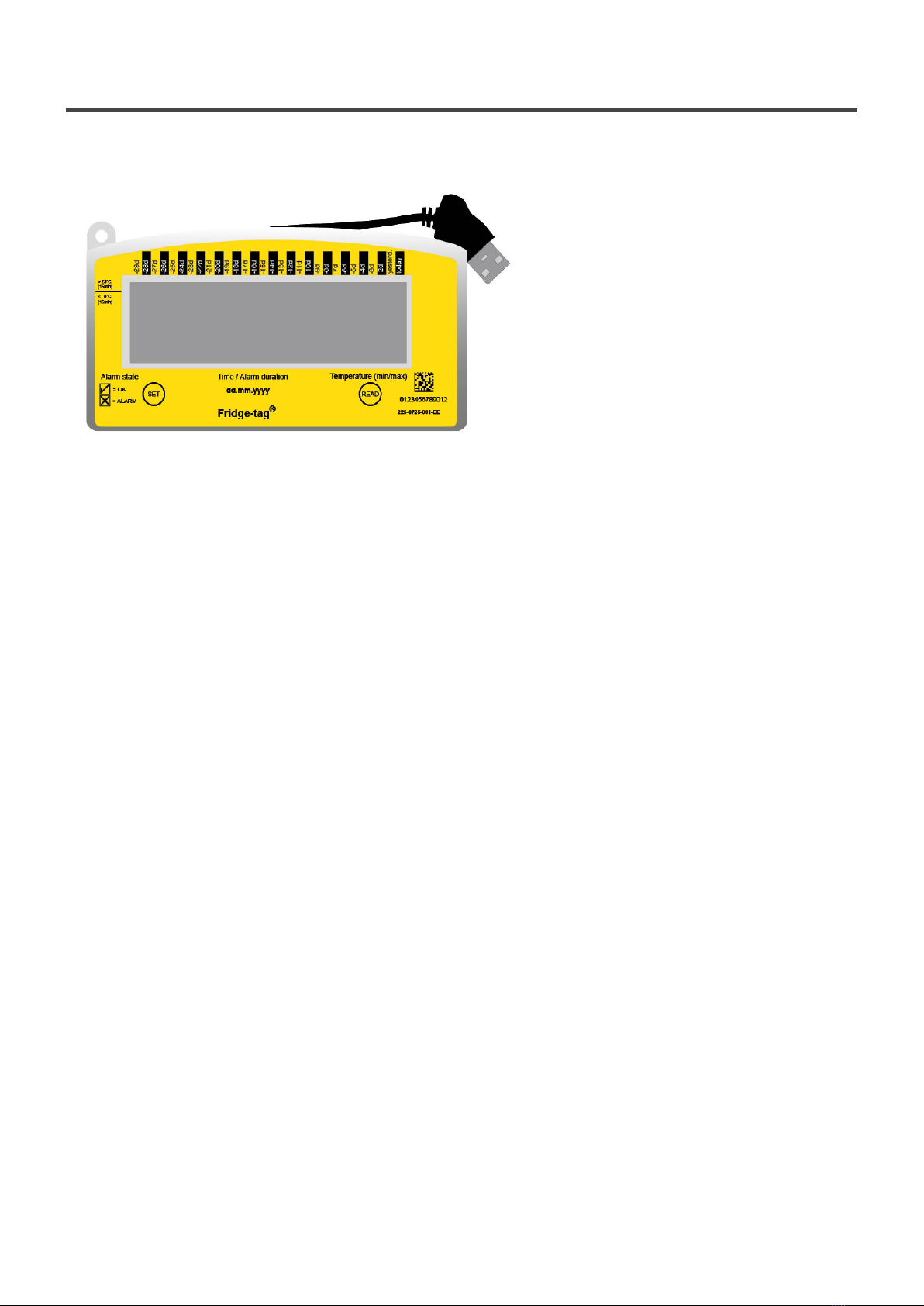
3. State of delivery / sleep mode
The Fridge-tag is shipped in sleep mode.
The display (LCD) is blank.
Berlinger & Co. AG User Manual Fridge-tag 3 - 1
Page 4 of 72

4. Read out information prior to activation
(in sleep mode)
The following page shows which information will be indicated on the screen upon successive READ
button pressings while in sleep mode.
Note: After approx. 60 seconds without to press any button of the Fridge-tag the devices goes back into
sleep mode; the display is blank again. Start from the beginning.
Press repeatedly READ to gather information.
After 1st
pressing
of READ
Display test:
all segments activated
After 2nd
pressing
of READ
Indication of date and production test
result: 16 February 2018/PASS (quality check passed)
After 3rd
pressing
of READ
Indicaton of the Network configuration
Status:
( ) configured
( ) not configured (go to chapter Initial device
configuration).
After 4th
pressing
of READ
Indication of the current temperature and which sensor is
activated (internal/external). Display shows —.-°C if
external sensor is not connected.
After 5th
pressing
of READ
Indication of configuration ID
(e.g. 1234)
After 6th
pressing
of READ
Indication of upper alarm settings.
Example shows duration and temperature limits: 10 hours,
>+8°C, high
After 7th
pressing
of READ
Indication of lower alarm settings. Example shows duration
and temperature limits: 1 hour, <–0.5°C, low
Berlinger & Co. AG User Manual Fridge-tag 3 - 1
Page 5 of 72

After 8th
pressing
of READ
Serial number of the device
After 9th
pressing
of READ
PCb number
(manufacturer information)
After 10th
pressing
of READ
Battery power:
3 bars = full (>70%)
2 bars = half-full (30–70%)
1 bar = low (0–30%)** **Device should be recharged.
After 11th
pressing
of READ
Disable user clock adjust.
For more information, please see chapter Activation
process
After 12th
pressing
of READ
The display is blank again.
Berlinger & Co. AG User Manual Fridge-tag 3 - 1
Page 6 of 72

5. Inserting a SIM card
Note: If using the device with a Datamanagement Software (Berlinger SmartView, etc.), make sure that
the system is set up before you go on with the next steps.
SIM card specifications
Dimension: Mini(classic) SIM, 25 mm, 15 mm, 0,76 mm
Telephone number: If the SIM card is already preinstalled the number is printed on the label.
PIN-Code: If the SIM card is already preinstalled, no PIN code is necessary.
Berlinger & Co. AG User Manual Fridge-tag 3 - 1
Page 7 of 72
Tabla de contenidos
Otros manuales de Monitor de Behringer


