beamUP BU250 Manual de usuario

PRODUCT MANUAL
WITH BATTERY BACKUP
BU250, BU850
beamlabs.io
REV0820

TABLE OF CONTENTS
Congratulations on purchasing your beamUP garage
door opener. It will provide you with many years of
security, safety and convenience. This installation and
owner’s manual contains complete instructions for
installing and operating your garage door opener.
For warranty registration
beamlabs.io/warranty
Carton Contents............................................1
Before You Begin.......................................... 2
Preparation + Tools Needed............................ 3
Rail Assembly .............................................. 4
Rail and Power Head Assembly ........................ 5
Trolley and Pulley Assembly............................. 6
Installing Chain and Cable .............................. 7
Installing Belt .............................................. 9
Attaching Sprocket Cover .............................. 11
Mounting Header Bracket..............................12
Attaching Rail and Mounting Door Bracket ......... 13
Mounting Power Head to Ceiling ..................... 14
Attaching Door Arms....................................15
Emergency Release Handle............................ 16
Connecting Photo Eye Safety System ................17
Connecting Power and Aligning Photo
Eye Safety System........................................18
Connecting Standard Door Control ..................19
Connecting Deluxe Door Control.................... 20
Before We Start Programming The Opener ........21
Travel Limit Adjustment – UP Limit ................... 22
Travel Limit Adjustment – DOWN Limit.............. 23
Setting the Force ........................................ 24
Final Adjustments and Testing........................ 25
Handheld Remote Control ............................ 26
Wireless Keypad ........................................ 27
Enabling/Disabling Motion Sensing ................ 28
Battery Backup .......................................... 29
Battery Backup Maintenance ......................... 30
beamUP Smart Garage Door Controller............. 31
Using your Garage Door Opener .................... 32
Troubleshooting......................................... 37
Maintenance ............................................. 39
Warranty .................................................. 40
Spare Parts ............................................... 44
Opener Assembly Parts................................ 45

beamlabs.io 1-800-436-9186 1
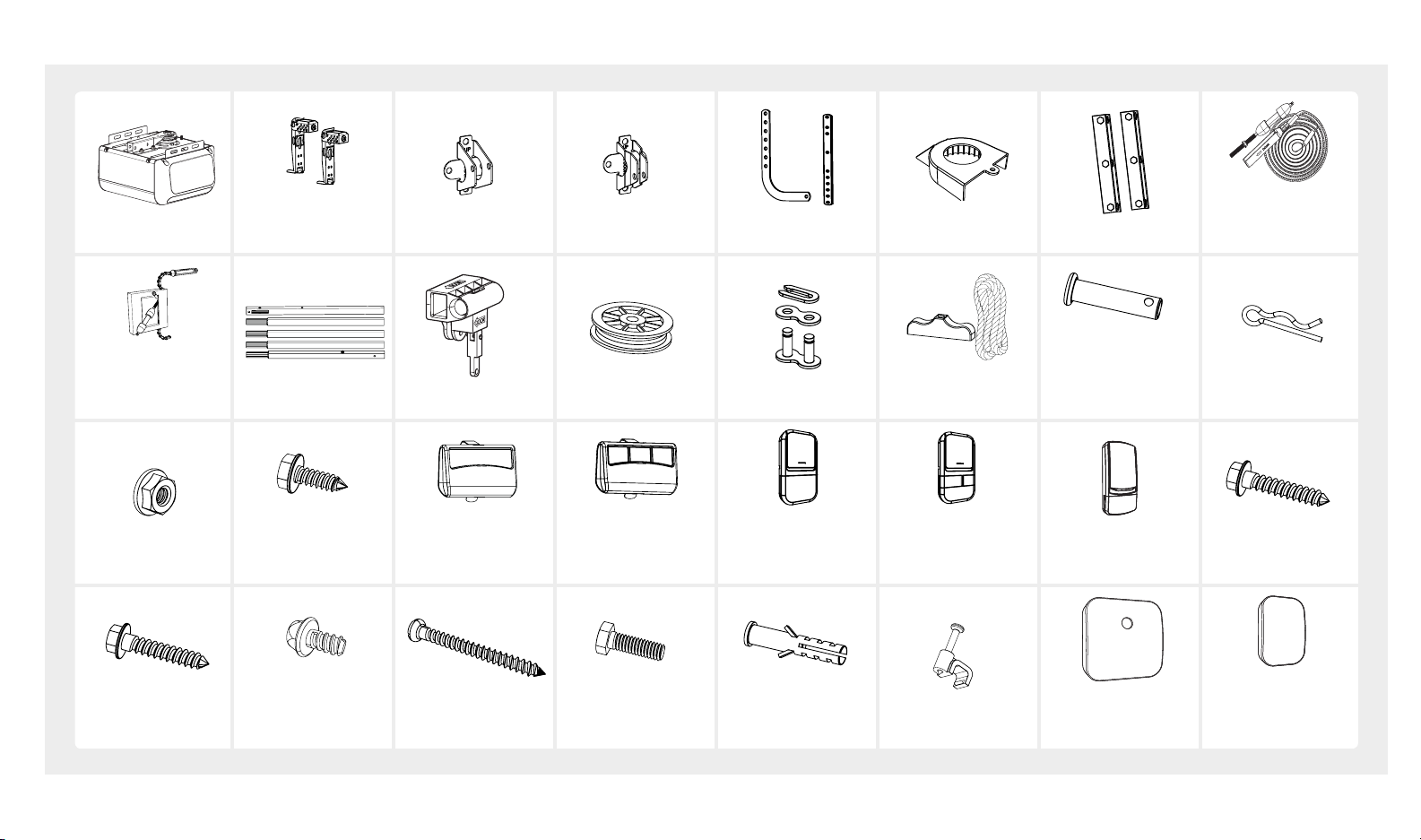
CARTON CONTENTS
Trolley Sha/
Cable Assembly
Rail Trolley Pulley 1 x Master Link
Emergency
Release Handle
5 x Clevis Pins
2 x 5/16" x 1"
2 x 5/16" x 1-3/8"
1 x 3/8" x 1-3/4" 5 x Hitch Pins
7 x Flange Nut
2x Self-Threading
Screws
1/4" x 5/8"
Single Button
Remote
BU250
Three Button
Remote
BU850
Standard
Door Control
(BU250)
Deluxe
Door Control
(BU850)
Wireless Keypad
(BU850)
6 x Lag Screws
5/16" – 1/1/2"
4 x Screws
#12 x 1-1/4"
1 x Self-Threading
Screw
#8-18 x 5/16
6 x Screws
#6 x 1-3/8"
6 x Bolts
5/16"– 18 x 1" 6 x Anchors
Insulated Staples
Controller
Wireless Door
Sensor
Power Head
Photo Eye
Safety System
Header Bracket
Door Bracket
Door Arms
Sprocket Cover
Hanging Bracket
Trolley Sha/
Belt Assembly

2beamlabs.io 1-800-436-9186
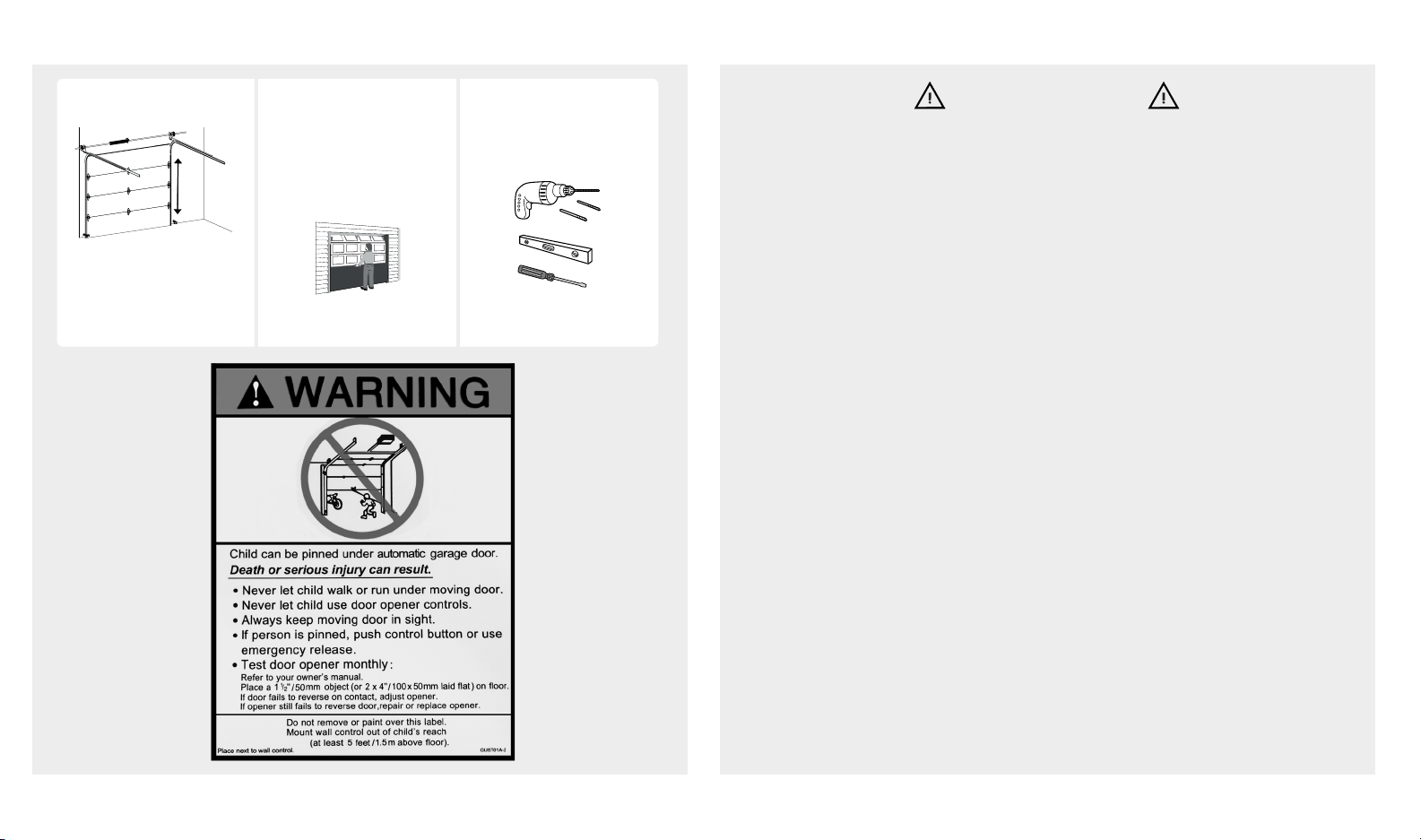
BEFORE YOU BEGIN SAFETY INSTRUCTIONS
To reduce the risk of severe injury or death:
1. READ AND FOLLOW ALL INSTALLATION INSTRUCTIONS.
2. Install only on a properly balanced garage door. An improperly balanced door has the
potential to inflict severe injury. Have a qualified service person make repairs to cables,
spring assemblies, and other hardware before installing the opener.
3. Remove all ropes and remove or make inoperative all locks connected to the garage
door before installing opener.
4. Where possible, install the door opener 7 feet (2.13 m) or more above the floor. For
products having an emergency release, mount the emergency release within reach, but
at least 6 feet above the floor and avoiding contact with vehicles to avoid accidental
release.
5. Do not connect the opener to source of power until instructed to do so.
6. Locate the door control button: (a) within sight of door, (b) at a minimum height of 5 feet
so small children are not able to reach it, and (c) away from all moving parts of the door.
7. Install the Entrapment Warning Label next to the wall-mount control button in a promi-
nent location.
8. Aer installing the opener, the door must reverse when it contacts a
1-1/2 inch (3.8 cm) high object (or a 2x4 board) laid flat on the floor.
9. NEVER try to remove, loosen, move, or adjust garage door, cables, pulleys, brackets,
and door springs. All are under EXTREME tension.
10. To reduce the risk of injuries to persons – use this operator only with residential sectional
garage doors. Only enable the unattended operation feature when installed with a
sectional door. The Smart Door Controller should be used only on sectional doors and
with garage door openers made aer 1993 with a photo eye safety system.
WARNING
Measure door height. Check mounting
locations.
Are additional
reinforcement material
needed?
If over 7.5 feet (2.28 m),
rail extension kit will be
needed. See page 3 See page 3
Check your toolbox. Do
you have all the tools
needed?
7.5 feet
(2.28 m)

beamlabs.io 1-800-436-9186 3
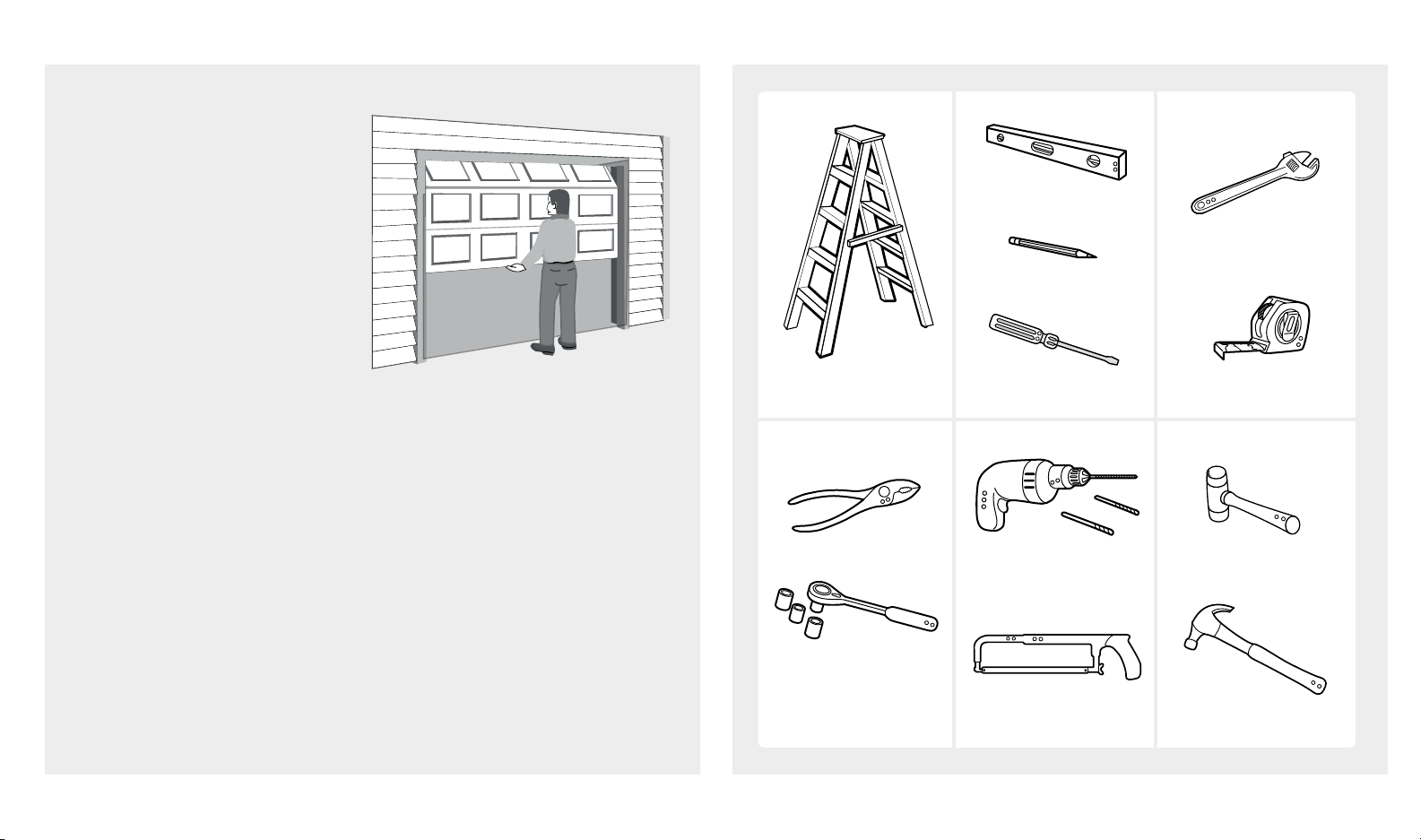
PREPARE GARAGE DOOR FOR INSTALLATION TOOLS NEEDED
Step Ladder
Ratchet with
1/4", 7/16" and
1/2" sockets
Level
Pencil
Screwdriver
Hack Saw
Tape Measure
Adjustable Wrench
Rubber MalletDrill 3/16" and
5/16" Drill Bits
Pliers
Hammer
DO NOT REUSE PARTS AND
WIRING FROM AN OLD
OPENER!!!
BEFORE beginning
installation:
1. Disable locks and disengage
trolley from current opener.
2. Perform the following door
test to ensure your door
is balanced and in good
working condition.
Make sure garage door is fully closed before you start the installation
To test your garage door:
1. Raise and lower the door to check if there is any sticking or binding.
2. Check for loose hinges, damaged rollers, frayed cables and damaged or
broken springs.
3. Li the door approximately halfway and release. The door should stay at
that point under proper spring tension.
Call a qualified garage door service technician if your door binds, sticks or
is unbalanced.

4beamlabs.io 1-800-436-9186
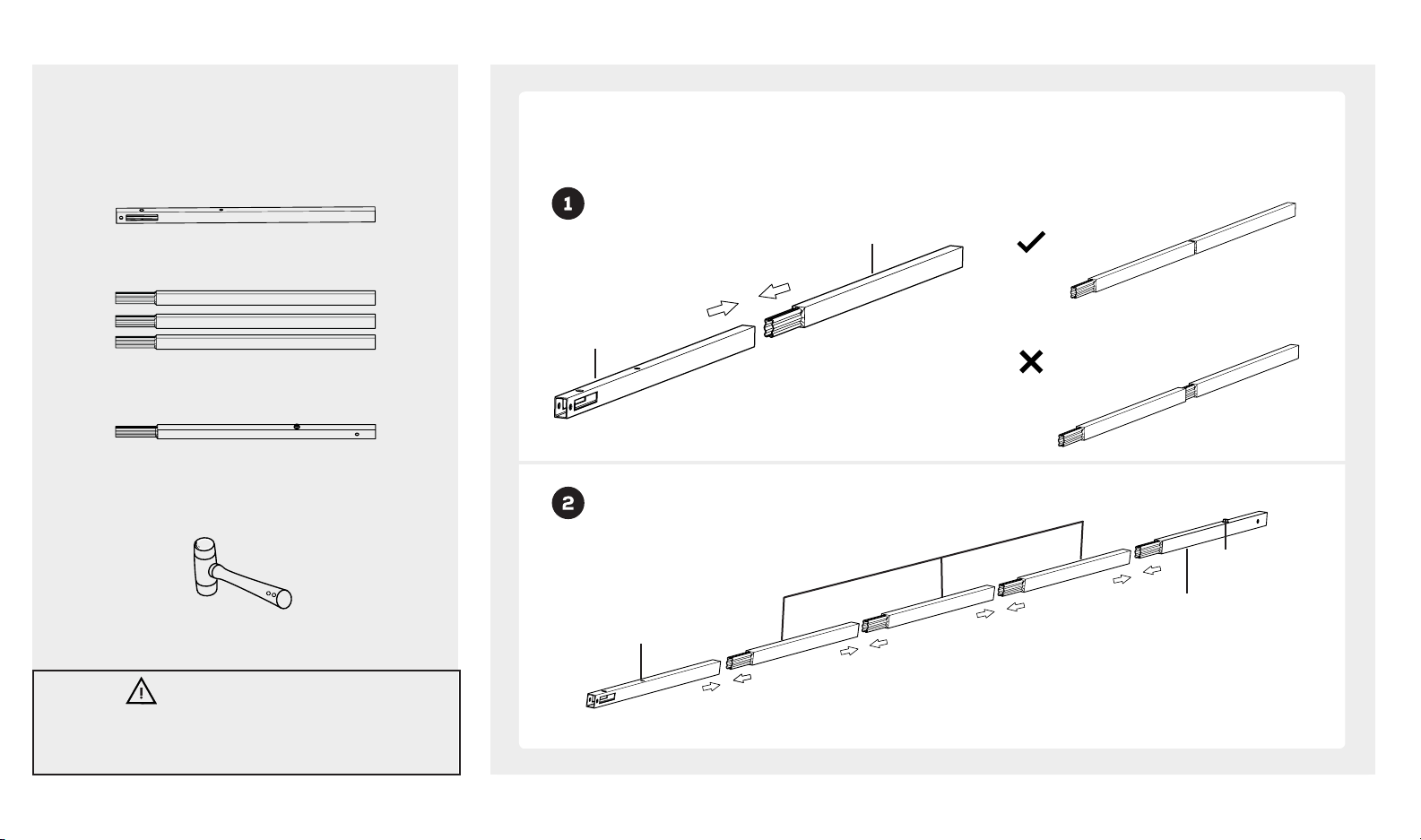
RAIL ASSEMBLY
Look in the box for:
Rubber Mallet
Rail – Middle Segments x3
Rail – End Segment
Tools needed:
Connect rails starting with the rail header segment. To apply additional force tap gently on the end of the
connected rail segments with a rubber mallet or on padded flooring.
Rail – Header Segment Securely connected by applying force
CAUTION
To prevent INJURY from pinching, keep hands and fingers
away from joints when assembling the rail.
Rail- Header
Segment
Rail- Middle
Segment
Rail- Header
Segment
Rail- Middle Segments x3
Rail- End Segment
Stop Bolt
Loosely connected
Right
Wrong

beamlabs.io 1-800-436-9186 5
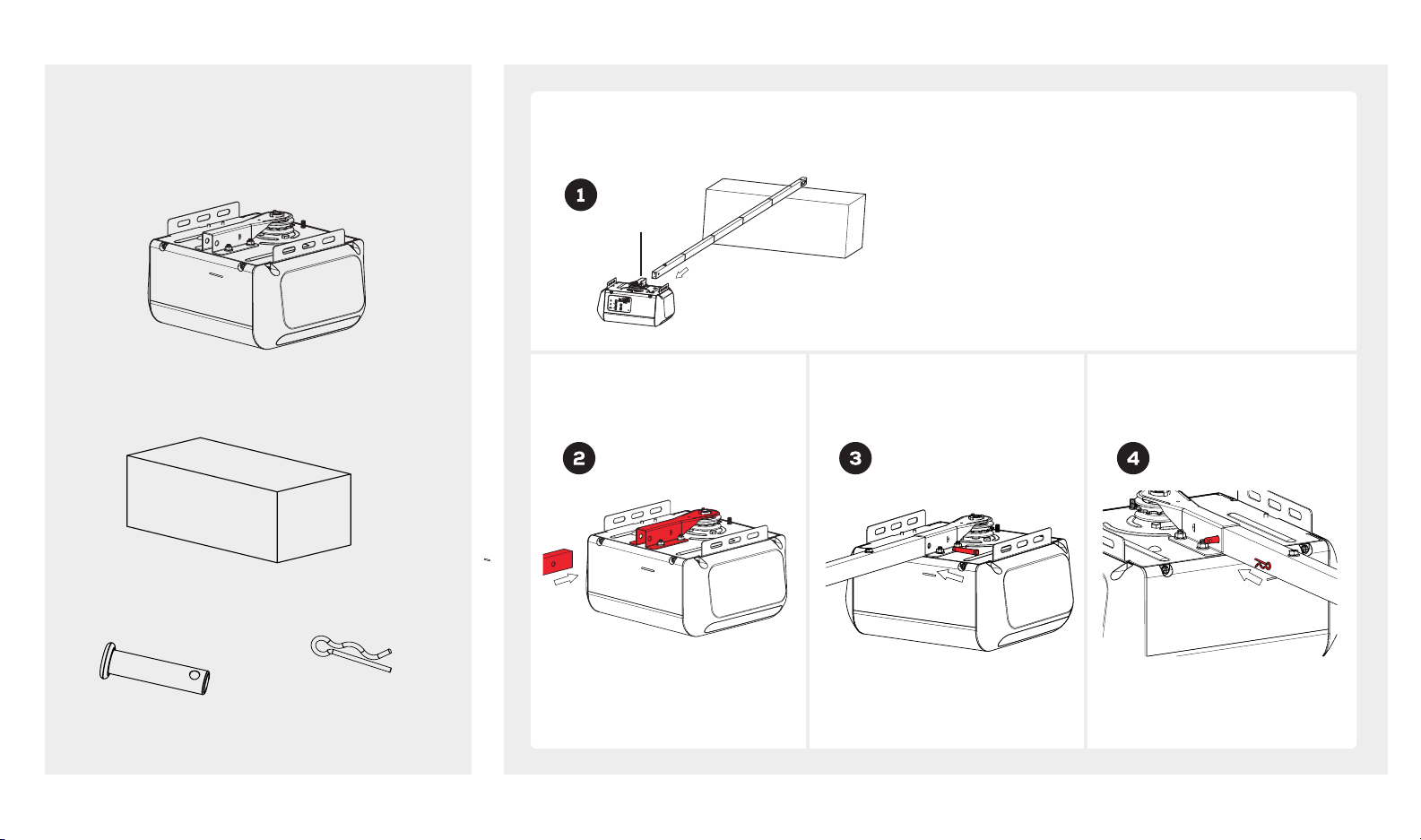
RAIL AND POWER HEAD ASSEMBLY
Look in the box for:
Power Head
Opener Carton
Clevis Pin
5/16" x 1-3/8"
Hitch Pin
Insert rail-end segment into
bracket as shown.
Insert clevis pin into rail
bracket as shown.
Insert hitch pin into clevis pin
as shown.
Use garage door opener carton to assemble rail to power head. Use packing material as protective base for
power head.
Rail Bracket

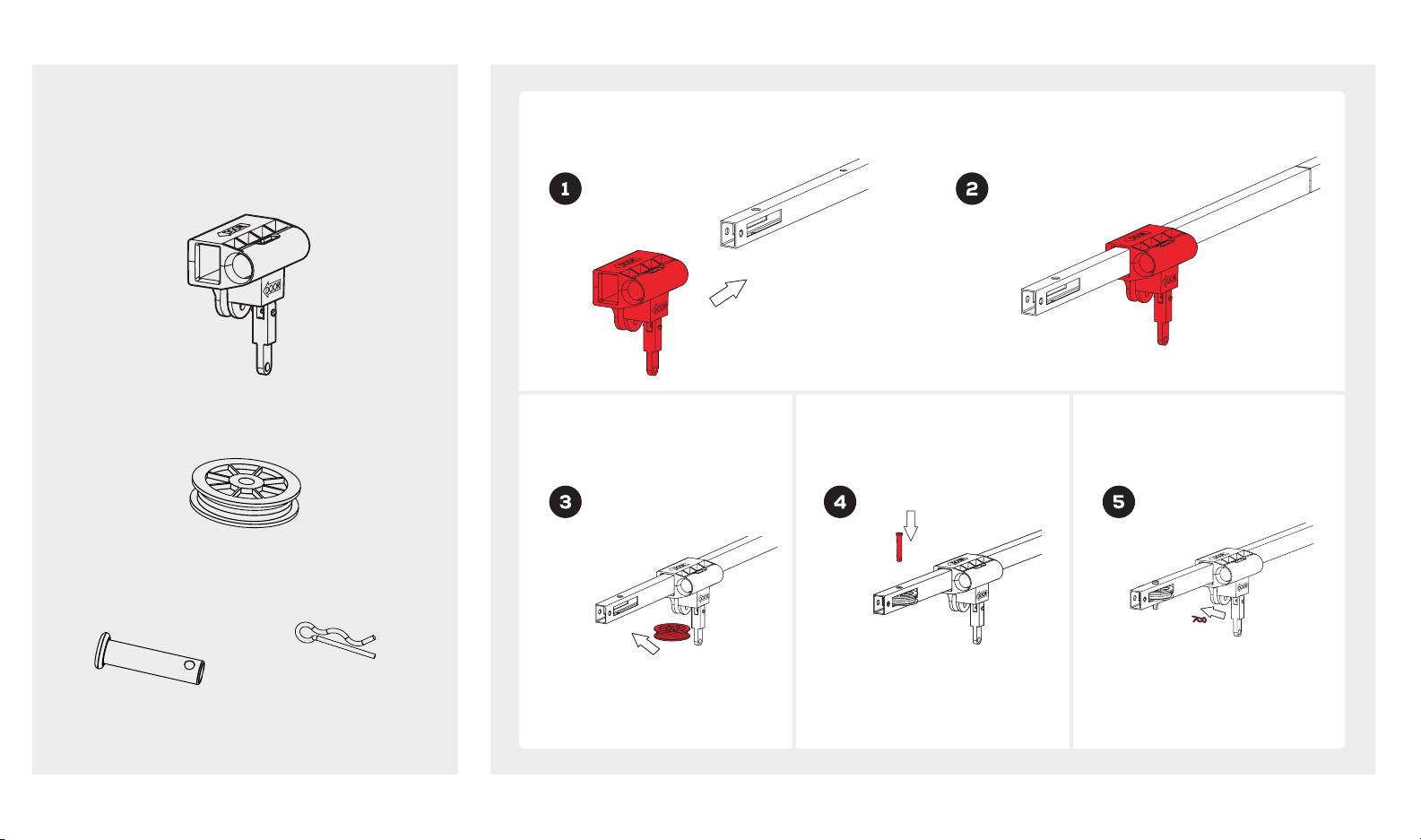
6beamlabs.io 1-800-436-9186
Clevis Pin
3/8" x 1-3/4"
Hitch Pin
Insert clevis pin through rail
hole and pulley.
Insert hitch pin into clevis pin.
TROLLEY AND PULLEY ASSEMBLY
Look in the box for:
Trolley
Pulley
Slide trolley onto the rail. Make sure the arrow on the trolley points toward the door.
Insert pulley into the pulley
slot.

beamlabs.io 1-800-436-9186 7
INSTALLING CABLE AND CHAIN (BU250)
Look in the box for:
Trolley Sha/Chain Assembly
Master Link
Align end of chain around sprocket and extend chain
past chassis, approximately 7" (17.8 cm). Sprocket teeth
must engage the chain.
WARNING
To prevent SERIOUS INJURY:
• DO NOT connect power until instructed.
• Keep hands and fingers clear from sprocket during
operation.
• Wear gloves when installing chain and cable.
• Keep hands and fingers away from joints and
possible sharp edges.
Insert cable through circular hole in trolley. Pull
cable through pulley slot and toward power
head.
Chassis
Pull chain with box along the rail towards trolley and
then remove box.
7"
(17.8 cm)
Loosely attach trolley sha with chain connector. 5 complete turns will be sufficient.
Pull trolley lock lever down to unlock. Insert trolley
sha through the trolley and pull lever back up.
End of
Chain
Trolley in
engaged
position

8beamlabs.io 1-800-436-9186
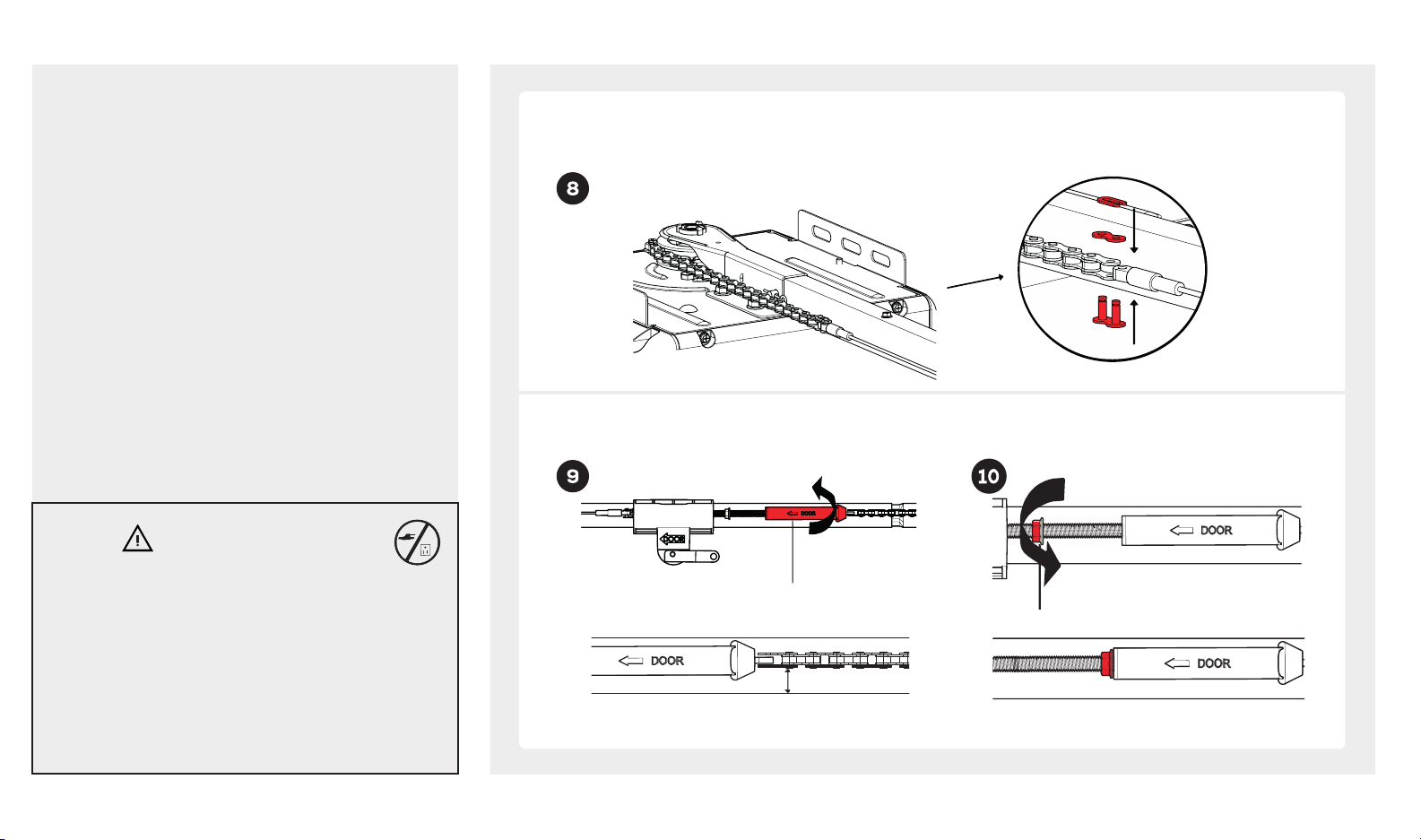
INSTALLING CABLE AND CHAIN (BU250)
Bring cable and chain together and connect with master link. Check to make sure the chain is not twisted. If
chain and cable are not close enough to connect with master link, loosen chain-to-cable connector to create
more slack.
WARNING
To prevent SERIOUS INJURY:
• DO NOT connect power until instructed.
• Keep hands and fingers clear from sprocket during
operation.
• Wear gloves when installing chain and cable.
• Keep hands and fingers away from joints and
possible sharp edges.
Adjust chain tension by turning chain-to-cable connector until chain is about 1/4 inch (.64cm) above the base of
rail. Once proper tension is achieved tighten lock nut against chain-to-cable connector.
Chain-to-cable connector
Tighten until...
1/4 inch
(.64 cm)
Nut
Este manual sirve para los siguientes modelos
1
Tabla de contenidos
Otros manuales de Abridor de puerta de garaje de beamUP
Manuales populares de Abridor de puerta de garaje de otras marcas

Craftsman
Craftsman 139.53924 Manual de usuario

Chamberlain
Chamberlain MyQ 940ESTD Manual de usuario

Automatic Technology
Automatic Technology GDO-9V1 SecuraLift Manual de usuario

Westfalia
Westfalia 19 36 07 Manual de usuario

Chamberlain
Chamberlain HD520EVP Manual de usuario

Cardin
Cardin BL Series Manual de usuario