Baum VisioDesk Manual de usuario

VisioDesk
User Guide
Item number: 106010H04
User guide version: 1.5
English 06/2017


About BAUM 3
About BAUM
BAUM Retec AG has been a leading provider of products and services
for blind and visually impaired people for more than 35 years. The high
quality and innovative braille products, desktop magnifiers, reading
machines, and software solutions are developed and manufactured in
Germany, and are ideal for educational, professional and private use.
Our Mission
“We believe in independence for every person who is blind or visually
impaired. We passionately apply our skills and experiences toward
developing solutions that reinforce success at school and work, and
improve quality of life.
We always question the way things have been done in the past. We
explore new and innovative ways to solve problems. Our approach
includes ergonomics, thoughtful design, and materials that meet the
highest quality standards. We care deeply about our customers, and help
and support them as much as we can. We care about our employees
too, and support them to reach their highest potential, ensuring a secure
and lasting working environment.
We develop innovative technology solutions that provide independence
for people who are blind or visually impaired. Our high-quality solutions
allow visually impaired people to magnify their world, and blind people to
access electronic and print content with speech or braille output.”
Wolfgang Baum, Chief Executive

Contents 4
Contents
1ABOUT THIS USER GUIDE .............................................................................................5
2ABOUT..............................................................................................................................6
3BEFORE YOU BEGIN ......................................................................................................7
WHAT COMES IN THE BOX?........................................................................................73.1
4HOW TO POSITION VISIODESK ON YOUR DESK ........................................................8
5CAMERA POSITIONS ....................................................................................................11
6POWER ADAPTOR ........................................................................................................12
7VISIODESK CONTROL PANEL.....................................................................................13
8VISIODESK CONTROL PANEL BUTTONS – QUICK REFERENCE............................14
9BECOMING FAMILIAR WITH YOUR NEW VISIODESK ...............................................15
SWITCH OFF LIGHT ..................................................................................................189.1
AUTOFOCUS ...........................................................................................................199.2
ALTERNATIVE SET OF FALSE COLOURS.....................................................................209.3
10 EXTERNAL CONNECTIONS OF VISIODESK...............................................................21
USB OUTPUT .........................................................................................................2110.1
VIDEO OUTPUT........................................................................................................2110.2
VIDEO INPUT ...........................................................................................................2210.3
11 COMMON PROBLEMS AND SOLUTIONS ...................................................................23
12 DEFECTS AND REPAIR ................................................................................................24
13 SERVICE BOX................................................................................................................25
14 COMPLIANCES..............................................................................................................26
CE CONFORMITY ....................................................................................................2614.1
FCC CONFORMITY..................................................................................................2614.2
ENVIRONMENTALLY FRIENDLY DISPOSAL ACCORDING TO EU-DIRECTIVE 2012/19/EU2714.3
15 WARRANTY ...................................................................................................................29
16 FOR YOUR SAFETY ......................................................................................................30
17 TECHNICAL SPECIFICATIONS ....................................................................................33

About this user guide 5
1 About this user guide
Thank you for purchasing a VisioDesk from BAUM Retec. The purpose
of this manual is to provide the end user and/or their service provider
with details on how to use VisioDesk.
VisioDesk is a high-quality, German-made portable video magnifier,
which will provide you many years of reliable service. This manual
contains everything you need to know to use your new device.
As you will learn, VisioDesk is very easy to use. In addition to
instructions on how to operate VisioDesk, this manual also includes
recommendations for how to position your device, what to do if anything
goes wrong with the device, and important safety guidelines.
We suggest that you store this manual in a safe place for future
reference.
Notice for End Users in Germany/Europe
This manual is a part of the VisioDesk product, and should be kept with
the product at all times. In the event your VisioDesk is ever sold to a new
end user, this manual must be provided to them.
Copyright Notice
Copyright © 2017 BAUM Retec AG, Industriestr. 15, 74909
Meckesheim, Germany. All rights reserved. No part of this publication
may be reproduced or distributed in any form or by any means, or stored
in a database or retrieval system, without prior written permission from
BAUM Retec AG.
All efforts have been made to ensure that information contained in this
document is correct at the time of issue. Neither BAUM Retec AG nor its
representatives assume any responsibility for errors or omissions. Nor is
any liability assumed for damages resulting from the use of information
contained herein.
Licenses and trademarks
All licenses and trademarks are the property of their respective owners.

About 6
2 About
Beautifully designed, high quality, very portable, simple to use, yet
powerful – this is the definition of VISIO. VisioBook and VisioDesk are
the smallest and most flexible members of the VISIO family.
VisioDesk can be folded flat when not in use, which combined with being
lightweight (10.5 lbs. / 4.8 kg) makes for an extremely portable device.
Best of all, VisioDesk is battery powered, running for 6 hours before you
need to recharge it.
VisioDesk features a full HD camera, a 15.6” display (16:9 format, full
HD), with high contrast and power saving LED backlight. Thanks to the
full HD camera VisioDesk provides a bright and crisp image even at the
smallest magnification level. This is especially helpful for users with
retinitis pigmentosa (RP).
Despite being one of the smallest and lightweight devices, VisioDesk
provides the type of functionality you expect from a basic CCTV reader.
VisioDesk displays magnified text and images in your choice of full
colour, black on white, or white on black and a variety of false colours.
Autofocus is provided as well as optional fix focus for hand writing and
filling in forms. Thanks to its image optimizer feature VisioBook will
always provide an optimum image quality, ensuring that text is always
crisp and clear.
The VisioDesk camera can be pivoted in 4 four positions. So besides
viewing down on a sheet of paper, you may also use the distance view or
mirror positions of the camera. The display screen can be easily adjusted
to the height and angle you prefer.
VisioDesk will, in most cases, take documents of poor quality (e.g. faint
print, crumpled or dirty paper, etc.) and magnify them in high contrast.
However, despite all of our technical efforts, there will be some
documents that cannot be displayed properly. In these rare instances,
the full colour setting is the best setting.

Before you begin 7
3 Before you begin
Please read the safety instructions at the end of this manual and check
the contents of the packaging.
What comes in the box?3.1
1 VisioDesk
1 carrying bag
1 Power Adaptor
1 User Manual
1 Cleaning cloth for camera window and display

How to position VisioDesk on your desk 8
4 How to position VisioDesk on your desk
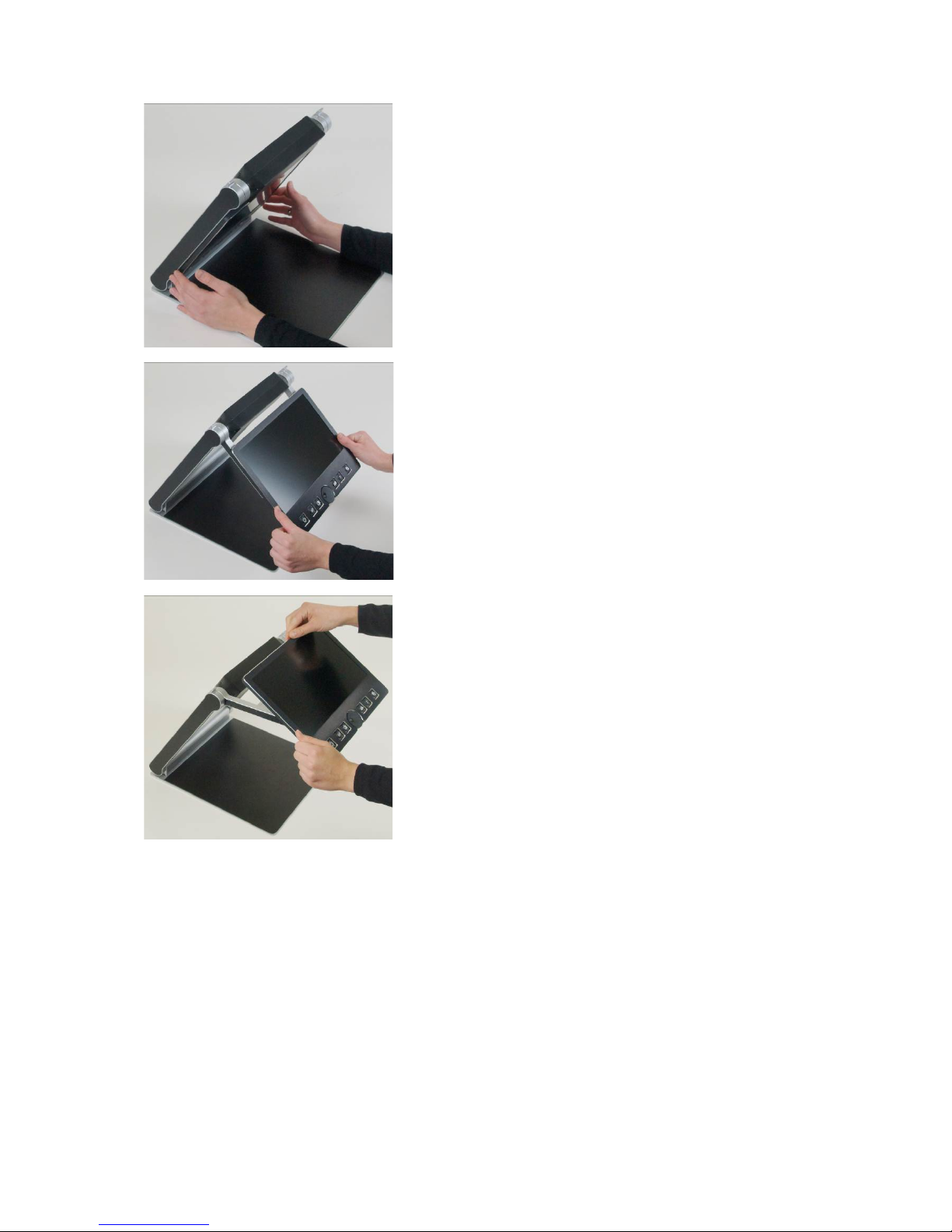
Place folded VisioDesk on the table, with
the front end approximately 8 inches (20
cm) from the edge of table.
Hold down base plate with one hand while
thumb of other hand grabs front corner of
one of the arms.
Lift arm until you feel it snap into position.
Warning: To avoid touching the
camera window, do not lift from the
camera housing!

How to position VisioDesk on your desk 9
Now place your hands on both sides of
display.
Pull display towards your body…
…while swinging it slightly upwards.

How to position VisioDesk on your desk 10
Adjust display to your preferred height and
tilt.
Grab side of camera and pivot camera
from transport position in downward
position directing slightly to you. Camera
now faces towards front edge of base.
From transport position, this is the second
snap in position.
If you want to fold VisioDesk shut, proceed in reverse order. Pivot the
VisioDesk camera unit to the transport position for folding. This is the
second snap in position. The two rubber straps will then rest on the
bottom plate when shut. VisioDesk will switch off automatically once the
device is folded shut.
Tabla de contenidos
Otros manuales de Lupa de Baum