
Avipas AV-1082W Manual de usuario


2
Preface
Thanks for using this HD Video Conferencing Camera.
This manual introduces the functions, installation process and operation of the HD camera. Prior to
installation and usage, please read the manual thoroughly.
Precautions
This product should only be used under the specified conditions in order to avoid any damage to
the camera:
◼Do not subject the camera to rain or moisture.
◼Do not remove the cover. Otherwise, you may risk receiving an electric shock. In case of
unintended equipment operation, contact an authorized engineer.
◼Never operate under unspecified temperature, humidity or power supply.
◼Please use soft dry cloth to clean the camera. If the camera is very dirty, clean it with diluted
neuter detergent; do not use any type of solvents, which may damage the surface.
Note:
This is a class A production. Electromagnetic radiation at certain frequencies may affect the image
quality of TV in home environment.

3
Contents
Attentions...........................................................................................................4
SuppliedAccessories .........................................................................................4
Quick Start.........................................................................................................5
Features..............................................................................................................8
Product Specifications .......................................................................................9
Main Units ....................................................................................................... 11
Dimensions ...................................................................................................... 11
IR Remote Control Menu.................................................................................12
RS-232 Interface..............................................................................................13
Serial Communication Control ........................................................................14
Menu Settings..................................................................................................15
Network Connection........................................................................................ 20
Maintenance and Troubleshooting...................................................................32
Appendix..........................................................................................................34

4
Attentions
⚫Electric Safety
Installation and operation must accord with electric safety standard.
⚫Use caution to transport
Avoid stress, vibration or soakage in transport, storage and installation.
⚫Polarity of power supply
The power supply of this product is +12V, the max electrical current is 2A. Polarity of the power
supply plug is shown in the drawing below.
⚫Installation precautions
Do not grasp the camera lens when carrying it. Do not touch camera lens by hand. Mechanical
damage may result from doing so.
Do not use in corrosive liquid, gas or solid environment to avoid any cover (plastic material)
damage.
Make sure there is no obstacle within rotation range.
Do not power on before installation is completed.
⚫Do not dismantle the camera
We are not responsible for any unauthorized modification or dismantling.
CAUTION!
Certain frequencies of electromagnetic field may affect the image of the camera!
SuppliedAccessories
Camera ..............................................................................1PCS
AC power adaptor .............................................................1PCS
Power cord..........................................................................1PCS
RS232 cable........................................................................1PCS
USB cable...........................................................................1PCS
Remote control....................................................................1PCS
User manual........................................................................1PCS
5
Quick Start
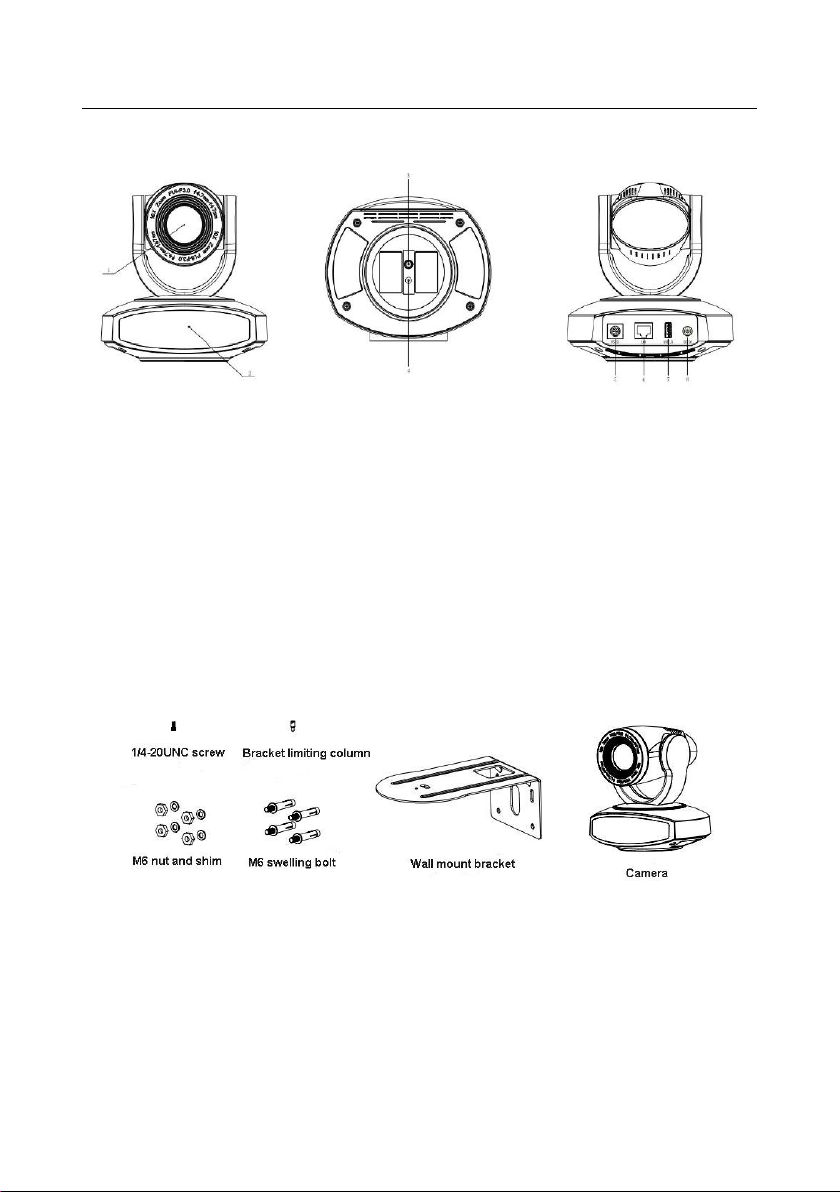
1. Camera Interface Illustration
Fig 1.1 Interface ofAV-1082
Interface of USB Model:
1. Camera Lens
4. Locating Hole
7. USB Interface
2. Remote Controller Receiver Light
5. RS232 Control Interface (input)
8. DC12V Power Supply Socket
3. Tripod Screw Hole
6. LAN Interface
2. Bracket mount
Note: Bracket can only be wall mounted or ceiling mounted (upside down) on concrete wall. It
cannot be installed on plasterboard.
1) Wall mount

6
2) Ceiling mount

7

8
Features
AV-1080 series camera features advanced ISP processing algorithms to provide vivid images with a
strong sense of depth, high resolution and fantastic color rendition. It supports H.265/H.264 encoding
which makes motion video fluent and clear even under less than ideal bandwidth conditions.
•Superb High-definition Image: It employs 1/2.8” high-quality CMOS sensor. Resolution is up
to 1920x1080 with frame rate up to 60 fps.
•Optical Zoom Lens: 10X zoom lens is with 60.9° wide view angle without distortion.
•Leading Auto Focus Technology: With innovative algorithm, auto-focusing is fast, accurate and
stable.
•Low Noise and High SNR: Low-noise CMOS effectively ensures high SNR of video. Advanced
2D/3D noise reduction technology is also used to further reduce noise while ensuring image
sharpness.
•Quiet PTZ Mechanism: By accurate step driving motor mechanism, the camera works extremely
quiet and moves smoothly.
•Multi-Format Video Outputs: Support SDI, HDMI, USB3.0 and LAN interfaces.
•Multiple Video compression: Support H.265/H.264 video compression.
•Multiple Network Protocol: Support ONVIF, RTSP, RTMP protocols, and RTMP push mode,
easy to link to streaming media server (Wowza, FMS…).
•Low-power sleep function: Support low-power sleep mode, and the consumption is lower than
400mW.
•Multiple Communication Protocols: Support VISCA, Pelco-D, Pelco-P protocols.
•RS-232 Cascade Function: Support RS-232 cascade function which is convenient for installing.
•255 presets Positions: Up to 255 presets (10 presets by IR remote).
•Wide Application: Tele-education, Lecture capture, Webcasting, Videoconferencing, Tele-training,
Tele-medicine, Interrogation and Emergency command systems.

9
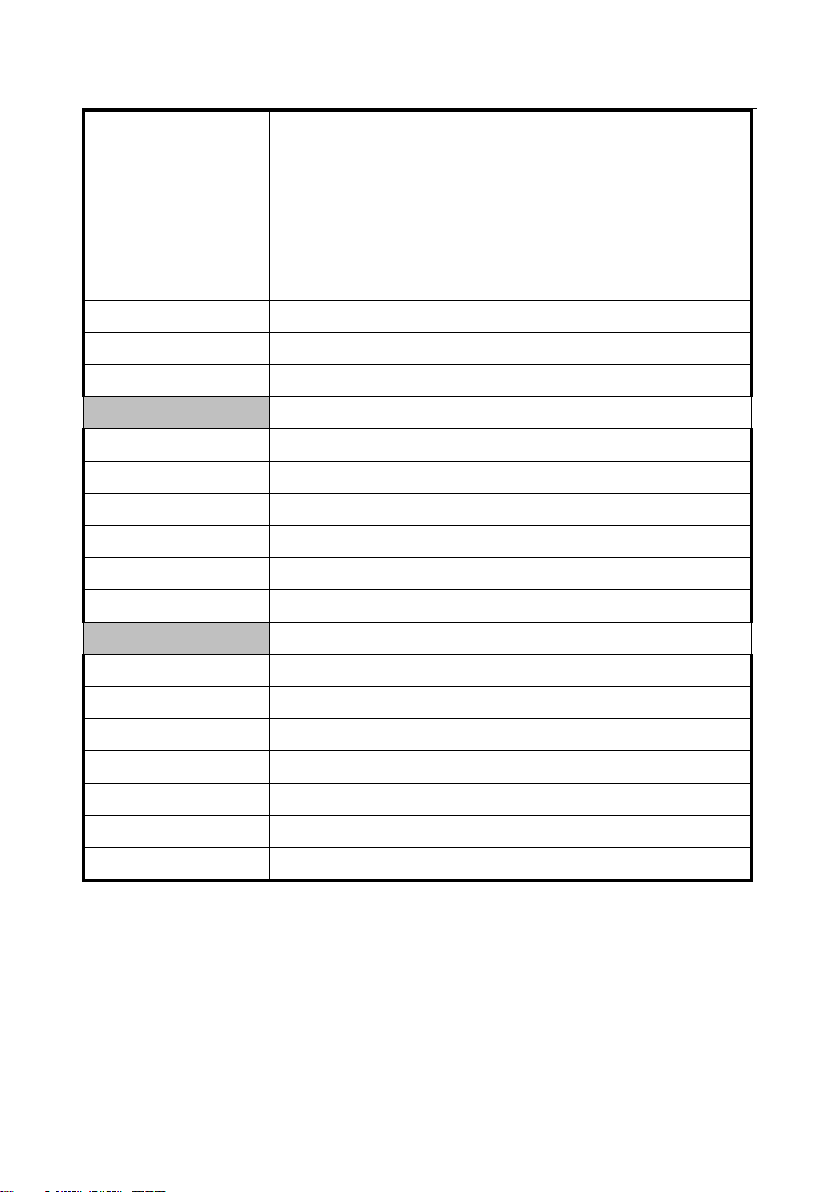
Product Specifications
Name
AV-1082 HD PTZ Camera (USB 2.0/3.0)
Camera
Video Format
USB2.0: 1080P30/25, 1080I60/50, 720P60/50;
USB3.0: Self-adaptive, up to 1920*1080
Sensor
1/2.8'', CMOS, 16:9, Effective Pixel: 2.07MP
Scanning Mode
Progressive
Lens
10x, f=4.7~47mm, F1.6 ~ F3.0
Digital Zoom
5x
Minimal Illumination
0.5 Lux @ (F1.8, AGC ON)
Focus
Auto/Manual/ One Push
Aperture
Auto/Manual
Electronic Shutter
Auto/Manual
White Balance
Auto / Manual/ One Push/ 3000K/ 4000K/5000K/6500K
Backlight Compensation
On/Off
Digital Noise Reduction
2D&3D Digital Noise Reduction
Video SNR
≥55dB
Video Adjustment
Brightness/ Color/ Saturation/ Contrast/ Sharpness/ BW mode/ Gamma
curve
View Angle
6.43°(tele)--60.9°(wide)
Pan Rotation Range
±135°
Tilt Rotation Range
±30°
Pan Speed Range
0.1° ~ 60°/s
Tilt Speed Range
0.1° ~ 30°/s
Number of Preset
255
Preset Accuracy
0.1°
IPC Features
Video coding standard
H.265/H.264
Video Stream
First stream, Second stream
Video Format
USB 2.0:
10
•Main Stream: 1920x1080, 1280x720
•Sub stream: 640x360, 320x180, 320x240, 1280x720
USB 3.0:
•Main stream: 1920x1080, 1280x720, 640x480
•Sub stream: 640x360, 640x480, 320x180, 320x240, 1280x720,
1920x1080
Frame Rate
5fps ~ 30fps
Sampling Rate
16000/ 32000/ 44100/ 48000
Network Protocols
RTMP/RTSP, ONVIF, GBT28181
Input/Output Interface
Communication Interface
1xRS232: 8pin Min DIN; Max Distance: 30m
Protocol
Pelco-D/ Pelco-P/ VISCA
Baud Rate
115200/9600/4800/2400
Video Output Interface
USB, LAN, RS232
Network interface
1xRJ45: 10/100/1000M Adaptive Ethernet ports
Power Jack
JEITA type (DC IN 12V)
Generic Specification
Input Voltage
DC 12V
Current Consumption
1.0A (Max)
Operating Temperature
20°F~80°F (-10°C~50°C)
Storage Temperature
20°F~95°F (-10°C~60°C)
Power Consumption
12W (Max)
Size
6”x6”x5” (151.2mmX152.5mmX126.7mm)
Net Weight
3lb (1.4kg)
Este manual sirve para los siguientes modelos
1
Tabla de contenidos
Otros manuales de Videocámara de Avipas


Manuales populares de Videocámara de otras marcas


Panasonic
Panasonic AG-HMC152EN Manual de usuario

Insignia
Insignia NS-DCC5HB09 - Camcorder - 720p Manual de usuario

MYDLINK
MYDLINK DCS-6100LH Manual de usuario

Sony
Sony video Hi8 Handycam CCD-TR555 Manual de usuario

SECURECOM
SECURECOM V-5014B Manual de usuario

Panasonic
Panasonic HDC-SD100 Manual de usuario


