Aviosys 9070-Lite Manual de usuario

IP Kamera 9070-Lite
User Manual
Note: 9070-Lite does not include the
following
- 2 GB memory
- My Web and EZ Blog functionality
- Pre-recording technology
- Connection Lost backup recording.
- Media Player
Release Date: 10/20/2009
Manual Version: 1.1
- 1-
Ref#90020326K0709

Warning: Any changes made to this equipment without permission may cause
damages to the device!
IMPORTANT NOTICE
1. IP Kamera s was designed for indoor use, it is the responsibility of the user for any possible
damages caused by outdoor use, especially in the rain.
2. Please use the power adapter provided by the dealer, the manufacturer responsibility for the
possible damage from using power adapters not .
3. Do not shake the IP Kamera 9070-Lite in any fashion
4. Please contact the dealer If IP Kamera 9070-Lite is not working properly.
Copyright © 2009 All rights reserved. No part of this publication may be reproduced, stored in a
retrieval system, or transmitted in any form or by any means, electronic, mechanical,
photocopying, recording or otherwise, without the prior written consent of us.
All trademarks and products mentioned in this document are the properties of us.
- 2-
Ref#90020326K0709

Table of Content
1.)WELCOME...........................................................................................................................5
INTRODUCTION............................................................................................................................5
MINIMUMSYSTEMREQUIREMENTS.................................................................................................5
2.)PRODUCTOVERVIEW..........................................................................................................6
FEATURES...................................................................................................................................6
SPECIFICATION............................................................................................................................6
3.)INTERFACEDESCRIPTION....................................................................................................8
REARPANELVIEW.......................................................................................................................8
4.)HARDWARESETUP..............................................................................................................9
INTERNETACCESSIBLESETUP..........................................................................................................9
CONNECTINGTHEDEVICE............................................................................................................10
5.)SOFTWARESETUP.............................................................................................................10
SOFTWAREFORIPKAMERA9070‐LITE...........................................................................................10
INSTALLINGVLCCODEC..............................................................................................................12
USINGIPEDIT...........................................................................................................................12
QUICKEASYSETUP(RECOMMENDED)...................................................................................................13
CUSTOMSETUP(ADVANCEUSERS).......................................................................................................14
IPSERVICE...............................................................................................................................15
6.)WEBINTERFACE................................................................................................................16
CONNECTINGTOTHE9070‐LITE....................................................................................................16
THECONTROLCONSOLE..............................................................................................................19
LIVEVIDEO...............................................................................................................................20
TYPEANDZOOM................................................................................................................................20
MOTIONDETECTION..........................................................................................................................21
ACTIVERECORD.................................................................................................................................21
RECORD...........................................................................................................................................22
SNAPSHOT........................................................................................................................................22
IMAGE.....................................................................................................................................23
IMAGESETTINGS................................................................................................................................23
- 3-
Ref#90020326K0709

TUNEIMAGE.....................................................................................................................................26
NETWORK................................................................................................................................27
NETWORK.........................................................................................................................................27
FTP.................................................................................................................................................27
SMTP(OUTGOINGE‐MAILSERVER).....................................................................................................28
SNTP..............................................................................................................................................28
IPSERVICE........................................................................................................................................29
SYSTEM...................................................................................................................................29
DATEANDTIME.................................................................................................................................29
TIMESTAMP.....................................................................................................................................30
USER...............................................................................................................................................30
LIGHT...............................................................................................................................................31
LANGUAGE........................................................................................................................................32
UPDATE............................................................................................................................................32
EVENTLOG.......................................................................................................................................34
APPLICATION............................................................................................................................34
SETTING...........................................................................................................................................35
SCHEDULERECORD............................................................................................................................36
ALARM.............................................................................................................................................37
EPTZ‐SET.................................................................................................................................39
7.)CONTROLLINGTHEDEVICE................................................................................................40
CGIHTTPCOMMANDS..............................................................................................................40
SNAPSHOTCOMMAND:......................................................................................................................40
CHANGENAME:................................................................................................................................40
CHANGEIPADDRESS:.........................................................................................................................40
CHANGEPORT:..................................................................................................................................40
CHANGESUBNETMASK:.....................................................................................................................40
CHANGEGATEWAY:...........................................................................................................................41
CHANGEDNS:..................................................................................................................................41
MJPEGSTREAMING...........................................................................................................................41
8.)USINGRTSPWITHVLC......................................................................................................41
9.)USINGCNTWITHSURF16CH............................................................................................43
FINDINGTHEMACADDRESS........................................................................................................43
ADDDEVICEUSINGCNT..............................................................................................................44
10.)FREQUENTLYASKEDQUESTIONS(F.A.Q).........................................................................45
- 4-
Ref#90020326K0709

1.) Welcome
Introduction
The IP Kamera 9070-Lite provides reliable, high quality solution to IP Kameras. Its distinctive 720P HD
quality picture, Tri-mode video capability, RTSP broadcasting capability, wide angle lens, and additional
functionality makes this small device very powerful and unique.
Using innovative IP technology, the built in web server of the IP Kamera 9070-Lite will allow you to view your
IP Kamera from any remote locations around the world while bringing you world class surveillance and ease
of mind. Furthermore, with CNT technology the 9070-Lite is easy to setup & use, simply just plug and play.
Minimum System Requirements
CPU Minimum Requirements
•Intel(R), Pentium(R), DUAL Core (D),CPU 3.0GHz or equivalent
•Operating Systems: WINDOWS Operating Systems (IE5.0+SPI)
•512 MB system memory or above
•Video Card: 3D hardware accelerator card required – 100% DirectX 9.0c compatible
•10/100 Ethernet switch/hub
•Sound Card: DirectX 9.0c compatible sound card
•Ethernet network port/card
•Network cable
•Internet (For remote access) or Ethernet Network (Internal Network use) with some type of Internet
connection, (i.e. ADSL, Cable, Dial up or any other forms of Internet service)
Software
•VLC media player 0.8.6b or above.
•Windows XP Service Pack 2 or above.
•Resolution of screen setting: 1280x960 or higher for the display of 720P
- 5-
Ref#90020326K0709

2.) Product Overview
Features
1. Tri-Mode Camera (MPG4-1/MPEG4-2/M-Jpeg )
2. Advance Motion detection trigger AVI /Jpeg save on FTP / Email
3. 3 layers (Admin, Operator, and User) Password protected
4. Resolution from CIF 352x192 up to HD 1280x720P
5. Supports NTP protocol to get correct time schedule.
6. 1/2.5” Advance CMOS sensor, with highly sensibility for quick response insufficient lighting.
7. Supports HTTP CGI command set. Easy for system integration
8. IP Service Search utility, to find your IP Kamera on internet with ease
9. Watchdog / Event log design
10. Adjustable frame-rate, bit-rate, rate-control type, quality factor for best image quality and speed.
11. Supports date and time marking on the captured video, and also inserted streamed data.
12. Measured End-to-End latency is less than 150ms
13. Supports adjustable backlight, brightness, contrast, saturation & sharpness
14. TV Output capabilities
15. Built in LED Spotlight
16. CNT Technology – Just Plug and Play no need to port forward
17. EPTZ – Electronic Pan, Tilt, and Zoom
18. Scheduler recording capabilities.
19. Email Capabilities
20. Supports: HTTP Web Server (HTTP), SSL, FTP client, SMTP client, NTP client, DHCP client,
UPnP client, RTSP over UDP, RTP
Specification
Casing: Lightweight plastic
Case Color: Black
Weight: 105 Grams (0.231 Lbs)
Dimensions (W x L x H): 108 X 58 X 28mm
Operating Conditions: 5 – 50 °C (41 – 122 °F)
Humidity 20 – 80% RH
(non-condensing)
Power: AC Adaptor
Input: 100-240V~0.3A MAX 10-20VA, 50-60Hz
Output: +5V 1.0A Max 5W
- 6-
Ref#90020326K0709

Package Contents
1.) 9070-Lite Unit x 1
2.) 9070-Lite Installation CD
3.) AC Adaptor
(One AC adaptor will be included and will correspond
to the countries power standards)
Specs:
Input: 100-250Vac /47-63Hz, 1A
Output: 5Vdc/1A
4.) Camera Mounting Bracket
5.) RJ45 Cable x 1 (Optional)
- 7-
Ref#90020326K0709

3.) Interface Description
Rear Panel View
Rear View
Device Reset:
Reset to Manufacturer Default:
Hold Reset button for 5-10 Seconds and the device
will reset to manufacturer default
Video Out:
The Video out requires a RCA connector to output
video to a different source.
RJ45 Ethernet:
Plug in the RJ45 Ethernet cable to the Ethernet port
DC 5 V Power Input:
Plug in the Power Adapter to the DC 5V
- 8-
Ref#90020326K0709

4.) Hardware Setup
*Before setup the device make sure of the following:
1.) Make sure that all the package contents are all included
if anything is missing please contact the store or your distributor.
2.) Make sure the power adaptor is the correct specification.
3.) Make sure that all the cables are working correctly
Internet Accessible Setup
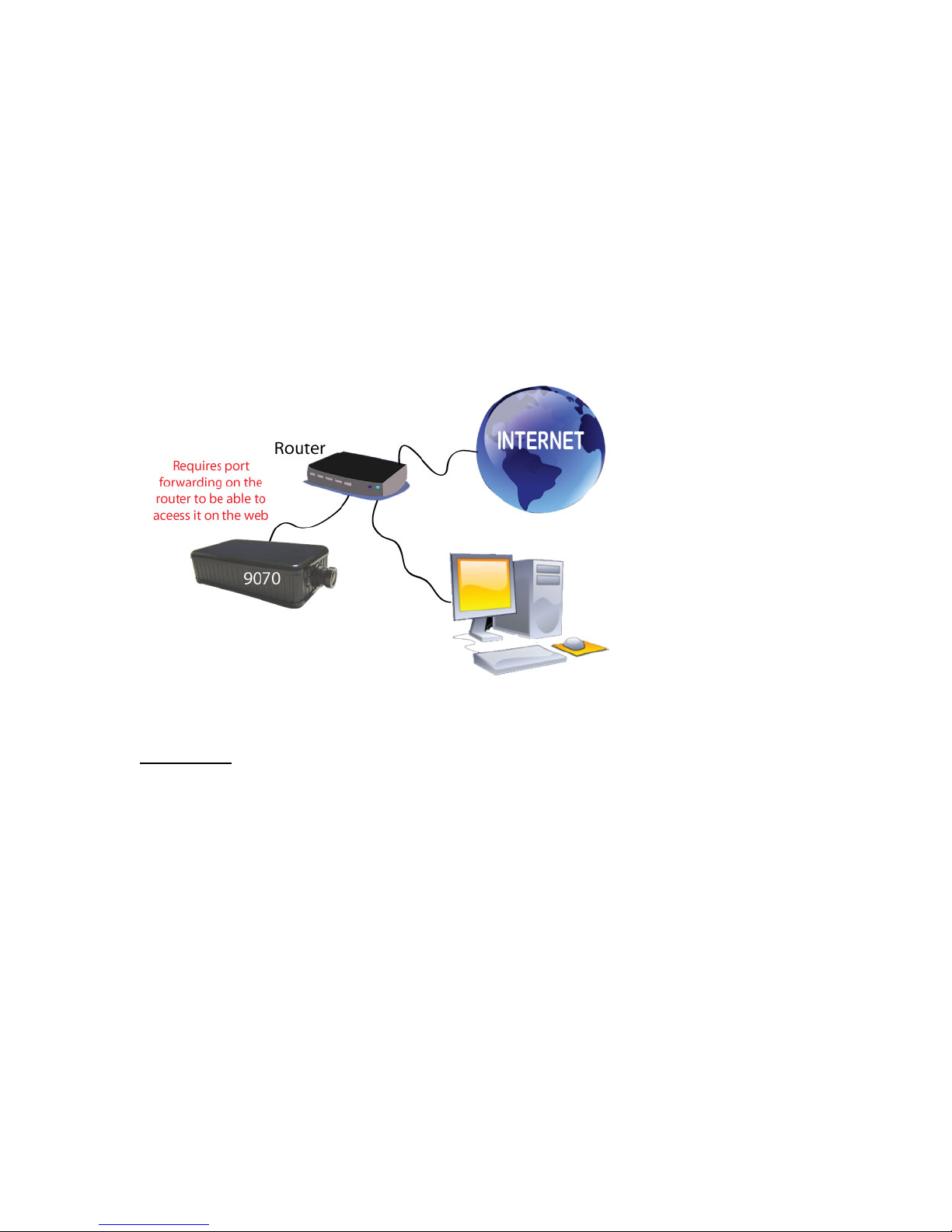
The internet connection can be setup in two main ways so that the 9070-Lite can be accessed
through the internet
a.) My network uses a Router/Firewall to connect each device to the internet
In this case, the 9070-Lite will need to be port forwarded on the router so that it can accessed by
the internet.
For example
9070-Lite IP Address: 192.168.1.882
9070-Lite Port: 9070
On the router that is being used port forwarded (port triggered) IP Address 192.168.1.882 and
port 9070. For this section you may be required to refer the user manual for the router due to the
fact that each router has a different way of setting up the device.
Note: Please refer to page: 43 on how to use CNT (Cross Network Technology). With CNT no
port forwarding is required to view the camera. But for normal functionality please use the web
browser to view the camera.
b.) My internet uses a static IP Address provided by the ISP.
- 9-
Ref#90020326K0709

In this case, the 9070-Lite is being connected to the internet through a hub, which is different from
a router. The hub does not provide DHCP, and therefore would require that this setup have a
static IP Address that is provided by the ISP.
Contact the ISP to find out the static IP address so that your device can be accessed through the
internet. Once a Static IP has been assigned the device will be able to automatically go onto the
internet. .
Connecting the Device
1.) Connect the IP Kamera 9070-Lite to a HUB or Router with a RJ45 network cable.
2.) Connect the HUB or Router to the internet (May through ADSL/XDSL modem).
3.) Connect the power adapter to the DC 5V port of IP Kamera 9070-Lite.
5.) Software Setup
The software for the device is located on the Media Link-IP Family CD that came with the device.
IP Kamera Pack is located on the main page of the CD. Please follow the directions carefully and
install the necessary files
Software for IP Kamera 9070-Lite
1.) First place the Media Link-IP Family CD that came with your device into your CD/DVD Rom drive.
The CD should auto run but if it does not go to the CD/DVD Rom drive and select the file
“autorun.html”.
- 10-
Ref#90020326K0709
Tabla de contenidos
Otros manuales de Cámara IP de Aviosys

Aviosys
Aviosys 9077SPD-I Manual de usuario

Aviosys
Aviosys IP Kamera 9070-IR Manual de usuario

Aviosys
Aviosys 9070-CSW Manual de usuario

Aviosys
Aviosys IP Kamera 9070 Manual de usuario

Aviosys
Aviosys 9000A Plus Manual de usuario

Aviosys
Aviosys IP Kamera 9070-IR Manual de usuario

Aviosys
Aviosys 9000A Plus Manual de usuario

Aviosys
Aviosys 9070-IRW Manual de usuario

Aviosys
Aviosys 9070CS-PoE Manual de usuario