AVer S42i+ Manual de usuario
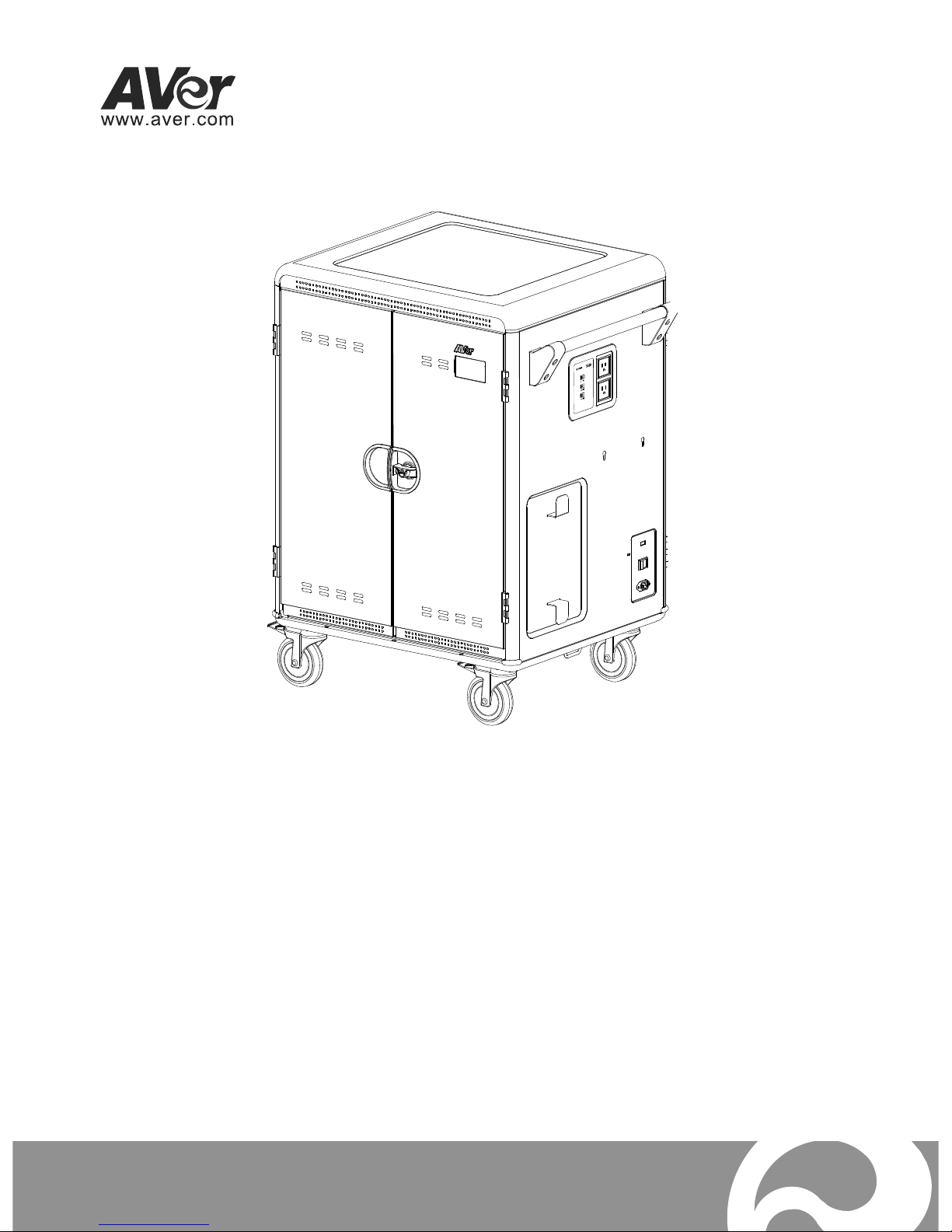
S42i+
User Manual

WARNING
ALWAYS FOLLOW SAFETY PRECAUTIONS
NEVER climb, sit
or stand on the cart.
ONLY ADULTS should
move the cart.
To reduce risk
of electric shock
ONLY use indoors.
CAUTION
Death or serious injury may occur when children climb on audio and/or
video equipment furniture. A remote control or toys placed on the
furnishing may encourage a child to climb on the furnishing and as a
result the furnishing may tip over on to the child.
Relocating audio and/or video equipment to furniture not specifically
designed to support audio and/or video equipment may result in death
or serious injury due to the furnishing collapsing or over turning onto a
child.

CAUTION!
DO NOT allow anyone to sit, stand or climb on the cart.
DO NOT lift the cart.
DO NOT block the ventilation holes used for air circulation.
DO NOT overload objects on the cart shelves. (work platform maximum
loading = 20kg / 44.1lbs; each pull-out shelf maximum loading = 35kg /
77.2lbs).
DO NOT put any devices that the weight is over the maximum loading weight
on top of cart.
When moving the cart, DO NOT put any devices (ex: TV, Monitor,
Documents camera…etc.) on top of cart.
No TV/monitor is to be used on top of cart.
Before moving the cart, disconnect the power from the wall outlet.
While moving the cart, make sure the power cord is secured and tightly
wrapped.
FCC NOTICE (Class A)
This device complies with Part 15 of the FCC Rules. Operation is
subject to the following two conditions: (1) this device may not cause
harmful interference, and (2) this device must accept any interference
received, including interference that may cause undesired operation.
Federal Communications Commission Statement
NOTE- This equipment has been tested and found to comply with the limits for a
Class A digital device, pursuant to Part 15 of the FCC Rules. These limits are
designed to provide reasonable protection against harmful interference in a
residential installation. This equipment generates uses and can radiate radio
frequency energy and, if not installed and used in accordance with the instructions,
may cause harmful interference to radio communications. However, there is no
guarantee that interference will not occur in a particular installation. If this
equipment does cause harmful interference to radio or television reception, which
can be determined by tuning the equipment off and on, the user is encouraged to
try to correct the interference by one or more of the following measures:
Reorient or relocate the receiving antenna.
Increase the separation between the equipment and receiver.
Connect the equipment into an outlet on a circuit different from that to which
the receiver is connected.
Consult the dealer or an experienced radio/television technician for help.
Class A ITE
Class A ITE is a category of all other ITE which satisfies the class A ITE limits but
not the class B ITE limits. Such equipment should not be restricted in its sale but
the following warning shall be included in the instructions for use:
Warning - This is a class A product. In a domestic environment this product may cause
radio interference in which case the user may be required to take adequate measures.
European Community Compliance Statement (Class A)
This product is herewith confirmed to comply with the requirements
set out in the Council Directives on the Approximation of the laws of
the Member States relating to Electromagnetic Compatibility
Directive 2014/30/EU.
Warning - This is a Class A product. In a domestic environment this product may
cause radio interference in which case the user may be required to take adequate
measures to correct this interference.

DISCLAIMER
No warranty or representation, either expressed or implied, is made with respect
to the contents of this documentation, its quality, performance, merchantability, or
fitness for a particular purpose. Information presented in this documentation has
been carefully checked for reliability; however, no responsibility is assumed for
inaccuracies. The information contained in this documentation is subject to
change without notice.
In no event will AVer Information Inc. be liable for direct, indirect, special,
incidental, or consequential damages arising out of the use or inability to use this
product or documentation, even if advised of the possibility of such damages.
TRADEMARKS
“AVer” is a trademark owned by AVer Information Inc. Other trademarks used
herein for description purpose only belong to each of their companies.
COPYRIGHT
©2017 AVer Information Inc. All rights reserved.
All rights of this object belong to AVer Information Inc. Reproduced or transmitted
in any form or by any means without the prior written permission of AVer
Information Inc. is prohibited. All information or specifications are subject to
change without prior notice.
The mark of Crossed-out wheeled bin indicates that this product must
not be disposed of with your other household waste. Instead, you need
to dispose of the waste equipment by handing it over to a designated
collection point for the recycling of waste electrical and electronic
equipment. For more information about where to drop off your waste
equipment for recycling, please contact your household waste disposal
service or the shop where you purchased the product.

Contents
Package Contents ................................................................................................ 1
Dimensions........................................................................................................... 1
Diagram ................................................................................................................ 2
LED Indicators ...................................................................................................... 3
Secure the Cart .................................................................................................... 3
Door Lock ............................................................................................................. 4
Cable Management .............................................................................................. 5
Charging Cart ....................................................................................................... 7
Intelligent Timer .................................................................................................... 8
Firmware............................................................................................................... 8
Troubleshooting .................................................................................................... 9
Specifications...................................................................................................... 10
Service and Warranty ..........................................................................................11
1
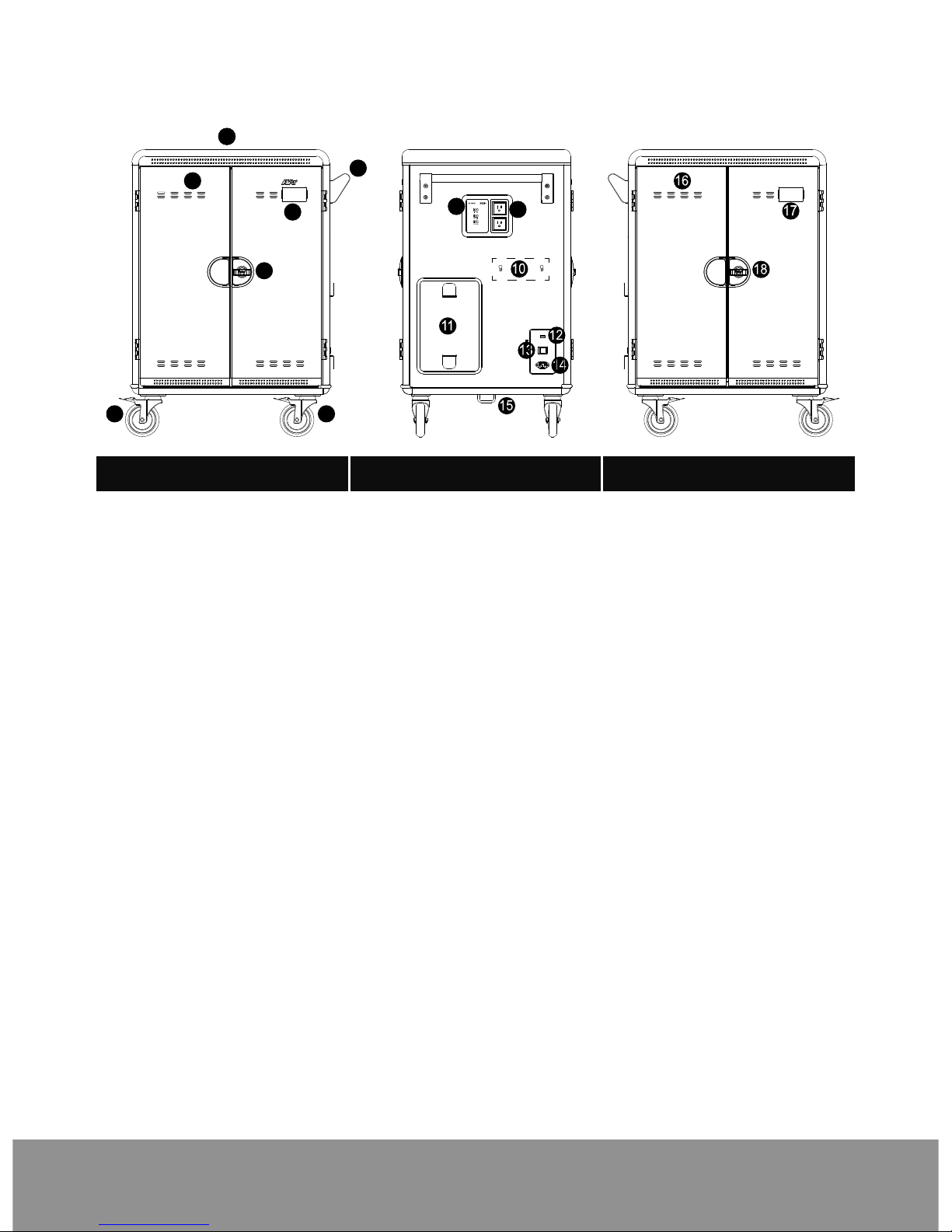
Package Contents
The following items are included in the package. Please check if each item is
available before using.
User Manual Key x 2
Power Cord
S42i+ Cart
Dimensions
81.93cm(32.26”)
108.16cm(42.58”)
63.3cm(24.92”)
2
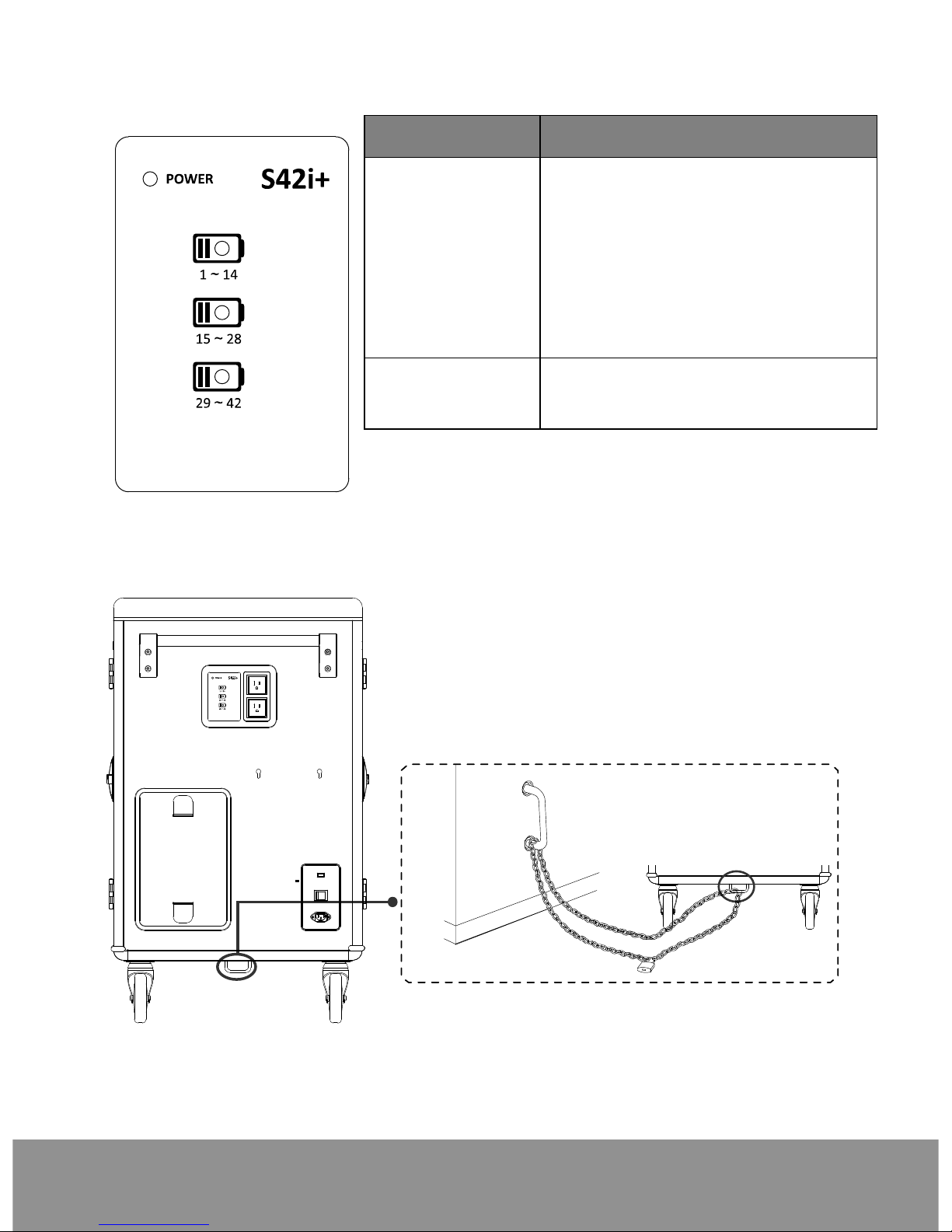
Diagram
2
4
3
11
5
67
8
9
Front Side Back
1. Work platform 8. Auxiliary outlets 16. Ventilation holes
2. Handle 9. LED panel 17. Name card holder
3. Ventilation holes
4. Name card holder
5. Door lock
10. Mounting points for
Access point**
holder(optional)
18. Door lock
6. 5” Locking caster
7. 5” Directional lock
caster*
11. Power cable wrap
brackets
12. USB firmware
upgrade port
13. Power switch
14. Power inlet
15. Security hook
*Keep the cart rolling in the fixed direction.
** Please make sure the Access point holder is balanced and installed securely to
cart.
3
LED Indicators
LED Status
Power x1
1. Solid Green: ON
2. Flashing Orange: Current
Overload
3. Flashing Red: Abnormal
Failure (Contact Support)
4. Flashing Green and Orange:
Current Overload – Aux is
turned off
Device Status 1. OFF: No Charging
2. Solid Blue: Charging
Secure the Cart
Use to secure cart
4
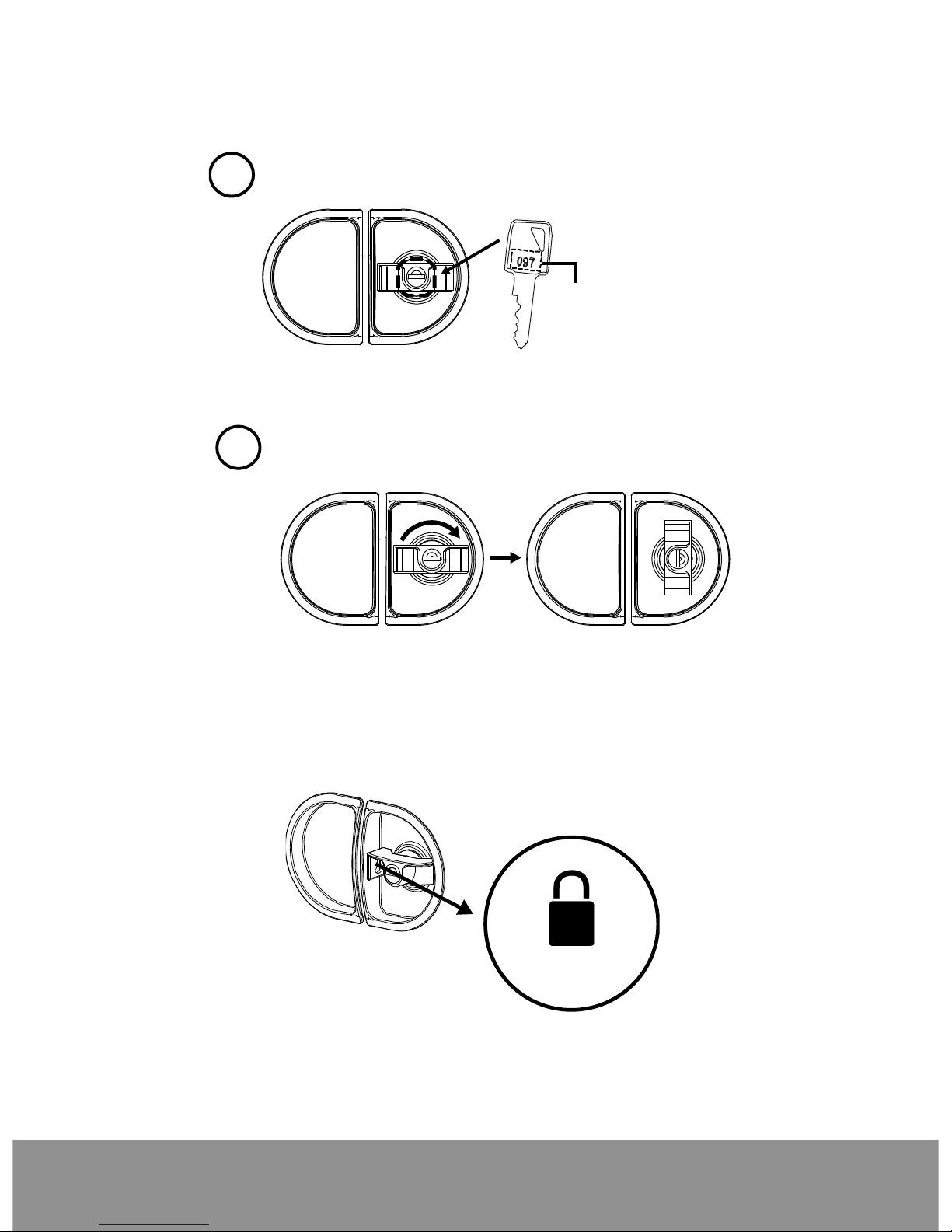
Door Lock
Unlock the door
Use key to unlock the door.
1
The number on the key
must match the number
on the door lock
2
Turn the door lock to vertical position
to open the door.
Lock the door
To lock the door, close the door and turn the door lock back to horizontal position.
Then, use the key to lock the door.
For more security, use shackle to double secure the door.
Optional
[Note] The shackle dimension of front and back doors are limited to Ø8mm
(0.31”).
Tabla de contenidos
Otros manuales de Carrito para exteriores de AVer