Avastor XD5 Manual de usuario

VER 1.0
1

VER 1.0
2
Table of Contents
GENERAL INFORMATION
COPYRIGHT ............................................................................................................ 3
NOTICES ................................................................................................................ 3
XD5 PRECAUTIONS.................................................................................................. 3
INTRODUCTION .......................................................................................4
FEATURES .............................................................................................................. 4
SYSTEM REQUIREMENT ........................................................................................... 4
XD5 FAMILULARIZATION ........................................................................5
PACKAGE CONTENTS............................................................................................... 5
HARDWARE GUIDE.................................................................................................. 6
CONNECTING TO THE COMPUTER ............................................................................ 7
RAID MODE CONFIGURATION & REBUILD .............................................7
SETTING AND CHANGING THE RAID MOD……………………………….……………………………7-8
FORMATTING DRIVES......................................................................................... 9-12
RAID MODE FAULT TOLERENCE ............................................................................. 13
REBUILD.......................................................................................................... 13-14
LED INDICATORS...................................................................................14
DISKS SUPPORTING RAID CONFIGURATION .......................................15
RAID CONFIGURATIONS .......................................................................15
RAID 0 (STRIPING)................................................................................................ 15
RAID 1 ................................................................................................................. 15
RAID 10.............................................................................................................. 176
RAID 3 ............................................................................................................... 176
RAID 5 ............................................................................................................... 176
COMBINE (NON RAID) ......................................................................................... 176
Clear RAID (JBOD) (NON RAID).............................................................................. 17
FAQ'S......................................................................................................17
CHOOSING THE RAID MODE .................................................................................. 17
DAISY CHAINING .................................................................................................. 17
DISCREPANCY IN CAPACITY................................................................................... 18
REBUILD............................................................................................................... 18
CAPACITIES OVER 2TB .......................................................................................... 18
TECHNICAL DATA...................................................................................19

VER 1.0
3
GENERAL INFORMATION
COPYRIGHT
This document is the copyright of Avastor Corporation 2012. All rights reserved.
No part of this publication may be reproduced, stored in a retrieval system, or
transmitted in any form or by any means, electronic, mechanical, photocopying,
recording or otherwise, without the prior consent of Avastor Corporation.
The product information provided in this manual is subject to change without
prior notice and does not represent a commitment on behalf of Avastor. Avastor
assumes no liability or responsibility for any errors that may appear in this
manual.
NOTICES
Any loss, corruption, or destruction of data is the sole responsibility of the user
of the XD5. Under no circumstances will Avastor be held liable for the recovery
or restoration of any data.
This equipment has been tested and found to comply with the limits for a Class B
digital device, pursuant to Part 15 of the FCC rules. These limits are designed to
provide reasonable protection against harmful interference when the equipment
is operated in a commercial environment.
PRECAUTIONS
The main circuit board of the XD5 is susceptible to static electricity.
Proper grounding is required to prevent electrical damage to the XD5 or
other connected devices, including the host computer.
Keep the XD5 away from liquids.
Do not place the XD5 close to magnetic devices, high-voltage devices, or
near a heat source.
Make sure Power Selector Switch is positioned to the correct voltage.
Do not attempt to service this XD5 yourself. Please contact Avastor
Technical Support.
Do not block ventilation. Proper airflow is required to ensure reliable
operation and to prevent overheating.
RAID 1, 10, 3 and 5 modes offer data redundancy and fault tolerance. In
modes CLEAR, COMBINE and RAID 0, a failure of any drive will cause the
loss of some or all stored data.

VER 1.0
4
INTRODUCTION
The XD5 3.5-inch 5-Drive RAID System with a hardware RAID controller provides
extended storage capacity with selectable RAID configuration options in a
compact, desktop storage device.
The XD5 allows easy configuration of RAID Modes: Clear (JBOD), Combine,
RAID 0, RAID 1, RAID 10, RAID 3 and RAID 5.
Please review the RAID mode options under “RAID MODES” in this manual to
choose the most suitable RAID mode for your application.
FEATURES
Supports 3.5-inch SATA II compliant drives, fully backward compatible with
SATA 1.0 and SATA 1.0a compliant drives
Connects via Super-Speed USB 3.0, IEEE 1394b (FireWire 800) or IEEE 1394a
(FireWire 400), or eSATA
Supports rebuild under Raid 1, 10, 3 and 5 modes
Configures RAID modes easily using hardware RAID mode selector switches
Monitors XD5 status via LED indicators
Power XD5 via internal high wattage power supply
Optimum temperature maintenance with two large (6CM) ultra-quiet fans
SYSTEM REQUIREMENT
To use the XD5, the minimum system configuration of the host computer is the
following:
800MHz or faster CPU
1GB of RAM
Microsoft Windows Vista, 7, or higher
One available USB 2.0/3.0, eSATA, FireWire 800 or 400 port

VER 1.0
5
SYSTEM UNIT VIEWS
PACKAGE CONTENTS
HARDWARE GUIDE

VER 1.0
6
CONNECTING TO A COMPUTER
CONNECTING THE XD5
1. Check the Voltage Selector Switch for proper setting. Connect the AC Power
Cord to the XD5.
2. Insert the USB 3.0, eSATA, FireWire 800 or 400 cable into the corresponding
port of the XD5 and the host computer.
NOTE: The XD5 should only be connected to a host computer via one type of
data cable. Connecting the XD5 to a computer simultaneously via two or
more data cables is not recommended and can cause data loss.
3. Press the Power Switch to turn on the XD5.
4. When powered on, the disk LED lights (blue) will illuminate when the drives
are detected and powered on.
5. You are now ready to begin using your XD5.

VER 1.0
7
RAID MODE CONFIGURATION & REBUILD
The XD5 standard configuration is configured for RAID 5 using five drives. This
mode improves speed and combines the drives into one large drive with
redundancy if any one of the drives were to fail.
Please review the RAID mode options under “RAID Configurations” in this
manual to choose the most suitable RAID mode for your application.
SETTING AND CHANGING THE RAID MODE
NOTE: All RAID mode settings and changes are made from the Clear RAID
mode. Ensure the RAID mode is set to Clear RAID or if you are changing the
RAID mode, ensure the RAID mode has been changed to Clear RAID mode.
Setting the Clear RAID Mode
Move the 3 RAID selector switches to the Clear RAID mode position
(down/down/down). Power the XD5 to off. While pressing the SET button,
power the XD5 to on, continue to press the SET button. The XD5 will beep
once, confirming power is on and RAID mode change is in progress. After 5-10
seconds the XD5 will beep once again, confirming the RAID mode has been
changed, release the SET button. The XD5 is now in Clear RAID mode.
Setting the RAID Mode or Changing the RAID Mode
Ensure the RAID mode is set to Clear RAID or if you are changing the RAID
mode, ensure the RAID mode has been changed to Clear RAID mode.
From the Clear RAID mode, set the 3 RAID Mode selector switches to the
desired RAID mode. See the chart below for the RAID Mode Selector Switch
position setting.

VER 1.0
8
SETTING AND CHANGING THE RAID MODE (Cont.)
Once the RAID selector switches are set to the desired mode, while pressing
the SET button, power the XD5 to on, continue to press the SET button. The
XD5 will beep once, confirming power is on and RAID mode change is in
progress. After 5-10 seconds the XD5 will beep once again, confirming the
RAID mode has been changed. Release the SET button.
NOTE: Whenever the RAID mode is changed, always change to the Clear RAID
mode before changing RAID modes. The XD5 should never be changed to a
different RAID mode without changing to Clear RAID mode first.

VER 1.0
9
FORMATTING DRIVES
NOTE: Whenever the RAID configuration is changed, the drive(s) will need to
be reformatted using the new RAID configuration.
Formatting using Windows Vista and 7
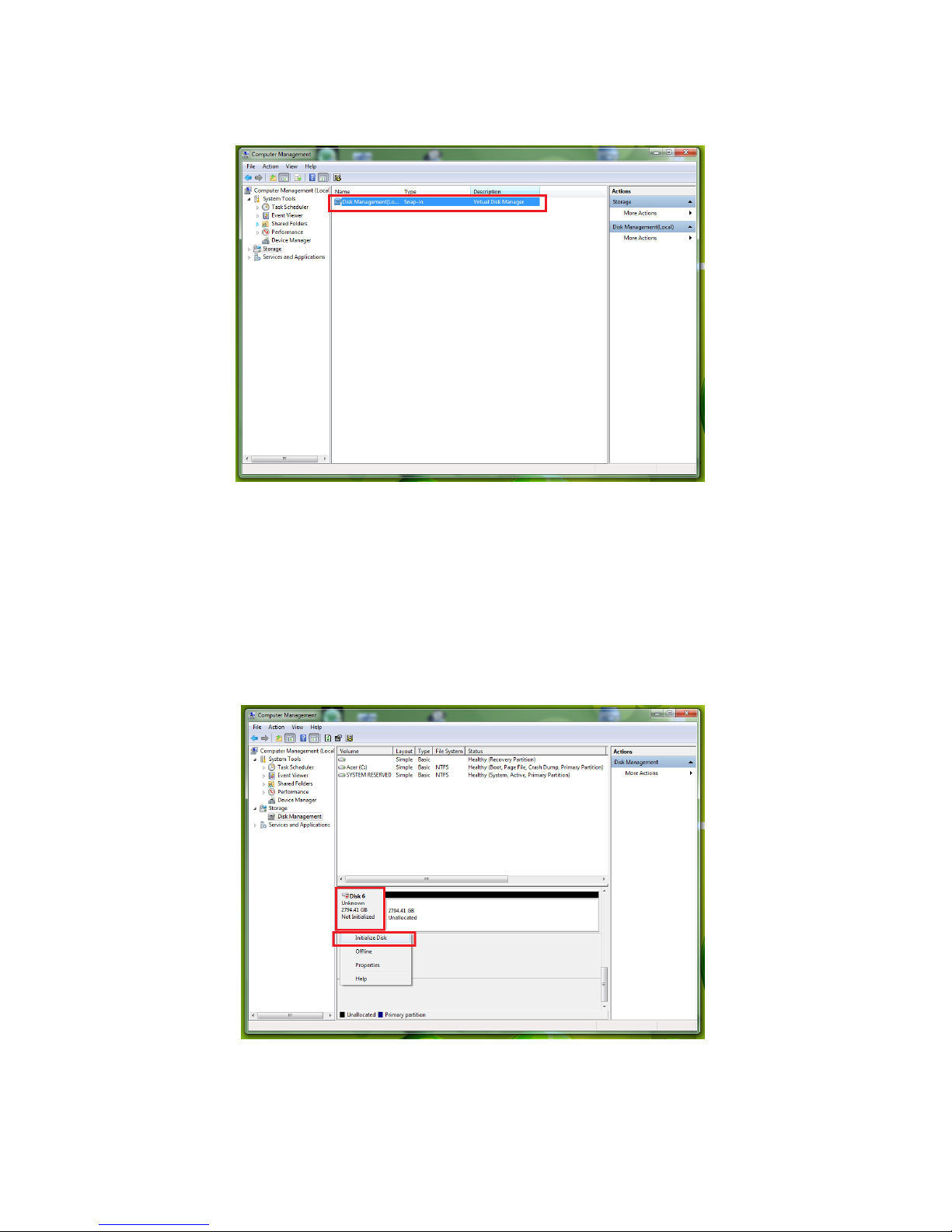
1. Right-click on “Computer” in the Start Menu and Select “Manage” from
the shortcut menu.
2. In the Computer management window, Click “Storage”

VER 1.0
10
3. In the Computer management window, under “Storage” Click “Disk
Management”
4. On the lower half of the screen there is a graphical representation of
each drive on your system. Right-click on the square box on the left
portion that reads “Not Initialized” and Select “Initialize Disk” from the
shortcut menu. On the Initialize Disk menu Select “GPT” and Click
“OK”.
Tabla de contenidos