
Avalla A-171 Manual de usuario

Air Fryer
A-171 A-175 A-177
Read this manual carefully before use and keep it for future
reference. Failure to do so may result in injury, property
damage and may void the warranty.
avalla.com

02 En
Contents
03 First time set up: A-171, A-175, A-177
• General guidance
04 Parts guide: A-171
05 Using your A-171
06 Parts guide: A-175
07 Using your A-175
08 Parts guide: A-177
09 Using your A-177
10 Cleaning and storage
10 Health and safety
• Symbols from the unit and packaging
• The following must always be observed for safety
13 Disposal
13 Troubleshooting
13 Specifications
Version 1.0

03En
Please familiarise yourself with the instructions and operation of
your cooker before use.
Basic safety precautions should always be followed.
Remove all packaging and labels. Check vents are clear of debris.
Clean the cooking basket and tray with warm soapy water, use a
non abrasive sponge or cloth. Wipe down the unit with a damp
cloth. Dry everything thoroughly before use.
Place the crisping tray into the cooking basket and slide the basket
into the unit
Place your air fryer on a solid, heat resistant surface. Ensure the unit
is level and stable. Leave space behind and around the unit to allow
hot air to vent safely.
We recommend running your air fryer empty at 200OC for 5
minutes to remove residue from manufacturing. You may notice a
slight smell on first use, this is normal.
Please ensure all food is piping hot throughout before serving.
Cooking times are a guide and may vary depending on quantity
and personal preference, please refer to your recipes' instructions
for more information.
Whilst cooking, you may want to periodically turn the food over to
ensure food is evenly cooked.
Once cooking has finished, remove the cooking basket and place
on a flat, heat resistant surface. Use a heat resistant utensil to
remove food.
First time set up: A-171, A-175, A-177
General guidance
04 En
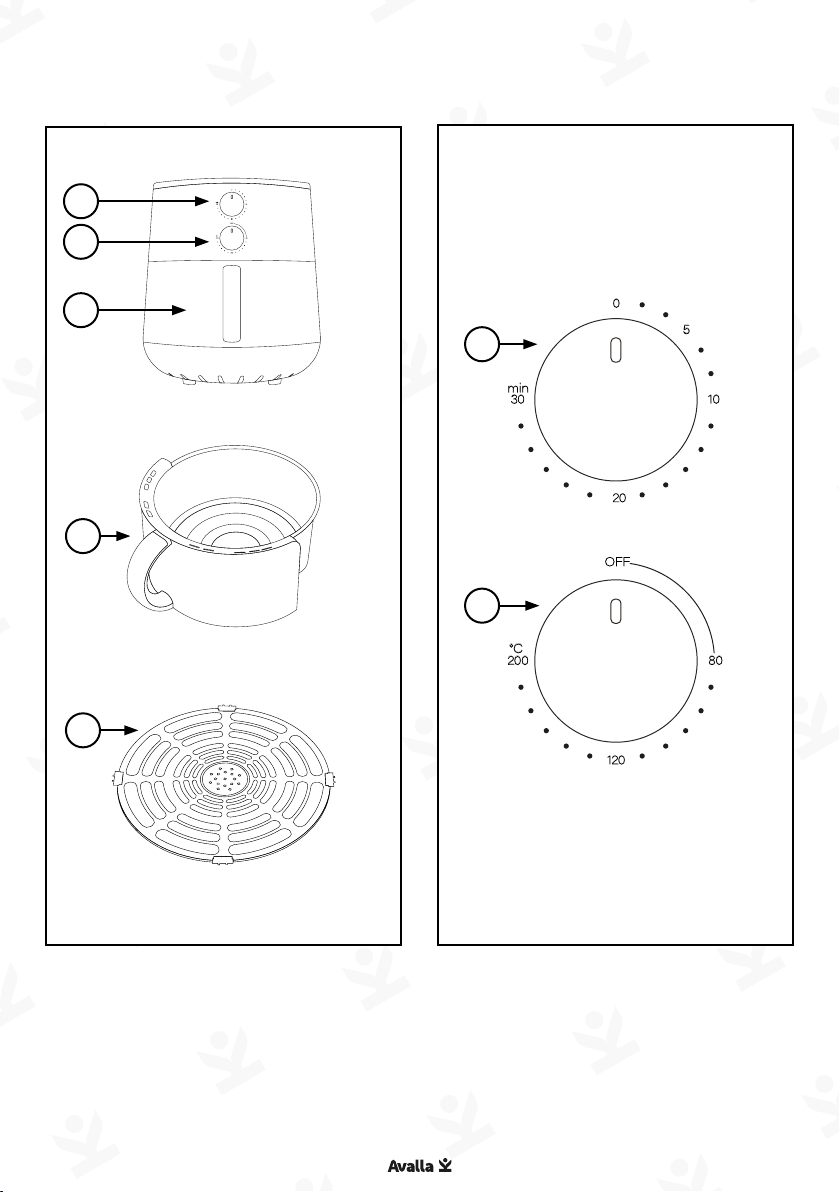
Parts guide: A-171
01. Time Control
02. Temperature Control
03. Cooking Basket
04. Tray
OFFOFF
112200
00
2200
8080
220000
55
33001100
minmin
°C°C
01
02
03
03
04
01
02

05En
Using your A-171
Set
Select cooking time and temperature, the table below gives
suggested cooking times and temperatures, adjust according to
your recipe or preference.
Turn the 'Time control' clockwise to desired cooking time, then
turn the 'Temperature control' clockwise to the desired cooking
temperature.
Start
Cooking will start when the temperature is selected.
End
After cooking, the A-171 will ring and the fan will operate for 40
seconds to cool the air fryer down.
Food Suggested cooking time
(mins)
Suggested cooking
temperature (OC)
Chips 15 -20 200
Bacon 12 -18 180
Pizza 15 - 20 170
Cake 12 - 18 180
Poultry 12 - 18 200
Meat 12 - 15 180
Fish 14 - 20 180

06 En
Parts guide: A-175
01. Control panel (top of unit)
02. Front display
03. Cooking Basket
04. Tray
09. <
10. Temperature
11. Power
12. >
01
02
03
03
04
05
06
07
08
10
11
1209
05. Display
06. Cooking program
07. Menu
08. Time

07En
Using your A-175
Press 'Power' to enter standby mode. The control panel and display
will illuminate.
Set - manual cooking
Press 'Time', the 'Display' will show cooking time in minutes
and 'min'. Adjust the time using '<' and '>'. Press 'Temperature',
the 'Display' will show cooking temperature and 'OC'. Adjust the
temperature using '<' and '>'.
Set - cooking programs
Press 'Menu' to cycle through the programs, the selected program
will illuminate and default cooking time is displayed, you can
adjust the cooking time using '<' and '>'. Press 'Temperature' and
the default cooking temperature is displayed, you can adjust the
cooking temperature using '<' and '>'.
Start - cooking
Press 'Power' and cooking will start. The 'Display' will show cooking
temperature and the 'Front display' will show the remaining time.
You can adjust the time or temperature during cooking and you
can cancel cooking at anytime by pressing 'Power'.
End
After cooking, the 'Display' will show 'End'. The fan will continue to
operate to cool the air fryer down.
Food Default cooking time (mins) Default cooking
temperature (OC)
Sweet Potato 30 200
Chicken Wings 20 200
Fries 20 200
Seafood 10 180
Vegetables 10 200
Cake 15 180
Toast 5 160
Dried Fruit 60 150

08 En
Parts guide: A-177
01. Water tank (top of unit)
02. Control panel (top of unit)
05
06
07
08 11
10
09
05. Tender roast symbol
06. Cooking program
07. Tender roast
08. Time / Temperature
09. Display
10. Power
11. - / +
03. Cooking basket
04. Tray
01
03
02
04

09En
Using your A-177
Press 'Power' to enter standby mode. The 'Control panel' and
'Display' will illuminate.
Set - manual cooking
Press 'Time', the 'Display' will show cooking time in minutes and
'min' will illuminate. Adjust the time using '- / +'. Press 'Time /
Temperature', the 'Display' will show cooking temperature and 'OC'
will illuminate. Adjust the temperature using '- / +'.
Set - cooking programs
Choose your desired program by pressing it, the selected program
will illuminate and default cooking time is displayed, you can
adjust the cooking time using '- / +'. Press 'Time/Temperature' and
the default cooking temperature is displayed, you can adjust the
cooking temperature using '- / +'.
Some modes offer a 'Tender roast' feature. In this mode water is
automatically sprayed on the food to prevent it from drying out.
When available the 'Tender roast symbol' will illuminate.
To use this feature, fill the 'Water tank' with fresh water. Press
'Tender roast' to activate or deactivate this mode.
Start - cooking
Press 'Power' and cooking will start. The 'Display' will show the
remaining time. You can adjust the time or temperature during
cooking and you can cancel cooking at anytime by pressing 'Power'.
End
After cooking, the 'Display' will show 'End'. The fan will continue to
operate to cool the air fryer down.
Food Default
time (mins)
Default
temperature
(OC)
Food Default
time (mins)
Default
temperature
(OC)
Sweet Potato 30 200 Toast 5 200
Chicken Wings 20 200 Dried Fruit 60 100
Fries 20 200 Meat 15 200
Seafood 10 180 Steak 10 200
Vegetables 10 200 Meatballs 10 180
Cake 12 180 Pizza 20 170

10 En
The unit should be cleaned thoroughly after every use.
• Unplug the unit from the wall outlet before cleaning.
• To clean the cooker base and the control panel, wipe them clean
with a damp cloth.
• Clean the cooking basket with water and mild soap, using a non
abrasive sponge or cloth.
• The crisping tray can be cleaned in a dishwasher
• If food residue is stuck on the cooking basket, fill the pot with
water and allow to soak before cleaning.
• Air-dry all parts after each use.
Caution - Do not use any abrasive materials or cleaning products
on any part of the air fryer.
Caution - Never put the air fryer in the dishwasher or immerse it in
water or any other liquid.
Only use genuine Avalla accessories designed for your air fryer.
Cleaning and storage
Health and safety
Symbols from the unit and packaging
Read the
instruction
manual
UK Conformity
Assessed
European
Conformity
Caution, hot
surface
Class I
Construction
(Earthed)
Este manual sirve para los siguientes modelos
2
Tabla de contenidos


