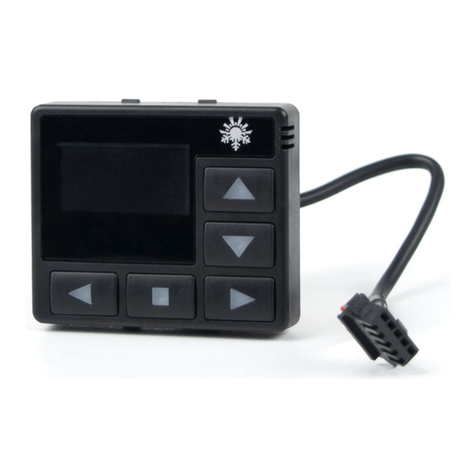
AUTOTERM PU-28 Manual de usuario

April 2022
Control panel
PU-28
EN

2
Introduction
This Operating Manual contains general information for
the user on safe maintenance and operation of the product.
In case of any problems, we strongly recommend that you
contact authorised service centres, the addresses and phone num-
bers of which you can obtain from the seller or on the www.au-
toterm.com website.
Before operating the product, read this oper-
ating manual and the heater operating man-
ual.
Warranty and liability
The manufacturer will not be liable for defects and dam-
age caused by failure to follow the heater installation and mainte-
nance instructions.
•The control panel can only be used to control liquid heaters
Flow 5, Flow 6, Flow 10, Flow 14 and air heaters Air 2D,
Air 4D, Air 9D.
•Do not connect and disconnect the control panel connector
while the liquid/air heater is operating.
•After the product is switched off, it should not be switched on
again for at least 5–10 seconds.
•For safe product operation, after two unsuccessful attempts to
start the product in a row, contact the service department for
troubleshooting information.
The warranty operating period and the conditions of warranty ser-
vice are specified in the warranty certificate.

3
Safety
DO NOT switch on and operate the liquid/air
heater in locations where combustible vapours
or gases or large amounts of dust can form and
accumulate (for example, fuelling stations or pe-
troleum, fuel, coal, timber, or grain storage facilities). Explo-
sion hazard.
Do not switch on and operate the product in enclosed
or non-ventilated premises (sheds, garages, etc.). Hazard of
poisoning and asphyxiation by exhaust gases.
Do not switch on and operate the product if combus-
tible materials or fluidsare present in the exhaustgas. Fire haz-
ard. Do not use a faulty product. Injury hazard due to the
use of faulty device.

4
Control panel PU-28
The control panel interface depends on the product
it is connected to.
The control panel is designed for:
•manual start and shut-off of the product;
•manual start and shut-off of the pre-heater pump (for liquid heaters
Flow 5, Flow 6, Flow 10, Flow 14);
•manual start and shut-off of ventilation (for air heaters Air 2D, Air 4D,
Air 9D);
•fluid temperature display (for liquid heaters);
•power supply voltage display;
•current time and operating time display;
•setting of the liquid temperature heating limit/set-point (for the heater);
•activation of the product start-up timer;
•economy mode activation (for liquid heaters Flow 10, Flow 14);
•display of the software version of the control panel and heater;
•auxiliary heater operation mode selection (for liquid heaters);
•display of malfunction code in case of product malfunctions.
When power is supplied to the control panel,
the time must be set
The front panel of the control panel has a capacitive touch screen
that can be physically pressed (with a small amount of force). There is a
button underneath the capacitive touch screen.
The touch screen responds to touch. The start-up/shut-down com-
mand is executed by physically touching the screen only if it has not been
triggered by the capacitive touch screen.

5
Control panel operation
Once connected to the product, the control panel retrieves the op-
erating settings from the product. It is necessary to verify whether the
actual settings correspond to the desired settings.
1. Main screen
The main screen (Fig. 1) shows the current time in the lower left
corner and the current heating medium/air temperature in the centre.
A short tap in the bottom right corner switches between heating
medium temperature, air temperature, and power supply voltage. A long
tap opens a graph showing changes in the temperature of the heating
medium, air temperature, and power supply voltage over the last 7 days.
To start the product (Fig. 2), tap the centre of the screen or press
mechanically.
Fig. 1. The main screen of a liquid heater and an air heater
After the product has been started up, the countdown of the oper-
ation time in minutes (Fig. 2) will begin at the bottom left of the screen.
Switching between operation time and current time is done by short tap-
ping on the operating time.
Set the temperature limit/set-point by moving the slider along the
circumference of the temperature scale, or by tapping the ‘+’ and ‘-’ next
to the current fluid temperature display (Fig. 3). During adjustment, the
set-point value is also displayed in the centre of the screen.

6
Fig. 2. Heater
start-up
Fig. 3. Setting the heating temper-
ature limit
To shut the product down (Fig. 4), tap the centre of the screen or
press mechanically. After the shut-down, the control panel switches to
the main screen (Fig.1). When the control panel remainsidle, it switches
to standby mode to reduce the power consumption (Fig. 5).
The heater must not be disconnected from the power supply
before the end of the purge cycle
Fig. 4. Heater shut-down
Fig. 5. Standby mode
2. Operational features
A long tap (2 seconds) on the centre of the screen when a Flow 5,
Flow 6, or Flow 10 heater is switched off will force the pump to start
(without heating the coolant). For an air heater, a long tap triggers venti-
lation mode (without heating).
During Flow 10 and Flow 14 heater operation, a long tap switches
the operating mode to economy mode.
During continuous operation at low setting, all products automati-
cally restart every 3 hours.

7
3. Timers
Fig. 6. Timer settings
Tap to set up the timer. The
control panel allows to program up to
three start-up timers.
switches between timers;
Timer on - timer activation;
Do not reset timers - the timer will not switch off after triggering.
The time is set by tapping the ‘+’ and ‘-’. exits the timer settings.
4. Control panel screen settings
Tap on the main screen
(Fig. 1) to access the settings. Navi-
gate between the menu pages by tap-
ping .
Control panel screen settings
(Fig. 7). The brightness can be ad-
justed using the Brightness slider.
Fig. 7. Display settings
Sleep mode when running - turn the screen off while the product is in
operation. To return from sleep mode, press or tap the screen. The time
after which the remote control enters sleep mode can be adjusted from
30 sec, to 5 min.
Show clock - display the current time and day of the week while the
control panel is in sleep mode (only when the product is running).
5. Liquid heater settings
In auxiliary heater mode, the heater is operated in conjunction with
the vehicle engine.
Pre-heater mode is intended for preheating the vehicle's engine
and/or passenger cabin. The heater can be pre-started using a timer or
manually.

8
Heater operating mode settings
(for Flow 5, Flow 6, Flow 10) (Fig. 8):
Auxiliary heater manual mode –
manual auxiliary heater mode (not
available on some software versions).
If the heater is switched off, it will not
start automatically after the engine is
started.
Fig. 8
Auxiliary heater auto mode –automatic auxiliary heater mode. If the
heater is switched off, it will start automatically after the engine is
started. When the engine is stopped, the heater will switch off automat-
ically. If the heater is switched on, it will automatically switch to the
auxiliary heater mode when the engine is started.
Engine temperature - auxiliary heater temperature setting. The re-
quired temperature can be set between +75...+95 °C. The default setting
is +85 °C.
Preheater temperature - the fluid temperature at which the heater en-
ters standby mode (heater operation stops, pump operation continues).
When the fluid temperature drops to the specified value, the heater exits
the standby mode (heater operation is resumed). The default value for
the standby temperature is +88 °C. The standby temperature can be set
between +20...+95 °C.
Pump operating mode settings
(for Flow 5, Flow 6, Flow 10) (Fig. 9):
Pump in standby mode - setting of
pump operation in standby mode.
In auxiliary heater mode, after the
heater goes into standby mode, the
heater stops running
Fig. 9
and the pump continues to run.
Pump on with engine - setting of starting the pump when the engine is
started. The pump supplied with the heater can be used for additional
circulation of the working liquid while the vehicle's engine is running.
The pump starts automatically when the engine is started and switches
off when the engine is stopped.
Turn on auxiliary blower –switch on the passenger cabin heater.

9
Auxiliary blower temp. –switch-on temperature setting forthe passen-
ger cabin heater. Therequired switch-on temperature can be setbetween
+30… +60 °С. The default value for the relay switch-on temperature is
+40° C.
Operation time settings
(Fig. 10).
Hours –number of hours;
Minutes –number of minutes;
Unlimited –no time limit.
Fig. 10
In the system settings (Fig. 11),
you can switch between the units of
temperature measurement: Celsius °C
or Fahrenheit °F; select the 12-hour
time format.
External operating –control of the
heater
Fig. 11. System settings
(Flow 5, Flow 6, Flow 10 only) using an external control channel (pro-
vided the heater is connected to the control channel).
For the Flow 14 heater, this setting is not displayed and is enabled by
default.
Thermostat mode –the mode for maintaining room temperature. The
temperature is maintained by a built-in sensor in the control panel.
Work Time –the operating time of
the heater ranging from 1 to 24 hours.
Unlimited –no time limit.
Hysteresis –difference between the
set-point temperature and the air tem-
perature from the built-in sensor in the
control panel (-3 to -10). Standby
mode will be
Fig. 12. Thermostat mode
activated at 1 °C above the set temperature ‘Set point’. Standby mode
will be deactivated at 3 °C below the set temperature ‘Set point’.

10
Preheater temperature –set-point for the heating medium temperature
(60 to 95 °C).
System information window (Fig. 13) shows the software version of
the control panel and the control unit of the product. It also displays the
total number of hours the product has worked.
The language selection menu looks as shown in Fig. 14.
Fig. 13. System information
Fig. 14. Language selection
6. Air heater settings
Air heater operating mode set-
tings (Fig. 15):
Panel sensor - the set-point temper-
ature of the temperature sensor lo-
cated in the control panel is used for
operation.
External sensor –the set-point
temperature
Fig. 15
of an external temperature sensor is used for operation.
Power - the power set-point is used for operation.
Operation time settings
(Fig. 16).
Days –number of days;
Hours –number of hours;
Minutes –number of minutes;
Unlimited –no time limit.
Fig. 16
Otros manuales de Panel de control de AUTOTERM