
AUDIOBYTE HYDRA X+ Manual de usuario

AUDIOBYTE TECHNOLOGIES
HYDRA X+ digital to digital converter
HYDRA X+ Owner’s Manual
Thank you for buying the Audiobyte Technologies Hydra X+ digital to digital converter!
You have now one of the finest USB transports available on the market.
The Hydra X+ was designed to give you countless hours of musical enjoyment.
The package you received should contain:
-Hydra X+ interface, black or silver anodized (4400mAh)
-External power supply, 90-250V AC input, 5V/2A output
Safety Precautions:
1) This device is meant for indoor use only.
2) Protect device from excessive heat, humidity and liquid filled objects, such as vases.
3) Clean only with dry cloth.
4) Do not remove product covering. This may cause an electric shock even if the device is not
plugged in.
5) Use earth grouded outlet if applicable.
6) Before plugging any cables in the device, make sure it is turned off.
AUDIOBYTE TECHNOLOGIES
HYDRA X+ Owner’s Manual
7) Do not move the device while operational.
8) Lightning or static electricity can affect normal operation of the apparatus. Make sure that it is
unplugged during a thunderstorm. If the device is affected by one of these conditions and stops
behaving as it should, a power reset usually resumes it’s normal operation.
9) Put unit in standby mode or unplug the power cord if the device is not to be used for a long period
of time.
PRODUCT DESCRIPTION :
USB to digital audio converter (one USB input, 4 outputs).
Outputs are: AES/EBU, S/PDIF, BNC, I2S (LVDS)
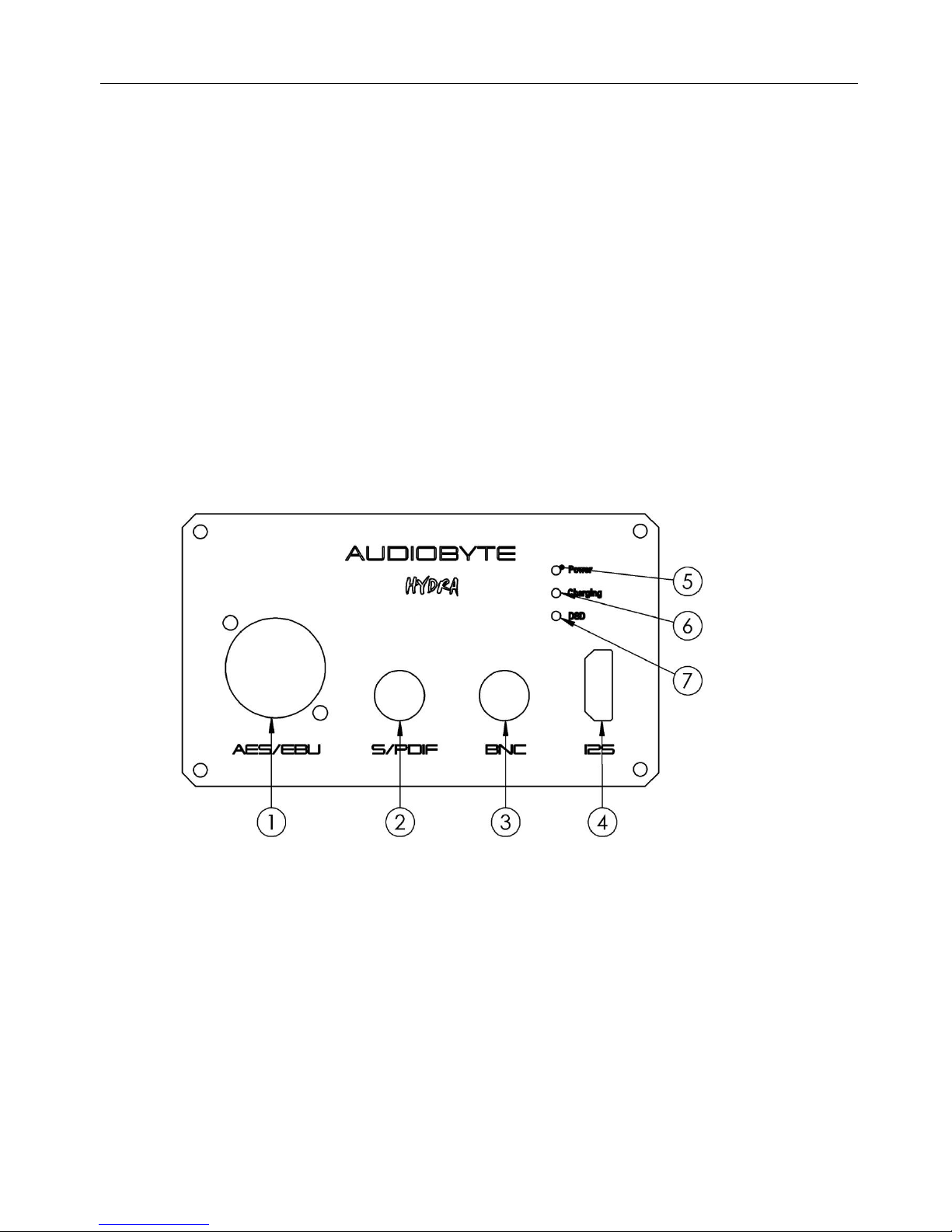
FRONT VIEW :
1) AES/EBU (XLR) digital output (44.1 - 384 KHz, DoP 64-128)
2) S/PDIF digital output (44.1 –384 KHz, DoP 64-128)
3) BNC digital output (44.1 –384 KHz, DoP 64-128)
4) I2S (LVDS) digital output (44.1 –384 KHz, DSD 64-512)
5) POWER LED (indicates if USB connection is detected)
6) CHARGING LED (active only during charging cycle, normally off)
7) DSD MODE LED (active on playback of DSD material)
Note : all outputs are active simultaneously.

AUDIOBYTE TECHNOLOGIES
HYDRA X+ Owner’s Manual
BACK VIEW :
1) BATTERY SWITCH (connects or disconnects the battery from the system –removed in latest
series)
2) EXTERNAL DC INPUT (5V , minimum 1A; do not use different voltage)
3) USB input port (USB 2.0 type B port, receptacle)
POWERING UP
1) In order to use Hydra X+, installation of drivers is necessary in Windows environment. Please
choose from the driver package available for download what fits your version of Windows. ASIO package
is available. For Mac and Linux users, the device is recognized natively (no drivers are needed).
2) Turn the battery switch (1 on back view) from OFF position to ON. If you have a newer version
without on/off switch, skip this paragraph. During normal (daily) use you can let it like this all the time,
assuming that external power supply is always connected to Hydra X+. You must switch back to OFF
position if you will not use the Hydra for a longer period of time (two weeks or so), when going into
holidays, putting the device into storage etc. All indicator LEDs should be off.
3) Connect the supplied external power supply to the mains and to Hydra X+. The unit is
completely isolated from PC, it cannot recharge from USB. To prevent over-discharge of the battery, in
newest version, the device will not start if external power supply is not connected, even if the battery is
full. If battery has enough power, the charging led (6 on front view) will remain off. If the battery is empty
it will start charging, and the charging led will be on. The device operates on external supply when
charging is active.

AUDIOBYTE TECHNOLOGIES
HYDRA X+ Owner’s Manual
4) Connect the Hydra X+ to your PC, using a good quality USB cable –printer type. Try to use a
short cable if possible. Now you can see and set the Hydra as sound output device. The power led (5 on
front view) should be active. If battery voltage is too low and cannot be recharged, or if the battery switch
has not been turned to ON, the device is operating using external supply voltage. This mode is indicated by
the charging LED being on and briefly turning off every three seconds.
In normal operation, if the USB cable is connected, the device runs on battery(charging LED off).
External supply can be disconnected at this time, although we do not recommend it.
When the battery reaches about 15% of its capacity, the charging LED (6) starts blinking every
three seconds, indicating that the charger should be connected to the device in case the battery runs out
completely. When this happens, if the charger is found, the device seamlessly switches power to the
external supply and battery charging is activated. When charging is complete, the device switches back to
battery without disrupting the PC streaming activity.
If, however, the battery runs out and the charger is not connected, the device supply is cut off and
the PC streaming stops. This may cause the PC or the streaming software to stop responding. This also
happens if the device is charging or is running on battery and the back panel switch is turned to OFF, while
streaming is active. To avoid these situations, please stop the PC playback before disconnecting the device
battery or the USB cable.
BATTERY CHARGING/DISCHARGING CONSIDERATIONS
Because Hydra X+ is a battery-powered device, extra precaution must be taken, to preserve the life
and the condition of the battery. Skip next paragraph if your unit does not have a on/off switch.
Once set up as previously shown, the Hydra X+ does not need any changes for daily use. The
charge/discharge cycles are completely automatic and the user should not confuse the battery ON/OFF
switch with a power ON/OFF of the device. The battery switch (1 from back view) is there just to protect
the battery from over-discharging and thus damaging it. Even in standby mode (with no USB cable
attached), if the battery is connected (switch is ON) there is a small current sinking from the battery. A full
battery can be discharged in more than a year if Hydra-X is not used, the battery is left connected, and no
external power supply is present. A depleted battery however will over-discharge in three weeks in the
same conditions, which will render the device operational using the external supply only, until the battery
is replaced.
In normal operation mode(USB connected), a fully charged battery can supply the Hydra-X for
approximately 48 hours. A full charging cycle takes about 9 hours, so we recommend leaving it to charge
overnight. The battery can’t be over-charged, so you can leave it for as long as you want with the external
supply connected. Additionally, charging is enabled when the USB cable is removed and the charger is
connected(charging can be safely enabled even if the battery is not depleted).
To disable the battery charging, stop the PC playback(if applicable) and remove the charger or
disconnect the battery(switch 1 on the back panel) for at least three seconds. If the battery is charged
enough when reconnected, the device will operate using it.
DETAILED SPECIFICATIONS, SOFTWARE
Hydra-X will support up-to-date maximum sample rates of 384 KHz on PCM and 22.5 MHz
(DSD512) on DSD. On DSD material, both native DSD stream and encoded over PCM (DoP) are
available. The native DSD stream is available over I2S output, while DoP is available over S/PDIF and
AES/EBU outputs. DSD over PCM (DoP) available rates are DSD64 and DSD128.

AUDIOBYTE TECHNOLOGIES
HYDRA X+ Owner’s Manual
Recommended software players:
1) Foobar2000
2) Jriver18
3) Jplay
4) Audiogate
5) Audirvana Plus
Under Win XP environment, kernel streaming (KS) is recommended for PCM, and ASIO (native or
ASIO4ALL) for DSD playback.
Under W7/8 environment, WASAPI or ASIO mode is recommended for both PCM and DSD playback.
Detailed software settings below. (TO COMPLETE)

AUDIOBYTE TECHNOLOGIES
HYDRA X+ Owner’s Manual
USB Driver Installation Details (Windows XP 32/64, Windows 7 32/64)
Do not connect the USB cable to the computer before driver installation! If you have already
connected the board to the PC, click Cancel on the screen that has showed up and remove the
USB cable.
1. Go to product’s page on www.audiobyte.ro .
2. Download the compatible drivers.
3. Unpack zip archive.
4. Enter your OS folder.
5. Launch Setup32.exe for 32bit OS or Setup64.exe for 64bit OS.
6. After the application launches, click Next:

AUDIOBYTE TECHNOLOGIES
HYDRA X+ Owner’s Manual
7. Wait for the driver to be copied and then click Finish:
8. Connect the USB to I2S adapter to the PC. In the dialog below, select “No, not this time” and
then click “Next”.

AUDIOBYTE TECHNOLOGIES
HYDRA X+ Owner’s Manual
9. In the new window select “Install the software automatically” and click “Next”.
10. Click the “Continue Anyway” button.

AUDIOBYTE TECHNOLOGIES
HYDRA X+ Owner’s Manual
11. Wait for the files to be copied and click “Finish”.
12. If drivers have been installed properly, a new “Audiobyte” device should appear in Device
Manager, under “Amanero Technologies 1.0.5 USB” category:

AUDIOBYTE TECHNOLOGIES
HYDRA X+ Owner’s Manual
Select Audiobyte Kernel Streaming as output device in your music player or Windows(Control
Panel->Sounds and Audio Devices->Audio->Sound playback).
To adjust device volume, open Start->Programs->Accessories->Entertainment->Volume
Control, enter Options->Properties, select Audiobyte Kernel Streaming as Mixer device, select all
volume controls and click OK.
Using the Safely Remove Hardware icon in your taskbar before unplugging the USB cable
prevents your system from becoming unstable. If the device cannot be removed, stop the
playback and exit the applications that may use it as an output.
Tabla de contenidos
Otros manuales de Convertidor de medios de AUDIOBYTE


