Atmel Atmel-ICE Manual de usuario

Programmers and Debuggers
Atmel-ICE
USER GUIDE
The Atmel-ICE Debugger
Atmel-ICE is a powerful development tool for debugging and programming
ARM® Cortex®-M based Atmel® SAM and Atmel AVR® microcontrollers with
On-Chip Debug capability.
It supports:
•Programming and on-chip debugging of all Atmel AVR 32-bit
microcontrollers on both JTAG and aWire interfaces
•Programming and on-chip debugging of all Atmel AVR XMEGA® family
devices on both JTAG and PDI 2-wire interfaces
•Programming (JTAG, SPI, UPDI) and debugging of all Atmel AVR 8-bit
microcontrollers with OCD support on either JTAG, debugWIRE or
UPDI interfaces
•Programming and debugging of all Atmel SAM ARM Cortex-M based
microcontrollers on both SWD and JTAG interfaces
•Programming (TPI) of all Atmel tinyAVR® 8-bit microcontrollers with
support for this interface
Consult the supported devices list in the Atmel Studio User Guide for a full
list of devices and interfaces supported by this firmware release.
Atmel-42330C-Atmel-ICE_User Guide-10/2016

Table of Contents
The Atmel-ICE Debugger................................................................................................ 1
1. Introduction................................................................................................................5
1.1. Introduction to the Atmel-ICE....................................................................................................... 5
1.2. Atmel-ICE Features......................................................................................................................5
1.3. System Requirements.................................................................................................................. 6
2. Getting Started with the Atmel-ICE............................................................................7
2.1. Full Kit Contents........................................................................................................................... 7
2.2. Basic Kit Contents........................................................................................................................ 7
2.3. PCBA Kit Contents....................................................................................................................... 8
2.4. Spare Parts Kits............................................................................................................................8
2.5. Kit Overview................................................................................................................................. 9
2.6. Assembling the Atmel-ICE..........................................................................................................10
2.7. Opening the Atmel-ICE...............................................................................................................11
2.8. Powering the Atmel-ICE............................................................................................................. 13
2.9. Connecting to the Host Computer.............................................................................................. 13
2.10. USB Driver Installation............................................................................................................... 13
2.10.1. Windows...................................................................................................................... 13
3. Connecting the Atmel-ICE....................................................................................... 15
3.1. Connecting to AVR and SAM Target Devices.............................................................................15
3.2. Connecting to a JTAG Target..................................................................................................... 16
3.3. Connecting to an aWire Target...................................................................................................17
3.4. Connecting to a PDI Target........................................................................................................ 18
3.5. Connecting to a UPDI Target......................................................................................................18
3.6. Connecting to a debugWIRE Target...........................................................................................19
3.7. Connecting to an SPI Target...................................................................................................... 20
3.8. Connecting to a TPI Target.........................................................................................................21
3.9. Connecting to an SWD Target....................................................................................................22
3.10. Connecting to Data Gateway Interface...................................................................................... 23
4. On-chip Debugging..................................................................................................24
4.1. Introduction.................................................................................................................................24
4.2. SAM Devices with JTAG/SWD................................................................................................... 24
4.2.1. ARM CoreSight Components...................................................................................... 24
4.2.2. JTAG Physical Interface...............................................................................................25
4.2.3. Connecting to a JTAG Target.......................................................................................27
4.2.4. SWD Physical Interface............................................................................................... 28
4.2.5. Connecting to an SWD Target..................................................................................... 28
4.2.6. Special Considerations................................................................................................ 29
4.3. AVR UC3 Devices with JTAG/aWire...........................................................................................29
4.3.1. Atmel AVR UC3 On-chip Debug System..................................................................... 30
4.3.2. JTAG Physical Interface...............................................................................................30
4.3.3. Connecting to a JTAG Target.......................................................................................32
Atmel Atmel-ICE [USER GUIDE]
Atmel-42330C-Atmel-ICE_User Guide-10/2016
2

4.3.4. aWire Physical Interface.............................................................................................. 33
4.3.5. Connecting to an aWire Target.................................................................................... 34
4.3.6. Special Considerations................................................................................................ 35
4.3.7. EVTI / EVTO Usage.....................................................................................................35
4.4. tinyAVR, megaAVR, and XMEGA Devices.................................................................................35
4.4.1. JTAG Physical Interface...............................................................................................36
4.4.2. Connecting to a JTAG Target.......................................................................................36
4.4.3. SPI Physical Interface..................................................................................................38
4.4.4. Connecting to an SPI Target........................................................................................38
4.4.5. PDI...............................................................................................................................39
4.4.6. Connecting to a PDI Target..........................................................................................39
4.4.7. UPDI Physical Interface...............................................................................................40
4.4.8. Connecting to a UPDI Target....................................................................................... 41
4.4.9. TPI Physical Interface..................................................................................................42
4.4.10. Connecting to a TPI Target.......................................................................................... 42
4.4.11. Advanced Debugging (AVR JTAG /debugWIRE devices)........................................... 43
4.4.12. megaAVR Special Considerations............................................................................... 44
4.4.13. AVR XMEGA Special Considerations.......................................................................... 45
4.4.14. debugWIRE Special Considerations............................................................................46
4.4.15. debugWIRE Software Breakpoints.............................................................................. 47
4.4.16. Understanding debugWIRE and the DWEN Fuse....................................................... 47
4.4.17. TinyX-OCD (UPDI) Special Considerations.................................................................48
5. Hardware Description.............................................................................................. 50
5.1. LEDs...........................................................................................................................................50
5.2. Rear Panel..................................................................................................................................50
5.3. Bottom Panel..............................................................................................................................51
5.4. Architecture Description............................................................................................................. 51
5.4.1. Atmel-ICE Main Board................................................................................................. 51
5.4.2. Atmel-ICE Target Connectors...................................................................................... 52
5.4.3. Atmel-ICE Target Connectors Part Numbers...............................................................52
6. Software Integration.................................................................................................53
6.1. Atmel Studio............................................................................................................................... 53
6.1.1. Software Integration in Atmel Studio........................................................................... 53
6.1.2. Programming Options..................................................................................................53
6.1.3. Debug Options.............................................................................................................53
6.2. Command Line Utility................................................................................................................. 54
7. Advanced Debugging Techniques........................................................................... 55
7.1. Atmel AVR UC3 Targets............................................................................................................. 55
7.1.1. EVTI / EVTO Usage.....................................................................................................55
7.2. debugWIRE Targets................................................................................................................... 55
7.2.1. debugWIRE Software Breakpoints.............................................................................. 55
8. Release History and Known issues......................................................................... 57
8.1. Firmware Release History.......................................................................................................... 57
8.2. Known Issues Concerning the Atmel-ICE.................................................................................. 57
8.2.1. General........................................................................................................................ 57
Atmel Atmel-ICE [USER GUIDE]
Atmel-42330C-Atmel-ICE_User Guide-10/2016
3

8.2.2. Atmel AVR XMEGA OCD Specific Issues....................................................................57
8.2.3. Atmel AVR - Device Specific Issues............................................................................ 58
9. Product Compliance................................................................................................ 59
9.1. RoHS and WEEE....................................................................................................................... 59
9.2. CE and FCC............................................................................................................................... 59
10. Revision History.......................................................................................................60
Atmel Atmel-ICE [USER GUIDE]
Atmel-42330C-Atmel-ICE_User Guide-10/2016
4

1. Introduction
1.1. Introduction to the Atmel-ICE
Atmel-ICE is a powerful development tool for debugging and programming ARM Cortex-M based Atmel
SAM and Atmel AVR microcontrollers with On-Chip Debug capability.
It supports:
•Programming and on-chip debugging of all Atmel AVR UC3 microcontrollers on both JTAG and
aWire interfaces
•Programming and on-chip debugging of all AVR XMEGA family devices on both JTAG and PDI 2-
wire interfaces
•Programming (JTAG and SPI) and debugging of all AVR 8-bit microcontrollers with OCD support on
both JTAG or debugWIRE interfaces
•Programming and debugging of all Atmel SAM ARM Cortex-M based microcontrollers on both SWD
and JTAG interfaces
•Programming (TPI) of all Atmel tinyAVR 8-bit microcontrollers with support for this interface
1.2. Atmel-ICE Features
•Fully compatible with Atmel Studio
•Supports programming and debugging of all Atmel AVR UC3 32-bit microcontrollers
•Supports programming and debugging of all 8-bit AVR XMEGA devices
•Supports programming and debugging of all 8-bit Atmel megaAVR® and tinyAVR devices with OCD
•Supports programming and debugging of all SAM ARM Cortex-M based microcontrollers
•Target operating voltage range of 1.62V to 5.5V
•Draws less than 3mA from target VTref when using debugWIRE interface and less than 1mA for all
other interfaces
•Supports JTAG clock frequencies from 32kHz to 7.5MHz
•Supports PDI clock frequencies from 32kHz to 7.5MHz
•Supports debugWIRE baud rates from 4kbit/s to 0.5Mbit/s
•Supports aWire baud rates from 7.5kbit/s to 7Mbit/s
•Supports SPI clock frequencies from 8kHz to 5MHz
•Supports UPDI baud rates from up to 750kbit/s
•Supports SWD clock frequencies from 32kHz to 10MHz
•USB 2.0 high-speed host interface
•ITM serial trace capture at up to 3MB/s
•Supports DGI SPI and USART interfaces when not debugging or programming
•Supports 10-pin 50-mil JTAG connector with both AVR and Cortex pinouts. The standard probe
cable supports AVR 6-pin ISP/PDI/TPI 100-mil headers as well as 10-pin 50-mil. An adapter is
available to support 6-pin 50-mil, 10-pin 100-mil, and 20-pin 100-mil headers. Several kit options
are available with different cabling and adapters.
Atmel Atmel-ICE [USER GUIDE]
Atmel-42330C-Atmel-ICE_User Guide-10/2016
5

1.3. System Requirements
The Atmel-ICE unit requires that a front-end debugging environment Atmel Studio version 6.2 or later is
installed on your computer.
The Atmel-ICE should be connected to the host computer using the USB cable provided, or a certified
Micro-USB cable.
Atmel Atmel-ICE [USER GUIDE]
Atmel-42330C-Atmel-ICE_User Guide-10/2016
6

2. Getting Started with the Atmel-ICE
2.1. Full Kit Contents
The Atmel-ICE full kit contains these items:
•Atmel-ICE unit
•USB cable (1.8m, high-speed, Micro-B)
•Adapter board containing 50-mil AVR, 100-mil AVR/SAM, and 100-mil 20-pin SAM adapters
•IDC flat cable with 10-pin 50-mil connector and 6-pin 100-mil connector
•50-mil 10-pin mini squid cable with 10 x 100-mil sockets
Figure 2-1. Atmel-ICE Full Kit Contents
2.2. Basic Kit Contents
The Atmel-ICE basic kit contains these items:
•Atmel-ICE unit
•USB cable (1.8m, high-speed, Micro-B)
•IDC flat cable with 10-pin 50-mil connector and 6-pin 100-mil connector
Atmel Atmel-ICE [USER GUIDE]
Atmel-42330C-Atmel-ICE_User Guide-10/2016
7

Figure 2-2. Atmel-ICE Basic Kit Contents
2.3. PCBA Kit Contents
The Atmel-ICE PCBA kit contains these items:
•Atmel-ICE unit without plastic encapsulation
Figure 2-3. Atmel-ICE PCBA Kit Contents
2.4. Spare Parts Kits
The following spare parts kits are available:
•Adapter kit
•Cable kit
Atmel Atmel-ICE [USER GUIDE]
Atmel-42330C-Atmel-ICE_User Guide-10/2016
8

Figure 2-4. Atmel-ICE Adapter Kit Contents
Figure 2-5. Atmel-ICE Cable Kit Contents
2.5. Kit Overview
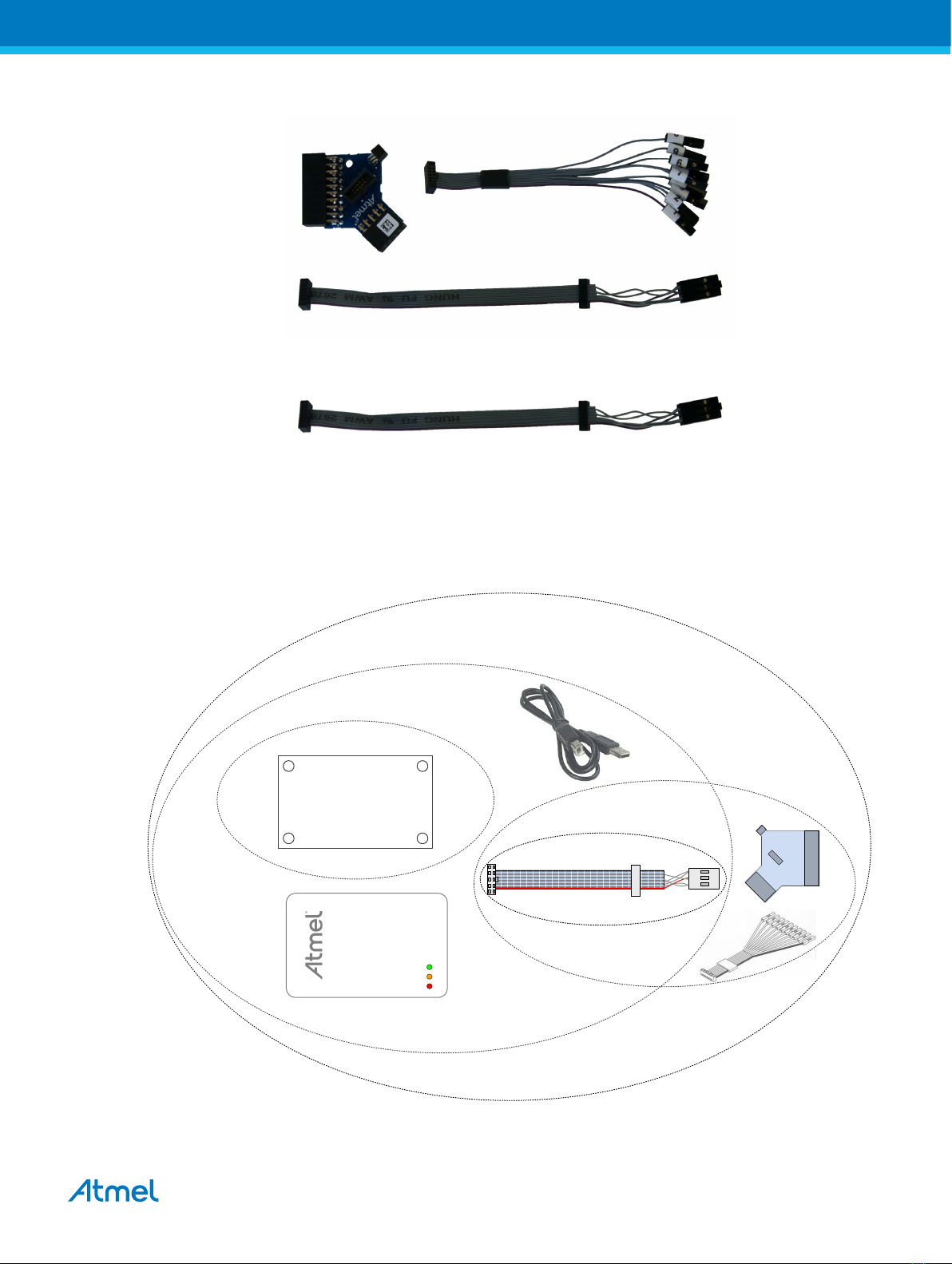
The Atmel-ICE kit options are shown diagrammatically here:
Figure 2-6. Atmel-ICE Kit Overview
PCBA
PCBA kit
basic kit
adapter kit
full kit
SAM AVR
cable kit
Atmel Atmel-ICE [USER GUIDE]
Atmel-42330C-Atmel-ICE_User Guide-10/2016
9

2.6. Assembling the Atmel-ICE
The Atmel-ICE unit is shipped with no cables attached. Two cable options are provided in the full kit:
•50-mil 10-pin IDC flat cable with 6-pin ISP and 10-pin connectors
•50-mil 10-pin mini-squid cable with 10 x 100-mil sockets
Figure 2-7. Atmel-ICE Cables
For most purposes, the 50-mil 10-pin IDC flat cable can be used, connecting either natively to its 10-pin
or 6-pin connectors, or connecting via the adapter board. Three adapters are provided on one small
PCBA. The following adapters are included:
•100-mil 10-pin JTAG/SWD adapter
•100-mil 20-pin SAM JTAG/SWD adapter
•50-mil 6-pin SPI/debugWIRE/PDI/aWire adapter
Figure 2-8. Atmel-ICE Adapters
Note:
A 50-mil JTAG adapter has not been provided - this is because the 50-mil 10-pin IDC cable can be used
to connect directly to a 50-mil JTAG header. For the part number of the component used for the 50-mil
10-pin connector, see Atmel-ICE Target Connectors Part Numbers.
The 6-pin ISP/PDI header is included as part of the 10-pin IDC cable. This termination can be cut off if it
is not required.
To assemble your Atmel-ICE into its default configuration, connect the 10-pin 50-mil IDC cable to the unit
as shown below. Be sure to orient the cable so that the red wire (pin 1) on the cable aligns with the
triangular indicator on the blue belt of the enclosure. The cable should connect upwards from the unit. Be
sure to connect to the port corresponding to the pinout of your target - AVR or SAM.
Atmel Atmel-ICE [USER GUIDE]
Atmel-42330C-Atmel-ICE_User Guide-10/2016
10
Otros manuales para Atmel-ICE
1
Tabla de contenidos
Otros manuales de Accesorios de computadora de Atmel