
ARTHUR MARTIN ASL5341LA Manual de usuario

CONTENTS
Safety information 2
Safety instructions 3
Product description 5
Control panel 6
Programmes 6
Settings 7
Options 10
Before first use 10
Daily use 11
Hints and tips 13
Care and cleaning 14
Troubleshooting 16
Technical information 19
Subject to change without notice.
SAFETY INFORMATION
Before the installation and use of the appliance, carefully read
the supplied instructions. The manufacturer is not responsible
for any injuries or damages that are the result of incorrect
installation or usage. Always keep the instructions in a safe
and accessible location for future reference.
Children and vulnerable people safety
•This appliance can be used by children aged 8 years and
above and by persons with reduced capabilities provided
that they have been given instruction and/or supervision
regarding the safe use of the appliance and understand the
potential hazards involved.
•Do not let children play with the appliance.
•Keep detergents away from children.
•Keep children and pets away from the appliance door when
it is open.
•Children shall not carry out cleaning and user maintenance
of the appliance without supervision.
General Safety
•This appliance is intended to be used in household and
similar applications such as:
–farm houses; staff kitchen areas in shops, offices and
other working environments;
–by clients in hotels, motels, bed & breakfast and other
residential type environments.
2

•Do not change the specification of this appliance.
•The operating water pressure (minimum and maximum)
must be between 0.5 (0.05) / 8 (0.8) bar (MPa)
•Obey the maximum number of 13 place settings.
•If the supply cord is damaged, it must be replaced by the
manufacturer, its Authorised Service Centre or similarly
qualified persons in order to avoid a hazard.
•Put knives and cutlery with sharp points in the cutlery basket
with the points down or in a horizontal position.
•Do not keep the appliance door open without supervision to
prevent to fall on it.
•Before any maintenance operation, deactivate the appliance
and disconnect the mains plug from the socket.
•Do not use high pressure water sprays and/or steam to
clean the appliance.
•The ventilation openings in the base (if applicable) must not
be obstructed by a carpet.
•The appliance is to be connected to the water mains using
the new supplied hose-sets. Old hose sets must not be
reused.
SAFETY INSTRUCTIONS
Installation
• Remove all the packaging.
• Do not install or use a damaged
appliance.
• Do not install or use the appliance where
the temperature is less than 0 °C.
• Follow the installation instruction
supplied with the appliance.
• Make sure that the appliance is installed
below and adjacent to safe structures.
Electrical connection
WARNING! Risk of fire and
electrical shock.
• The appliance must be earthed.
• Make sure that the electrical information
on the rating plate agrees with the
power supply. If not, contact an
electrician.
• Always use a correctly installed
shockproof socket.
• Do not use multi-plug adapters and
extension cables.
• Make sure not to cause damage to the
mains plug and to the mains cable.
Should the mains cable need to be
replaced, this must be carried out by our
Authorised Service Centre.
• Connect the mains plug to the mains
socket only at the end of the installation.
Make sure that there is access to the
mains plug after the installation.
• Do not pull the mains cable to
disconnect the appliance. Always pull
the mains plug.
• This appliance complies with the E.E.C.
Directives.
• Only for UK and Ireland. The appliance
has a 13 amp mains plug. If it is
3

necessary to change the fuse in the
mains plug, use fuse: 13 amp ASTA (BS
1362).
Water connection
• Do not cause damage to the water
hoses.
• Before connection to new pipes, pipes
not used for a long time, where repair
work has been carried out or new
devices fitted (water meters, etc.), let the
water flow until it is clean and clear.
• Ensure that there are no visible water
leaks during and after the first use of the
appliance.
• The water inlet hose has a safety valve
and a sheath with an inner mains cable.
WARNING! Dangerous
voltage.
• If the water inlet hose is damaged,
immediately close the water tap and
disconnect the mains plug from the
mains socket. Contact the Authorised
Service Centre to replace the water inlet
hose.
Use
• Do not sit or stand on the open door.
• Dishwasher detergents are dangerous.
Obey the safety instructions on the
detergent packaging.
• Do not drink and play with the water in
the appliance.
• Do not remove the dishes from the
appliance until the programme is
completed. There can be detergent on
the dishes.
• The appliance can release hot steam if
you open the door while a programme
operates.
• Do not put flammable products or items
that are wet with flammable products in,
near or on the appliance.
Service
• Contact the Authorised Service Centre
to repair the appliance. We recommend
only the use of original spare parts.
• When you contact the Authorised
Service Centre, ensure that you have the
following information that is available on
the rating plate.
Model :
PNC :
Serial Number :
Disposal
WARNING! Risk of injury or
suffocation.
• Disconnect the appliance from the mains
supply.
• Cut off the mains cable and discard it.
• Remove the door catch to prevent
children and pets to get closed in the
appliance.
4

PRODUCT DESCRIPTION
43
7
9 8
10 56
11
12
1Upper spray arm
2Lower spray arm
3Filters
4Rating plate
5Salt container
6Air vent
7Rinse aid dispenser
8Detergent dispenser
9Cutlery basket
10 Lower basket
11 Upper basket
Beam-on-Floor
The Beam-on-Floor is a light that is
displayed on the floor below the appliance
door.
• When the programme starts, a red light
comes on and stays on for the duration
of the programme.
• When the programme is completed, a
green light comes on.
• When the appliance has a malfunction,
the red light flashes.
The Beam-on-Floor goes off
when the appliance is
deactivated.
5

CONTROL PANEL
1 2 4
35
1On/off button
2Display
3Delay button
4Programme buttons
5Indicators
Indicators
Indicator Description
XtraDry indicator.
Rinse aid indicator. It is always off while the programme operates.
Salt indicator. It is always off while the programme operates.
PROGRAMMES
Programme Degree of soil
Type of load
Programme phases Options
1) • Normal soil
• Crockery and
cutlery
• Prewash
• Wash 50 °C
• Rinses
• Dry
• XtraDry
2) • All
• Crockery, cut-
lery, pots and
pans
• Prewash
• Wash from 45 °C to 70
°C
• Rinses
• Dry
• XtraDry
3) • Heavy soil
• Crockery, cut-
lery, pots and
pans
• Prewash
• Wash 70 °C
• Rinses
• Dry
• XtraDry
4) • Fresh soil
• Crockery and
cutlery
• Wash 60 °C or 65 °C
• Rinses
• XtraDry
6

Programme Degree of soil
Type of load
Programme phases Options
5) • All • Prewash
1) With this programme you have the most efficient use of water and energy consumption for crockery and cutlery
with normal soil. (This is the standard programme for test institutes).
2) The appliance senses the degree of soil and the quantity of items in the baskets . It automatically adjusts the tem-
perature and the quantity of water, the energy consumption and the programme duration.
3) This programme has a high temperature rinsing phase for better hygiene results. During the rinsing phase, the
temperature stays at 70 °C for at least 10 minutes.
4) With this programme you can wash a load with fresh soil. It gives good washing results in a short time.
5) With this programme you can quickly rinse dishes to prevent remains of food to bond on dishes and odours to
form in the appliance. Do not use detergent with this programme.
Consumption values
Programme 1) Water
(l)
Energy
(kWh)
Duration
(min)
11 1.050 195
7 - 12 0.6 - 1.4 40 - 150
13 - 15 1.5 - 1.6 150 - 170
9 0.8 30
4 0.1 14
1) The pressure and the temperature of the water, the variations of the mains supply, the options and the quantity of
dishes can change the values.
Information for test institutes
For all the necessary information for test
performance, send an email to:
Write down the product number (PNC) that
is on the rating plate.
SETTINGS
Programme selection mode and
user mode
When the appliance is in programme
selection mode it is possible to set a
programme and to enter the user mode.
In user mode, the following settings
can be changed:
• The level of the water softener according
to the water hardness.
• The activation or the deactivation of the
acoustic signal for end of programme.
• The activation or deactivation of the rinse
aid empty notification.
These settings will be saved until you
change them again.
7
How to set the programme
selection mode
The appliance is in programme selection
mode when the programme indicator
is flashing and the display shows the
programme duration.
When you activate the appliance, usually it
is in programme selection mode. However,
if this does not happen, you can set the
programme selection mode in the following
way:
Press and hold simultaneously and
until the appliance is in programme
selection mode.
The water softener
The water softener removes minerals from
the water supply, which would have a
detrimental effect on the washing results
and on the appliance.
The higher the content of these minerals,
the harder your water is. Water hardness is
measured in equivalent scales.
The water softener should be adjusted
according to the hardness of the water in
your area. Your local water authority can
advise you on the hardness of the water in
your area. It is important to set the right
level of the water softener to assure good
washing results.
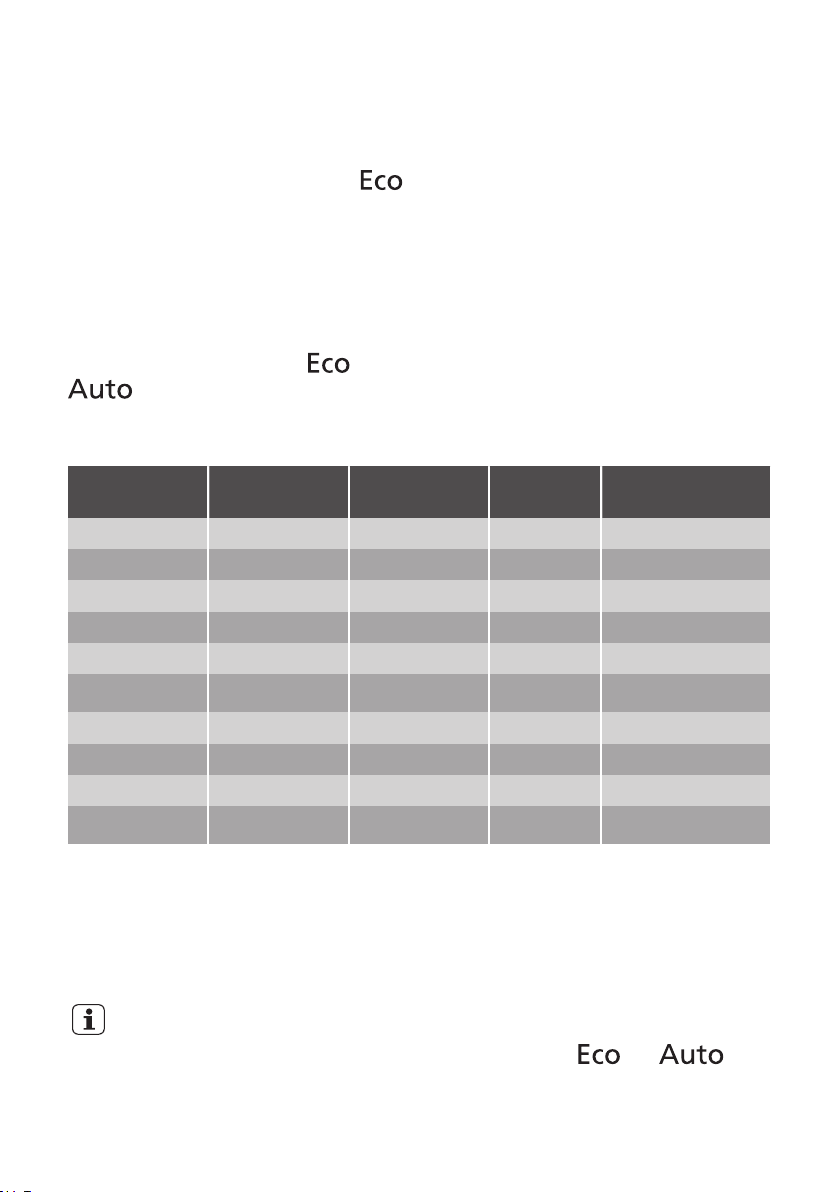
Water hardness
German de-
grees (°dH)
French de-
grees (°fH)
mmol/l Clarke de-
grees
Water softener
level
47 - 50 84 - 90 8.4 - 9.0 58 - 63 10
43 - 46 76 - 83 7.6 - 8.3 53 - 57 9
37 - 42 65 - 75 6.5 - 7.5 46 - 52 8
29 - 36 51 - 64 5.1 - 6.4 36 - 45 7
23 - 28 40 - 50 4.0 - 5.0 28 - 35 6
19 - 22 33 - 39 3.3 - 3.9 23 - 27 5 1)
15 - 18 26 - 32 2.6 - 3.2 18 - 22 4
11 - 14 19 - 25 1.9 - 2.5 13 - 17 3
4 - 10 7 - 18 0.7 - 1.8 5 - 12 2
<4 <7 <0.7 < 5 1 2)
1) Factory setting.
2) Do not use salt at this level.
Whether you use a standard detergent
or multi-tabs (with or without salt), set
the proper water hardness level to
keep the salt refill indicator active.
Multi-tabs containing salt are not
effective enough to soften hard
water.
How to set the water softener
level
The appliance must be in programme
selection mode.
1. To enter the user mode, press and hold
simultaneously and until
8

the indicators , and
start to flash and the display is blank.
2. Press .
• The indicators and go
off.
• The indicator continues to flash.
• The display shows the current
setting: e.g. = level 5.
3. Press again and again to change the
setting.
4. Press the on/off button to confirm the
setting.
The rinse aid empty notification
The rinse aid helps to dry the dishes
without streaks and stains.
The rinse aid is automatically released
during the hot rinse phase.
When rinse aid chamber is empty, the rinse
aid indicator is turned on notifying to refill
rinse aid. If you are using multi-tabs
containing rinse aid and you are satisfied
with the drying result, you can deactivate
the notification for refilling rinse aid.
However, we recommend that you always
use rinse aid for best drying performance.
If you use standard detergent or multi-
tablets without rinse aid, activate the
notification to keep the rinse aid refill
indicator active.
How to deactivate the rinse aid
empty notification
The appliance must be in programme
selection mode.
1. To enter the user mode, press and hold
simultaneously and until
the indicators , and
start to flash and the display is blank.
2. Press .
• The indicators and go
off.
• The indicator continues to
flash.
• The display shows the current
setting.
– = rinse aid empty notification
activated.
– = rinse aid empty
notification deactivated.
3. Press to change the setting.
4. Press the on/off button to confirm the
setting.
Acoustic signals
Acoustic signals sound when a malfunction
of the appliance occurs. It is not possible to
deactivate these acoustic signals.
There is also an acoustic signal that sounds
when the programme is completed. By
default this acoustic signal is deactivated
but it is possible to activate it.
How to activate the acoustic
signal for the end of programme
The appliance must be in programme
selection mode.
1. To enter the user mode, press and hold
simultaneously and until
the indicators , and
start to flash and the display is blank.
2. Press .
• The indicators and go off.
• The indicator continues to
flash.
• The display shows the current
setting:
– = Acoustic signal off.
– = Acoustic signal on.
3. Press to change the setting.
4. Press the on/off button to confirm the
setting.
9
OPTIONS
Desired options must be
activated every time before you
start a programme.
It is not possible to activate or
deactivate options while a
programme is running.
Not all options are compatible
with each other. If you have
selected non compatible
options, the appliance will
automatically deactivate one or
more of them. Only the
indicators of the options still
active will stay on.
XtraDry
Activate this option when you want to boost
the drying performance. With the use of this
option, the duration of some programmes,
water consumption and the last rinse
temperature can be affected.
The option XtraDry is not a permanent
option and must be selected at every cycle.
How to activate XtraDry
Press simultaneously and . The
indicator comes on.
If the option is not applicable to the
programme, the related indicator does not
come on or it flashes quickly for a few
seconds and then goes off.
The display shows the updated programme
duration.
BEFORE FIRST USE
1. Make sure that the current level of
the water softener agrees with the
hardness of the water supply. If not,
adjust the level of the water
softener.
2. Fill the salt container.
3. Fill the rinse aid dispenser.
4. Open the water tap.
5. Start a programme to remove any
processing residuals that can still be
inside the appliance. Do not use
detergent and do not load the baskets.
When you start a programme, the
appliance can take up to 5 minutes to
recharge the resin in the water softener. It
seems that the appliance is not working.
The washing phase starts only after this
procedure is completed. The procedure will
be repeated periodically.
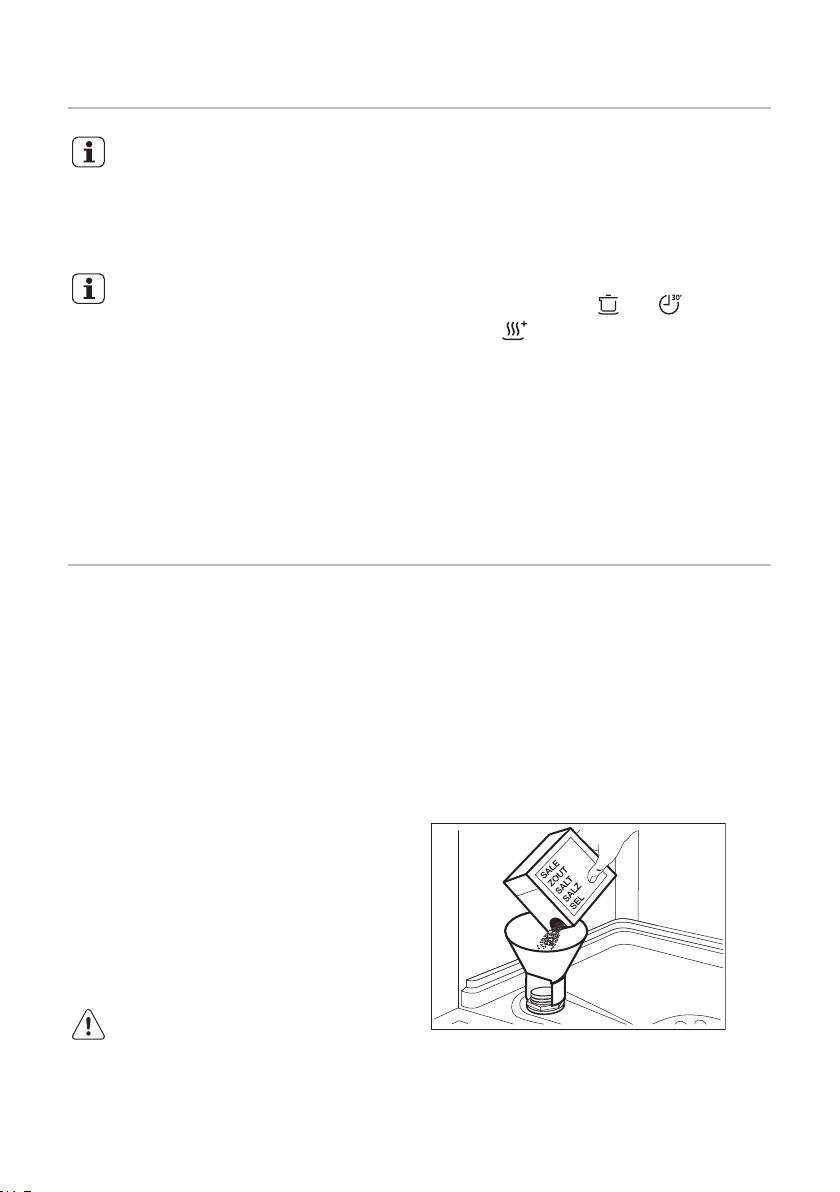
The salt container
CAUTION! Only use salt
specifically designed for
dishwashers.
The salt is used to recharge the resin in the
water softener and to assure good washing
results in the daily use.
How to fill the salt container
1. Turn the cap of the salt container
counterclockwise and remove it.
2. Put 1 litre of water in the salt container
(Only for the first time).
3. Fill the salt container with dishwasher
salt.
4. Remove the salt around the opening of
the salt container.
10
Tabla de contenidos
Idiomas:
Otros manuales de Lavavajillas de ARTHUR MARTIN

ARTHUR MARTIN
ARTHUR MARTIN ASF9500LOX Manual de usuario

ARTHUR MARTIN
ARTHUR MARTIN ASA22100SX Manual de usuario

ARTHUR MARTIN
ARTHUR MARTIN ASF4513LOX Manual de usuario

ARTHUR MARTIN
ARTHUR MARTIN ASF5206LOW Manual de instrucciones

ARTHUR MARTIN
ARTHUR MARTIN ASF5512LOX Manual de usuario

ARTHUR MARTIN
ARTHUR MARTIN ASF8645ROX Manual de usuario

ARTHUR MARTIN
ARTHUR MARTIN ASI5545LOX Manual de usuario

ARTHUR MARTIN
ARTHUR MARTIN ASL5346LA Manual de usuario

ARTHUR MARTIN
ARTHUR MARTIN ASL5368LA Manual de usuario


