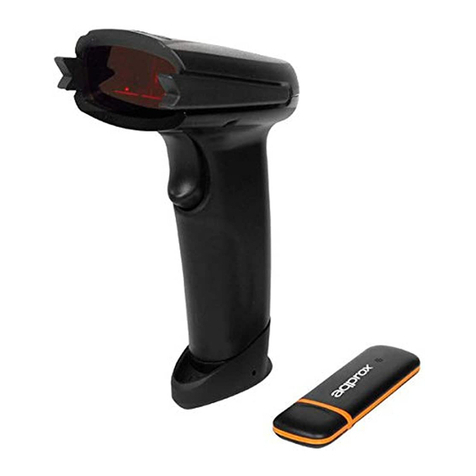
aqprox! appLS06OMNI Manual de usuario


One-dimensional scanning
platform
User manual

1
Catalog
Catalog ................................................................................................................................1
System settings....................................................................................................................4
I、enter the settings ......................................................................................................................... 4
II、exit settings ................................................................................................................................. 4
III、restore the factory settings........................................................................................................ 4
IV、display the version number........................................................................................................ 5
V、prompt tone................................................................................................................................ 5
VI、LED light tips............................................................................................................................... 7
VII、read settings.............................................................................................................................. 7
system sleep settings ........................................................................................................................ 16
user settings ...................................................................................................................................... 18
Communication settings ....................................................................................................21
I、Transmission mode setting ........................................................................................................ 21
II、Serial port parameter setting .................................................................................................... 22
III、Keyboard port function setting ................................................................................................ 26
Data format setting............................................................................................................36
I、AIM_ID........................................................................................................................................ 36
II、Global identity character (Code_ID).......................................................................................... 36
III、Data inversion setting............................................................................................................... 37
IV、Data multiple check ................................................................................................................. 37
V、Data terminator ........................................................................................................................ 38
Code setting.......................................................................................................................41

2
I、UPC-A.......................................................................................................................................... 41
II、UPC-E......................................................................................................................................... 44
III、EAN-8........................................................................................................................................ 48
IV、EAN-13...................................................................................................................................... 51
V、ISBN........................................................................................................................................... 57
VI、ISSN .......................................................................................................................................... 60
VII、Code 39 ................................................................................................................................... 63
VIII、Code 93 .................................................................................................................................. 66
IX、Code 128................................................................................................................................... 67
X、Code 11...................................................................................................................................... 67
XI、Codabar .................................................................................................................................... 69
XII、Standard 2 of 5 ........................................................................................................................ 71
XIII、Interleaved 2 of 5 ................................................................................................................... 72
XIV、Industrial 2 of 5 ...................................................................................................................... 74
XV、Matrix 2 of 5............................................................................................................................ 76
XVI、GS1-Databar........................................................................................................................... 77
XVII、MSI-Plessey ........................................................................................................................... 78
XVIII、Plessey.................................................................................................................................. 79
Editing system ...................................................................................................................81
I、Code selection ............................................................................................................................ 81
II、Prefix/suffix settings.................................................................................................................. 81
III、insert......................................................................................................................................... 82
IV、delete ....................................................................................................................................... 83
V、replace....................................................................................................................................... 85
VI、Length setting........................................................................................................................... 86
Appendix ...........................................................................................................................90

3
Appendix A: Default Settings Table:.................................................................................................. 90
Appendix B: Code_ID+AIM_ID List: ................................................................................................... 97
Appendix C: ASCII List:..................................................................................................................... 100
Appendix D: Coded Identity Characters .......................................................................................... 102
Appendix E: Data Code.................................................................................................................... 104
Appendix F: 0-127 ASCII Codes........................................................................................................ 105
Appendix G: Serial Port Command Function Implementation........................................................ 116
Appendix H: Command Settings Table............................................................................................ 118
Appendix I: Control Character Escape Function Table.................................................................... 138
Appendix J: Test-specific bar code .................................................................................................. 140

4
System settings
I、enter the settings
Reading the "enter" barcode allows the reading engine to turn on the function of configuring the
specific barcode (setting code function).After the function is turned on, the reading engine can be
modified by reading one or more setting codes.
Enter settings
II、exit settings
After reading the “Exit Settings” barcode, the reading engine will exit the status of reading the setting
code and save the previous settings. In this state, only the specifics such as “Enable Setting Code” and
“Restore Factory Default” can be read and processed. Setup code.
Exit settings
III、restore the factory settings
Note: Please use the “Restore Factory Default” function carefully. After reading this setting code, the
current parameter setting will be lost and replaced with the factory default value.

5
The factory default parameters and functions can be found in the default settings table in the
appendix.
reset
IV、display the version number
After reading the "display version number" barcode, the version information of the device can be
output.
Display version number
V、prompt tone
After the reading engine successfully reads, it can output a PWM signal to drive the external buzzer
circuit to make a sound.The sound signal can be turned off or allowed to be output by setting, and the
type and volume of the sound can be modified by setting.The corresponding settings can be made with
the following setting codes.
1.Turn on/off the tone
Note: The bar code is silent when the sound is turned off, but there is an audible prompt when
reading the setup code.

6
**Open the sound
Turn off the sound
2.Volume setting
**Volume 1 (maximum)
Volume 2
Volume 3

7
3.Sound sequence
**Transmission after first sound
First transmission
VI、LED light tips
**LED light on
LED light off
VII、read settings
1.Automatic scan mode
In the automatic scan mode, the reading engine performs continuous reading operations.

8
**Automatic scanning
2.Button trigger scan mode
In the button trigger scan mode, you need to press the button to control whether the reading engine
starts working.
Key trigger scan
VIII、Button reading time setting
Key reading time: refers to the time that the reading engine will keep working during the process of
pressing the button once the device enters the button to trigger the scanning mode.When the set time is
exceeded, the reading engine will no longer work and you need to press the button again to wake it up.
Key reading time 1S
Tabla de contenidos
Otros manuales de Lector de código de barras de aqprox!

aqprox!
aqprox! appLS04WH Manual de usuario

aqprox!
aqprox! appLS21WS Manual de usuario

aqprox!
aqprox! appLS19 Manual de usuario

aqprox!
aqprox! appLS17I2D Manual de usuario

aqprox!
aqprox! appLS05HD2D Manual de usuario

aqprox!
aqprox! appLS03 Manual de usuario

aqprox!
aqprox! appLS07DESK Manual de usuario

aqprox!
aqprox! appLS18I Manual de usuario

aqprox!
aqprox! appLS12R Manual de usuario

aqprox!
aqprox! appLS10 Manual de usuario