
Appro LC-7244 Manual de usuario

Before trying to connect or operate this product, please read this manual completely
INSTALLATION &
OPERATION MANUAL
IP SPEED DOME CAMERA
LC-7244 (NTSC)


1
Table Of Contents
SAFETY PRECAUTIONS .............................................................................3
1. PRODUCT FEATURES.............................................................................4
1.1 PRODUCT INSTRUCTIONS.....................................................................4
1.2 PRODUCT FEATURES ...........................................................................4
2. DESCRIPTION..........................................................................................6
2.1 INSTALLATION INSTRUCTION .......................................................6
2.2 PIN DEFINE......................................................................................8
3. INSTALLATION ........................................................................................9
3.1 UPDATING SYSTEM SOFTWARE...................................................9
3.2 IP CAMERA SD CARD TROUBLESHOOTING ..........................................11
4. Network Configuration..........................................................................12
4.1 CABLE CONNECTIONS........................................................................12
4.2 CONFIGURE YOUR IP CAMERA NETWORK SETTINGS ...........................12
4.2.1 Enable DHCP Function.....................................................................................................................12
4.2.2 Set IP Address ...................................................................................................................................13
4.3 TCP/IP COMMUNICATION SOFTWARE.................................................14
4.4 TCP/IP INSTALLATION .......................................................................15
4.5 TCP/IP CONFIGURATION SETTING ......................................................16
4.6 CONNECTION TESTING.......................................................................17
5. Operating Instructions for Video Software and Network ..................19
5.1 MICROSOFT INTERNET EXPLORER......................................................20
5.1.1 Connecting the IP camera ................................................................................................................20
5.1.2 Change Image Setting......................................................................................................................23
5.1.3 Change the Network Setting............................................................................................................25

2
5.1.4 Change the System Setting ..............................................................................................................34
5.1.5 Change the Application Setting .......................................................................................................41
5.1.6 Change the SD card Setting.............................................................................................................48
5.1.7 PPPoE & DDNS...............................................................................................................................49
5.2 THE IP CAMERA CMS (CENTRAL MANAGEMENT SYSTEM)...................51
5.2.1 Introduction to the CMS ..................................................................................................................51
5.2.2 Install the CMS in your PC..............................................................................................................52
5.2.3 Login the IP Camera software..........................................................................................................53
5.2.4 Operation..........................................................................................................................................55
6. ADVANCED OPERATION......................................................................69
7. SPECIFICATIONS...................................................................................72
8. Functions of client PC...........................................................................73
APPENDIX 1. –IP camera UPnP How To..................................................74
APPENDIX 2. –The ARP function.............................................................84
APPENDIX 3. –Register as a DDNS member ..........................................86
APPENDIX 4. –MPEG4 Bit Rate Lookup Table of IP camera.................90
APPENDIX 5. –FAQ....................................................................................91

3
SAFETY PRECAUTIONS
All the following safety and operational instructions to prevent harm or injury to the operator(s) or
other persons should be read carefully before the unit is activated.
WARNING
To prevent fire or shock hazard, avoid exposing this unit to rain or moisture.
Do not block ventilation openings.
Do not place anything on top of the unit that might spill or fall into it.
Do not attempt to service this unit yourself, as opening or removing covers may
expose you to dangerous voltage or other hazards. Please refer all servicing to
your distributor / retailer.
Do not use liquid cleaners or aerosols for cleaning.
To prevent fire or electric shock, do not overload wall outlets or extension cord.
This unit must be grounded to reduce the risk of electric shocks.
CAUTION
RISK OF EXPLOSION IF BATTERY IS REPLACED BYAN INCORRECT TYPE.
DISPOSE OF USED BATTERIES ACCORDING TO THE INSTRUCTIONS.

4
1. PRODUCT FEATURES
1.1 Product Instructions
The mini IP PTZ camera (LC-7244) is a speed dome camera which delivers dual MPEG4 /
MJPEG video streams at up to 30 (NTSC) frames per second for real-time images. This IP
camera comes with waterproof casing (IP-66) and a 360 degree pan width auto flip for flexible
indoor surveillance. Its small size makes it easy to mount, and it can be moved swiftly to any
angle you want.
The camera is equipped with a total zoom 120X (optical10X, digital 12X) capability and 128
presets to enhance its monitoring options. It supplies user-friendly PnP configurations for smooth
operation, including an SD card for alarm recording and firmware update. Its built-in Web server
supports remote monitoring and control via local area network or the Internet.
The camera comes with a free bundle of recording software for video management and provides
you with cutting edge video surveillance functions at a competitive price, making it the ideal device
to meet your security demands.
1.2 Product Features
• Selectable MPEG4 / MJPEG video compression.
• 1/4” Sony Exview HAD CCD.
• Horizontal resolution: 520 TV lines.
• Built-in motion detection.
• Built-in Web server.
• Supports upgrading by SD card / HTTP.
• Free bundle with recording software.
• Up to 30 (NTSC) fps in all resolutions.
• 360° panning and 90° tilting with auto flip.
• Total 120X zoom (10X optical, 12X digital).
• IP66 casing for waterproof and dust prevention.
• Flexible indoor mounting.
5
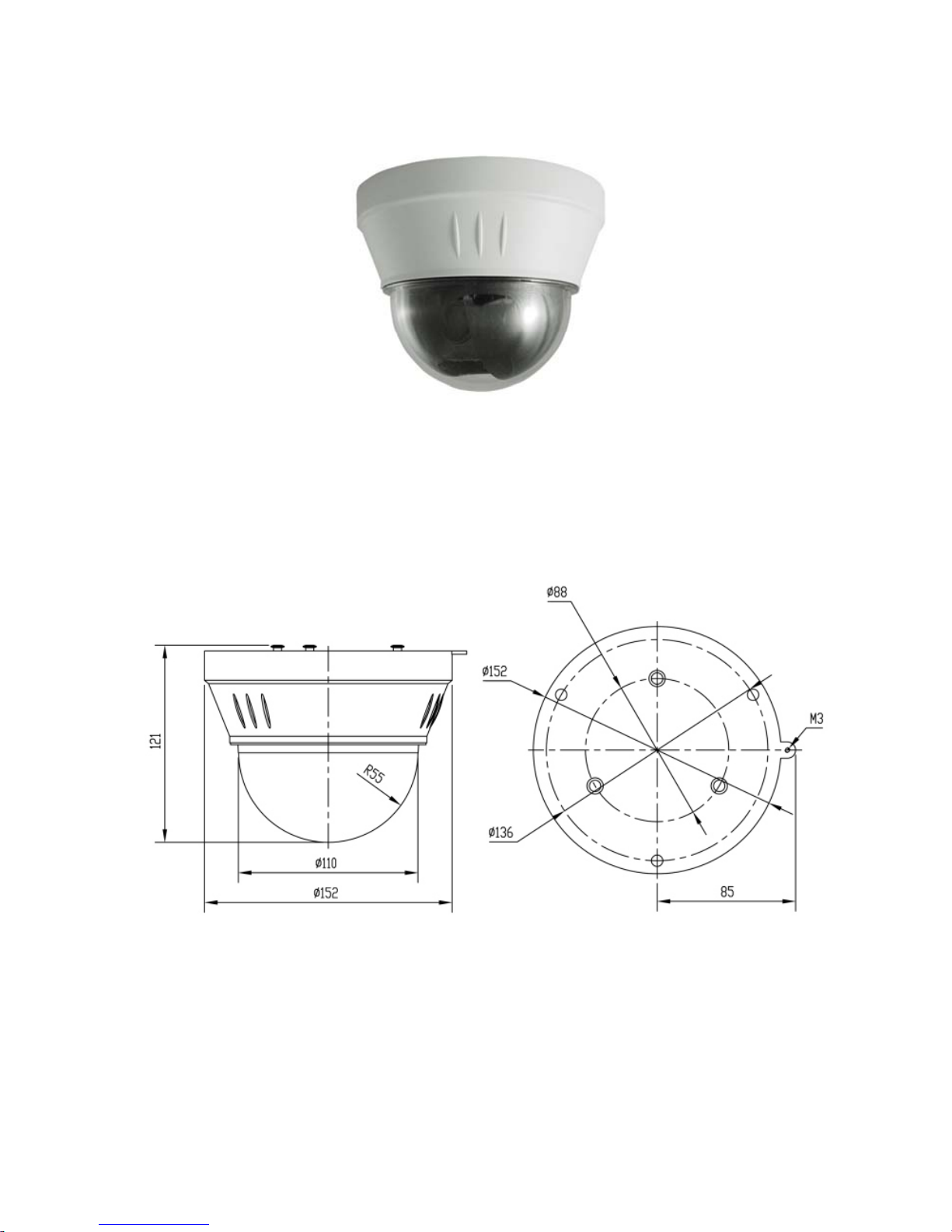
Designed Housing
Dimensions:

6
2. DESCRIPTION
2.1 INSTALLATION INSTRUCTION
1. Dimension of product as picture below.
2. Get the products out from the packages.
3. Drill holes and fix base board on the ceiling floor by using of 3 M4 bolts

7
4. Insert three screws in the mini dome into the apertures on the base board (refer to
step 1), then turn 15 degree in clock wise (refer to step 2).
5. Using 3 additional M3 x5 screws to lock tightly.
6. Connect the RJ45 cable, BNC cable, RS-485 control-cable, power cable, alarm I/O.

8
2.2 PIN DEFINE
1. RJ-45 Wire
2. BNC Wire
3. RS-485:
Yellow: RS485-
Green: RS485+
4. Power Wire: AC_24V
5. ALARM Wire:
PIN1: Red ALM1
PIN2: Pink ALM2
PIN3: Yellow ALM3
PIN4: Green ALM4
PIN5: GND
PIN6: N/A
PIN7: White Relay_COM
PIN8: Blue Relay_N.O
Tabla de contenidos
Otros manuales de Cámara IP de Appro

Appro
Appro LC-7224EP Manual de usuario

Appro
Appro TMS320DM355 Manual de usuario

Appro
Appro LC-7411 Manual de usuario

Appro
Appro LC-6790 Manual de usuario

Appro
Appro LC-7311 Manual de usuario

Appro
Appro CV-7930S Manual de usuario

Appro
Appro LC-7222E Manual de usuario

Appro
Appro LC-7513 Manual de usuario

Appro
Appro LC-7222E Manual de usuario

Appro
Appro CV-7930S Manual de usuario


